Hello! Welcome to the final module of our course on mastering Docker.
In our previous lessons, we built a comprehensive CI/CD pipeline. You learned how to construct optimized, multi-stage Dockerfiles, run tests within them, and even perform post-build smoke tests to verify that a built image is functional. We now have a process for producing professional, production-ready container images.
The logical next step is to deploy and manage these images at scale. This brings us to the world of container orchestration and, specifically, Kubernetes. Given your background with Kubernetes, you know it's the industry standard. But a common point of confusion, even for experienced engineers, is how Docker and Kubernetes actually fit together today.
This lesson will clarify that relationship. Our goal is to explain the role of Docker as a container runtime within the Kubernetes ecosystem. We'll demystify the "Docker deprecation" news you may have heard about and establish a clear mental model of the modern cloud-native stack.
From Tight Coupling to Decoupling: A Brief History
To understand the present, we need to look at the past. In the early days, Kubernetes was built specifically to orchestrate Docker containers. The two were tightly coupled. However, as the container ecosystem matured, the need arose for a more flexible, standardized approach that could accommodate other container runtimes.
This led to the development of two critical standards:
- The Open Container Initiative (OCI), which standardized container image formats and runtime specifications.
- The Container Runtime Interface (CRI) in Kubernetes, which created a plugin architecture for different runtimes.
The following video provides an excellent overview of this evolution. It explains why Kubernetes moved away from its direct Docker integration and what that means in practice.
Docker vs Containerd: Understanding the Differences and Choosing the Right Containerization Tool
This video from KodeKloud, titled "Docker vs Containerd," clearly explains the historical relationship between Docker and Kubernetes and the reasons for the architectural shift.
Watch the section from 01:08 to 05:06. As you watch, focus on understanding these key points: The initial design where Kubernetes was tightly coupled with Docker. The introduction of the CRI to allow for a pluggable runtime architecture. The purpose of the dockershim as a temporary compatibility layer. The reasons why dockershim was eventually deprecated and removed from Kubernetes.
Visualizing the Architectural Shift
As the video explained, the core change was the removal of the dockershim component from the Kubelet (the Kubernetes agent that runs on each node). This change streamlined the architecture, making it more efficient and easier to maintain.
The diagram below perfectly illustrates this transition.
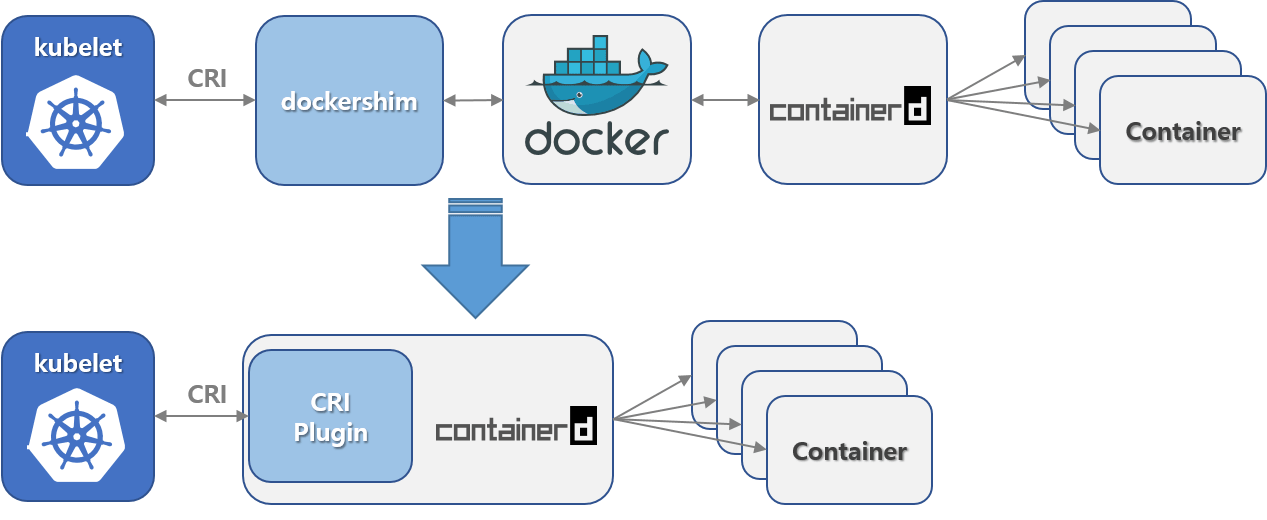
In the new model, Kubernetes talks directly to containerd (or another CRI-compliant runtime like CRI-O). You might notice that containerd was present in both architectures. This is because Docker had already modularized its own architecture, using containerd as its underlying container supervisor. Kubernetes now simply uses that component directly.
Docker's Role in the Modern Kubernetes Ecosystem
So, if Kubernetes no longer includes the dockershim to talk to the Docker daemon, what is Docker's role today? It remains critically important in three key areas.
1. The De Facto Tool for Building Container Images
The docker build command is still the most popular, powerful, and developer-friendly way to create OCI-compliant container images. The key takeaway is:
An image built with
docker buildis a standard OCI image. It will run perfectly on any CRI-compliant runtime in Kubernetes, includingcontainerdand CRI-O.
The removal of the dockershim was a change in the runtime plumbing on the Kubernetes node; it has no effect on image compatibility. Your entire workflow of writing Dockerfiles and building images remains as relevant as ever.
2. The Foundation of the Most Common Runtime
containerd, the most widely used container runtime in managed Kubernetes services (like GKE, EKS, and AKS), originated from the Docker project and is now an independent project under the Cloud Native Computing Foundation (CNCF). In a very real sense, the DNA of Docker is at the heart of most modern Kubernetes clusters.
3. An Optional Runtime via cri-dockerd
What if you still want to use the Docker Engine as your runtime? It is still possible. The community has created an external adapter, cri-dockerd, that provides the same translation functionality as the old built-in dockershim.
For a deeper dive into the available runtimes and how they are configured, the official Kubernetes documentation is the best source.
The official Kubernetes documentation on "Container Runtimes" is the definitive guide to this topic. It provides details on the main CRI-compliant runtimes and how to configure them.
Please read the introduction and the section on "Docker Engine". Notice how the documentation immediately clarifies the dockershim removal and then points to cri-dockerd as the solution for using Docker Engine as a runtime.
The View from the Node: crictl
With the dockershim gone, you can no longer use docker ps or docker logs on a Kubernetes node to inspect the containers managed by the Kubelet (unless you are using the cri-dockerd adapter).
Instead, as a DevOps engineer, you will use a generic, CRI-compatible command-line tool called crictl. It allows you to troubleshoot pods and containers regardless of whether the runtime is containerd or CRI-O.
This video provides a great hands-on demonstration of crictl.
Docker vs Containerd: Understanding the Differences and Choosing the Right Containerization Tool
This video from KodeKloud demonstrates the practical tools used to interact with containerd and other runtimes from a Kubernetes perspective.
Watch the segment from 07:18 to 11:28. This section focuses specifically on crictl. Pay attention to how its commands for listing pods (crictl pods), images (crictl images), and running containers (crictl ps) are similar to Docker commands but are runtime-agnostic.
Test your understanding!
A developer on your team is concerned after reading an old blog post about Docker being "deprecated" by Kubernetes. They ask you: "Does this mean we have to stop using Dockerfiles and docker build to create our application images for the company's new GKE (Google Kubernetes Engine) cluster?"
How would you respond to clarify the situation for them?
Show answer
You should reassure them that they can and should continue using Dockerfiles and docker build. Here's a clear explanation:
"That's a common point of confusion. The 'deprecation' was about a specific, internal piece of plumbing on the Kubernetes nodes called the dockershim, not about Docker as a development tool.
- Image Compatibility: An image you create with
docker buildis a standard OCI image. GKE uses thecontainerdruntime, which is fully OCI-compliant and can run your images without any issues. - Development vs. Runtime: The change only affected how Kubernetes runs containers, not how they are built. Docker remains the best tool for building images.
So, you can continue your existing workflow. The change is transparent to you as an application developer."
Conclusion
You now have a clear and accurate understanding of Docker's role within the modern Kubernetes ecosystem. This knowledge is essential for any DevOps professional working with containers.
Key Takeaways:
- Decoupled Architecture: Kubernetes uses the Container Runtime Interface (CRI) to interact with various OCI-compliant container runtimes like
containerdandCRI-O. - Docker's Main Role is Building:
docker buildis the premier tool for creating OCI-compliant images that can run on any CRI runtime in Kubernetes. dockershimis History: The built-indockershimwas removed from Kubernetes, streamlining the architecture. To use the full Docker Engine as a runtime, you now need the externalcri-dockerdadapter.containerdis the Standard: Most major Kubernetes services usecontainerdas the default runtime, a technology that originated from the Docker project.- Troubleshooting with
crictl: On a modern Kubernetes node,crictlis the standard tool for inspecting and debugging containers, replacing thedockerCLI for that specific task.
In this lesson, we've established the foundational relationship between Docker and Kubernetes. In our next lesson, we'll build on this by comparing the developer-centric workflow of Docker Compose with the production-oriented world of Kubernetes, helping you understand when to use each tool and how they can complement each other.