Hello! Welcome back to our module on Advanced Networking and Core Services.
In our last lesson, we mastered the client-side of DNS, learning how to configure a Linux system to resolve domain names and how to use powerful tools like dig to troubleshoot the process. We now know how a client finds the correct IP address for a server like github.com.
Today, we'll explore what happens next. Once your browser has the server's IP address, it needs to request the web page. This is done using the Hypertext Transfer Protocol (HTTP). Our goal for this lesson is to describe how HTTP and its secure counterpart, HTTPS, work, and understand the critical role of TLS/SSL certificates in securing web traffic.
This knowledge is fundamental for a DevOps engineer. You'll be responsible for deploying web applications, configuring web servers, and ensuring that the communication between your users and your services is secure and trustworthy. Understanding the mechanics of HTTPS is essential for troubleshooting everything from expired certificates to misconfigured security policies.
Part 1: HTTP, the Language of the Web
HTTP stands for Hypertext Transfer Protocol. At its core, it's a simple, text-based protocol that follows a client-server model. When you type a URL into your browser:
- The client (your browser) sends an HTTP Request to the server, asking for a resource (like a webpage, an image, or data from an API).
- The server (e.g., an Nginx or Apache web server) processes the request and sends back an HTTP Response, which contains the resource you asked for and a status code (like
200 OKor404 Not Found).
The crucial point about standard HTTP is its major vulnerability: it's a plaintext protocol.
To see exactly what this means, let's look at how HTTP was designed.
Why is HTTP not secure? | HTTP vs. HTTPS
To understand why we need HTTPS, we must first see what's insecure about plain HTTP. This article from Cloudflare explains the basics of HTTP and highlights its fundamental weakness.
Please read the sections 'What is HTTP?' and 'What does a typical HTTP request look like?'. Focus on the concept of requests and responses, and the fact that they are transmitted as plaintext.
As the article demonstrates, an HTTP request is just readable text. If an attacker is monitoring the network between you and the server (a "man-in-the-middle" attack), they can read everything: the pages you visit, the data you submit in forms, your session cookies, and more. This is clearly unacceptable for any modern application.
This fundamental lack of security is why you see browsers prominently mark HTTP sites as "Not Secure."
Part 2: HTTPS - Adding Security with TLS/SSL
HTTPS is the solution to HTTP's security problem. The 'S' stands for "Secure," and it's essentially HTTP layered on top of a security protocol called SSL/TLS.
- SSL (Secure Sockets Layer): The original protocol. It's now deprecated due to security vulnerabilities.
- TLS (Transport Layer Security): The modern, secure successor to SSL. While TLS is the correct term, you'll often see "SSL" or "SSL/TLS" used to refer to this technology.
When you use HTTPS, the TLS protocol provides three essential security guarantees:
- Encryption: Scrambles the data so it cannot be read by anyone else. This ensures confidentiality.
- Authentication: Verifies that the server you're connecting to is actually who it claims to be, preventing impersonation. This provides identity.
- Integrity: Ensures that the data has not been tampered with during transit.
So, how does this work? The magic happens during an initial negotiation process called the TLS Handshake.
The TLS Handshake: A Secure Introduction
The goal of the TLS handshake is for the client and server to authenticate each other and securely agree on a secret key to encrypt their conversation. This process cleverly uses two different types of encryption:
- Asymmetric Encryption (Public/Private Key): This method uses two keys—a public key that can be shared with anyone and a private key that is kept secret. Data encrypted with the public key can only be decrypted by the corresponding private key. It's very secure for exchanging small amounts of information, but it's too slow for encrypting an entire session.
- Symmetric Encryption (Session Key): This method uses a single, shared secret key for both encryption and decryption. It's extremely fast and efficient, making it perfect for encrypting the bulk of the communication (the actual HTTP traffic).
The TLS handshake uses the slow, secure asymmetric encryption at the start just to safely exchange the fast, efficient symmetric session key.
This article from Cloudflare explains the handshake process in more detail.
How does SSL work? | SSL certificates and TLS
The core of establishing a secure connection is the 'TLS handshake'. This process uses clever cryptography to allow the client and server to agree on a secret key. Let's read how it works.
Read the sections 'How does SSL/TLS work?', 'The TLS handshake', and 'Symmetric encryption with session keys'. Focus on understanding the difference between asymmetric and symmetric encryption and the role each plays.
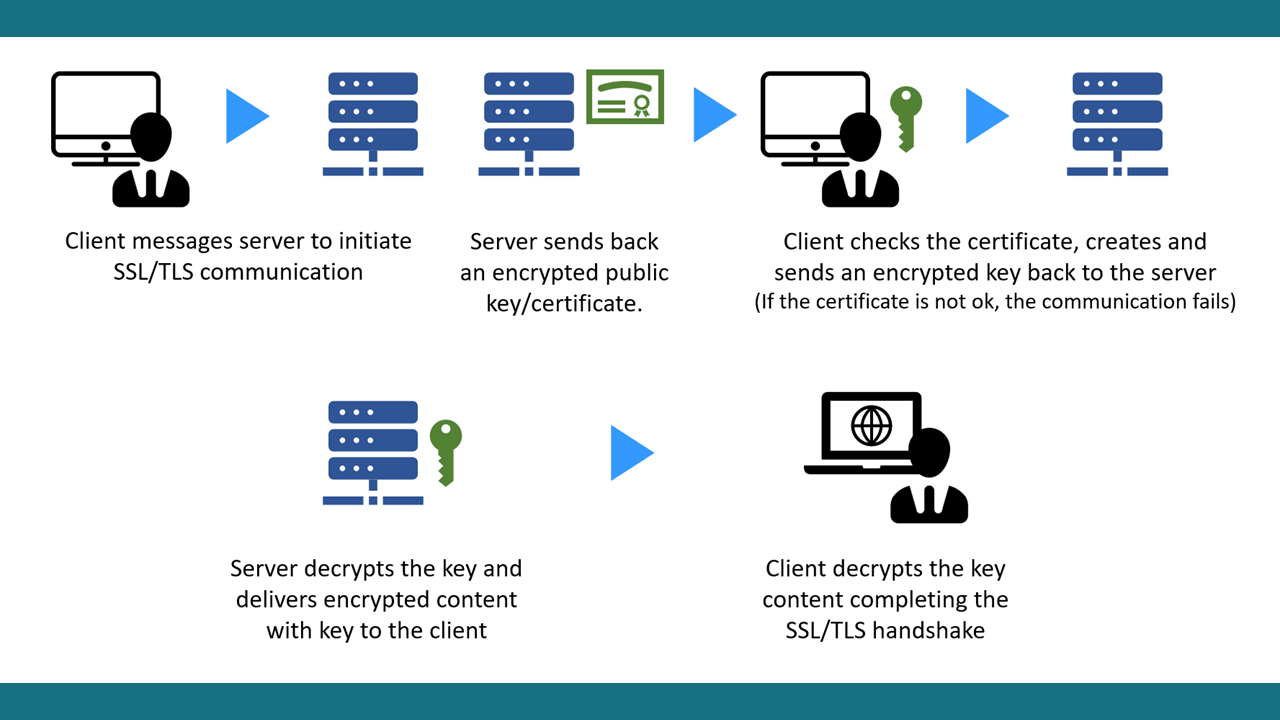
Here is a simplified summary of the handshake, which is also visualized in the diagram below:
- Client Hello: The client (your browser) sends a message to the server, saying it wants to start a secure session.
- Server Hello & Certificate: The server sends back its SSL certificate, which contains its public key and information about its identity.
- Client Verification & Key Exchange:
- The client verifies the server's certificate to confirm its identity (more on this in the next section).
- If the certificate is valid, the client generates a secret key for symmetric encryption (the "session key").
- It encrypts this new session key using the server's public key and sends it to the server.
- Server Decryption: The server uses its private key to decrypt the message and retrieve the session key.
- Secure Communication Begins: Both the client and server now have the same session key. They switch to fast symmetric encryption for all further communication. Any attacker who captures the traffic will only see jumbled, encrypted data.
Test your understanding!
Given that asymmetric (public/private key) encryption is so secure, why don't the client and server use it to encrypt their entire conversation instead of switching to symmetric encryption?
Show answer
The primary reason is performance. Asymmetric encryption operations are computationally very expensive and much slower than symmetric encryption. Using it for the entire session would make the website feel sluggish. The TLS handshake uses it only for the initial, critical step of securely exchanging the much faster symmetric session key. It's the best of both worlds: the security of asymmetric crypto to start, and the speed of symmetric crypto for the main conversation.
Part 3: The Role of SSL/TLS Certificates
We skipped over a crucial step: how does the client know it can trust the server's certificate? What stops an attacker from creating a fake certificate for your-bank.com with their own public key to intercept your traffic?
This is where Certificate Authorities (CAs) come in. An SSL certificate is more than just a public key; it's a digital identity document for a website, and it must be signed by a trusted third party.
Think of it like a driver's license:
- It proves your identity (the server is who it says it is).
- It's issued by a trusted authority (the government, or in this case, a CA like Let's Encrypt, DigiCert, or GlobalSign).
- It has an expiration date.
Your browser and operating system come with a pre-installed list of trusted CAs. When your browser receives a certificate from a server, it checks three things:
- Does the domain name on the certificate match the domain you are visiting?
- Is the certificate still valid (i.e., not expired)?
- Is the certificate signed by a CA that is on its list of trusted authorities?
If all three checks pass, the browser trusts the certificate and proceeds with the handshake. If any check fails, you get a security warning.
How does SSL work? | SSL certificates and TLS
The SSL certificate is the key to providing authentication. It acts as a digital passport for a website. Let's learn about its purpose and how websites obtain one.
Please read the sections 'What is an SSL certificate?' and 'How does a website get an SSL certificate?'. Pay close attention to the role of the Certificate Authority (CA) in this chain of trust.
As a DevOps engineer, you will frequently be tasked with obtaining, installing, and renewing SSL certificates for your company's web servers. Understanding this chain of trust is vital for maintaining a secure and professional web presence.
Conclusion
In this lesson, we dissected the protocols that power the modern web. You learned how the internet moved from the insecure, plaintext world of HTTP to the secure, encrypted standard of HTTPS.
Key Takeaways:
- HTTP is a simple but insecure plaintext protocol for web communication.
- HTTPS is HTTP layered over TLS/SSL, providing encryption, authentication, and integrity.
- The TLS handshake is the process where the client and server use slow but secure asymmetric encryption (public/private keys) to establish a shared, fast symmetric session key.
- SSL certificates act as a website's digital ID. They contain the server's public key and are signed by a trusted Certificate Authority (CA) to prove the server's identity.
In our next lesson, we will build on this foundation. Now that we understand how a single client communicates securely with a server, we'll ask: how do we handle traffic from thousands or millions of clients efficiently? This will lead us directly into the concept of load balancers and their role in distributing traffic across multiple servers.