Hello! Welcome to your next lesson in the Advanced Networking module.
In our last session, we gave our server a stable identity on the network by configuring a static IP address. While this is perfect for machines, humans find it much easier to remember names than numbers like 192.168.1.100. This lesson tackles that exact problem by introducing the Domain Name System (DNS), the internet's global address book.
Today, you will learn to explain the process of DNS resolution and the purpose of common record types (A, CNAME, MX, TXT). Understanding DNS is non-negotiable for a DevOps engineer, as it's the glue that connects services, users, and infrastructure across the internet.
We will cover:
- The primary function of essential DNS records: A, CNAME, MX, and TXT.
- The step-by-step hierarchical process that translates a domain name into an IP address.
- The roles of the different servers involved in a DNS query: Recursive, Root, TLD, and Authoritative.
The "What" of DNS: Common Record Types
Before we dive into how DNS works, let's look at what it provides. A DNS query doesn't just return an IP address; it can provide various types of information stored in different record types. Each record type serves a specific purpose.
Here is a quick overview of some common record types you will encounter frequently.

To get a more detailed understanding of the records most critical for day-to-day DevOps tasks, let's read about them.
Complete Guide to DNS: Records, Hierarchy, Resolution ...
The article 'Complete Guide to DNS' provides clear and concise explanations for the fundamental record types.
Please read the sections titled 'Address (A) Records', 'Canonical Name (CNAME) Records', 'Mail Exchange (Mx) Records', and 'Text (TXT) Records'. For each one, focus on understanding its specific purpose and the example provided.
Let's summarize the key records from that reading:
-
A Record (Address): This is the most fundamental record type. It maps a hostname directly to an IPv4 address. For example, it answers the question, "What is the IP address for
example.com?" (Note:AAAArecords serve the same purpose for IPv6 addresses). -
CNAME Record (Canonical Name): This record creates an alias for another domain name. It essentially says, "The name
blog.example.comis just another name fordata.heroku.com." The client must then perform a new DNS lookup fordata.heroku.comto get the IP address. This is useful for pointing a subdomain to a third-party service without needing to know its IP address. -
MX Record (Mail Exchange): This record specifies the mail servers responsible for accepting email on behalf of a domain. It answers the question, "Where should I send an email addressed to
user@example.com?" MX records also have a priority value, allowing you to set up primary and backup mail servers. -
TXT Record (Text): This is a versatile record that can hold arbitrary text. In DevOps, it's most commonly used for verification and security purposes. For example:
- Domain Ownership Verification: A service like Google Workspace or AWS might ask you to place a unique TXT record on your domain to prove you own it.
- Email Authentication: Frameworks like SPF (Sender Policy Framework) and DKIM (DomainKeys Identified Mail) use TXT records to publish information that helps prevent email spoofing.
Test your understanding!
You are configuring your company's domain, mycompany.com. You need to achieve two things:
- Make
www.mycompany.compoint to the same server asmycompany.com, which has an A record. - Set up email with a provider who has given you the mail server address
mail.provider.com.
Which two record types would you create?
Show answer
- A CNAME record to alias
www.mycompany.comtomycompany.com. - An MX record to point email for
mycompany.comtomail.provider.com.
The "How" of DNS: The Resolution Process
Now that we know what we're looking for, how does your computer find it? When you type www.google.com into your browser, a fascinating, high-speed chase across the internet begins. This is the DNS resolution process.
It's a hierarchical and distributed system designed for resilience and scale. The process involves several types of servers working together.
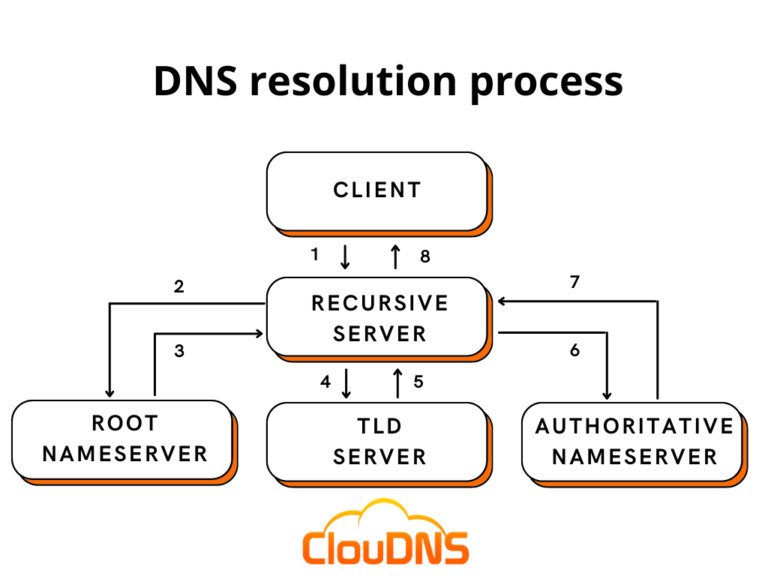
Let's break down this journey step-by-step. The following resource gives a fantastic, detailed walkthrough of this entire flow.
How DNS Works: A Guide to Understanding the Internet's ...
The freeCodeCamp article 'How DNS Works' provides a very clear, step-by-step explanation of the entire resolution journey, from your computer's local cache to the final authoritative answer.
Start reading from the section 'How DNS Resolution Powers Your Application’s Network Requests' and continue through to the end of 'Recursive Resolver and Authoritative Name Server Interaction'. Focus on understanding the sequence of events: The initial checks in the application and operating system caches. The role of the Recursive Resolver. The interactions between the Recursive Resolver and the Root, TLD, and Authoritative servers.
Based on that reading, here is a summary of the key steps and actors in the DNS resolution process:
-
Local Cache Check: Before going out to the internet, your system takes the most efficient route.
- Application Cache: Your web browser checks its own cache to see if you've visited the domain recently.
- OS Cache: If not in the browser, your operating system (Windows, macOS, Linux) checks its DNS cache and its local
hostsfile. If a match is found, the process stops here.
-
Query the Recursive Resolver: If the answer isn't local, your computer sends the query to its configured Recursive Resolver (also called a recursive DNS server). This is typically your Internet Service Provider's (ISP) server or a public one you've configured, like Google's
8.8.8.8or Cloudflare's1.1.1.1. The recursive resolver's job is to do all the work of finding the answer on your behalf. -
The Hierarchical Lookup: The recursive resolver now embarks on a three-step query process:
- a. Query a Root Nameserver: The resolver asks one of the 13 root server clusters, "Where can I find information about the
.comdomain?" The root server doesn't know the IP forgoogle.com, but it knows who manages.com. It responds with the address of the TLD server for.com. - b. Query a TLD (Top-Level Domain) Nameserver: The resolver then asks the
.comTLD server, "Where can I find information aboutgoogle.com?" The TLD server doesn't have the final IP address either, but it knows which nameservers are responsible (i.e., authoritative) for thegoogle.comdomain. It responds with the addresses of Google's authoritative nameservers (e.g.,ns1.google.com). - c. Query an Authoritative Nameserver: Finally, the resolver asks one of Google's authoritative nameservers, "What is the A record for
www.google.com?" This server is the ultimate source of truth for thegoogle.comdomain. It checks its records and returns the final IP address.
- a. Query a Root Nameserver: The resolver asks one of the 13 root server clusters, "Where can I find information about the
-
Response and Caching: The recursive resolver receives the IP address from the authoritative nameserver. It passes this answer back to your operating system, which in turn gives it to your browser. The browser can now make a direct connection to the server at that IP. Crucially, the recursive resolver caches this answer for a period of time (defined by the TTL, or Time To Live), so if another user asks for the same domain, it can answer instantly without repeating the entire process.
Conclusion
Today, you've unpacked one of the most fundamental services of the internet. You learned that DNS is not just about translating names to IPs, but a sophisticated system for storing different types of network information.
Key Takeaways:
- DNS acts as the internet's address book, translating human-friendly domain names into machine-readable IP addresses.
- Common DNS records serve distinct purposes:
- A: Maps a name to an IPv4 address.
- CNAME: Creates an alias from one name to another.
- MX: Directs a domain's email to specific mail servers.
- TXT: Stores text information, often for verification or security policies.
- The DNS resolution process is a hierarchical query flow:
- Check local caches (browser, OS).
- Send a query to a Recursive Resolver.
- The resolver queries Root, then TLD, then Authoritative nameservers to find the final answer.
- The answer is returned to the client and cached for future use.
In our next lesson, we will move from theory to practice. You will learn how to configure client-side DNS settings on a Linux system and use command-line tools like dig and nslookup to perform DNS queries yourself. This will allow you to directly inspect DNS records and troubleshoot name resolution issues, a critical skill for any DevOps role.