Hello! Welcome to the first lesson in our new module, Containerization with Docker.
In the last few modules, you've built a strong foundation in Linux, networking, and scripting. You even capped off the Python module by building your own command-line tool. A natural next question is: "How do I package this tool so it runs reliably on my machine, my colleague's machine, and on a cloud server, without any issues?"
This is where containerization comes in. Today, we'll explore the fundamental technology that makes modern DevOps possible.
Today's Learning Outcome: By the end of this lesson, you will be able to explain container technology and how it differs from virtual machines.
We'll start by understanding the traditional approach to virtualization—virtual machines (VMs)—and then dive into what makes containers a lighter, faster alternative. This conceptual understanding is crucial before we get our hands dirty in the next lesson.
1. The Traditional Approach: Virtual Machines (VMs)
Before containers became popular, if you wanted to run multiple applications in isolation on a single server, you used virtual machines. A VM is essentially a complete computer emulated in software. It has its own virtual CPU, memory, storage, and, most importantly, its own full guest operating system (OS).
This is made possible by a piece of software called a hypervisor (like VMware, VirtualBox, or Hyper-V), which sits between the physical hardware and the VMs, managing and allocating resources to each one.
Virtual Machines vs Containers – The Complete Beginner's ...
To get a clear definition of a VM and understand its core components, please read the first section of the article 'Virtual Machines vs Containers' from DesignGurus.
Read the section titled 'What is a Virtual Machine?'. Focus on understanding the role of the hypervisor and the concept of hardware-level isolation.
The key takeaway for VMs is strong isolation. Because each VM has its own independent OS, a crash or security issue in one VM is very unlikely to affect others or the host server. However, this isolation comes at a cost: running a full OS for every application is resource-intensive, leading to large file sizes (gigabytes) and slow boot times (minutes).
2. The Modern Approach: Containers
Containers offer a different, more lightweight approach to virtualization. Instead of virtualizing the hardware, containers virtualize the operating system.
This means that all containers running on a host machine share the host's OS kernel. A container packages only the application code and its specific libraries and dependencies. It doesn't need its own guest OS. This is managed by a container engine, like Docker.
Virtual Machines vs Containers – The Complete Beginner's ...
Now, let's look at the container side of the story. This next section from the same article explains how containers achieve isolation without the overhead of a full OS.
Read the section 'What is a Container?'. Pay close attention to the idea of operating system-level virtualization and why containers are so much more lightweight than VMs.
The key takeaway for containers is efficiency. By sharing the host OS kernel, containers avoid the overhead of a guest OS. This makes them much smaller (megabytes), faster to start (seconds), and allows you to run many more of them on the same hardware.
3. Visualizing the Difference
The architectural difference between VMs and containers is the most important concept to grasp. The image below shows a side-by-side comparison.
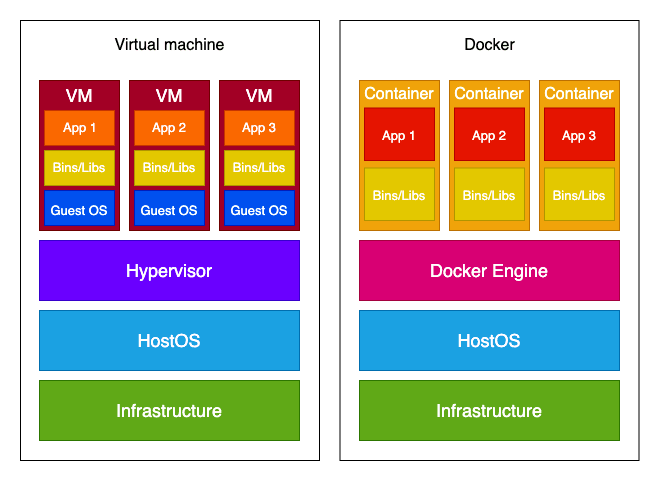
Notice the key difference: the container model eliminates the "Guest OS" and "Hypervisor" layers, replacing them with a single, efficient "Docker Engine" that communicates directly with the "Host OS" kernel.
4. Key Differences: A Head-to-Head Comparison
Now that we've defined both technologies, let's break down their differences across several key areas.
| Feature | Virtual Machines (VMs) | Containers |
|---|---|---|
| Virtualization Level | Hardware-level. Emulates a full physical machine. | OS-level. Virtualizes the OS user space. |
| Core Component | Hypervisor | Container Engine (e.g., Docker) |
| Isolation | Strong. Full OS separation. | Weaker. Shared host OS kernel. |
| Resource Usage | High. Each VM needs its own OS, consuming significant CPU, RAM, and disk space. | Low. Share the host OS, minimal overhead. |
| Size | Large (Gigabytes). | Small (Megabytes). |
| Startup Time | Slow (Minutes). | Fast (Seconds). |
| OS Compatibility | Can run different OSes on one host (e.g., Linux VM on a Windows host). | All containers must be compatible with the host OS kernel (e.g., Linux containers on a Linux host). |
To solidify these points, the following reading provides a detailed breakdown of each difference.
Containers vs Virtual Machines: A Detailed Comparison
This article from DataCamp offers an excellent, structured comparison that reinforces the differences we've outlined. The summary table is particularly useful.
Read the section titled 'Differences Between Containers and Virtual Machines'. Focus on the summary table and the explanations for Architecture, Resource utilization, Startup time, Isolation, and Portability.
Test your understanding!
You need to run a legacy application that only works on an old version of Windows Server 2008. Your company's infrastructure runs exclusively on modern Linux servers. Which technology would you choose to run this application and why?
Show answer
You would choose a Virtual Machine. The key reason is OS compatibility. Containers must share the host's OS kernel, so you cannot run a Windows-based container on a Linux host. A VM allows you to create a fully isolated environment and install the specific Windows Server 2008 OS it needs to run on top of your Linux host server.
5. Use Cases: Choosing the Right Tool for the Job
It's important to understand that containers are not a universal replacement for VMs. They are different tools for different jobs.
-
Use VMs when you need:
- Strong security and isolation: For multi-tenant environments or running untrusted applications where a security breach must be completely contained.
- Multiple operating systems: When you need to run applications designed for different OSes on a single physical server.
- Legacy applications: To support old software that depends on an outdated OS.
-
Use Containers when you need:
- Speed and efficiency: For microservices, where you need to run many small, independent services that can be started and stopped quickly.
- DevOps and CI/CD: To create consistent, reproducible environments for building, testing, and deploying applications rapidly.
- Application portability: To package an application once and be confident it will run anywhere (development, testing, production, cloud).
6. The Hybrid Approach: Better Together
In the real world, the choice isn't always "either/or". It's very common to use both technologies together. Cloud providers like AWS often give you a Virtual Machine (e.g., an EC2 instance), and on that VM, DevOps engineers install Docker to run containers.
This hybrid model provides the best of both worlds:
- The VM provides strong hardware-level isolation from other tenants on the same physical cloud hardware.
- The containers running inside the VM provide lightweight, fast, and portable application environments.
Conclusion
In this lesson, we've unpacked the core concepts of virtualization. You now have a solid theoretical understanding of what containers and virtual machines are and how they differ.
Key Takeaways:
- Virtual Machines virtualize the hardware, creating a full, self-contained computer with its own OS. They are heavy but offer strong isolation.
- Containers virtualize the operating system, packaging an application and its dependencies while sharing the host OS kernel. They are lightweight, fast, and portable but have weaker isolation than VMs.
- The choice between them depends on your specific needs, such as security, OS requirements, and speed.
- In many modern cloud architectures, containers run inside VMs to combine the benefits of both.
Next Up: Getting Hands-On with Docker
With this foundational knowledge in place, you are ready to move from theory to practice. In the next lesson, you will install Docker on your system and run your very first container. We'll see just how quickly you can get a pre-built application up and running.