Hello! Welcome to your fifth lesson in the "Collaboration with GitHub" module.
In our last lesson, you mastered GitHub Issues, learning how to track tasks, report bugs, and request features. We saw how Issues provide the "what" and "why" behind the work. Today, we'll focus on the "how"—the systematic way development teams organize their code contributions.
This lesson introduces you to Git branching strategies. You will learn why a structured approach to branching is essential for collaboration and then dive into two of the most well-known strategies: GitFlow and GitHub Flow. Understanding these workflows is fundamental for any DevOps professional, as they form the backbone of predictable, automated, and efficient software delivery pipelines.
1. Why Do We Need a Branching Strategy?
When you work on a project alone, you might get away with committing directly to the main branch. But as soon as you add another developer, this becomes chaotic. How do you prevent developers from overwriting each other's work? How do you test a new feature without breaking the main application? How do you manage releases and urgent bug fixes simultaneously?
A branching strategy is an agreed-upon set of rules for how a team uses Git branches. It brings order to this chaos by providing a clear process for creating, managing, and merging branches. For a DevOps team, a good strategy is the foundation for automation—it defines predictable points where you can trigger automated builds, tests, and deployments.
To get an overview of why these strategies evolved and are so crucial, let's start with a short introduction.
3 Git Workflows Every Developer Should Know (And When to Use Each)
This video from TechWorld with Nana provides excellent context on why different Git workflows exist and how they have evolved to meet different project needs.
Watch the first 3 minutes of the video (00:00 - 03:11). Pay attention to the distinction between building a versioned mobile app versus a continuously deployed web application, as this is key to understanding the different strategies.
2. GitFlow: The Structured Release Workflow
GitFlow is a robust, comprehensive branching model first proposed by Vincent Driessen in 2010. It was designed for projects that have scheduled, versioned releases, like desktop software, mobile apps, or large enterprise systems.
The core idea of GitFlow is to use multiple long-lived branches to isolate different stages of development.
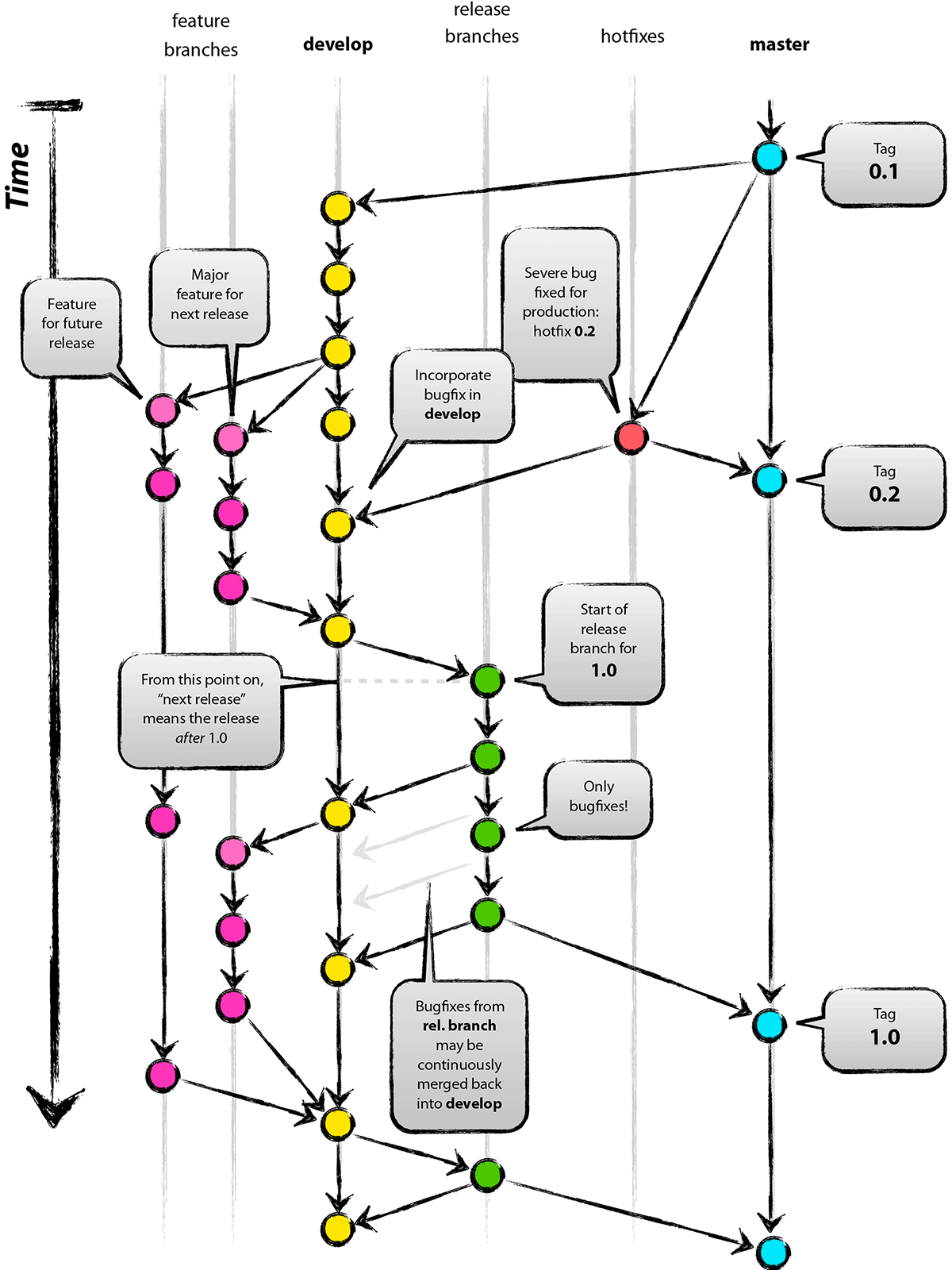
The Branches of GitFlow
GitFlow uses two main persistent branches and several types of ephemeral (temporary) branches.
main: This branch stores the official release history. The code inmainis always production-ready and is tagged with version numbers (e.g.,v1.0,v1.1).develop: This is the primary integration branch for ongoing development. All completed features are merged intodevelop. It contains the latest delivered development changes for the next release.
The supporting ephemeral branches are:
feature/*: Used for developing new features. They branch off ofdevelopand are merged back intodevelopwhen the feature is complete.release/*: Used to prepare for a new production release. They branch off ofdevelopwhen it has enough features for a release. This branch is for final bug fixes, documentation, and other release-oriented tasks. No new features are added here. Once ready, thereleasebranch is merged into bothmain(and tagged) anddevelop(to ensure the fixes are also in future development).hotfix/*: Used to quickly patch production releases. They branch off ofmainto fix a critical bug and are merged back into bothmainanddevelop.
Let's watch a detailed walkthrough of this process.
Getting started with branching workflows, Git Flow and GitHub Flow
This video from Nick Chapsas provides a clear, diagram-based explanation of how code moves through the various branches in the GitFlow model.
Watch from 00:51 to 05:57. Follow along as the diagram is built, paying close attention to where each branch originates and where it gets merged back.
Advantages and Disadvantages of GitFlow
For a balanced perspective, let's turn to this excellent summary.
Github Flow vs. Git Flow: What's the Difference?
The article 'Github Flow vs. Git Flow' from Harness.io provides a concise breakdown of the pros and cons of the GitFlow model.
Read the sections 'Diving Into Git Flow', 'Advantages', and 'Challenges'. This will solidify your understanding of when GitFlow is a good choice and when it might be too complex.
In summary:
- Best for: Projects with scheduled releases, multiple versions in production (e.g., supporting v1.0 while developing v2.0), large teams, and regulated environments needing strict audit trails.
- Challenges: Its complexity can slow down the development cycle and add significant overhead. It's not well-suited for modern web applications that practice continuous delivery, as the long-lived branches can lead to difficult merges and delay deployment.
3. GitHub Flow: The Lightweight, Continuous Workflow
As web development shifted towards continuous delivery and deployment, the complexity of GitFlow became a bottleneck. GitHub Flow was created as a much simpler, leaner alternative.
The entire philosophy of GitHub Flow can be summarized in one rule: Anything in the main branch is deployable.

The GitHub Flow Process
GitHub Flow is elegantly simple and optimized for speed and continuous deployment.
- Create a new, descriptively named branch off of
main(e.g.,add-user-authentication). - Add commits to the branch on your local machine and regularly push your work to the same-named branch on the server.
- When you need feedback or are ready to merge, open a Pull Request. This initiates discussion and code review.
- After the PR is reviewed and approved, it is merged into
main. - Once merged into
main, it should be deployed immediately. This is a critical part of the flow and relies heavily on a robust automated testing and CI/CD pipeline.
Getting started with branching workflows, Git Flow and GitHub Flow
Let's watch a walkthrough of GitHub Flow to see its simplicity in action.
Watch from 05:57 to 08:07. Notice the direct path from a feature branch to main and then to production.
Advantages and Disadvantages of GitHub Flow
GitHub Flow's simplicity is its greatest strength, but it also comes with prerequisites.
Github Flow vs. Git Flow: What's the Difference?
Let's read the 'Exploring GitHub Flow' section from the same Harness.io article to understand its pros and cons.
Read the sections 'Exploring GitHub Flow', 'Advantages', and 'Challenges'. Pay special attention to the 'Challenges' section, as it highlights the reliance on strong testing and CI/CD practices.
In summary:
- Best for: Web applications, SaaS products, and any project practicing continuous delivery or continuous deployment. It excels in environments where speed and simplicity are paramount.
- Challenges: It requires a high degree of team discipline and, crucially, a mature automated testing and CI/CD pipeline. Since every merge to
mainis deployable, you must have confidence that your test suite will catch any regressions before they hit production. It is also not designed to manage multiple versions of a product simultaneously.
4. Comparison and Choosing a Strategy
So, which one is better? The answer is: it depends on your context.
Here is a quick comparison table to help you decide:
| Aspect | GitFlow | GitHub Flow |
|---|---|---|
| Primary Goal | Managing scheduled, versioned releases | Continuous delivery and deployment |
| Complexity | High (multiple long-lived branches) | Low (one main branch + feature branches) |
| Key Branches | main, develop, feature, release, hotfix |
main, feature |
| Suited For | Mobile apps, desktop software, enterprise apps | Web apps, APIs, SaaS products |
| CI/CD Friendliness | Moderate; can be complex to automate | High; designed for and dependent on CI/CD |
| Release Speed | Slower, more deliberate | Fast and frequent |
Test your understanding!
For each of the following scenarios, which branching strategy (GitFlow or GitHub Flow) would you recommend, and why?
- You are on a DevOps team building a mobile banking application. Your company releases a new major version every quarter (v3.1, v3.2, etc.) and must provide critical security patches for the previous two versions still used by customers.
- You are developing a company blog platform where the marketing team wants to publish multiple articles and make small UI adjustments throughout the day.
Show answer
-
GitFlow is the ideal choice for the mobile banking app. Its structure is perfectly suited for managing versioned releases. The
releasebranches allow for stabilization before a quarterly release, and thehotfixbranches provide a clear process for patching older, production versions (main) without interfering with new development happening indevelop. -
GitHub Flow is the best fit for the blog platform. Its simplicity and focus on continuous deployment allow the team to quickly merge and deploy new articles or small changes to production multiple times a day. The overhead of GitFlow would be unnecessary and would slow down the team's ability to respond to marketing requests.
5. A Glimpse into the Future: Trunk-Based Development
As a final point, it's worth knowing that the trend toward simplicity and speed continues. Many high-performing DevOps teams now use Trunk-Based Development (TBD), which is an even more streamlined version of GitHub Flow.
In TBD, developers merge their small, frequent changes directly into the main branch (the "trunk"). To manage incomplete features, they rely heavily on feature flags—switches in the code that can turn new functionality on or off for users without requiring a new deployment. This minimizes merge conflicts and maximizes deployment speed.
We won't go into detail here, but it's important to recognize this trend as you advance in your DevOps career.
3 Git Workflows Every Developer Should Know (And When to Use Each)
To see where these ideas are heading, let's get a brief introduction to Trunk-Based Development from the TechWorld with Nana video.
Watch from 14:34 to 17:50. Focus on the core principles: very short-lived branches (or none at all) and the use of feature flags to hide incomplete work that is already in production.
Conclusion
You have now explored two of the most influential Git branching strategies. Understanding the "why" behind them is just as important as the "how." The strategy you choose has a profound impact on your team's workflow, speed, and ability to automate.
Key Takeaways:
- Branching strategies provide rules for collaboration, bringing order and predictability to development.
- GitFlow is a structured, comprehensive model ideal for projects with scheduled, versioned releases. It uses
main,develop,feature,release, andhotfixbranches. - GitHub Flow is a simple, lightweight model optimized for continuous delivery. It uses a
mainbranch and short-lived feature branches, with the core rule thatmainis always deployable. - The right strategy depends on your project's context, especially its release model (versioned vs. continuous).
In our next lesson, we will put this theory into practice. You will get hands-on experience by implementing the GitHub Flow workflow for a complete feature development cycle, from creating an issue to deploying a change.