Hello! Welcome to the next lesson in your journey to mastering Bash scripting.
In our last session, we focused on making your scripts robust by implementing error handling with exit codes, set -e, and the trap command. You learned how to create a centralized error_handler function that could be triggered by any error, which gave you a glimpse into how functions can help organize and manage your code.
Today, we're going to dive deep into that concept. As scripts grow from a few lines to a few hundred, simply writing commands one after another becomes messy, repetitive, and difficult to maintain. Functions are the primary tool for bringing structure, reusability, and clarity to your automation scripts—a cornerstone of professional DevOps practices.
Today's Learning Outcome: By the end of this lesson, you will be able to create reusable functions in Bash scripts to organize code.
1. The "Why": The Power of Reusable Code
In programming and scripting, one of the most important principles is DRY (Don't Repeat Yourself). If you find yourself copying and pasting the same block of code multiple times, it's a strong signal that you should turn that code into a function.
Using functions offers several key advantages:
- Reusability: Write a piece of logic once and call it as many times as you need, from anywhere in your script.
- Readability: Breaking a complex script into logical, named chunks makes it much easier to understand. A function call like
backup_database()is far more descriptive than a 20-line block ofmysqldumpcommands and file operations. - Maintainability: If you need to fix a bug or update logic, you only need to change it in one place—the function definition—instead of hunting down every copy of that code.
- Testability: Small, self-contained functions are much easier to test and debug than one large, monolithic script.
2. Defining and Calling a Basic Function
A function is a block of code that you give a name. The syntax is straightforward. There are two common ways to define a function in Bash:
# Style 1: Using the 'function' keyword
function my_function_name {
  # Code goes here
  echo "Hello from my_function_name"
}

# Style 2: The more common and recommended style
another_function_name() {
  # Code goes here
  echo "Hello from another_function_name"
}
To execute the code inside a function, you simply "call" it by writing its name.
Crucially, you must define a function before you call it. The shell reads the script from top to bottom, so it needs to know what the function is before you ask it to run it.
#!/bin/bash

# Define the function first
say_hello() {
  echo "Hello, world!"
}

# Now, call the function
say_hello
# Output: Hello, world!
Bash Scripting Tutorial for Beginners
Let's look at a practical example. The following article introduces functions by building a user_details function and then adds two more that count files and directories, demonstrating both definition and calling.
Read the section titled 'Functions'. Pay close attention to: The basic syntax for defining the user_details function. How the total_files and total_directories functions are defined and then called later in the script.
3. Passing Arguments and Returning Values
Functions become truly powerful when you can pass data to them and get data back.
Passing Arguments (Positional Parameters)
Just like a script can accept arguments from the command line, a function can accept arguments when it's called. Inside the function, these arguments are available as positional parameters: $1 for the first argument, $2 for the second, $@ for all arguments, and $# for the count of arguments.
Important: These positional parameters are local to the function. They temporarily hide the script's main positional parameters.
The total_files function from the article you just read is a perfect example:
# This function counts the number of files in the directory passed as its first argument.
total_files() {
  # $1 refers to the first argument passed to total_files, not the script.
  find "$1" -type f | wc -l
}

# You would call it like this:
num_files=$(total_files "/var/log")
echo "There are $num_files files in /var/log."
"Returning" Values
Bash functions don't "return" values in the way functions in languages like Python or Java do. Instead, we have two primary mechanisms:
-
Return Status (Exit Code): The
returncommand sets the function's exit status ($?). This is used to signal success (0) or failure (non-zero), just like theexitcommand does for a whole script. It's for status, not data. The value must be an integer between 0 and 255. -
Standard Output (Command Substitution): This is the standard way to get data out of a function. The function uses
echoorprintfto print its result to standard output. The calling code then captures this output using command substitution$(...).
The example num_files=$(total_files "/var/log") above demonstrates this perfectly. The total_files function echos its result (implicitly, as it's the output of the wc -l command), and we capture that result into the num_files variable.
4. Variable Scope: local vs. Global
This is one of the most common sources of bugs in Bash scripting. By default, any variable you declare in a Bash script is global. This means it's visible and modifiable everywhere, including inside functions. If a function changes a global variable, that change persists even after the function finishes.
To avoid unintended side effects, you should always declare variables that are only needed inside a function using the local keyword. A local variable is only visible within that function.
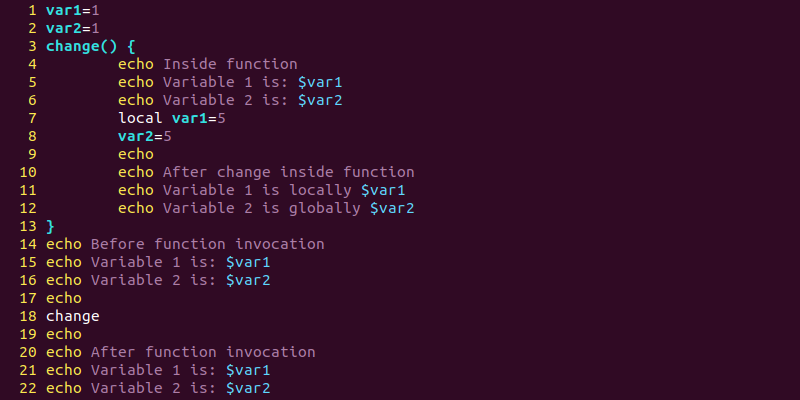
Best practice: Always use local for variables inside your functions unless you have a very specific reason to modify a global variable.
Test your understanding!
You have a script with a function designed to greet a user.
#!/bin/bash

# A global variable
GREETING="Hello"

greet_user() {
  GREETING="Welcome"
  local NAME=$1
  echo "$GREETING, $NAME!"
}

# Script execution starts
echo "$GREETING, world!"
greet_user "Alice"
echo "$GREETING, again!"
What will be the output of this script? Why?
Show answer
The output will be:
Hello, world!
Welcome, Alice!
Welcome, again!
Explanation:
echo "$GREETING, world!"prints the initial global value "Hello".greet_user "Alice"is called. Inside the function, the global variableGREETINGis changed to "Welcome". TheNAMEvariable is local. It prints "Welcome, Alice!".echo "$GREETING, again!"is executed after the function call. Because the function modified the globalGREETINGvariable, this line prints "Welcome, again!". IfGREETING="Welcome"inside the function had beenlocal GREETING="Welcome", the last line would have printed "Hello, again!".
5. Structuring a Professional Script
As scripts become more complex, a good structure is essential. A widely adopted best practice is to encapsulate your script's main logic in a main() function and call it at the very end of the script. This approach provides several benefits:
- It forces you to define all your helper functions before the main logic runs.
- It makes the script's entry point clear.
- It allows other scripts to
sourceyour script to use its functions without executing its main logic.
Let's examine how to apply this structure in practice. This article gives excellent advice on modular scripting and provides a concrete before-and-after example of refactoring a simple script into a robust, function-based structure.
Read section '11. Modular Script Structure' and then '13. Before/After Refactor: Real-World Example'. In section 11, focus on the idea of a main() function that calls other helper functions like parse_args(). In section 13, carefully compare the 'Before' script with the 'After' script. Notice how the logic is broken down into parse_args() and compress_logs() functions, all orchestrated by main().
This pattern of having a main function that calls other, more specific functions is a hallmark of professional, maintainable scripts. As you write more automation, adopting this structure will save you and your team a great deal of time and prevent many headaches.
Conclusion
You've now learned how to transform a simple, linear script into a structured, modular, and reusable piece of automation. By embracing functions, you are moving from just writing commands to engineering reliable tools.
Key Takeaways:
- DRY Principle: Use functions to avoid repeating code.
- Syntax: Define functions with
my_func() { ... }before you call them. - Arguments: Pass data into functions using positional parameters (
$1,$2, etc.). - Return Values: Use
returnfor success/failure status (0-255) and captureecho'd output with$(...)to get data back. - Scope: Always use
localfor variables inside functions to prevent side effects. - Structure: Organize your script with a
main()function as the entry point for clarity and reusability.
In our next lesson, we will cover a tool that is indispensable in modern DevOps: jq. You'll learn how to parse and process JSON files from the command line using jq. This is a crucial skill, as many APIs and cloud tools communicate using the JSON format, and your new, well-structured functions will often be tasked with handling this data.