Hello! Welcome back.
In our last lesson, we tackled a crucial challenge: making our stateful services, like databases, persistent using Docker named volumes. We successfully configured our application so that data survives even when we stop and remove the containers. However, in doing so, we left a significant security risk in our docker-compose.yml file:
  db:
    image: postgres:14-alpine
    environment:
      POSTGRES_PASSWORD: mysecretpassword # <-- Hardcoded secret!
    volumes:
      - db-data:/var/lib/postgresql/data
This hardcoded password is a problem. If you commit this file to a Git repository, the secret is exposed to anyone with access. This is a practice you must avoid in any real-world project.
Today, we will fix this. The goal of this lesson is to learn how to manage service configurations and secrets using environment variables and .env files. This will make our applications more secure, flexible, and easier to configure for different environments (like development, testing, and production).
1. The Problem: Why Hardcoding is a Bad Idea
Any piece of information that changes between deployment environments (e.g., database credentials, API keys, domain names) or is sensitive in nature is considered configuration. Hardcoding this directly into your docker-compose.yml is risky and inflexible.
To understand why this is such a critical issue in DevOps, let's watch the beginning of the following video. It clearly explains the security implications.
Environment Variables in Docker Compose: Secure Your Secrets!
This video by Oluwaseun Alausa starts by highlighting the exact problem we're facing: sensitive data hardcoded in a docker-compose.yml file and the risks associated with checking it into version control.
Watch the first two minutes (00:00 - 02:12). The presenter explains why it is bad practice to commit files containing secrets to a repository like GitHub, even if it's a private repository.
The key takeaway is that your docker-compose.yml file defines the structure of your application, and it should be safe to commit to version control. The specific, sensitive values that configure it should be kept separate.
2. The Solution: Using .env Files
The standard solution in the Docker ecosystem is to use an environment file, conventionally named .env. This is a simple text file where you define configuration variables as key-value pairs.
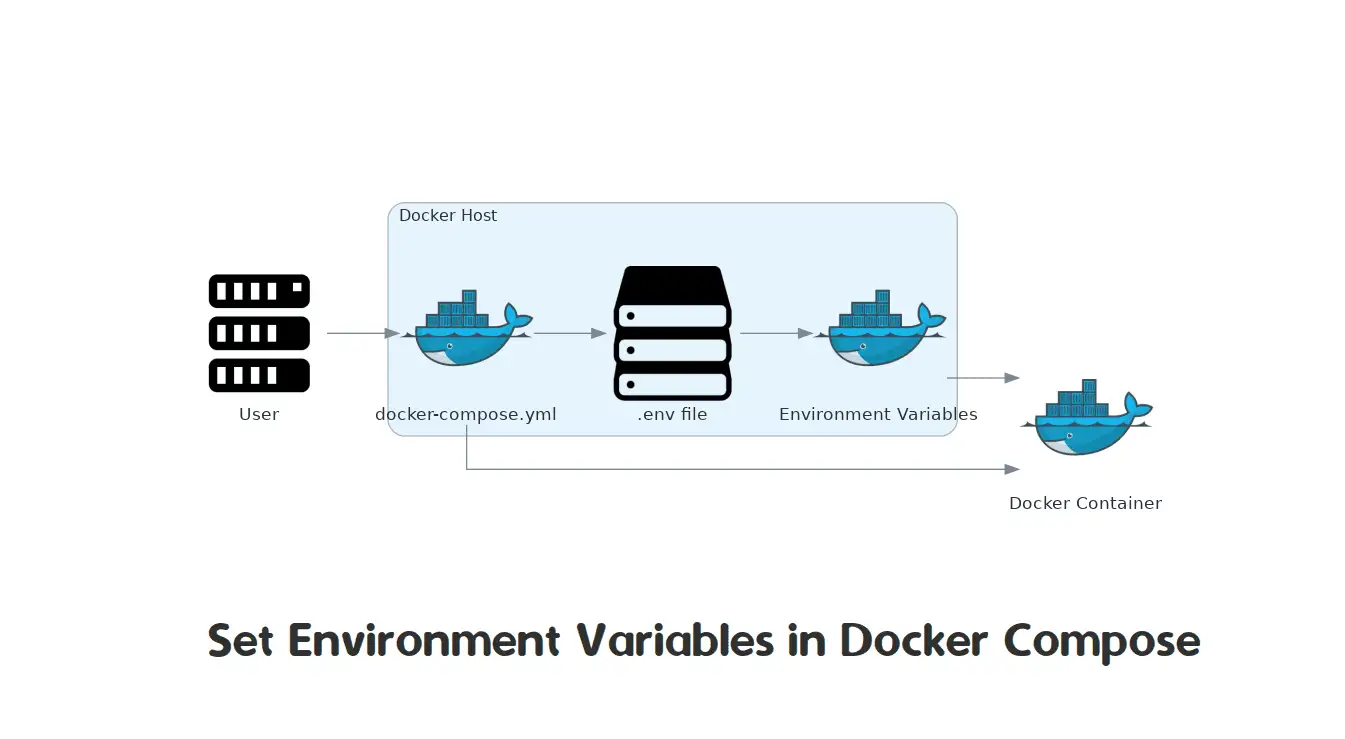
By default, when you run docker compose up, Docker Compose automatically looks for a file named .env in the same directory as your docker-compose.yml file and loads the variables defined within it.
Here is the flow:
Step 1: Create the .env File
You create a file named .env in your project root with the following format:
# .env file

# This is a comment
# No spaces around the equals sign
POSTGRES_USER=myuser
POSTGRES_PASSWORD=mysecretpassword
POSTGRES_DB=mydatabase
Step 2: Reference Variables in docker-compose.yml
Next, you modify your docker-compose.yml to use these variables. The syntax for this is ${VARIABLE_NAME}.
# docker-compose.yml

services:
  db:
    image: postgres:14-alpine
    environment:
      POSTGRES_USER: ${POSTGRES_USER}
      POSTGRES_PASSWORD: ${POSTGRES_PASSWORD}
      POSTGRES_DB: ${POSTGRES_DB}
    volumes:
      - db-data:/var/lib/postgresql/data

volumes:
  db-data:
Now, when Docker Compose reads this file, it will substitute ${POSTGRES_PASSWORD} with the value mysecretpassword from the .env file.
Step 3: The Most Important Step - .gitignore
The whole point of this is to keep secrets out of version control. Therefore, you must add the .env file to your .gitignore file.
# .gitignore

.env
This tells Git to ignore this file, ensuring your secrets are never accidentally committed.
Let's watch a practical demonstration of these steps.
Environment Variables in Docker Compose: Secure Your Secrets!
The same video now demonstrates how to create the .env file, reference the variables in the Compose file, and—most importantly—how to exclude the .env file from Git.
Watch from 05:16 to 08:09. Observe how the .env file is created, how the docker-compose.yml is updated with ${...} syntax, and how .gitignore is used to protect the secrets file.
3. Different Ways to Use Environment Variables
Environment variables in Docker Compose can be used in two main ways, and it's important to understand the difference.
A) For Variable Substitution in the Compose File
Docker Compose can use variables from your .env file to substitute values within the docker-compose.yml itself. This is useful for non-secret configuration that you might want to change easily, like image tags or container names.
The following video provides an excellent, concise example of this.
Docker Environment Variables: Best Practices and Examples
This video from Code with Nevyan shows how to use environment variables to dynamically set an image version and a container name prefix.
Watch from 00:00 to 01:22 and then skip to 02:28 to 03:36. Notice how ${PHP_VERSION} is used to select the image tag and ${CONTAINER_PREFIX} is used in the container name.
In this case, the variables are used by Docker Compose during the parsing of the file but are not necessarily passed into the container's runtime environment.
B) For the Container's Runtime Environment
This is what we did with our database credentials. The environment key under a service definition passes the variables into the container so that the application running inside (in our case, PostgreSQL) can use them.
You have two primary directives for this:
environment: Passes variables one by one. You can set a value directly or pass through a value from the host or.envfile.services: app: environment: - DEBUG=true # Set a value directly - LOG_LEVEL=${LOG_LEVEL} # Pass through from .envenv_file: Passes all variables from a specified file directly into the container.services: app: env_file: - ./app.env # Pass all variables from app.env
The following article provides a great summary of the different approaches and best practices.
How to Use Docker Environment Files (.env) Effectively
Let's read 'How to Use Docker Environment Files (.env) Effectively' by OneUptime to solidify these concepts and learn about managing multiple environments.
Read the sections 'Basic .env File Usage', 'Environment File for Containers', 'Multi-Environment Setup', 'Environment Variables vs env_file', and '.env File Format'. Pay attention to the table comparing environment and env_file, and the syntax rules for .env files.
4. Advanced Techniques and Best Practices
As you move from a simple project to a real-world DevOps workflow, you'll need more advanced techniques for managing configurations.
Managing Multiple Environments
A typical project has multiple environments: development, staging, production, etc. Each requires a different configuration. A common pattern is to have multiple .env files:
.env.development.env.production
You can then tell Docker Compose which one to use with the --env-file flag:docker compose --env-file .env.production up -d
Default and Required Variables
Your docker-compose.yml can be made more robust by setting default values for development or requiring certain variables to be set in production.
- Set a default value:
${VAR:-default}. IfVARis not set or is empty,defaultwill be used.# Use 'latest' tag if VERSION is not set image: myapp:${VERSION:-latest} - Require a variable:
${VAR:?error message}. IfVARis not set or is empty, Compose will exit with an error.# Fail if API_KEY is not provided API_KEY: ${API_KEY:?API_KEY must be set in the environment!}
Documenting with .env.template
Since .env is not committed to Git, how does a new developer on your team know which variables to set? The best practice is to create a template file, often called .env.template or .env.example, that is committed to the repository.
# .env.template
# This file documents required environment variables.
# Copy this to .env and fill in the values.

POSTGRES_USER=
POSTGRES_PASSWORD=
POSTGRES_DB=
This serves as clear documentation for your project's configuration.
Test your understanding!
You are given the following docker-compose.yml for an application that uses a backend service and a Redis cache.
services:
  backend:
    image: my-backend-app:1.2
    container_name: dev_backend
    environment:
      API_SECRET_KEY: "super-secret-key"
      REDIS_HOST: "redis"

  cache:
    image: redis:6-alpine
    container_name: dev_cache
Your task is to refactor this setup to follow best practices for configuration management. How would you:
- Define the configuration in an external
.envfile? - Modify the
docker-compose.ymlto use these variables? For theimagetag andcontainer_names, make them configurable too. - Ensure the
API_SECRET_KEYis mandatory, and provide a default value for the backend image tag (latest) if it's not specified?
Show answer
-
Create a
.envfile:# .env # App Versioning BACKEND_VERSION=1.2 # Naming ENV_PREFIX=dev # Secrets API_SECRET_KEY=a-much-better-secret-key-that-is-not-in-git # Service Configuration REDIS_HOST=redisYou would also add
.envto your.gitignorefile. -
Modify
docker-compose.yml:services: backend: # Use a default value for the image tag image: my-backend-app:${BACKEND_VERSION:-latest} container_name: ${ENV_PREFIX}_backend environment: # Make the API key mandatory API_SECRET_KEY: ${API_SECRET_KEY:?API_SECRET_KEY must be set in your .env file} REDIS_HOST: ${REDIS_HOST} cache: image: redis:6-alpine container_name: ${ENV_PREFIX}_cache
Conclusion
Congratulations! You've taken a massive step towards building professional, secure, and maintainable applications with Docker Compose. By externalizing configuration and keeping secrets out of version control, you are adopting a core principle of modern software development and DevOps.
Key Takeaways:
- Never hardcode secrets or environment-specific configuration in
docker-compose.yml. - Use a
.envfile to store these values and always add it to.gitignore. - Reference variables in
docker-compose.ymlusing the${VARIABLE_NAME}syntax. - Use variables for both Compose-level substitution (e.g., image tags) and for passing into the container's runtime environment (e.g., database credentials).
- Manage different configurations (dev, prod) using multiple
.envfiles and the--env-fileflag. - Use a
.env.templatefile to document the required variables for your project. - Make your Compose files more robust with default values (
:-) and required variables (:?).
Next Up
Our application services are now networked, persistent, and securely configured. However, there's a potential race condition. What if our backend service starts before the database is ready to accept connections? The application will crash. In our next lesson, we will solve this by learning how to control service startup order and dependencies using depends_on.