Hello! In our last lesson, we got a sneak peek at API security by adding permission_classes to a custom action. But before Django can check what a user is allowed to do (Permissions), it first needs to know who the user is. This process is called Authentication.
Today, we'll dive into the foundation of API security in Django REST Framework. We will focus on how to configure the default authentication schemes that apply to your entire project. By the end of this lesson, you will be able to configure DRF's default authentication classes, with a specific focus on SessionAuthentication, which is crucial for integrating APIs with traditional web applications.
What is Authentication in DRF?
At its core, authentication in DRF is the mechanism for associating an incoming request with a specific user. It's the first security checkpoint in the request-response cycle.
To understand its role precisely, let's start with the official DRF documentation.
This section of the DRF documentation provides a clear and concise definition of authentication and its place in the request lifecycle.
Read the introductory section and the following section titled How authentication is determined. Focus on these key points: Authentication simply identifies the user; it does not permit or deny the request on its own. DRF attempts to authenticate using a list of classes, and stops at the first success. What request.user and request.auth are set to if authentication succeeds or fails.
The key takeaway is that authentication populates request.user. If no authentication scheme succeeds, request.user becomes an instance of AnonymousUser. The permission checks, which happen next, then use the request.user object to make an access decision.
This flowchart provides a great visual of where authentication fits into the overall DRF request process.
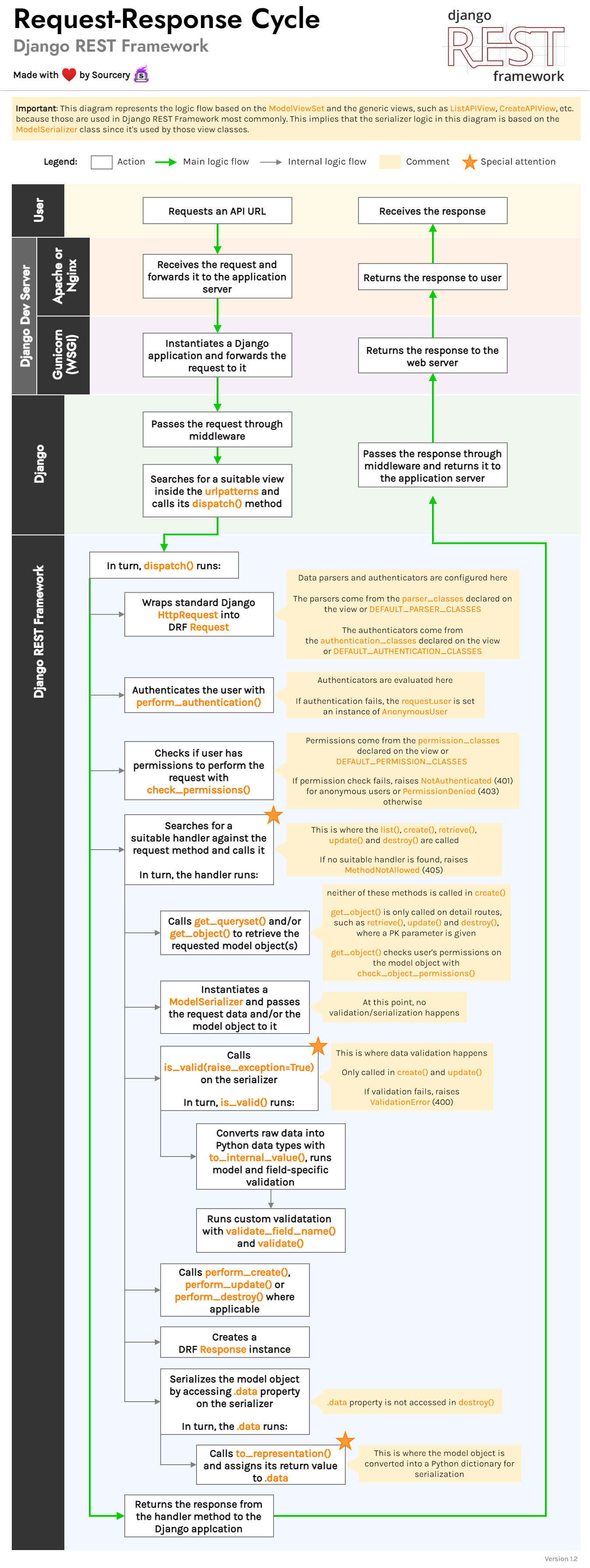
Configuring Default Authentication Classes
While you can set authentication methods on a per-view basis (similar to how we set permission_classes for our custom action), it's far more common to establish a project-wide default policy. This is done in your settings.py file within a dictionary called REST_FRAMEWORK.
Let's look at how to set this up.
Authentication and Permissions in Django REST Framework ...
This article provides a very clear, practical example of the REST_FRAMEWORK settings dictionary.
Read the section titled Authentication in Django REST Framework. Pay close attention to the code block showing the DEFAULT_AUTHENTICATION_CLASSES setting. This is the central piece of configuration for this lesson.
As you saw, you define a list of authentication classes. By default, DRF uses:
rest_framework.authentication.SessionAuthenticationrest_framework.authentication.BasicAuthentication
DRF will try them in order for each incoming request. Let's explore the most common one, SessionAuthentication.
Understanding SessionAuthentication
SessionAuthentication uses Django's built-in session backend. When a user logs into your Django site (even through the Django admin), a session is created and a sessionid cookie is sent to the user's browser. For subsequent requests from that browser, the cookie is sent back, and Django uses it to retrieve the session data and identify the logged-in user.
This makes SessionAuthentication ideal for two main scenarios:
- APIs that will be consumed by JavaScript running on pages rendered by the same Django project.
- Giving you authenticated access to your own API through DRF's browsable API interface.
The following diagram illustrates this flow, showing how a client (browser) and server exchange cookies to maintain an authenticated session.

To see this in practice, you first need to ensure Django REST Framework is properly installed and its authentication URLs are included in your project.
Setting up Django REST Framework DRF - Free Full-stack Course 🦄
This video walks through the initial setup of DRF. Watching these steps will show you how SessionAuthentication provides a login mechanism for the browsable API right out of the box.
Please watch the following segments: 12:15 - 14:34: Adding 'rest_framework' to INSTALLED_APPS in settings.py. 14:34 - 18:36: Adding DRF's auth URLs to your project's urls.py. 18:36 - 21:00: Running the server and seeing the 'Login' link in the browsable API. This is SessionAuthentication at work. You can ignore the parts about installing markdown and django-filter for now.
After following those steps, you have a fully functional login endpoint provided by DRF. When you use it, Django creates a session, and you become authenticated for all subsequent requests you make within the browsable API. This is SessionAuthentication in action!
One critical note: when using SessionAuthentication, any "unsafe" methods (POST, PUT, DELETE, etc.) also require CSRF (Cross-Site Request Forgery) protection. DRF handles this for you, but it's important to be aware that this is happening under the hood. You can read more about it in the "SessionAuthentication" section of the DRF Authentication documentation we looked at earlier.
Test your understanding!
You are building a project where the API will only be accessed by a React front-end application served from a completely different domain (e.g., api.example.com and app.otherexample.com).
Is SessionAuthentication a good choice for this scenario? Why or why not?
Show answer
SessionAuthentication is generally a poor choice for this scenario. It relies on cookies that are typically scoped to a single domain. Managing session cookies across different domains is complex and can introduce security vulnerabilities (it requires careful CORS and cookie flag configuration).
A better choice, which we will cover in the next lesson, would be a stateless method like TokenAuthentication.
Conclusion
You now understand the role of authentication in DRF and how to configure the default, project-wide authentication policy.
Key Takeaways:
- Authentication vs. Permissions: Authentication identifies who the user is, while Permissions determine what they can do.
- Global Configuration: Default authentication schemes are set in
settings.pyunderREST_FRAMEWORK['DEFAULT_AUTHENTICATION_CLASSES']. - Processing Order: DRF attempts to authenticate using each class in the
DEFAULT_AUTHENTICATION_CLASSESlist until one succeeds. SessionAuthentication: This class uses Django's session framework and is ideal for APIs consumed by browsers on the same domain, including the browsable API itself.
Preview of the Next Lesson:SessionAuthentication is stateful—it depends on session data stored on the server. This is perfect for web browsers but less so for mobile apps or third-party services. In our next lesson, we will implement token-based authentication, a stateless approach where the client sends a unique token with every request to prove its identity. This is the standard for modern, decoupled APIs.