Hello! In our last lesson, we set up a robust, token-based authentication system using JWT. You now know how to handle the authentication part of security—identifying who a user is. Today, we move to the next crucial step: authorization, which is about controlling what a user is allowed to do.
This lesson will introduce you to Django REST Framework's permission system. We will focus on applying DRF's built-in permission classes, such as IsAuthenticated and IsAdminUser, to protect your API endpoints. By the end of this lesson, you'll be able to implement fundamental access control rules for your APIs, ensuring that only the right users can perform specific actions.
From Authentication to Authorization
Authentication and authorization are two sides of the same coin, and it's essential to understand the distinction:
- Authentication answers the question: "Who are you?" In our last lesson, we answered this by validating a JWT to identify a user.
- Authorization answers the question: "Are you allowed to do this?" This is what we will tackle today using DRF's permission classes.
In DRF, permission checks run immediately after authentication has successfully identified a user. Before any of your view's logic executes, DRF checks if the authenticated user has permission to access that endpoint.
To get a quick overview of this process, let's start with a short video segment.
Django REST Framework - Permissions and Testing Permissions
This clip from BugBytes provides a concise explanation of the role permissions play in DRF, linking them directly to the authentication information we've already worked with.
Watch from 01:03 to 01:58. Pay close attention to how permissions use the request.user object (which authentication populates) to make access decisions.
The Permission Checking Flow
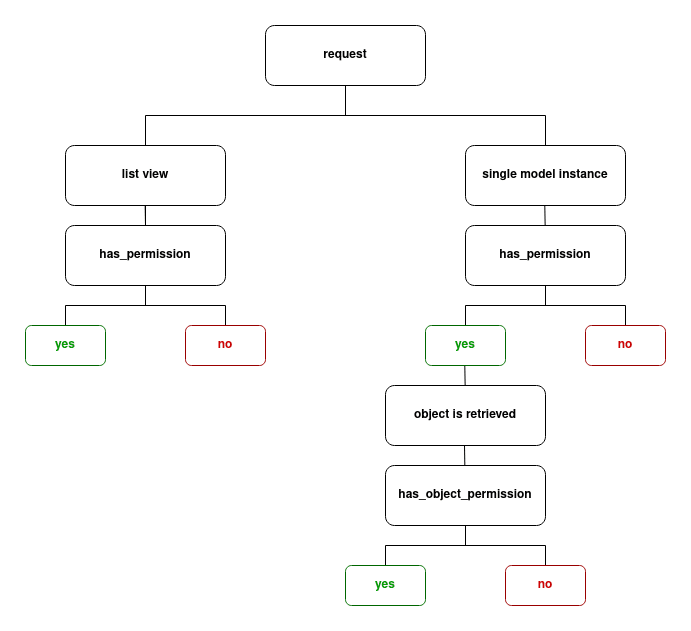
DRF's permission system is flexible. It distinguishes between checking permission for a view in general (e.g., "Can this user even see the list of posts?") and checking permission for a specific object (e.g., "Can this user edit this specific post?").
This is handled by two methods on a permission class:
has_permission(): A view-level check. It's called for all requests.has_object_permission(): An object-level check. It's only called for views that retrieve a single object (likeDetailVieworRetrieveUpdateDestroyAPIView).
The following flowchart illustrates this process clearly. For today, we will be focusing primarily on the view-level has_permission checks, which are what most built-in classes implement.
How to Apply Permissions
You can apply permission classes in three main ways, which offer different levels of scope. The official DRF documentation provides the definitive guide on this.
Let's review the official documentation to understand the three primary methods for setting permission policies in a DRF project.
Read the section titled Setting the permission policy. It explains: Global Default: Setting DEFAULT_PERMISSION_CLASSES in settings.py. Per-View (Class-Based): Setting the permission_classes attribute on an APIView subclass. Per-View (Function-Based): Using the @permission_classes decorator. Note the important point that setting permissions on a view overrides the global default, it does not add to it.
The Toolkit: DRF's Built-in Permission Classes
DRF comes with a set of ready-to-use permission classes that cover the most common authorization needs. Think of these as your starter toolkit for securing an API.
The following article from TestDriven.io provides an excellent, clear summary of these classes. We'll use it as our primary reference as we explore the most important ones.
Built-in Permission Classes in Django REST Framework
This article, 'Built-in Permission Classes in Django REST Framework', gives a great overview of the available classes. Let's start with the introduction to see the complete list.
First, read just the introductory section and look at the table under Built-in Classes. This table provides a high-level summary of what each class does.
Now, let's dive into the four most essential classes from that list. As you read about each one, consider a practical use case for it.
Built-in Permission Classes in Django REST Framework
Now, let's examine the most common permission classes in detail. This article provides clear code examples for each.
Read the sections for the following four classes. They are the workhorses of DRF permissions: AllowAny: The default. Explicitly grants access to everyone. Useful for public, read-only data. IsAuthenticated: The most common restriction. Denies access to any unauthenticated user. IsAuthenticatedOrReadOnly: A very practical class. It allows anyone to make safe requests (GET, HEAD, OPTIONS), but requires authentication for write operations (POST, PUT, DELETE). IsAdminUser: Restricts access to users where user.is_staff is True.
These four classes provide a powerful foundation for controlling access to your API endpoints.
Putting Permissions into Practice
Theory is great, but let's see how this works in a real project. We will now watch a demonstration of applying these classes and observing their effect.
This video will show two key concepts:
- Setting a project-wide default permission.
- Overriding that default on a specific view for more granular control.
Django Rest Framework Series - Permissions and Custom Permissions - Part-2
This tutorial from Very Academy will demonstrate how to apply permission classes at both the global and view level.
Watch the following two segments: Setting a Global Default (02:37 - 06:45): Observe how DEFAULT_PERMISSION_CLASSES is set in settings.py. The presenter chooses IsAuthenticatedOrReadOnly as a sensible default for a public-facing blog API. Overriding on a View (10:24 - 13:30): Watch how the permission_classes attribute is added to a view, overriding the global default with IsAdminUser. Notice the 403 Forbidden error when an unauthenticated or non-admin user tries to access the endpoint.
As you saw, combining a sensible global default with specific per-view overrides gives you a flexible and maintainable security model.
Test your understanding!
You are building an e-commerce API with the following endpoints. For each one, which built-in permission class would be most appropriate?
GET /api/products/- An endpoint to list all available products for anyone to see.POST /api/orders/- An endpoint for a logged-in user to create a new order.GET /api/users/- An endpoint for an administrator to view a list of all registered users.
Show answer
GET /api/products/:AllowAny. Since anyone, including anonymous guests, should be able to browse products, this is the most suitable choice.IsAuthenticatedOrReadOnlywould also work, butAllowAnyis more explicit if the view only handlesGETrequests.POST /api/orders/:IsAuthenticated. Only a registered, logged-in user should be able to place an order. This permission class ensures thatrequest.userwill be an actual user instance, which is necessary to associate the order with a customer.GET /api/users/:IsAdminUser. Viewing a list of all users is a sensitive administrative action. This permission ensures that only users with theis_staffflag can access this data.
Conclusion
You've now added a critical layer of security to your API. By moving from authentication to authorization, you've gained control over not just who can access your API, but what they are allowed to do.
Key Takeaways:
- Authorization vs. Authentication: Authentication identifies the user, while authorization determines their access rights.
- Permission Checks First: DRF checks permissions at the very beginning of a view's execution, before your code runs.
- Applying Permissions: You can set a global policy in
settings.pywithDEFAULT_PERMISSION_CLASSESand override it on specific views using thepermission_classesattribute. - Essential Built-in Classes:
AllowAny: Open access for all.IsAuthenticated: Access for logged-in users only.IsAdminUser: Access for staff/admin users only.IsAuthenticatedOrReadOnly: Allows public read access but restricts write access to logged-in users.
Preview of the Next Lesson:
The built-in classes are powerful, but what if you need more specific rules? For example, "a user can only edit their own profile," or "only members of the 'Editors' group can delete articles." These scenarios require logic that goes beyond simply checking if a user is logged in or is an admin. In our next lesson, we will learn how to create custom permission classes to implement this kind of fine-grained, object-level access control.