Hello! Welcome to the first lesson of our "Deployment Fundamentals" module.
In the previous module, we established a solid testing foundation for our application. Having a comprehensive test suite gives you the confidence that your code works as expected. The next logical step is to prepare that code for the real world—for deployment. A critical first step in this process is ensuring your application can behave differently depending on where it's running.
Today, our goal is to manage project settings for different environments (development vs. production). A setting that's perfect for development, like an extensive error page, can be a major security vulnerability in a live production environment. We will refactor our project from using a single settings.py file to a more robust, professional structure that cleanly separates configurations for each environment.
1. The Problem with a Single Configuration File
When you start a new Django project, you get a single settings.py file. This is fine for getting started, but it quickly becomes a problem as your project grows. You need different configurations for your local machine (development), the live server (production), and potentially other environments like testing or staging.
Configuring Django Settings: Best Practices
To understand the core challenges, let's read a brief overview from the article 'Configuring Django Settings: Best Practices' by Djangostars.
Please read the introductory section titled 'Managing Django Settings: Issues'. This section clearly lays out the main problems we are about to solve: Handling settings for different environments. Keeping sensitive data like SECRET_KEY out of version control. Sharing configuration needs across a development team.
As the article highlights, trying to manage all these concerns in one file is problematic. Consider these two settings:
DEBUG: You wantDEBUG = Trueduring development to see detailed error pages. However, in production, this exposes sensitive information about your application's internals.DEBUGmust beFalsein production.DATABASES: You might use a simple SQLite database locally, but a more powerful PostgreSQL database in production.
Manually changing these values before deploying is tedious and prone to human error. A better approach is to structure our settings so the correct configuration is loaded automatically based on the environment.
2. The Multi-File Settings Pattern
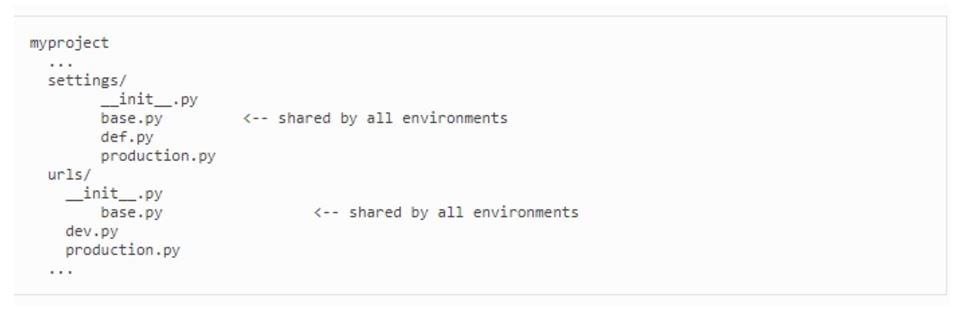
The industry-standard solution is to break up the single settings.py file into a package of settings modules. The common pattern is:
- A
base.pyfile containing all the settings common to all environments. - A
local.pyfile for your local development environment. - A
production.pyfile for your live server.
The local.py and production.py files will import all settings from base.py and then override or add the specific settings they need.
This structure gives us a clean separation of concerns.
3. A Practical Guide to Refactoring Your Settings
Let's walk through the process of converting a default Django project to this new, more powerful structure. We'll use a combination of file restructuring and a handy package called django-environ.
Environment-based Settings in Django Projects | django-environ | Setup for local/production/testing
The video 'Environment-based Settings in Django Projects' by BugBytes provides an excellent, step-by-step walkthrough of this entire process. We will follow its guidance.
Watch from 02:53 to 13:40. This is the core of our lesson. The video will guide you through four key stages: Restructuring the files (02:53): Creating the django settings directory with base.py, local.py, etc. Overriding a setting (06:15): A simple example of setting DEBUG = False in production.py. Using django-environ (06:56): Installing the package and using a .env file to pull out sensitive data like SECRET_KEY. Updating entry points (12:16): Modifying manage.py, wsgi.py, and asgi.py to use the new settings structure.
Let's summarize the key steps from the video.
Step 1: Restructure Files and Inherit Settings
First, we create a more organized directory structure. If your project's configuration directory is named myproject, you would:
- Rename
myproject/settings.pytomyproject/settings/base.py. (You'll need to create thesettingsdirectory and an__init__.pyfile inside it). - Create
myproject/settings/local.pyandmyproject/settings/production.py. - In both
local.pyandproduction.py, add the following line at the top to import all the common settings:from .base import * - Now, you can override any setting. For example, in
production.py:# In production.py from .base import * DEBUG = False
Step 2: Use django-environ to Manage Configuration
Hard-coding values like SECRET_KEY or database passwords directly in your settings files is a security risk, as these files are often committed to version control. The best practice, inspired by the 12-Factor App methodology, is to store configuration in environment variables.
The django-environ package makes this easy. After installing it (pip install django-environ), you can load variables from a .env file in your project's root directory.
.env file (at the project root):
# This file should NOT be committed to git
SECRET_KEY=your-super-secret-key-goes-here
DEBUG=True
settings/base.py:
import environ
from pathlib import Path

# ... (other imports)

BASE_DIR = Path(__file__).resolve().parent.parent.parent # Adjust based on your structure

# Initialize django-environ
env = environ.Env(
    # set casting, default value
    DEBUG=(bool, False)
)

# Read .env file
environ.Env.read_env(BASE_DIR / '.env')

# Use the variables
SECRET_KEY = env('SECRET_KEY')
DEBUG = env('DEBUG')
Now, your sensitive values are read from the .env file, which should be added to your .gitignore file to keep it out of your repository.
Step 3: Point Django to the Correct Settings File
How does Django know whether to use local.py or production.py? It uses the DJANGO_SETTINGS_MODULE environment variable. We need to update manage.py and our web server gateway interface files (wsgi.py, asgi.py) to point to our settings by default, while allowing this to be overridden.
In manage.py, you'll change:
# old
os.environ.setdefault('DJANGO_SETTINGS_MODULE', 'myproject.settings')
to something like this:
# new
os.environ.setdefault('DJANGO_SETTINGS_MODULE', 'myproject.settings.local')
This sets local as the default for development commands (runserver, makemigrations). On a production server, you would set the DJANGO_SETTINGS_MODULE environment variable directly to myproject.settings.production, which would override this default.
Test your understanding!
You want to use a lightweight SQLite database for local development but a powerful PostgreSQL database in production. In which file(s) would you define the DATABASES setting?
Show answer
You would define the DATABASES setting in two places:
settings/local.py: Here, you would configure it to use SQLite.# settings/local.py from .base import * DATABASES = { 'default': { 'ENGINE': 'django.db.backends.sqlite3', 'NAME': BASE_DIR / 'db.sqlite3', } }settings/production.py: Here, you would configure it for PostgreSQL, likely reading credentials from environment variables usingdjango-environ.# settings/production.py from .base import * DATABASES = { 'default': env.db(), # Reads DATABASE_URL from .env file }
You might remove the original DATABASES setting from base.py, as it will always be defined by an environment-specific file.
4. Essential Production-Only Settings
With our new structure, we can easily define settings that should only apply to our live production server. Here are some of the most important ones.
7 Critical Django Production Server Settings to Configure Before Going Live
The video '7 Critical Django Production Server Settings to Configure Before Going Live' by Tony Teaches Tech gives a great overview of these settings. We'll focus on the 'what' and 'why'.
Watch the following clips to understand some key production settings: DEBUG = False (05:08 - 06:02): Why it's a security risk. ALLOWED_HOSTS (04:40 - 05:17): To prevent HTTP Host header attacks. HTTPS Security Settings (02:58 - 04:49): To enforce secure connections.
Here's a summary of settings you should have in your production.py:
DEBUG = False: The most important security setting.ALLOWED_HOSTS = ['your-domain.com', 'www.your-domain.com']: A list of host/domain names that your Django site can serve. This is a required security measure whenDEBUGisFalse.SESSION_COOKIE_SECURE = True: Ensures session cookies are only sent over HTTPS.CSRF_COOKIE_SECURE = True: Ensures the CSRF cookie is only sent over HTTPS.SECURE_SSL_REDIRECT = True: Redirects all non-HTTPS requests to HTTPS.
Checking Your Deployment Configuration
Django provides a built-in command to help you check for common production misconfigurations.
python manage.py check --deploy
Running this command will warn you about issues like DEBUG being True or SECRET_KEY being insecure.
5. Sharing Configuration with Your Team
We've established that the .env file contains secrets and should not be committed to version control. So, how does a new developer on your team know which environment variables they need to set up the project?
The best practice is to create an .env.example file.
Environment-based Settings in Django Projects | django-environ | Setup for local/production/testing
Let's return to the BugBytes video, which explains this concept perfectly.
Watch from 23:33 to 24:35 to understand the purpose of the .env.example file.
The .env.example file is a template that is committed to your repository. It lists all the required environment variables but with placeholder or dummy values.
.env.example file:
# This file IS committed to git
SECRET_KEY=
DEBUG=True
DATABASE_URL=postgres://user:password@host:port/dbname
A new developer can copy this file to .env, fill in their own local values, and get the project running quickly without you ever having to share secret keys.
Conclusion
Congratulations! You have now learned how to implement a professional, scalable, and secure settings structure for a Django project. This is a fundamental skill for moving any application from development to production.
Key Takeaways:
- A single
settings.pyfile is inadequate for managing different environments. - A multi-file structure using
base.py,local.py, andproduction.pyprovides a clean separation of configurations. - The 12-Factor App methodology advises storing configuration in environment variables, not in code.
django-environis an excellent tool for loading environment variables from a.envfile.- The
DJANGO_SETTINGS_MODULEenvironment variable tells Django which settings file to load. - Sensitive files like
.envmust be added to.gitignore, while an.env.examplefile should be committed to guide other developers.
Next Up
In this lesson, we introduced using a .env file to manage our SECRET_KEY and DEBUG flag. In the next lesson, we will expand on this powerful technique and explore how to use environment variables to store sensitive information and configuration of all kinds, including database credentials and third-party API keys, ensuring our application is both configurable and secure.