Hello! Welcome back to your Django course.
In the last module, we completed our tour of Django's presentation layer, learning how to manage static files like CSS and JavaScript to style our pages. You're now equipped to build the entire front-end of a server-rendered Django application, from handling requests and routing URLs to rendering dynamic, well-structured, and styled templates.
Now, we pivot from what the user sees to the data that powers the application. This lesson begins a new, crucial module: Models and the ORM. We'll shift our focus to defining the structure of our application's data.
The core of any web application is its data. Django provides a powerful, Python-centric way to interact with your database called the Object-Relational Mapper (ORM). Instead of writing SQL, you define your data structures as Python classes called Models. Django's ORM then handles the work of translating these classes into database tables and gives you an intuitive API to create, retrieve, update, and delete data.
By the end of this lesson, you will be able to define models with various fundamental field types like CharField, IntegerField, and DateField.
What is a Django Model?
A Django model is the single, definitive source of information about your data. It contains the essential fields and behaviors of the data you’re storing. Each model maps to a single database table.
This concept is the heart of the ORM. You work with Python objects, and Django takes care of the database commands. Given your background in Python classes and SQL, you can think of a model as a Pythonic blueprint for a database table.
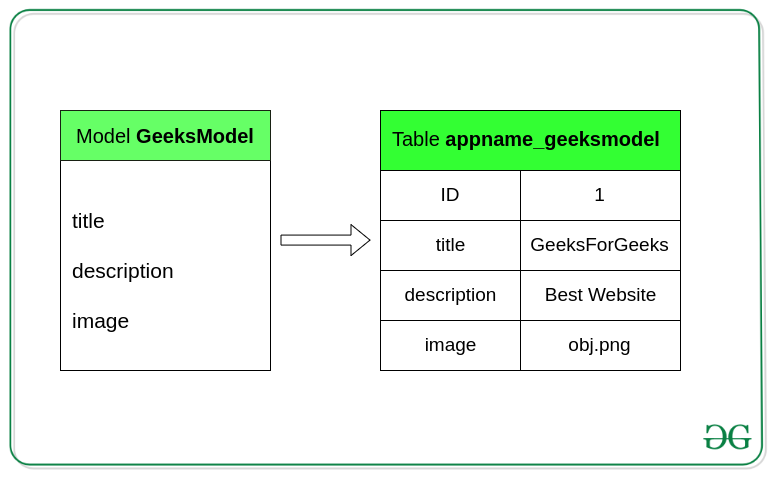
To get a solid grasp of this concept, let's start with a foundational reading from the Mozilla Developer Network (MDN).
Django Tutorial Part 3: Using models - Learn web development
The MDN Web Docs provide an excellent, high-level introduction to what Django models are and how they're defined. This will set the stage for the rest of the lesson.
Please read the 'Overview' and 'Model primer' sections. Focus on understanding: The role of a model in defining data structure. How models abstract away direct database communication. The basic structure of a model class inheriting from django.db.models.Model.
Defining Fields: The Building Blocks of a Model
As you just read, models are defined in an app's models.py file. A model is composed of fields, where each field represents a column in the database table and tells Django what type of data to store.
Django comes with a wide variety of built-in field types. Let's explore the most common ones you'll use to build your models. The following video provides a rapid tour of many of these fields and their options. We will refer back to specific parts of it as we discuss each field type.
Field types and options in Django models
This video from Pyplane acts as a great visual 'cheat sheet' for many of Django's model fields and their most common options. We'll use it as a practical guide.
You don't need to watch the whole video at once. We'll be jumping to specific timestamps as we cover different topics. It provides a quick look at CharField, DateField, IntegerField, BooleanField, and other important concepts.
Text Fields: CharField and TextField
models.CharField: Used for short-to-medium length strings.- It has one required argument:
max_length. This is enforced at both the database level and in Django's validation.
- It has one required argument:
models.TextField: Used for large amounts of text. It's like aCharFieldbut without amax_lengthrequirement.
Common Options for Text Fields:
help_text: Displays additional helpful text in forms (like in the Django admin).verbose_name: A human-readable name for the field. If not provided, Django creates it from the field's variable name.unique=True: Ensures that every value in this column is unique across all rows in the table.
Watch the video from 01:52 to 02:26 to see CharField in action with max_length, unique, and help_text.
Numeric Fields: IntegerField, DecimalField, and more
models.IntegerField: Stores integer (whole number) values. Django also providesPositiveIntegerField,SmallIntegerField, etc., for more specific needs, which can optimize database storage and provide automatic validation.models.DecimalField: Used for storing fixed-precision decimal numbers, which is crucial for financial data to avoid floating-point rounding errors.- Required arguments:
max_digits(total number of digits allowed) anddecimal_places(number of digits after the decimal point).
- Required arguments:
You can see DecimalField demonstrated from 03:07 to 04:02 in the video, and the various integer fields are discussed from 04:55 to 05:45.
Date and Time Fields: DateField and DateTimeField
models.DateField: Stores a date (YYYY-MM-DD).models.DateTimeField: Stores a date and time.
These fields have two very useful options for handling timestamps:
auto_now_add=True: Automatically sets the field to the current date/time only when the object is first created. Perfect for acreated_attimestamp.auto_now=True: Automatically updates the field to the current date/time every time the object is saved. Perfect for alast_updatedtimestamp.
The Pyplane video covers auto_now and auto_now_add from 08:00 to 09:20. It's important to note that when you use either of these options, the field becomes non-editable by default.
Other Common Field Types
models.BooleanField: A true/false field. You can set adefaultvalue, likedefault=False.models.EmailField: ACharFieldthat also checks if the value is a valid email address.models.UUIDField: Stores a universally unique identifier (UUID). Useful for primary keys if you don't want to use the default auto-incrementing integers.
Critical Field Options: null vs. blank
Two of the most important and often confused field options are null and blank.
null=True: This is purely database-related. It means the database is allowed to store aNULLvalue for this field. For string-based fields likeCharFieldandTextField, you should avoidnull=Truebecause Django's convention is to store empty strings ('') instead ofNULL.blank=True: This is validation-related. It means the field is allowed to be empty in forms (e.g., the Django admin). The field is no longer required.
The rule of thumb is:
- For string-based fields (
CharField,TextField), useblank=True. - For non-string fields (
IntegerField,DateField,ForeignKey), you often usenull=Trueandblank=Truetogether if the field is optional.
The Pyplane video has an outstanding, practical demonstration of this concept.
Field types and options in Django models
The following clip from the Pyplane video clearly explains what happens when you add a new field to an existing model and how null=True and blank=True solve the resulting problems.
Watch carefully from 12:40 to 16:19. Notice how the terminal prompts for a default value when a field is added without null=True, and how the admin form requires the field until blank=True is added.
Test your understanding!
You are creating a Profile model for users. You want to add an optional bio field for a short biography and an optional birth_date field.
How would you define these two fields in your model, keeping the null vs. blank conventions in mind?
class Profile(models.Model):
    user = # ... (we'll cover this relationship in the next lesson)
    # How would you define bio and birth_date here?
Show answer
class Profile(models.Model):
    user = # ...
    bio = models.TextField(blank=True) # A text field can be an empty string, so no null=True needed.
    birth_date = models.DateField(null=True, blank=True) # For non-string fields, we need both.
bio: As aTextField(a string-based field), we only needblank=Trueto make it optional in forms. The database will store an empty string ('') if it's left blank.birth_date: As aDateField, we neednull=Trueto allow the database column to beNULLandblank=Trueto make it optional in forms.
Putting It All Together: A Practical Example
Let's combine what we've learned to create a simple Post model for a blog application. This model will use several of the field types we've discussed.
Create a new app (e.g., python manage.py startapp blog) and open blog/models.py.
# blog/models.py
from django.db import models
from django.utils import timezone

class Post(models.Model):
    """
    Represents a single blog post.
    """
    # Choices for the status field
    STATUS_CHOICES = (
        ('draft', 'Draft'),
        ('published', 'Published'),
    )

    title = models.CharField(max_length=250, unique=True)
    content = models.TextField(blank=True)

    # auto_now_add=True sets the creation timestamp
    created_at = models.DateTimeField(auto_now_add=True)
    # auto_now=True updates the timestamp on every save
    updated_at = models.DateTimeField(auto_now=True)

    # A CharField with a dropdown menu of choices
    status = models.CharField(max_length=10, choices=STATUS_CHOICES, default='draft')

    is_featured = models.BooleanField(default=False)

    def __str__(self):
        """A string representation of the model."""
        return self.title
This example demonstrates:
CharFieldwithunique=True.TextFieldwithblank=True.DateTimeFieldwithauto_now_addandauto_now.CharFieldwith achoicesparameter to create a dropdown selector.BooleanFieldwith adefaultvalue.- The
__str__method, which provides a human-readable name for an object instance—essential for the Django admin and debugging.
Conclusion
In this lesson, you took a major step into the backend world of Django. You learned that models are Python classes that define your data's structure and that the ORM uses these models to manage all database interactions for you.
Key Takeaways:
- Models are Python classes that inherit from
django.db.models.Modeland map to database tables. - Fields like
CharField,IntegerField, andDateFielddefine the columns of your database table and the type of data they store. - Fields take arguments like
max_length,default, anduniqueto further constrain the data. blank=Truemakes a field optional in forms (validation-related).null=Trueallows a database column to storeNULLvalues (database-related).- Timestamps can be automated with
auto_now_add=True(on creation) andauto_now=True(on update).
We've laid the groundwork for defining individual tables. However, the real power of a database lies in the relationships between tables. In our next lesson, we will explore exactly that, learning how to connect our models using ForeignKey, ManyToManyField, and OneToOneField.