Hello! Welcome back to our course on the Django framework.
In our last lesson, we mastered handling file uploads, a key skill for building dynamic applications. We covered everything from model configuration with ImageField to serving media files in development.
Today, we're diving into another cornerstone of web development: user authentication and authorization. This is the foundation for creating user accounts, protecting content, and building personalized experiences. Our learning outcome for this lesson is to describe Django's built-in User model and authentication system.
We'll break down the components that Django provides out of the box, explore the structure of the default User model, and understand the flow of how a user is authenticated. This theoretical foundation is essential before we jump into the practical implementation of login and registration forms in our next lesson.
1. The Django Authentication System: An Overview
At its core, any authentication system answers two fundamental questions:
- Authentication: "Who are you?" (Verifying a user's identity, typically with a username and password).
- Authorization: "What are you allowed to do?" (Checking if an authenticated user has permission to perform a specific action).
Django comes with a powerful and secure system that handles both, bundled in a "contrib" application called django.contrib.auth. This application is included by default in every new Django project, which is why you've seen it in your settings.py file from the very beginning.
To get a clear picture of what this system includes and how it's wired into your project, please read the "Overview" and "Installation" sections of the official Django documentation.
The official Django documentation provides a concise overview of the authentication system's purpose and its default configuration.
Please read the sections 'Overview' and 'Installation'. As you read, focus on: The distinction between authentication and authorization. The core components of the auth system (Users, Permissions, Groups). The roles of 'django.contrib.auth' in INSTALLED_APPS and AuthenticationMiddleware in MIDDLEWARE.
Key Takeaways from the Documentation
From that reading, there are two critical pieces of configuration to understand:
INSTALLED_APPS:'django.contrib.auth'provides the core framework and models (like theUsermodel we'll discuss next), and'django.contrib.contenttypes'allows permissions to be associated with your models.MIDDLEWARE: TheAuthenticationMiddlewareis especially important. On every incoming request, this middleware inspects the session data to see if a user is logged in. If so, it attaches the correspondingUserobject to the request. This is why you can accessrequest.userin any of your views to get the currently logged-in user.
2. The Built-in User Model
The heart of the authentication system is the User model. This is a regular Django model, but it comes pre-defined with all the fields you would typically expect for a user account.
The API reference in the Django documentation gives a complete breakdown of its fields, attributes, and methods.
Let's dive into the specifics of the User model by consulting its API reference page.
Read the section titled 'User model'. Pay close attention to the 'Fields', 'Attributes', and 'Methods' subsections. Don't worry about memorizing everything; focus on understanding the purpose of the main fields and methods.
Important User Model Fields and Methods
Here are the most critical components of the User model you should know:
-
Fields:
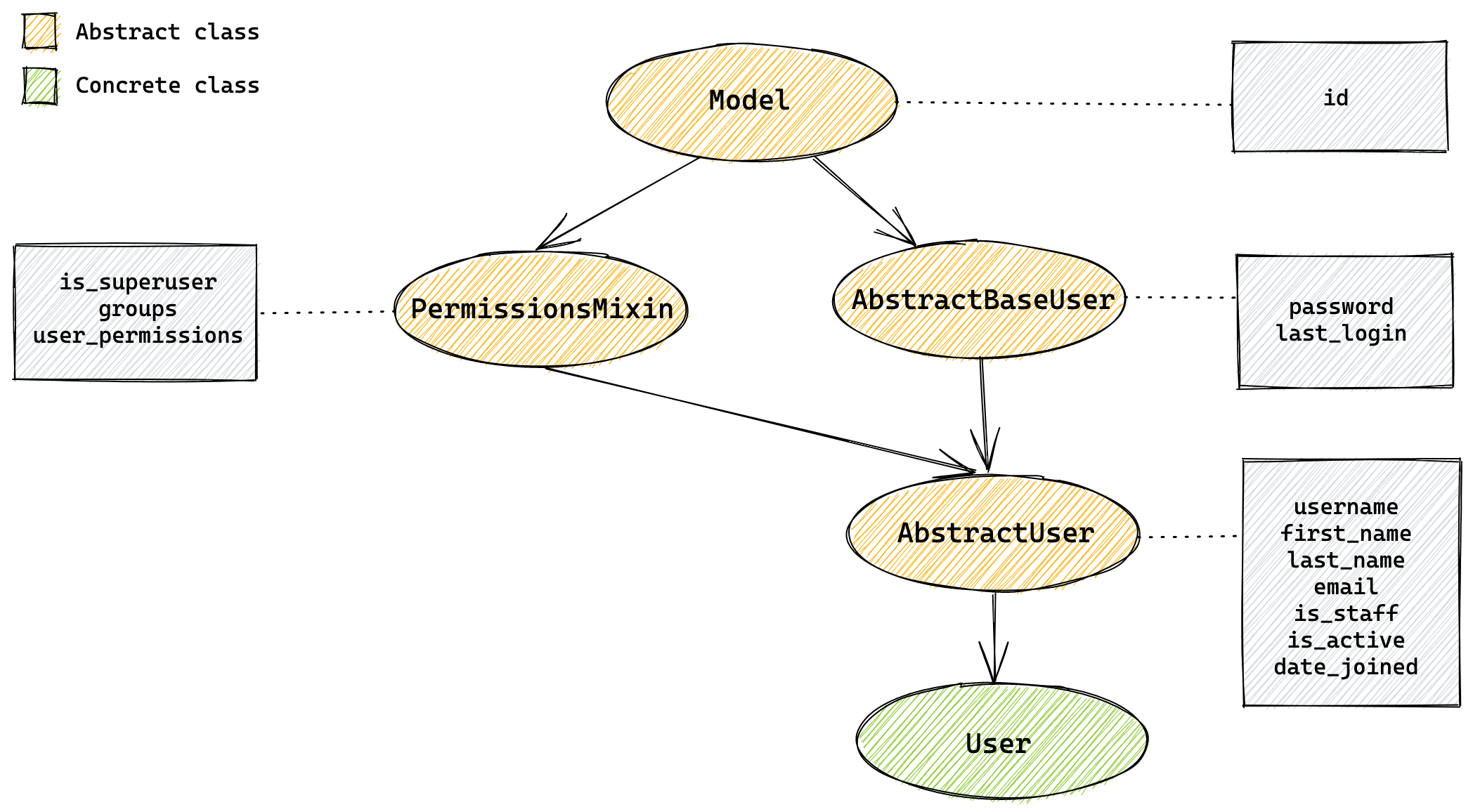
username: A unique identifier for the user.password: A hashed representation of the user's password. Django never stores raw passwords.email,first_name,last_name: Optional fields for user information.is_active: A boolean flag. It's recommended to set this toFalseinstead of deleting a user to preserve data integrity. An inactive user cannot log in by default.is_staff: A boolean flag that determines if a user can access the Django admin site.is_superuser: A boolean flag that grants a user all permissions without explicitly assigning them.
-
Methods:
set_password(raw_password): Takes a raw password string and saves it as a secure hash.check_password(raw_password): Takes a raw password string and returnsTrueif it matches the stored hash,Falseotherwise.
Given your background in programming, this class inheritance diagram provides a great visual summary of how the final User model is constructed from several base classes.
What About Unauthenticated Users?
When a visitor is not logged in, what is request.user? Django handles this elegantly with a special object called AnonymousUser. It has a similar interface to the User model, which allows you to write consistent code.
To complete our understanding of user objects, let's look at how Django represents users who aren't logged in.
Read the short section 'AnonymousUser object'. The key takeaway is understanding its properties, like is_authenticated being False.
The primary difference is that for an AnonymousUser, the is_authenticated attribute is always False, whereas for a regular User object, it's always True. This makes request.user.is_authenticated the standard way to check if a user is logged in.
Test your understanding!
You are building an e-commerce site. You want to grant certain users the ability to manage products via the Django admin interface, but you don't want them to have "god mode" access to delete other users or change site-wide permissions. Which boolean flag on the User model should you set to True for these users?
Show answer
You should set the is_staff flag to True. This grants access to the admin site. The is_superuser flag would grant them all permissions, which is more than what is required.
3. The Authentication Workflow
We now know what the User model looks like and how the AuthenticationMiddleware makes it available as request.user. But how does Django actually verify a user's credentials during a login attempt? This process involves Authentication Backends.
An authentication backend is a class that knows how to authenticate a user. The default backend, ModelBackend, authenticates against the User model in your database.
The documentation on authentication backends explains the mechanism that Django uses to verify user credentials.
Read the introductory part of 'Authentication backends' and the description of ModelBackend. This will explain how Django uses the username and password to find and verify a user.
This backend logic is exposed to you through a few simple, powerful functions in django.contrib.auth:
-
authenticate(request, username=..., password=...):- This function takes the request and user credentials.
- It passes these credentials to all configured authentication backends (like
ModelBackend). - If the credentials are valid,
authenticate()returns the correspondingUserobject. - If the credentials are invalid, it returns
None.
-
login(request, user):- This function takes the request and a
Userobject (the one you got fromauthenticate()). - It uses Django's session framework to "log the user in" by saving the user's ID to the session.
- From this point on, for subsequent requests from the same user, the
AuthenticationMiddlewarewill be able to find the user's ID in the session and attach the fullUserobject torequest.user.
- This function takes the request and a
-
logout(request):- This function clears the user's authentication data from the session, effectively logging them out.
These three functions—authenticate, login, and logout—are the fundamental building blocks you will use in the next lesson to create your login and logout views.
Conclusion
In this lesson, we've unpacked the theory behind Django's built-in authentication system. You now have a solid understanding of its core components and workflow.
Key Takeaways:
- Django's authentication system is provided by
django.contrib.authand enabled by default through settings inINSTALLED_APPSandMIDDLEWARE. - The
AuthenticationMiddlewareis responsible for populatingrequest.userin your views. - The built-in
Usermodel provides standard fields likeusername, a hashedpassword, and important boolean flags (is_active,is_staff,is_superuser). - For unauthenticated sessions,
request.useris an instance ofAnonymousUser, whereis_authenticatedisFalse. - The authentication process is handled by backends and orchestrated by three main functions:
authenticate(to verify credentials),login(to create a session), andlogout(to clear a session).
Preview of the Next Lesson:
Now that we have the theory down, we're ready for the fun part. In our next lesson, we will put this knowledge into practice by implementing user registration, login, and logout functionality using Django's built-in forms and views.