In the last lesson, you successfully made your first direct call to the OpenAI API, learning how to structure prompts with system and user roles to guide the model's persona. This was a crucial first step in moving from a user of AI to a builder of AI systems.
Today, we'll build on that foundation to gain more precise control over the AI's output. The goal is to control LLM generation with parameters like temperature and max_tokens. Think of these as the primary dials you can turn to shape the AI's response. For your work in system architecture, mastering these parameters is non-negotiable; they are the key to ensuring that an AI's output is not just relevant but also reliable, predictable, and fit for a specific business purpose.
Part 1: How LLMs Generate Text
Before we can effectively control the output, it's helpful to have a mental model of how it's generated. At its core, an LLM is a sophisticated next-token predictor. When it generates a response, it's making a series of predictions, one token at a time, based on the input it received.
LLM Parameters Explained: OpenAI API in Python
This article from LearnPrompting.org provides a concise explanation of the text generation process.
Please read the section How Do LLMs Generate Text?. Focus on the core idea that the model assigns a probability to every possible next token and then uses a sampling method to choose one.
This probabilistic nature is why you can get different answers to the same prompt. Our goal now is to influence that sampling method.
Part 2: The Creativity Knob – temperature
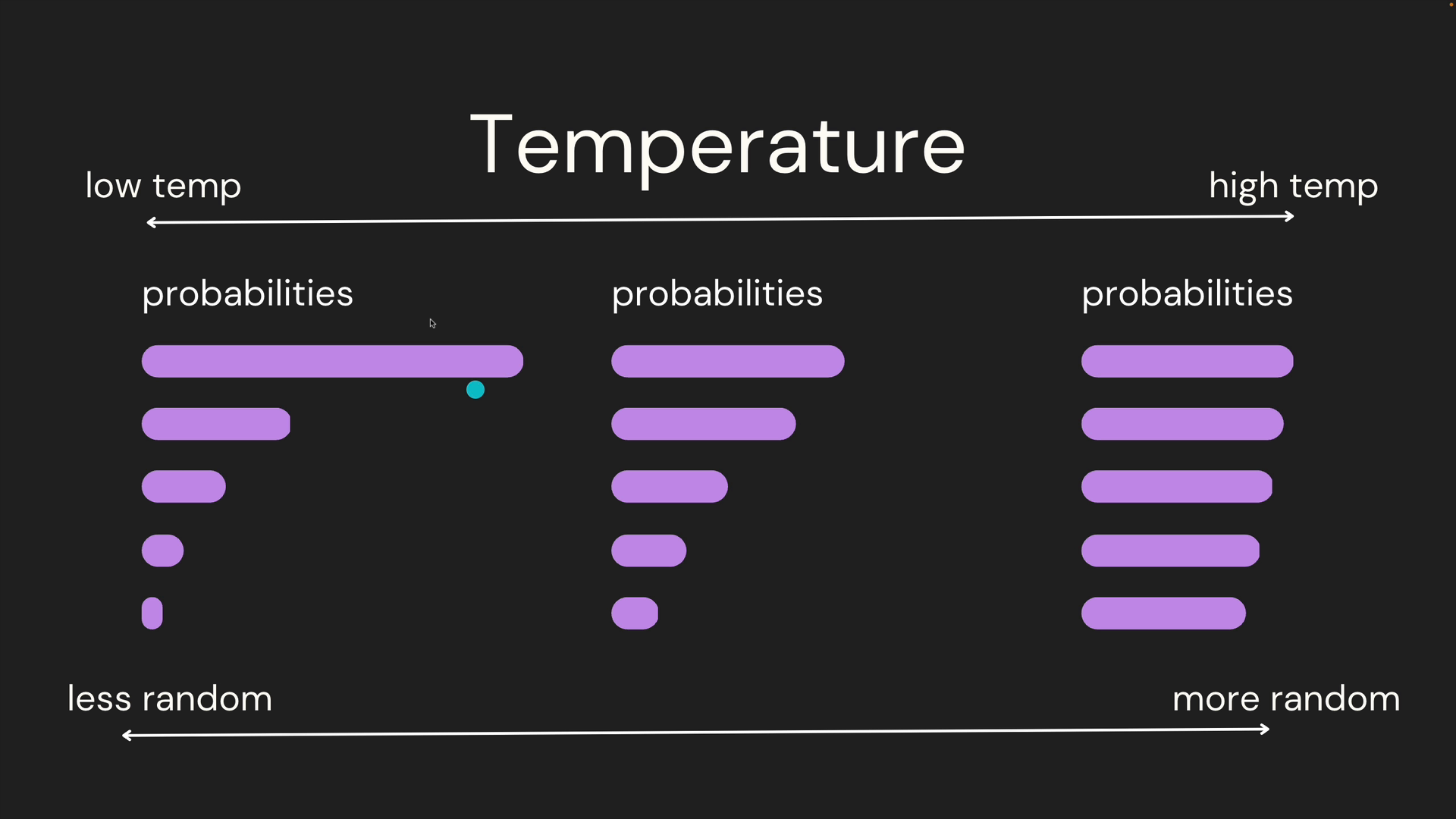
The temperature parameter is your primary tool for controlling the randomness, or "creativity," of the model's output. It directly influences the probability distribution we just read about.
- A low temperature (e.g., 0.1, 0.2) makes the model more deterministic. It sharpens the probability distribution, making it overwhelmingly likely to choose the highest-probability token. This is ideal for factual, predictable tasks.
- A high temperature (e.g., 0.9, 1.5) makes the model more creative and random. It flattens the probability distribution, giving less likely tokens a higher chance of being selected. This is useful for brainstorming or creative writing.
The image below provides an excellent visual for this concept. At low temperatures, one token has a much higher probability than the others. At high temperatures, the probabilities become more evenly distributed, increasing randomness.
Let's dig into a more formal definition.
LLM Parameters Explained: OpenAI API in Python
This section of the same article explains the temperature parameter in detail.
Read the section What Is the Temperature Parameter in LLMs?. Pay close attention to the example outputs for low vs. high temperature.
To see this in action, let's watch a short segment from the video we used in the previous lesson.
The OpenAI (Python) API | Introduction & Example Code
Shaw Talebi provides a clear, practical demonstration of how changing the temperature affects the model's output.
Watch the segment from controlling randomness with temperature. Notice how setting the temperature to 0 makes the output identical every time, while a high temperature produces varied and sometimes nonsensical results.
Your Turn: Experimenting with Temperature
Now, let's apply this. Take the first_call.py script you wrote in the last lesson. We are going to add the temperature parameter to the client.chat.completions.create() call.
Task:
- Open your script from the previous lesson.
- Add
temperature=0.1to your API call. Run the script three or four times. Note how the response is very consistent, likely identical each time. - Now, change the parameter to
temperature=1.4. Run the script another three or four times. Observe the significant variation in tone, phrasing, and even the core argument.
Your API call should now look something like this:
response = client.chat.completions.create(
    model="gpt-4o-mini",
    messages=messages,
    temperature=1.4  # Or 0.1 for the first part of the task
)
By toggling this one value, you've moved the AI from a predictable assistant to a creative, if sometimes erratic, partner.
Part 3: The Length Leash – max_tokens
The next essential parameter is max_tokens. It sets a hard limit on the number of tokens the model will generate for its response. This is crucial for controlling costs, managing latency, and ensuring the output fits within a desired format (e.g., a brief summary vs. a detailed explanation).
A "token" is a unit of text that the model processes. It's roughly equivalent to 4 characters or about ¾ of a word in English.
LLM Parameters Explained: OpenAI API in Python
This next section of the guide explains the max_tokens parameter.
Read the section What Is the Max Tokens Parameter in LLMs?. Note the tip about how smaller values can help lower costs.
When a model's output is cut short because it hit the max_tokens limit, the API response will tell you. The finish_reason in the response object will be length instead of the usual stop. This is a useful signal for debugging.
Your Turn: Constraining the Output Length
Let's modify your script again to see max_tokens in effect.
Task:
- Set the
temperatureto a neutral value, like0.7, to allow for a natural-sounding response. - Add
max_tokens=25to your API call. - Run the script. You will likely see the response get cut off mid-sentence. If you were to inspect the full response object (e.g., by printing
response.choices[0]), you would seefinish_reason='length'. - Now, increase the value to
max_tokens=250and run it again. The model should now have plenty of room to complete its thought, and thefinish_reasonwill bestop.
Your modified API call will now include both parameters:
response = client.chat.completions.create(
    model="gpt-4o-mini",
    messages=messages,
    temperature=0.7,
    max_tokens=25  # Or 250 for the second part of the task
)
Part 4: The Architect's Viewpoint
As a system architect, you rarely want maximum creativity or maximum length. Your job is to find the right balance for the task at hand. This table shows how important these parameters are considered in practice.

The optimal settings depend entirely on the use case.
- Task: Summarize a legal document. You need high fidelity and conciseness.
temperature: Low (e.g.,0.2) to stick to the facts.max_tokens: Controlled (e.g.,150) to enforce a summary.
- Task: Brainstorm marketing slogans. You need novelty and variety.
temperature: High (e.g.,1.0) to encourage creative ideas.max_tokens: Generous (e.g.,300) to allow for multiple options.
- Task: Classify customer support tickets. You need a deterministic, single-word output.
temperature: Very Low (0.0) for maximum predictability.max_tokens: Very Low (e.g.,5) to ensure only a category label is returned.
The following resource provides a great summary table for different tasks.
LLM Parameters Explained: OpenAI API in Python
This final section provides a handy reference for tuning parameters.
Scroll down to the table under the heading Example Parameter Combinations for Various Tasks. Review the suggested values for tasks like "Technical code explanation" and "Summarization." This is a practical starting point for your own projects.
Conclusion
You now have direct, programmatic control over the two most important aspects of LLM generation: creativity and length. This moves you beyond simple prompting into the realm of true output engineering.
Key Takeaways:
- LLMs generate text by probabilistically predicting the next token in a sequence.
- The
temperatureparameter adjusts this probability, acting as a "creativity" dial. Low values are deterministic, while high values are more random. - The
max_tokensparameter sets a firm limit on the length of the generated response, which is essential for controlling costs and output structure. - Choosing the right parameter values is a critical design decision that depends on the specific goal of your application.
In our last lesson for this module, we'll address a crucial aspect of building production-ready systems: robustness. API calls can fail for many reasons—network issues, rate limits, server errors. We will learn how to implement robust error handling for API calls, ensuring your applications can gracefully manage these inevitable hiccups.