In our previous lesson, we honed your ability to shape the output of a large language model by tuning the temperature and max_tokens parameters. You learned to control the creativity and length of an AI's response, which are fundamental skills for engineering predictable and useful AI applications.
Today, we shift our focus from the content of the API response to the reliability of its delivery. In any real-world system, especially one you would architect, assuming every API call will succeed is a recipe for failure. Networks are unreliable, servers get busy, and usage limits are an economic reality. Our goal for this lesson is to implement robust error handling for API calls, including rate limits and timeouts. By the end, you'll have transformed your simple script into a more resilient piece of software, ready for the unpredictability of production environments.
Part 1: Anatomy of an API Failure
When your Python script calls the OpenAI API, it's making a request across the internet. Like any network-dependent operation, it can fail. As a system architect, you're familiar with the importance of anticipating failure modes. Let's categorize the most common ones you'll encounter with LLM APIs.
The OpenAI API, like most web services, uses standard HTTP status codes to signal the outcome of a request. The openai Python library translates these into specific exception classes, which makes handling them in your code much cleaner.
This official guide from OpenAI documents the various errors you might encounter. It's an essential reference for building reliable applications.
First, review the summary table under the main heading to get a high-level overview of common HTTP codes like 429 (Rate Limits) and 503 (Server Overload). Next, scroll down and read the section that details the Python-specific error types, paying close attention to APITimeoutError and RateLimitError. Finally, look at the code snippet under the Handling errors heading. This demonstrates the standard Python try...except pattern for catching these specific exceptions.
As you can see from the documentation, the primary tool for handling these issues in Python is the try...except block. By wrapping your API call, you can catch specific errors and decide how your program should react, rather than letting it crash.
For example, your API call could be structured like this:
import openai


# Assume client is already configured
# client = openai.OpenAI(...)

try:
  response = client.chat.completions.create(
    model="gpt-4o-mini",
    messages=[{"role": "user", "content": "Tell me a story."}]
  )
  print(response.choices[0].message.content)

except openai.RateLimitError as e:


  # This block executes if you send requests too quickly.
  print(f"Rate limit exceeded: {e}")

except openai.APITimeoutError as e:


  # This block executes if the request takes too long.
  print(f"Request timed out: {e}")

except openai.APIConnectionError as e:


  # This block executes if there's a network problem.
  print(f"Network connection error: {e}")

except openai.APIError as e:


  # This block catches other OpenAI-specific errors.
  print(f"An API error occurred: {e}")
This structure is the foundation of robust error handling. However, for certain "transient" errors—temporary issues like rate limits or server overloads—simply catching the error and stopping isn't ideal. We want the system to recover automatically.
Part 2: The Retry Pattern with Exponential Backoff
The most common transient error you'll face is RateLimitError. APIs implement rate limits to ensure fair use and prevent a single user from overwhelming the service. When you hit a rate limit, the server is telling you, "You're making requests too fast. Please slow down."
A naive response would be to wait a fixed amount of time and retry. A bad response would be to retry immediately in a loop, which would only worsen the problem and could get your API key temporarily blocked.
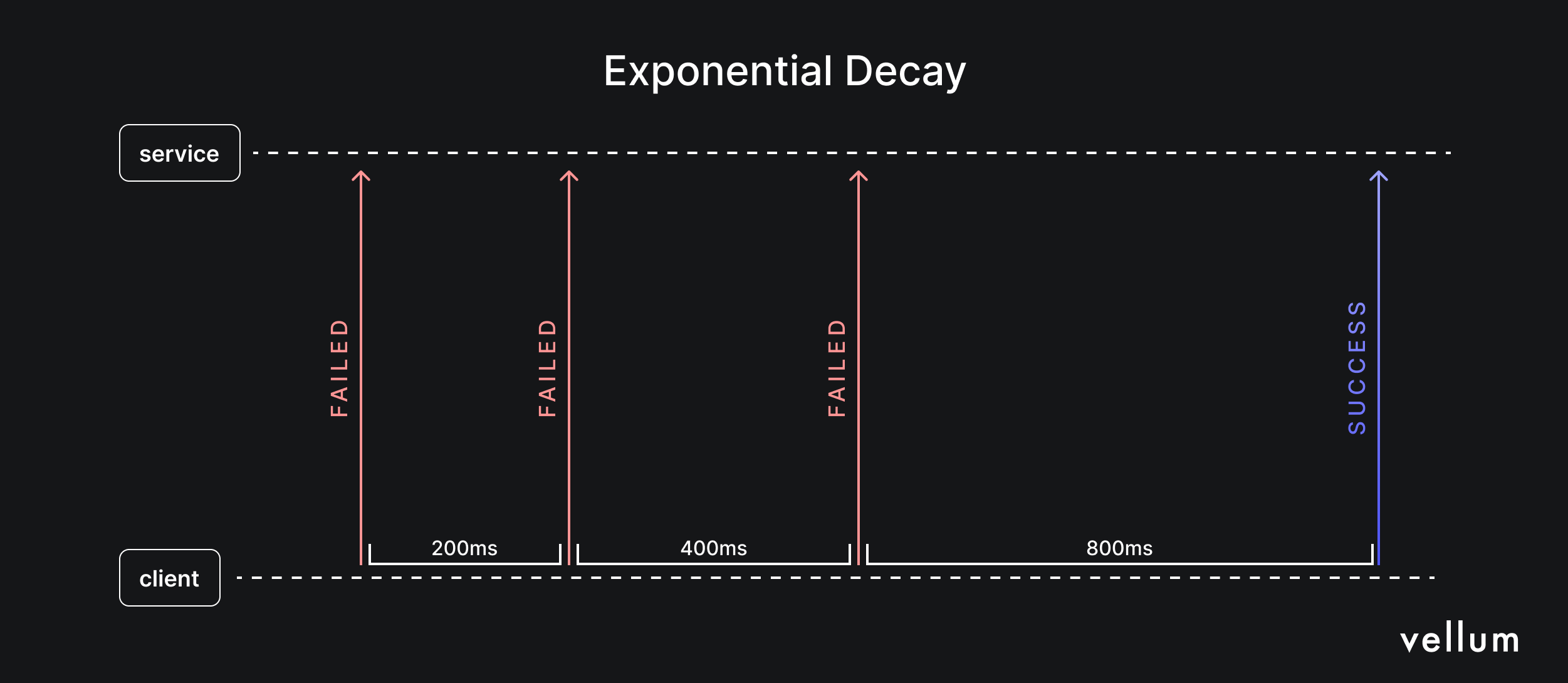
The industry-standard solution is retrying with exponential backoff. Here’s how it works:
- If a request fails with a transient error, wait for a short initial duration (e.g., 1 second).
- Retry the request.
- If it fails again, double the waiting period (e.g., 2 seconds, then 4, then 8, and so on).
- Optionally, add a small random amount of time ("jitter") to the delay. This prevents multiple processes from retrying in perfect sync, which could cause a "thundering herd" problem.
- Repeat until the request succeeds or a maximum number of retries is reached.
This diagram illustrates the concept perfectly. The client retries with progressively longer delays until the request is successful.
To understand this pattern more deeply from a Python implementation perspective, the following video provides an excellent from-scratch explanation.
Retry Pattern: The Secret to Resilient Python Code
This video from the ArjanCodes channel explains the motivation behind the retry pattern and shows how to implement exponential backoff.
First, watch the introduction explaining transient failures and why the retry pattern is necessary. Then, jump to the segment on exponential backoff, where the logic of increasing the delay is added to the retry function.
Part 3: Your Turn: Implementing a Resilient API Call
While it's valuable to understand how to build a retry mechanism from scratch, in a production environment, you should almost always use a well-tested, community-vetted library. For this task, we'll use tenacity, which is recommended in OpenAI's own documentation.
Your task is to take the script you've been working on and make it resilient using tenacity.
Task:
-
Install the library. Open your terminal and run the following command:
pip install tenacity -
Modify your Python script. You will wrap your API call in a function and apply the
tenacityretry decorator to it. This decorator transparently adds the exponential backoff logic to your function.Here is how your code should be modified. Notice how the logic is cleanly separated: the
completion_with_backofffunction only contains the API call, and the@retrydecorator handles all the complex retry logic.import openai import os from tenacity import retry, wait_random_exponential, stop_after_attempt # Configure your client (as you did in previous lessons) client = openai.OpenAI(api_key=os.getenv("OPENAI_API_KEY")) # This decorator will retry the function up to 6 times, # waiting exponentially between 1 and 60 seconds. @retry(wait=wait_random_exponential(min=1, max=60), stop=stop_after_attempt(6)) def completion_with_backoff(**kwargs): """ Wrapper function to make an API call with exponential backoff. """ return client.chat.completions.create(**kwargs) # --- Your main script logic --- try: # Now, call your new resilient function instead of the client directly response = completion_with_backoff( model="gpt-4o-mini", messages=[ {"role": "system", "content": "You are a helpful assistant."}, {"role": "user", "content": "Explain the theory of relativity in one sentence."} ], temperature=0.7, max_tokens=100 ) print(response.choices[0].message.content) except Exception as e: # If all retries fail, the final exception will be raised. print(f"The API call failed after multiple retries: {e}")Integrate this structure into your script. You won't be able to easily trigger a
RateLimitErrorfor testing, but by implementing this pattern, you have now fortified your application against the most common type of temporary API failure.
Part 4: The Architect's View: Advanced Strategies
Exponential backoff is your primary tool, but a system architect should be aware of other strategies for building highly available systems.

Beyond retries, consider these design patterns:
- Fallback Models: If a call to a powerful but expensive model like
gpt-4ofails due to rate limits or overload, your system could automatically fall back to a faster, cheaper model likegpt-4o-mini. This can maintain service availability, but you must account for the potential difference in output quality. This is a trade-off between availability and consistency. - Proactive Delay (for Batch Jobs): If you are running a large batch process that will make thousands of API calls, instead of reacting to rate limits, you can proactively avoid them. Calculate the maximum number of requests you can make per minute (e.g., 60 requests/minute = 1 request/second) and add a
time.sleep(1)between each call. This maximizes throughput without "wasting" calls on requests that fail and need to be retried.
These strategies, combined with the robust retry logic you just implemented, form the core of a resilient AI integration architecture.
Conclusion
You have now completed the first module of our course! You started with an empty file and now have a resilient Python script that can communicate with an LLM, control its output, and gracefully handle the most common network failures. This is a massive step forward.
Key Takeaways:
- Production-grade applications must anticipate and handle API errors.
- The
try...exceptblock is the fundamental Python mechanism for catching specific errors likeRateLimitErrorandAPITimeoutError. - Exponential backoff is the standard, robust pattern for automatically retrying operations that fail due to temporary issues.
- For production code, it's best to use a battle-tested library like
tenacityrather than implementing retry logic from scratch.
With these fundamentals of Python programming and API interaction secure, we are now ready to dive into the core concepts of agentic AI. In the next lesson, we will officially begin our journey into agents by defining the foundational Perception-Reasoning-Action loop. You will learn to map a problem onto this framework, which is the first step in designing an AI that can not just respond, but act.