Welcome to our third lesson. In the previous session, you became familiar with Cargo, Rust's build system, and used commands like cargo run to compile and execute a project in a single step. While convenient, this command abstracts away a fundamental aspect of how Rust works.
Today, we will peel back that layer of abstraction. Our goal is to write a minimal "Hello, World!" program and, more importantly, to understand Rust's ahead-of-time (AOT) compilation model. This concept is key to appreciating Rust's performance and safety guarantees, especially when contrasted with languages you're familiar with, like Python. We will dissect the structure of a basic Rust program to understand its essential components.
1. Compiled vs. Interpreted: Where Rust Fits In
Your experience with Python involves an interpreter, which reads and executes code line by line. Rust operates on a different principle. It's a compiled language, meaning your human-readable source code is translated into machine code that the CPU can execute directly. This translation happens "ahead of time," before you run the program.
To get a clear, high-level overview of this concept, let's start with a short video.
Understanding AOT Compilers, JIT Compilers, and Interpreters
The video "Understanding AOT Compilers, JIT Compilers, and Interpreters" by Engineer Man provides a concise definition of Ahead-of-Time (AOT) compilation.
Watch the segment from the beginning. The presenter defines AOT compilation and explicitly mentions Rust as an example of a language that uses this model.
This AOT model has significant implications. To explore them further, we'll consult a brief article that compares compiled and interpreted languages.
Interpreted vs. Compiled Languages: Understanding the ...
This article from dev.to provides a solid breakdown of different language execution models.
Please read the following sections: The definition of a compiled language and its use of AOT compilation. The list of key characteristics. Pay attention to "Faster Execution" and "Strict Error Checking." The more detailed explanation under AOT Compilation. As you read, consider how these characteristics contrast with your experience in Python. The compile-time error checking, for instance, is a cornerstone of Rust's philosophy of catching bugs before they can run.
2. The Compile and Run Workflow
In our last lesson, cargo run handled everything for you. Now, let's perform the two distinct steps manually: compiling the code and then running the resulting executable. This manual process makes the AOT model tangible.
We will use "The Rust Programming Language," the official book, as our guide for this practical exercise.
Hello, World! - The Rust Programming Language
This chapter from the official Rust book walks through creating, compiling, and running the traditional first program.
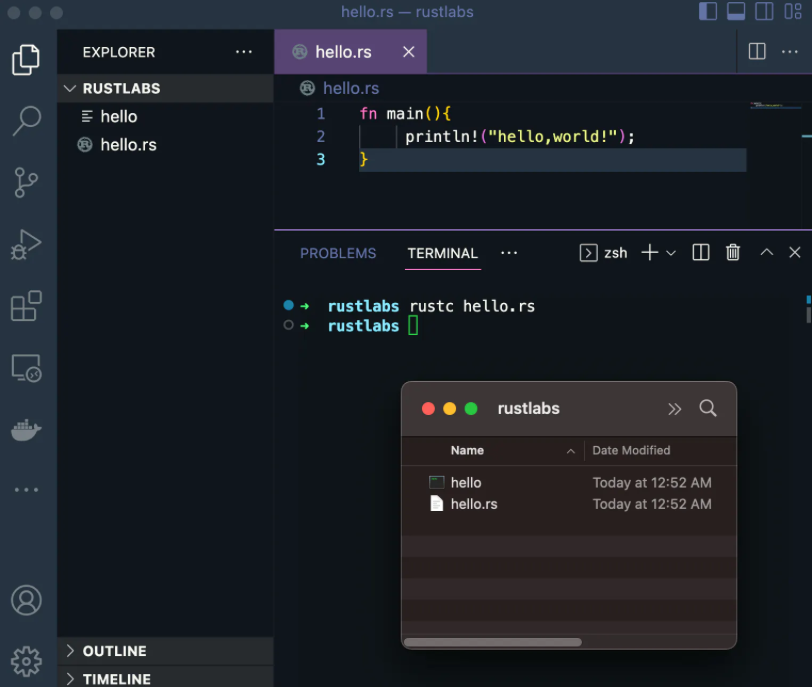
First, navigate to a practice directory and create a file named main.rs. Then, follow the instructions in the book: In the section on Rust Program Basics, copy the main function code into your main.rs file. Next, read the section on Compilation and Execution. Execute the commands as described: rustc main.rs ./main (on Linux/macOS) or .\main.exe (on Windows) Notice the key difference from an interpreted language: rustc doesn't print "Hello, world!". It creates a new, separate executable file. You then run that file to see the output. This executable is self-contained and can be shared with others, who can run it without having Rust installed.
The process you just completed—editing source code, compiling with rustc, and running the binary—is the fundamental development loop in Rust. The following image illustrates this entire sequence within a typical development environment.
3. Anatomy of a Rust Program
Now that you've successfully compiled and run a Rust program, let's analyze the code you wrote. It's simple, but every part is significant.
fn main() {
    println!("Hello, world!");
}
Let's turn back to the Rust book for a detailed breakdown of these few lines.
Hello, World! - The Rust Programming Language
This section of the book meticulously explains each component of the "Hello, world!" program.
Read the section Anatomy of a Rust Program. Focus on these key points: fn main() { }: This defines the main function. Just like in C-family languages, main is special. It's the entry point—the very first code that is executed when a program runs. The curly braces {} define the scope of the function's body. println!: This is what prints the text to the console. The ! is important; it signifies that you are calling a Rust macro, not a normal function. Macros are a way of writing code that writes other code (a concept known as metaprogramming). We will explore them in depth much later in the course. For now, just remember that the ! indicates a macro. "Hello, world!": This is a string literal passed as an argument to the println! macro. ;: The semicolon marks the end of the expression.
Understanding these basic building blocks is the first step toward writing more complex programs. The main function, the use of macros for common tasks, and the syntax for expressions are all core elements you'll see in every Rust application.
Conclusion
In this lesson, you've bridged the gap between using a high-level tool like Cargo and understanding the core mechanics of the Rust compiler. You've seen firsthand what it means for Rust to be an ahead-of-time (AOT) compiled language.
Here are the key takeaways:
- Rust is an AOT compiled language, meaning source code is translated into a standalone machine-code executable before it is run.
- The compilation process is handled by the
rustccommand, which takes a.rssource file and produces a binary executable. - This is a two-step process: compile first, then run the resulting file. This contrasts with interpreted languages like Python, which execute directly from the source.
- Every executable Rust program has a
mainfunction, which serves as its entry point. println!is a macro used to print formatted text to the console, and its use is indicated by the!suffix.
In the next lesson, we will look more closely at that semicolon. We'll explore a crucial and powerful distinction in Rust: the difference between expressions and statements. This concept, which has parallels in Swift, is fundamental to writing concise and idiomatic Rust code.