Welcome to the first lesson of your journey into AI animation! Your goal is to create a 7–10 minute animation using the images you've already generated. To get there, we'll follow a streamlined, practical workflow focused entirely on AI tools, starting with the most crucial foundation: your visual assets.
In this lesson, you will learn how to assess the visual consistency of your images to determine if they are suitable for animation. Think of this as quality control. Feeding inconsistent images into an AI animation tool results in characters that flicker, morph, or change identity from one moment to the next—a phenomenon known as "character drift." By vetting your images now, you'll save yourself significant time and frustration later and ensure your final animation is coherent and believable.
1. Understanding Character Consistency in AI Animation
Before you can assess your images, it's important to understand what "consistent" truly means in the context of AI generation. It’s not about every image being identical, but about the character maintaining a stable identity across different poses, expressions, and scenes.
This is arguably the biggest challenge in AI-driven creative work. AI models are designed to generate novelty, not to maintain continuity. As a storyteller, your job is to impose that continuity.
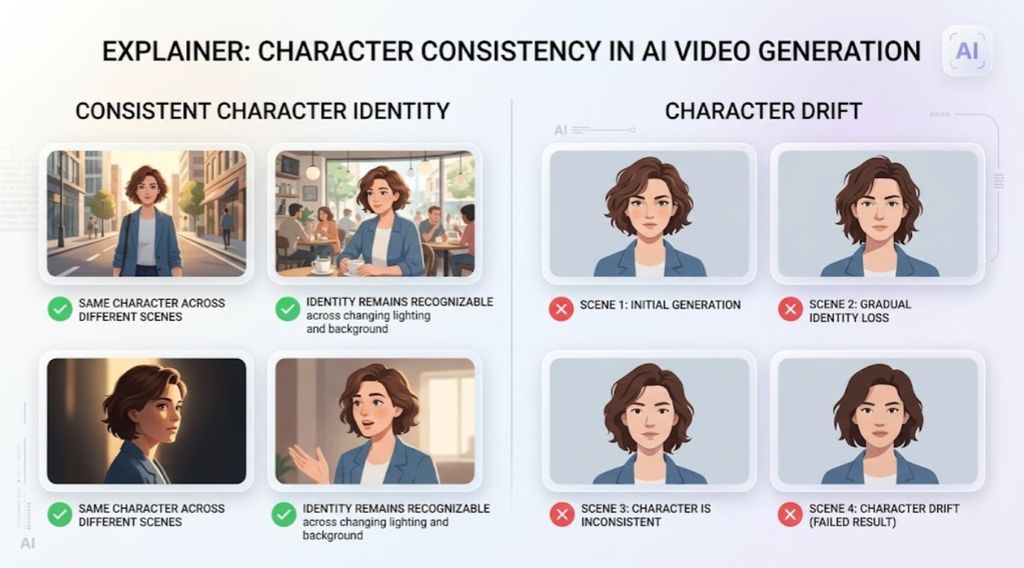
The problem is that AI video tools aren't magic; they build upon the data you provide. If the source images themselves are inconsistent, the AI will struggle to create smooth, believable motion, leading to the "character drift" seen above.
Create Seamless AI Films from One Image (Consistent Characters & Backgrounds)
The video "Create Seamless AI Films from One Image" by Sirio explains why this visual continuity is so fundamental to telling a story, whether in traditional film or with AI.
Watch the segment from why this matters to understand how controlling consistency is the key to creating compelling visual narratives.
2. The Anatomy of a Consistent Character: Defining Your "Character DNA"
To achieve consistency, you need to distinguish between the elements that define your character and the elements that change from scene to scene. The core traits—like facial structure, hair style, and signature clothing—should be locked in. Other elements, like pose, facial expression, and background, are meant to change to tell the story.
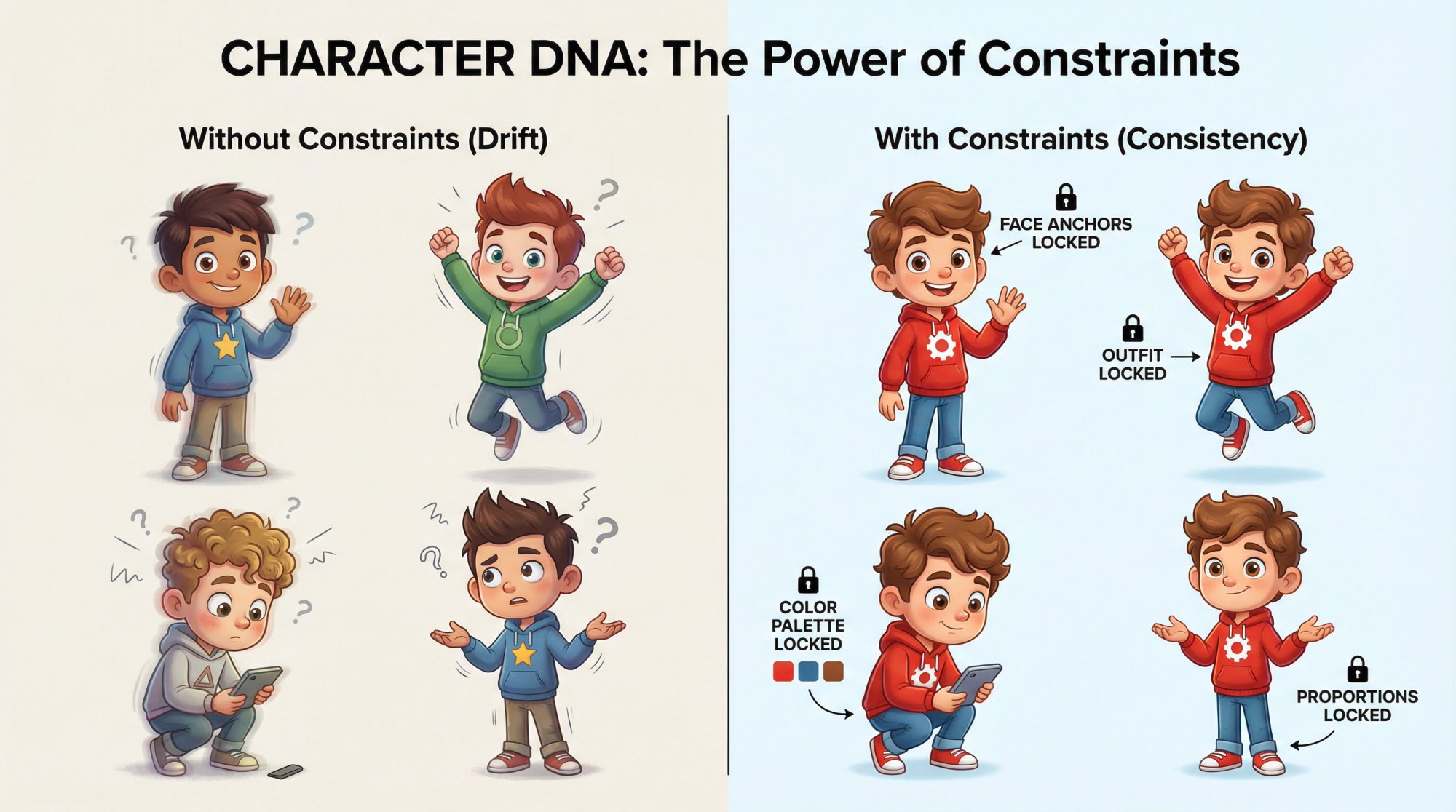
A great way to formalize this is by defining a "Character DNA." This is a set of rules that describe your character's unchangeable core.
Character Consistency: How to Keep the Same AI Character Across Every Image and Scene
To build a solid foundation for your animation, it's essential to understand which character traits must remain fixed and which can vary. The article "Character Consistency" from QuestStudio breaks this down brilliantly.
Please read the first two sections, What Character Consistency Means and the 3-Layer System. Pay close attention to the distinction between "Identity Anchors," "Style Anchors," and "Scene Variables." This framework is key to assessing your own images.
This "3-Layer System" gives you a clear mental model:
- Identity Anchors: The non-negotiable facial and physical features.
- Style Anchors: The consistent artistic style (e.g., 3D cartoon, watercolor).
- Scene Variables: Everything else that changes (action, location, mood).
When you generated your images with DALL·E, you likely noticed how small changes in your prompts could lead to very different-looking characters. A successful animation requires you to work with images where the Identity and Style Anchors are rock-solid.
3. A Practical Method for Assessing Your Images
Now it's time to apply these concepts to the images you've created. This is a hands-on activity that forms the core of this lesson. You'll need a systematic way to compare your images and decide which ones make the cut.
How to Create Consistent AI Cartoon Characters (2026)
Let's get practical. You need a systematic way to evaluate the images you've already created. The article "How to Create Consistent AI Cartoon Characters" provides a professional-grade checklist for this exact purpose.
Find the section titled "The Consistency QC Checklist (Use This Like a Studio)" and review the checklist items. Think of this as your quality control rubric for the next step.
Your Task: Evaluate and Sort Your Images
Follow these steps to assess your image collection for one of your characters:
1. Choose Your "Master Image"
Gather all the images you have for a single character. Look through them and select the one that you feel best represents the character. This will be your "anchor" or "master" image, against which all others will be judged. A good master image is essential for the AI animation process later on.
Create Seamless AI Films from One Image (Consistent Characters & Backgrounds)
Choosing the right master image is a critical step. The "Create Seamless AI Films" video explains what makes a source image strong and suitable for generating consistent variations.
Watch the segment from Generate your character. The presenter outlines key considerations like frontal expressions, visible costume details, and controlled backgrounds. Use these principles to select the best master image from your collection.
2. Compare and Score
Using your master image as the reference, go through every other image of that character. Use the "Consistency QC Checklist" from the Neolemon article to guide your evaluation. Ask yourself for each image:
- Is the face shape the same?
- Are the eyes, nose, and mouth consistent in shape and placement?
- Is the hairstyle and color identical?
- Is the signature outfit correct, without new or missing details?
- Are the body proportions the same?
- Does the artistic style (line weight, shading, color palette) match?
3. Sort Your Images
Create two folders or piles:
Consistent: Images that pass the checklist with high marks. These are your prime candidates for animation.Inconsistent: Images that fail on one or more key points from the checklist.
Be strict in your assessment. It is perfectly normal—and expected—that many of your initial generations will end up in the "Inconsistent" pile. This isn't a failure; it's a vital part of the creative process, helping you understand the limitations of generating images without a strict consistency workflow. The images in the Consistent folder are your curated assets for the next stage of the project. For now, set the inconsistent images aside.
Conclusion
In this lesson, you've taken the first critical step in your AI animation project. You now understand that visual consistency is the bedrock of believable AI animation and that it’s achieved by locking down a character's "DNA" while allowing scene-specific elements to change. Most importantly, you have performed a practical assessment of your own generated images, sorting them into a "vetted" collection of assets that are suitable for animation.
Key Takeaways:
- Character drift is a common problem in AI animation caused by inconsistent source images.
- A consistent character is defined by stable identity and style anchors, while scene variables like pose and expression are allowed to change.
- You can systematically assess your images by choosing a master image and comparing others to it using a consistency checklist.
You now have a curated set of high-quality, consistent images. In our next lesson, we will build upon this foundation by organizing these images into a scene-by-scene storyboard to structure your animation's narrative.