Hello! In our previous lesson, you learned how to configure and apply powerful extended named ACLs to filter traffic based on a variety of criteria. We briefly touched on the commands used to check your work. Now, we'll dive deep into that crucial second step: verification and troubleshooting.
An incorrectly configured ACL can be worse than no ACL at all—it might either fail to block malicious traffic or, just as frustratingly, block legitimate users and services. This lesson focuses on how to systematically verify that your ACLs are working as intended and how to quickly diagnose and fix common configuration errors. Mastering these skills is essential for ensuring the security policies in your project are both effective and functional.
Your ACL Verification and Troubleshooting Toolkit
When an ACL isn't behaving as expected, your primary tools are two key show commands. They help you answer the two most important questions:
- Is the ACL applied correctly?
- Is the ACL processing traffic the way I intended?
1. Checking ACL Application with show ip interface
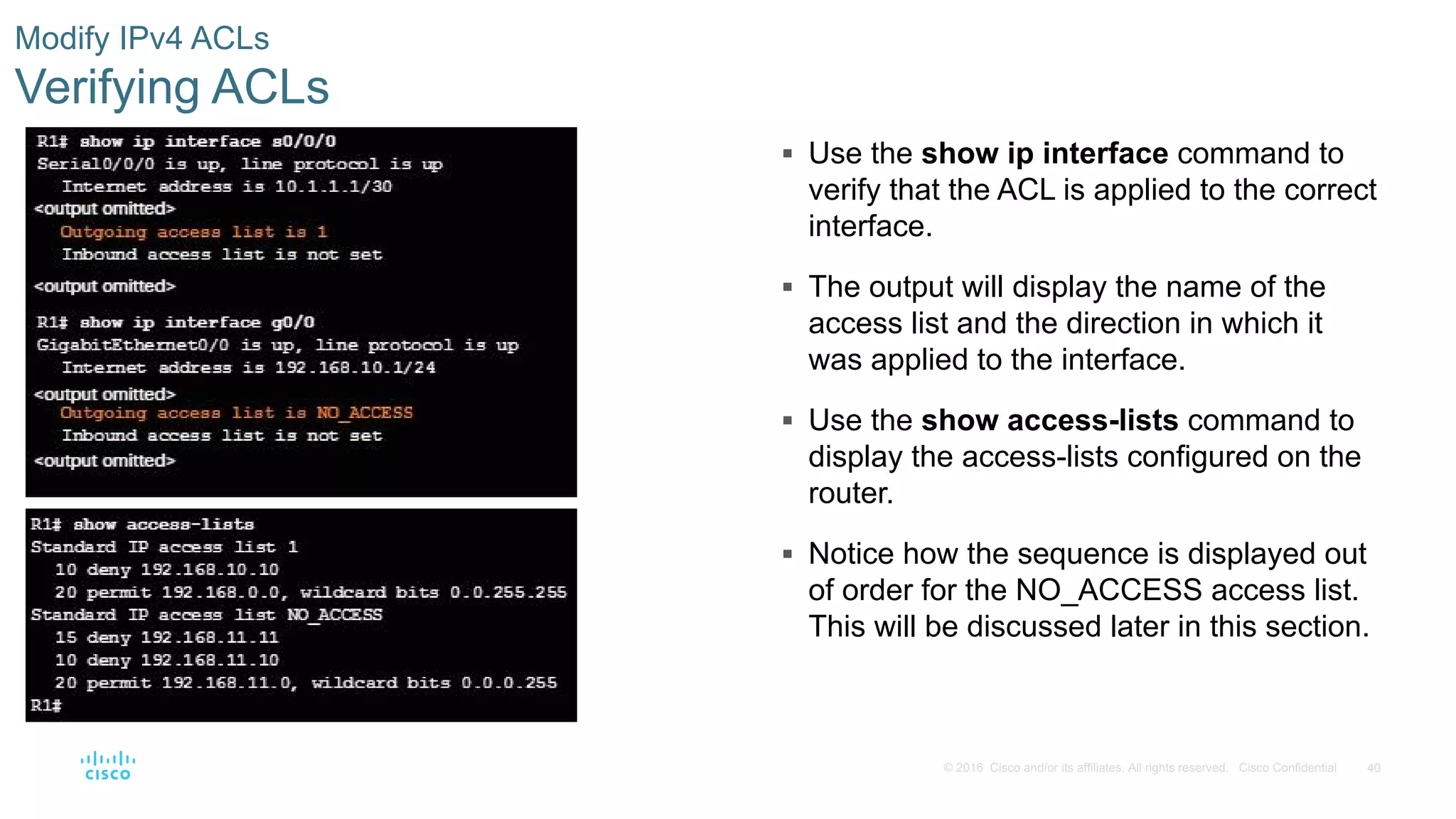
Before you even look at the ACL rules themselves, you must confirm the ACL is applied to the correct interface and in the correct direction (in or out). It's a very common mistake to create a perfect ACL but forget to apply it, or apply it to the wrong place.
The show ip interface <interface_name> command is your go-to for this.

2. Inspecting ACL Logic and Hits with show access-lists
Once you've confirmed the ACL is applied, the show access-lists command lets you see the details. It displays all configured ACLs, their individual lines—called Access Control Entries (ACEs)—and, most importantly, a match counter for each line.
These match counters are your best friend for troubleshooting.
- If traffic you expect to be blocked is getting through, check the counters on your
denystatements. If they are not increasing, the traffic isn't matching those rules. - If traffic you expect to be permitted is getting blocked, check the counters. You'll likely see the hits increasing on a
denystatement or nopermitstatement being matched at all (falling into the implicitdeny).
A Systematic Approach to Troubleshooting
When an ACL misbehaves, avoid making random changes. Instead, work through a logical process. The most common errors fall into a few categories.
Access Control Lists - ACLs - howtonetwork.com
This guide from howtonetwork.com outlines some fundamental ACL rules. Understanding these rules is key to understanding why ACLs break.
Focus on "ACL Rule 2 – The Lines Are Processed Top-Down" and "ACL Rule 3 – There Is an Implicit Deny All at the Bottom of Every ACL." These two principles are the source of many common configuration errors.
Based on these rules, here are some frequent problems:
- Incorrect ACE Order: The router processes rules from top to bottom and stops at the first match. If you have a broad
permit ip any anystatement at the top of your ACL, nodenystatements below it will ever be checked. Always place your most specific rules at the top. - Forgetting the Implicit Deny: Every ACL ends with an invisible
deny anyrule. If you create an ACL with onlydenystatements, all other traffic will be blocked, including routing protocol updates and other essential services. You must explicitlypermitthe traffic you want to keep. - Wrong Direction or Interface: You might apply an
inACL when it should beout, or apply it to the wrong router interface entirely. This is whyshow ip interfaceis your first check. - Incorrect Logic: Simple typos in an IP address, using
tcpwhen the service usesudp(like DNS queries), or using the wrong port number can cause your rule to fail.
Troubleshooting in Action
Let's watch a network engineer diagnose and fix several common ACL issues. As you watch, try to identify the problem based on the symptoms before the solution is revealed.
FREE CCNA Lab 072: ACL Troubleshooting
This video from Jeremy's IT Lab presents a fantastic hands-on lab for ACL troubleshooting. It covers three distinct, realistic problem scenarios.
First, watch the segment on a standard ACL issue. Notice how show access-lists reveals that the order of the permit and deny statements is the problem. Next, observe the troubleshooting of an IPv6 extended ACL. Here, the issue is not the ACL itself, but its application. The engineer uses show ipv6 interface to spot that the ACL was applied in the wrong direction (out instead of in). Finally, watch how an ACL intended to secure Telnet access is fixed. This is a classic example of applying a rule to the wrong place—the console line instead of the VTY lines.
Lab Exercise: Verifying and Modifying ACLs
Now, let's look at a complete lab guide to see how these verification steps are integrated into a configuration workflow. This will help solidify your understanding of how to build, test, and modify ACLs.
4.2.2.13 Lab - Configuring and Verifying Extended ACLs Answers
This lab walkthrough from ITExamAnswers.net provides a full scenario for configuring, verifying, and modifying multiple ACLs. It's a great example of the complete process.
Your task is to review the verification and modification steps in this lab. You don't need to perform the lab yourself, but rather analyze the process. Read through Part 3, Step 1c (Verify ACL 100). Pay attention to how show access-lists is used and how its output, including the match counters, confirms the ACL is working. Note the explanation for why the ping fails. Next, look at Part 3, Step 2c (Verify the ACL WEB-POLICY). See how show ip interface is used to confirm the named ACL is applied correctly. Again, note the test results and the reasoning behind them. Finally, review Part 4 (Modify and Verify Extended ACLs). This section is crucial as it demonstrates how to add a new rule to an existing ACL and immediately test the change. This directly relates to the iterative process of troubleshooting.
Conclusion
You've now moved beyond just configuring ACLs to the critical skills of verifying and troubleshooting them. This systematic approach—checking application, then logic, then order—will save you immense time and ensure your network security policies are both effective and correctly implemented for your project.
Key Takeaways:
- Your primary verification commands are
show ip interfaceandshow access-lists. - Start troubleshooting by confirming the ACL is applied to the correct interface and in the correct direction (
in/out). - Use the match counters in
show access-liststo see which rules are being triggered. - Always remember the two most common logical errors: incorrect rule ordering (top-down processing) and the implicit
deny anyat the end of every ACL. - A systematic process of testing, verifying, and modifying is the most efficient way to solve ACL problems.
In our next lesson, we will move on to a different but related topic: Network Address Translation (NAT). You'll learn how NAT is used to translate private IP addresses into public ones, a fundamental technology for connecting private networks to the internet.