Welcome to our new module on Switch and Device Security. In our last lesson, you learned how to configure a syslog server to centralize your network device logs. This is a crucial skill because those logs are often your first and best source for detecting the malicious activities we are about to explore.
Today's lesson focuses on describing common Layer 2 attacks. We will investigate the mechanisms behind three specific threats: MAC flooding, VLAN hopping, and DHCP spoofing. Understanding how these attacks exploit the normal functions of a network switch is the first step toward building a secure network for your project. We'll focus on the theory of the attacks here, and in the next lesson, we'll get hands-on with the configurations to stop them.
1. MAC Flooding Attack
To understand this attack, we first need to remember how a switch operates. It builds a Content-Addressable Memory (CAM) table, which maps the MAC addresses of connected devices to the switch ports they are on. This allows the switch to intelligently forward frames only to the intended destination port.
The video below provides a quick refresher on this process and then explains how an attacker can exploit it.
Switch attacks: MAC Flooding and MAC Spoofing
This video from Sunny Classroom first reviews how a switch's MAC address table works and then demonstrates how a MAC flooding attack corrupts it.
Start by watching the review of the MAC address table. This will reinforce the foundational knowledge of how a switch learns and forwards traffic. Next, watch the explanation of the MAC flooding attack. Pay close attention to how the switch's behavior changes when its CAM table is full.
As the video explained, a MAC flooding attack (also known as a CAM table overflow attack) works as follows:
- Flood: The attacker connects a device to a switch port and uses a tool (like
Macof) to send thousands of Ethernet frames, each with a different, randomly generated source MAC address. - Overwhelm: The switch receives these frames and tries to learn each new source MAC address by adding an entry to its CAM table. Because the CAM table has a limited size, it quickly fills up with these bogus entries.
- Fail-Open: Once the CAM table is full, the switch can no longer store new MAC addresses. It enters a "fail-open" mode, where it can no longer make intelligent forwarding decisions.
- Eavesdrop: In this state, the switch essentially acts like a hub. It broadcasts all incoming frames to every single port. The attacker can now enable a packet sniffer on their machine and capture traffic from all other users on the switch, which would normally be invisible to them.
A related, but distinct, attack is MAC spoofing, where an attacker changes their device's MAC address to match that of a legitimate, trusted device. This can be used to bypass port security or access control lists that filter traffic based on MAC addresses.
2. VLAN Hopping Attack
You already have some familiarity with Virtual LANs (VLANs) and their purpose: to segment a network into separate broadcast domains for security and efficiency. A VLAN hopping attack is a method used by an attacker on one VLAN to gain unauthorized access to traffic on another VLAN, bypassing the Layer 3 router that should be controlling this communication.
There are two primary methods for VLAN hopping.
A. Switch Spoofing
This attack exploits the Dynamic Trunking Protocol (DTP), a Cisco-proprietary protocol that allows switches to automatically negotiate whether a link between them should become a trunk.
This video from TechKnowSurge explains how DTP can be abused to perform a switch spoofing attack.
Watch the segment on switch spoofing. Focus on the role DTP plays in allowing an attacker's machine to trick a switch into forming a trunk link.
In a switch spoofing attack, the attacker's machine emulates a switch by sending DTP packets to the switch it's connected to. If the switch port is configured to its default dynamic auto or dynamic desirable mode, it will agree to form a trunk link with the attacker's machine. Once the trunk is established, the attacker gains access to all VLANs that are allowed on that trunk, effectively breaking the network segmentation.
B. VLAN Double-Tagging
This is a more clever attack that works even if DTP is disabled. It relies on the concept of a native VLAN on trunk links. Frames belonging to the native VLAN are not tagged when they cross a trunk.
The attack works like this:
- The attacker must be connected to a port that belongs to the same VLAN as the trunk's native VLAN.
- The attacker crafts a special frame that has two 802.1Q VLAN tags.
- The outer tag has the VLAN ID of the native VLAN.
- The inner tag has the VLAN ID of the victim's VLAN.
- The attacker sends this frame to the first switch (SW1). SW1 sees the outer tag, recognizes it as the native VLAN, and strips it off. It then forwards the frame—now with only the inner tag—across the trunk to the second switch (SW2).
- SW2 receives the frame, sees the remaining tag for the victim's VLAN, and forwards the frame to the victim.
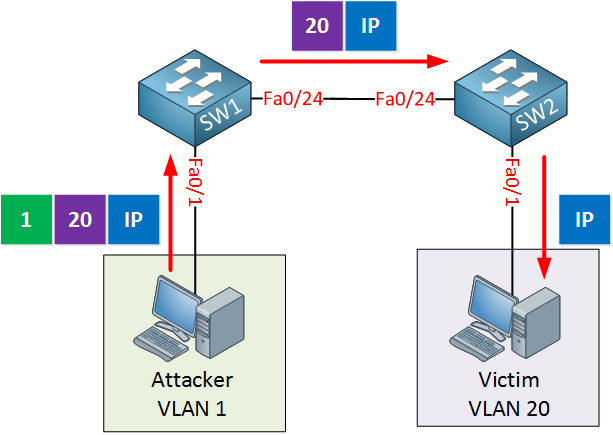
This video provides a dynamic explanation of the double-tagging process.
This segment explains the mechanics of a double-tagging attack.
Watch the description of the double-tagging attack. Note how the first switch processes the outer tag and the second switch acts on the inner tag.
This attack is generally one-way, but it can be sufficient for launching Denial of Service (DoS) attacks or sending other malicious traffic to a protected network segment.
3. DHCP Attacks
DHCP (Dynamic Host Configuration Protocol) is fundamental to nearly every network, automating the assignment of IP addresses, subnet masks, and default gateways. This reliance also makes it a target for attackers.
A. DHCP Spoofing
In a DHCP spoofing attack, an attacker connects a rogue DHCP server to the network. This rogue server listens for DHCP requests from legitimate clients and tries to reply with false information before the real server can.
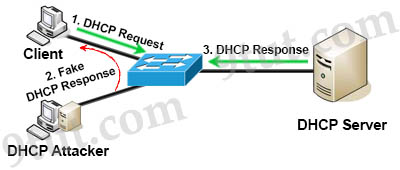
The primary goal is often a man-in-the-middle (MitM) attack. The rogue server will provide clients with a valid IP address but will set the default gateway to the IP address of the attacker's own machine. From that point on, all of the victim's outbound traffic is sent through the attacker's machine, allowing them to inspect, modify, or drop the traffic at will.
Layer 2 Threats and Security Features - CCNA Training
This article from 9tut provides a concise explanation of DHCP spoofing.
Read the first section titled "1. DHCP Spoofing". It clearly explains the goal of the attack and how it facilitates a man-in-the-middle position.
B. DHCP Starvation
A DHCP starvation attack is often a precursor to a DHCP spoofing attack. The goal is to perform a Denial of Service attack against the legitimate DHCP server.
[PDF] Mitigating Layer 2 Attacks - Pearsoncmg.com
This PDF excerpt from a Pearson textbook describes how a DHCP starvation attack is carried out.
Find the section titled "DHCP Starvation Attacks" (it's near the end of the document). Focus on understanding how spoofed MAC addresses are used to exhaust the DHCP server's IP address pool.
As the text explains, an attacker uses a tool to broadcast a huge number of DHCP Discover messages, each using a unique, fake source MAC address. The legitimate DHCP server receives these requests and starts offering and leasing out all of its available IP addresses until its pool is completely exhausted.
Once the legitimate server is depleted, it can no longer serve new clients. At this point, the attacker can easily launch their own rogue DHCP server, as it will be the only one on the network capable of responding to new client requests.
Conclusion
In this lesson, we have dissected three of the most common and impactful Layer 2 attacks. Understanding their mechanics is fundamental to network security.
Key Takeaways:
- MAC Flooding: An attacker overflows a switch's CAM table with fake MAC addresses, forcing the switch into a "fail-open" mode where it acts like a hub, allowing for traffic sniffing.
- VLAN Hopping: An attacker bypasses VLAN segmentation. This can be done via switch spoofing (by tricking a switch into forming a trunk using DTP) or double tagging (by using the native VLAN to pass a tagged frame to a target VLAN).
- DHCP Spoofing: An attacker deploys a rogue DHCP server to provide clients with false network information, typically setting the attacker's own IP as the default gateway for a man-in-the-middle attack.
- DHCP Starvation: A Denial of Service attack that exhausts the legitimate DHCP server's IP address pool, often to pave the way for a DHCP spoofing attack.
Now that you can describe how these attacks work, our next lesson will focus on how to stop them. We will configure Port Security, DHCP Snooping, and other switch features that provide direct countermeasures to the vulnerabilities we've discussed today.