Hello! In our last lesson, we focused on troubleshooting EtherChannel, a task that often involves verifying which physical ports are supposed to be bundled. But how do you confirm your physical cabling in the first place, especially in a complex network you didn't build yourself? This is where Layer 2 discovery protocols become essential.
This lesson introduces two invaluable tools for network mapping: Cisco Discovery Protocol (CDP) and Link Layer Discovery Protocol (LLDP). These protocols allow a device to learn about its directly connected neighbors automatically, saving you from having to manually trace cables. By the end of this lesson, you'll be able to use both CDP and LLDP to discover neighboring devices, a foundational skill for documenting, verifying, and troubleshooting any network topology for your project.
Cisco Discovery Protocol (CDP)
Let's start with the Cisco-proprietary solution, CDP. It's a simple yet powerful tool that runs by default on nearly all Cisco equipment.
This article from FlackBox gives a concise introduction to CDP, explaining its purpose and utility.
Please read the first section, "CDP Cisco Discovery Protocol". Pay attention to what kind of information CDP shares and why it's so useful for troubleshooting and network mapping.
As you just read, CDP is a Layer 2 protocol that enables Cisco devices to share information about themselves with directly connected neighbors. Because it operates at Layer 2, it works even if the devices don't have IP addresses configured yet.
Verifying CDP Neighbors
The most common use of CDP is to view the neighbor table. The video below will walk us through the primary commands.
Free CCNA | CDP & LLDP | Day 36 | CCNA 200-301 Complete Course
This video from Jeremy's IT Lab provides a clear, command-by-command walkthrough of CDP verification.
First, watch the overview of CDP operation to understand how it sends messages. Next, focus on the command show cdp neighbors from this segment. Pay close attention to the breakdown of each column. Finally, watch the part on show cdp neighbors detail from this segment to see what additional, crucial information it provides.
Let's break down the output of show cdp neighbors, as this is a command you will use constantly.
R1#show cdp neighbors
Capability Codes: R - Router, T - Trans Bridge, B - Source Route Bridge
                  S - Switch, H - Host, I - IGMP, r - Repeater

Device ID   Local Intrfce   Holdtme   Capability   Platform      Port ID
SW1         Gig 0/0         149       R S I        C3750-E       Gig 1/0/1
R2          Gig 0/1         122       R            CISCO2911     Gig 0/1
- Device ID: The hostname of the neighboring device. This is why setting a descriptive hostname is so important.
- Local Intrfce: The port on your device (R1) that the neighbor is connected to.
- Holdtme: The countdown timer (in seconds) before this entry is purged if no new CDP message is received. It resets (typically to 180s) each time a message arrives.
- Capability: Tells you what type of device the neighbor is (e.g., 'R' for Router, 'S' for Switch). A multilayer switch will often show 'R S'.
- Platform: The hardware model of the neighbor (e.g., CISCO2911).
- Port ID: The port on the neighboring device.
The show cdp neighbors detail command adds vital information, most importantly the neighbor's IP address, which you can then use to connect to it via SSH or Telnet.
Configuring CDP
While CDP is on by default, you may need to disable it for security reasons, especially on ports facing untrusted networks.
- To disable CDP globally:
no cdp run(in global config mode) - To enable CDP globally:
cdp run(in global config mode) - To disable CDP on a specific interface:
no cdp enable(in interface config mode)
Link Layer Discovery Protocol (LLDP)
CDP is great, but it only works between Cisco devices. In a multi-vendor environment, you need an open standard. That standard is LLDP (IEEE 802.1AB).
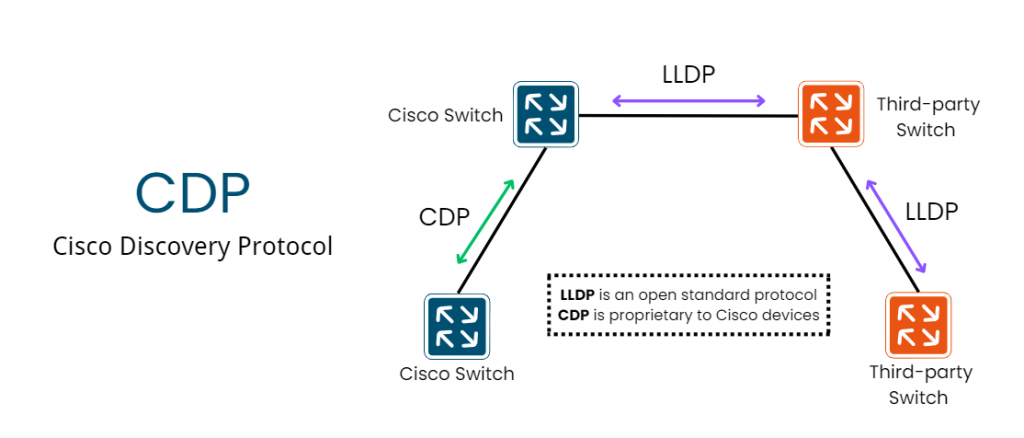
LLDP functions very similarly to CDP but with a few key differences:
- It's an open standard, supported by virtually all network vendors.
- On Cisco devices, it is disabled by default.
- The timers are different by default: advertisements are sent every 30 seconds, and the hold time is 120 seconds.
- The interface configuration is more granular.
Configuring and Verifying LLDP
Because LLDP is disabled by default, you must first enable it. Let's see how this is done.
Free CCNA | CDP & LLDP | Day 36 | CCNA 200-301 Complete Course
Let's return to the Jeremy's IT Lab video to learn the LLDP commands.
Start with the introduction to LLDP to understand its timers and default state. Watch how to configure LLDP. Note that you enable it globally with lldp run, and then you must enable sending (lldp transmit) and receiving (lldp receive) on each interface. Finally, review the verification commands show lldp neighbors (neighbor table) and show lldp neighbors detail (detailed view), and notice the similarities and differences compared to the CDP output.
The commands are straightforward and mirror their CDP counterparts:
- Global Enable:
lldp run - Interface Enable:
lldp transmitlldp receive
- Verification:
show lldp neighborsshow lldp neighbors detail
CDP vs. LLDP: A Quick Comparison
Having a clear understanding of the differences is crucial for both your project and the CCNA exam.

To solidify this comparison, let's review a concise breakdown.
LLDP | Link Layer Discovery Protocol | How LLDP Works? ⋆ - IPCisco
This article from IPCisco provides an excellent summary table and FAQ that directly compares the two protocols.
Please read the section "LLDP vs CDP" and the "Freuently Asked Questions" at the end. This will reinforce the key distinctions, such as vendor support, default status, and use cases.
Given your background in security, it's important to reiterate that both protocols broadcast information about your network devices. As a best practice, you should disable CDP and LLDP on any ports that are user-facing or connect to untrusted networks to avoid leaking potentially sensitive information about your network infrastructure.
Conclusion
In this lesson, you've learned how to use two fundamental network discovery protocols. These tools are often the very first commands you'll run when connecting to a device to understand its place in the network topology.
Key Takeaways:
- CDP (Cisco Discovery Protocol) is Cisco proprietary, enabled by default, and excellent for all-Cisco environments.
- LLDP (Link Layer Discovery Protocol) is an open standard (IEEE 802.1AB), ideal for multi-vendor networks, but must be enabled manually on Cisco devices.
- The primary verification command for both is
show [cdp|lldp] neighbors, which tells you the neighbor's hostname, your local port, and the neighbor's remote port. - Use
show [cdp|lldp] neighbors detailto find the neighbor's IP address and operating system version. - For security, always consider disabling these protocols on untrusted interfaces.
In our upcoming lessons, we'll shift from discovering devices to controlling the traffic that flows between them. Our next topic is Access Control Lists (ACLs), where you'll learn how to write rules to permit or deny traffic based on source and destination addresses, a cornerstone of network security.