Introduction
In our previous lesson, we focused on the strategic process of defining a Minimum Viable Platform (MVP), translating developer pain points into a prioritized scope of core capabilities. You learned to think like a product manager for your internal platform, focusing on the "what" and "why." Now, we transition from strategy to structure. This lesson addresses the learning outcome: Create a high-level architectural diagram for an MVP, identifying its key technical components.
This is where your system design expertise comes to the forefront. We will take the abstract capabilities of our MVP—like service scaffolding or self-service environment provisioning—and give them a concrete technical form. We'll explore established reference architectures and the key components that bring an Internal Developer Platform (IDP) to life. By the end of this lesson, you will be able to sketch a coherent architectural blueprint for an MVP, making informed choices about its core building blocks.
The Anatomy of a Platform: The Five Planes Model
Before diving into specific tools, it's helpful to have a conceptual model for an IDP's architecture. A widely adopted approach is to break the platform down into five logical "planes," each responsible for a distinct set of concerns. This separation helps manage complexity and clarifies the role of each component.

How to build an Internal Developer Platform | Humanitec
This article from Humanitec provides a concise overview of the five-plane model, which serves as an excellent mental framework for structuring your platform's architecture.
Please read the section "The architecture of an IDP". As you read, focus on the purpose of each of the five planes: Developer Control Plane: The user-facing layer. Integration and Delivery Plane: The "engine" that builds and deploys. Resource Plane: The underlying infrastructure where workloads run. Monitoring and Logging Plane: The layer for observability. Security Plane: The layer handling secrets and permissions.
This model acts as a map. When we discuss a specific technology like Backstage or Terraform, you can place it within one of these planes to understand its role in the overall system.
Reference Architecture 1: The Orchestrator-Centric Model
One of the most common and powerful patterns for an IDP is centered around a Platform Orchestrator. In this model, a specialized engine takes a high-level description of what a developer wants (the "workload specification") and orchestrates all the underlying tools to make it a reality. This approach excels at abstraction, hiding the complexity of CI/CD, infrastructure provisioning, and configuration management from the developer.
A well-documented example of this is the reference architecture developed by McKinsey and popularized by Humanitec.
Here’s One Golden Path to Build an MVP Enterprise IDP - The New Stack
This article in The New Stack presents a concrete diagram and explanation of an orchestrator-centric MVP based on the McKinsey reference architecture. It's an excellent example of a real-world blueprint.
Read the first half of the article, from the beginning down to the diagram of the Platform Orchestrator. Pay close attention to the architectural diagram for AWS and how it maps technologies like Backstage, GitHub, Terraform, and the Platform Orchestrator into the different planes.
The static diagram in the article is brought to life in the following presentation by its creators. Watching the flow of information and automation in action provides a much deeper understanding than the diagram alone.
Platform as Code: Simplifying developer platform design with reference architectures
This video from Platform Engineering features the McKinsey engineers who designed the reference architecture. They explain the components and then provide a live demonstration of the entire workflow.
First, watch the high-level explanation of the architecture. This will verbally walk you through the diagram you just saw in the article, clarifying how the components interact. Next, watch the core of the live demo. This is the most critical part. Observe how a developer simply defines their needs in a score.yaml file. The orchestrator then takes over, provisioning all necessary AWS resources (VPC, EKS cluster, RDS databases) from scratch and deploying the application. This is the "golden path" in action, a tangible example of reducing developer cognitive load.
This model's key takeaway is the power of the workload specification (score.yaml in this case) as the contract between the developer and the platform. The developer declares what they need (a container, a database), and the orchestrator, configured by the platform team, handles the how.
Reference Architecture 2: The Kubernetes-Native Control Plane Model
An alternative and equally valid approach leverages the Kubernetes API itself as the foundation for your platform. Given your background in system design, you'll recognize this as extending a powerful, existing distributed system rather than introducing a separate orchestration engine.
In this model, you use tools like Crossplane to create your own custom resources (CRDs) within Kubernetes. Instead of a developer running a proprietary CLI, they could, in theory, use kubectl apply -f my-app.yaml where my-app.yaml defines a high-level abstraction like kind: WebApplication. A custom controller, built using Crossplane, then watches for these resources and composes all the low-level Kubernetes objects (Deployments, Services, Ingress) and external cloud resources (like an S3 bucket or RDS database) needed to satisfy the request.
This turns Kubernetes from just a container orchestrator into a universal control plane for all your infrastructure.
From Zero to Fully Operational Developer Platform in 5 Steps!
This comprehensive video from DevOps & AI Toolkit demonstrates how to build a fully operational developer platform from the ground up using Kubernetes, Crossplane, and other open-source tools.
To understand the core of this architectural pattern, focus on these segments: The API Foundation: First, watch the segment explaining how Kubernetes CRDs and Crossplane are used to create the platform's API. This is the heart of the Kubernetes-native approach. State Management: Next, watch how controllers handle state management. This shows Crossplane compositions translating a simple custom resource (e.g., a SQLClaim) into actual cloud provider resources (an Azure PostgreSQL server). UI Integration: Finally, see how a developer portal like Backstage can interface with this API. It discovers the CRDs you created and dynamically generates UI forms, providing a user-friendly frontend to your Kubernetes-native backend. This demonstrates that both architectural patterns can deliver a similar developer experience.
The Kubernetes-native model is compelling because it unifies configuration around a single API and a declarative, GitOps-friendly workflow. The trade-off is that it may require deeper expertise in Kubernetes and operator development within the platform team.
Designing Your MVP Architectural Diagram
Now it's time to synthesize these concepts into your own diagram. For the MVP, you don't need to design a system as comprehensive as the final examples we've seen. Your goal is to create a clear, high-level blueprint that maps out the essential components for your initial "golden path."
Let's assume your MVP aims to solve the common pain point of "scaffolding and deploying a new Node.js microservice to a dev environment."
Your Task:
Sketch a high-level architectural diagram for this MVP. As you design, make choices for the key technical components. Your diagram should visually represent the flow from developer action to a running service. Consider including:
- Developer Interface: How will developers interact with the platform? (e.g., Backstage portal, a custom CLI)
- Source Control: Where does the code live? (e.g., GitHub)
- Abstraction: How does the developer specify their workload? (e.g., a
score.yamlfile, a customWebAppCRD in a Git repo) - CI/CD Pipeline: What triggers the process and runs the build/test steps? (e.g., GitHub Actions, GitLab CI)
- Orchestration/Control Plane: What is the "brain" of the platform? (e.g., Humanitec Orchestrator, Crossplane with custom compositions)
- Infrastructure as Code: What tool provisions the underlying resources? (e.g., Terraform, Crossplane providers)
- Container Registry: Where are images stored? (e.g., AWS ECR, Docker Hub)
- Target Environment: Where does the application run? (e.g., Amazon EKS, Google GKE)
- Core Resources: What infrastructure does the app need? (e.g., Amazon RDS, Google Cloud SQL)
There is no single "right" answer. The exercise is to think through the components and their connections, choosing a coherent set of technologies that form a viable architecture. You can use the reference architectures we've studied as a template.
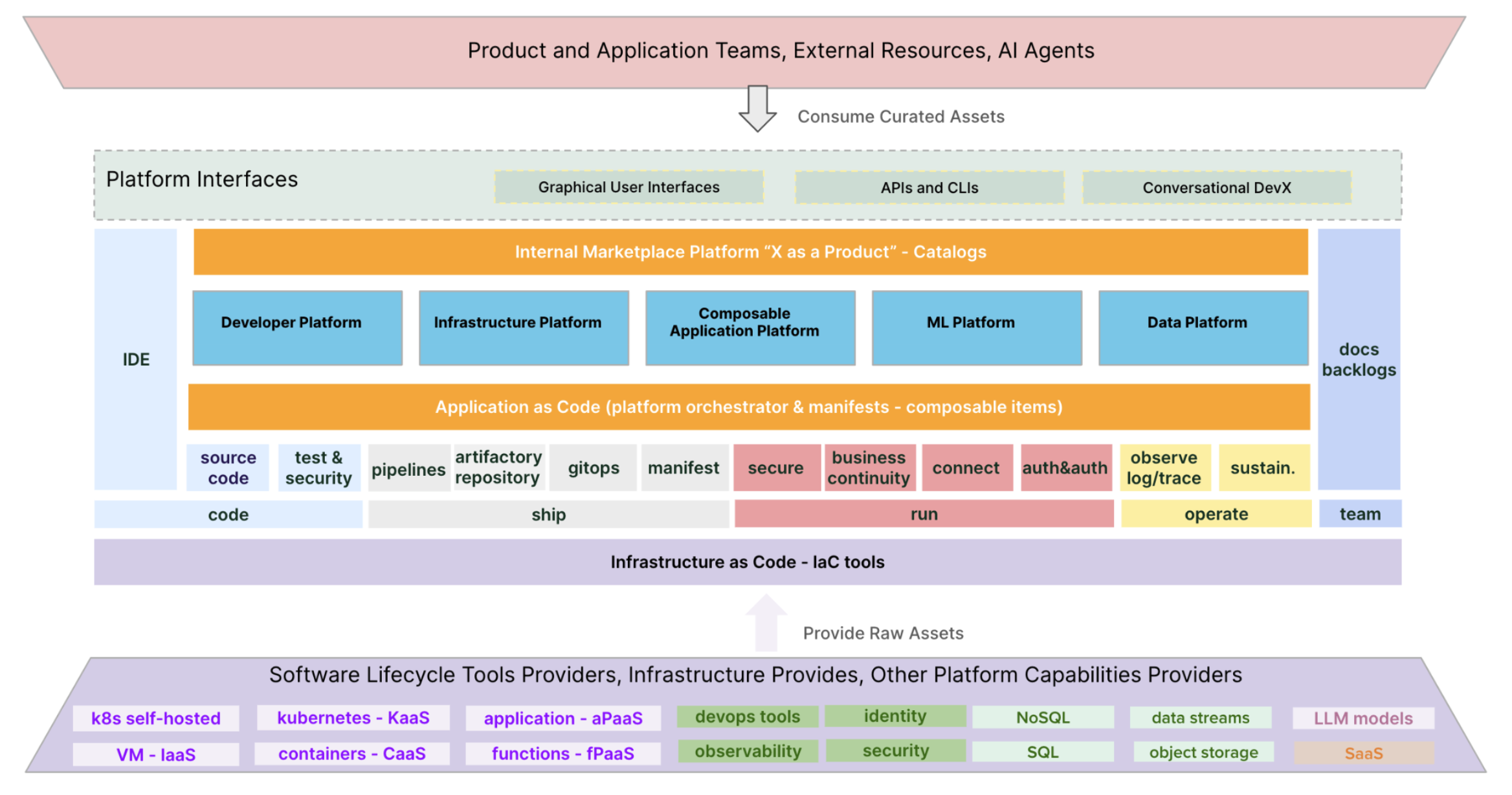
For a forward-looking perspective, consider this more mature platform architecture.
Conclusion
You have now moved from defining an MVP's scope to creating its architectural blueprint. By visualizing the components and their interactions, you create a tangible plan that can be discussed, refined, and ultimately built.
Key Takeaways:
- Structure with Planes: Organizing your IDP architecture into five logical planes (Developer Control, Integration & Delivery, Resource, Monitoring & Logging, Security) helps manage complexity.
- Choose a Core Pattern: The two dominant architectural patterns are the orchestrator-centric model, which uses a central engine to manage tools, and the Kubernetes-native model, which extends the Kubernetes API itself to be the universal control plane.
- Identify Key Components: A viable MVP architecture consists of a curated set of tools for interfaces, CI/CD, orchestration, IaC, and the target environment, all working together to automate a "golden path."
- The Blueprint is the Plan: A high-level architectural diagram is not just a drawing; it is the primary communication tool for aligning the platform team and its stakeholders on the technical vision.
Preview of the Next Lesson
Creating a diagram is a critical step, but every box and arrow represents a decision with trade-offs. How do you choose between simplicity and feature richness? How much flexibility should you offer developers? In our next lesson, we will address the learning outcome: Balance competing platform design goals, such as standardization vs. flexibility and simplicity vs. feature richness. We will explore frameworks and principles for navigating these crucial design tensions as you build and evolve your platform.