Hello! Welcome back.
In our last lesson, you learned how to use a noise gate to clean up recordings by silencing unwanted background noise between phrases. This was an example of controlling a track's dynamics based on its own volume.
Today, we're going to explore a technique where you control a track's dynamics using the signal from a different track. This is called sidechain compression. Your goal for this lesson is to learn how to set up sidechain compression to create a rhythmic pumping effect between a kick drum and a bass. This is a foundational technique in modern electronic and hip-hop production, and a powerful tool for creating clean, punchy low-end in any mix.
1. What is Sidechain Compression?
At its core, sidechain compression means using the audio signal from one track (the "trigger") to control a compressor on another track (the "target").
The most common use case is with a kick drum and a bassline. Both instruments occupy similar low-frequency ranges and can often clash, making the mix sound muddy and undefined. By sidechaining, you can make the bass "duck" or decrease in volume for a split second every time the kick drum hits. This carves out space for the kick's transient to punch through clearly, resulting in a tighter, more powerful low end.
This video provides an excellent visual and auditory introduction to the concept.
How to Sidechain in FL Studio - Kicks & 808’s
The video 'How to Sidechain in FL Studio - Kicks & 808’s' from Mix With Jerry clearly explains what sidechaining is and why it's used, showing how the bass waveform is ducked by the kick.
Watch the section from 00:09 to 01:32. Pay attention to how the 808 waveform is visually ducked down when the kick hits. This is the effect we're aiming to create.
As the video shows, this technique ensures the kick's impact isn't lost, and when the settings are exaggerated, it creates the distinct "pumping" rhythm popular in many genres.
2. Setting Up Sidechain Compression in FL Studio
Since you're comfortable in FL Studio, we'll walk through this step-by-step. The process involves three main stages: routing the signal, loading the compressor, and dialing in the settings. For this, we'll use the Fruity Limiter, which you've already used for gating and standard compression.
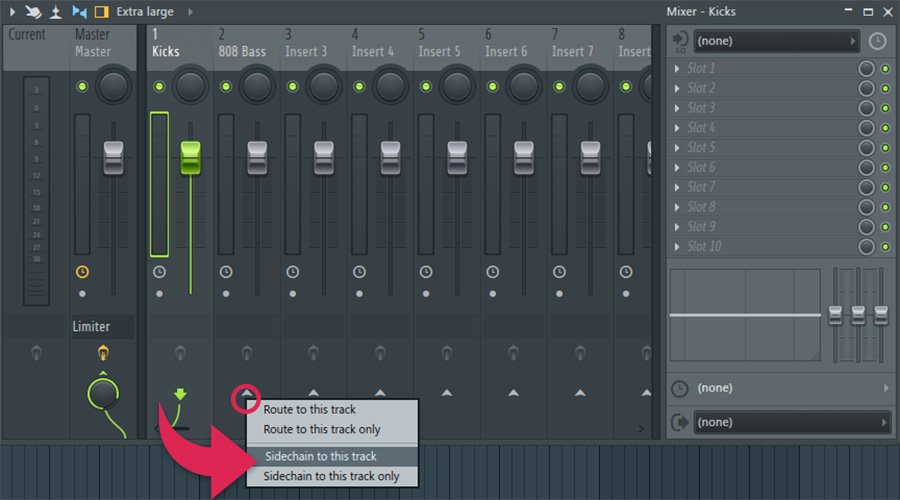
Step 1: Routing the Kick to the Bass Track
First, you need to tell the bass track's mixer channel to "listen" to the kick track's signal. This doesn't mean the kick's audio will play through the bass channel; it's just sending a control signal.
- Select your Kick track in the FL Studio Mixer.
- Find your Bass track in the mixer.
- Right-click the small arrow at the bottom of the Bass track's fader.
- From the context menu, select "Sidechain to this track."
You'll see a new wire appear, routing from the Kick to the Bass track.
Step 2: Loading the Fruity Limiter and Selecting the Sidechain Input
Next, you need to add the compressor to the track you want to affect—the Bass track.
- On your Bass mixer track, add an instance of Fruity Limiter.
- In the Fruity Limiter plugin, switch from the
LIMITtab to theCOMP(compressor) tab. - At the bottom of the compressor section, find the
SIDECHAINinput box. Right-click it and select your Kick track from the list.

For a complete walkthrough of these first two steps, the same video we started with provides a clear guide.
How to Sidechain in FL Studio - Kicks & 808’s
Let's continue with the 'Mix With Jerry' video. It provides a perfect, practical demonstration of the routing and plugin setup within FL Studio.
Watch from 01:32 to 04:51. The presenter demonstrates exactly how to route the tracks in the mixer and then how to select the correct sidechain input within the Fruity Limiter plugin.
Step 3: Dialing in the Compressor Settings for the Pumping Effect
This is where you shape the sound. With the sidechain active, the compressor's parameters now react to the kick drum, not the bass.
Top 3 Ways To Sidechain In FL Studio
The article 'Top 3 Ways To Sidechain In FL Studio' from MixElite provides a great written summary of the process and the settings involved. We'll use it as a reference as we dial in the sound.
Read the section titled 'Sidechain Compression With Fruity Limiter'. Focus on 'Step #2 – Getting Your Settings Right' and 'Step #3 – Further Tweaking'. This will reinforce the functions of the Threshold, Ratio, and Release knobs in this context.
Now, let's adjust the key parameters on the Fruity Limiter (on your Bass track) to create the pumping effect:
- Threshold (THRES): Lower the threshold until the compressor starts reacting to the kick drum hits. The lower you set it, the more the bass will be compressed (ducked).
- Ratio: Set a high ratio, such as 6:1 or higher. This ensures a strong, noticeable ducking effect each time the kick hits.
- Attack: Set the attack to its fastest possible setting (all the way to the left). You want the bass to get out of the way immediately when the kick hits.
- Release (REL): This is the most important control for shaping the rhythmic pump.
- A fast release will create a subtle ducking effect, primarily for clarity. The bass volume returns to normal very quickly.
- A slower release will hold the bass down for longer, creating the classic, obvious "pumping" sound. The timing of the pump is dictated by the release time.
The following video section is an excellent demonstration of dialing in these settings by ear.
How to Sidechain in FL Studio - Kicks & 808’s
This final clip from 'Mix With Jerry' shows you how to adjust the compressor settings to get the exact sidechain sound you want, from subtle to an exaggerated pump.
Watch from 06:27 to 12:03. Listen carefully as he adjusts the Release knob and explains how it changes the character of the pump. Try to replicate this on your own track.
Test your understanding!
You've set up sidechain compression, but the pumping effect is too subtle for the electronic track you're working on. You want the bass to feel like it's "breathing" in time with the kick drum.
Which two compressor settings are the most important to adjust to make the pumping effect more obvious and rhythmic, and in which direction would you adjust them?
Show answer
You would primarily adjust the Release and Threshold.
- Increase the Release time: This will make the compressor hold the bass down for longer after the kick hits, creating a more noticeable and longer "pump."
- Lower the Threshold: This will make the compressor react more aggressively to the kick, causing more gain reduction and a deeper ducking effect. You could also increase the Ratio for a similar result.
Conclusion
Well done! You have now mastered one of the most essential techniques in modern mixing. You learned not just the "how" but also the "why" of sidechain compression, and you can now apply it in FL Studio to create space and rhythmic energy in your low end.
Key Takeaways:
- Sidechain compression uses one track's signal (e.g., a kick) to trigger a compressor on another track (e.g., a bass).
- The primary goal is to create space for the trigger element to cut through the mix, improving clarity and punch.
- The setup involves three steps: routing the sidechain signal in the mixer, loading a compressor on the target track, and selecting the sidechain input in the plugin.
- The Release time is the key parameter for controlling the character and timing of the rhythmic pumping effect.
In the next lesson, we will cover the final topic in our module on dynamic control: using a limiter. You'll learn how to use it on a bus or your master track to increase overall loudness and prevent your mix from clipping.