Hello! Welcome back to your sound engineering course.
In our last lesson, you learned how to use compression to create consistency in a vocal track by controlling its dynamic range. We focused on using the threshold, ratio, attack, and release to make a vocal sit perfectly in a mix.
Today, we're going to explore a more creative use of compression. Instead of just controlling dynamics, we'll use it as a powerful shaping tool. You will learn how to use a compressor to manipulate the transient and sustain of a drum sound, adding punch or body. This is a fundamental skill for making your drum tracks feel powerful and professional.
1. Understanding Transients and Sustain
Every drum hit has an "envelope" or shape. For our purposes, we can break this down into two main parts:
- Transient: This is the initial, high-energy impact of the sound. Think of the "click" of a kick beater hitting the drum skin or the sharp "crack" of a snare drum. It's very short and very loud.
- Sustain (or Body/Tail): This is the sound that follows the transient. It's the resonant "boom" of the kick drum or the "ring" of the snare shell.
As a mix engineer, you can dramatically change the feel of a drum by altering the balance between its transient and its sustain. We can use a compressor to do exactly that.
2. The Two Core Techniques: Punch vs. Body
The key to shaping drums with compression lies almost entirely in the attack and release settings. By adjusting how quickly the compressor reacts and lets go, we can either emphasize the initial punch or bring out the resonant body of a drum.
Let's look at a text that breaks this down into clear, actionable techniques.
Three Different Ways to Compress Drums
The article 'Three Different Ways to Compress Drums' from EDMProd provides a perfect framework for understanding how attack and release times create different effects. We will focus on two of these methods.
Please read sections 2 and 3, titled 'Fast Attack & Slow Release' and 'Slow Attack & Slow Release'. Pay close attention to how the combination of settings affects the balance between the transient and the tail (sustain) of the drum hit.
As you just read, the attack time is the master control for this process. Let's explore these two opposing goals in more detail.
Technique 1: Adding Punch (Emphasizing the Transient)
To make a drum sound punchier, you want to make its transient feel louder relative to its sustain.
- The Logic: Use a slow attack (e.g., 20-50ms). This gives the sharp, fast transient enough time to pass through the compressor unaffected. The compressor then clamps down on the sustain that follows. When you use makeup gain to bring the overall level back up, the uncompressed transient becomes much more prominent.
- The Result: A drum sound with a sharp, defined, and punchy attack that cuts through the mix.
This technique is a go-to for making kicks and snares hit harder. Let's watch a video that walks through this process on a kick drum.
How to add PUNCH to your KICKS using Compression (3 SIMPLE STEPS)
The video 'How to add PUNCH to your KICKS using Compression' from Producer Sphere gives a great visual and audible demonstration of this technique.
Watch from 02:32 to 04:55. Notice how increasing the attack time lets the initial transient of the kick pass through. The final waveform comparison clearly shows how the transient is emphasized and the tail is shaped.
Technique 2: Adding Body and Sustain
Sometimes a drum sounds too thin or "clicky." You might want less punch and more weight or length.
- The Logic: Use a fast attack (e.g., < 5ms). The compressor reacts almost instantly, clamping down on and reducing the level of the transient. The release time is then often set a bit slower to keep the compression going through the body of the sound. When you apply makeup gain, the entire compressed signal is turned up, making the quieter sustain portion much more audible relative to the now-tamed transient.
- The Result: A drum sound that feels fatter, longer, and heavier, with a softer attack.
Test your understanding!
You have a snare sample that has a very sharp, aggressive "crack" but almost no body. It sounds thin and weak in your track. To make it sound fuller and add more sustain, would you use a fast or slow attack on your compressor?
Show answer
You would use a fast attack. This will clamp down on the aggressive transient ("crack"), and then using makeup gain will allow you to bring up the overall level, making the quieter body and sustain of the snare more prominent.
3. Practical Exercise: Ear Training for Drum Compression
Knowing the theory is one thing, but hearing it is everything. This exercise is designed to train your ears to hear how a compressor shapes the groove and envelope of a drum loop. Since you're comfortable in FL Studio, let's set this up.
For this exercise, we will follow the excellent method laid out in the "How to Use Compression on Drums" article from Nail the Mix. Grab any drum loop or program a simple beat in FL Studio to work with.
How to Use Compression on Drums
This article provides a fantastic, step-by-step ear training exercise. We will adapt it for our use in FL Studio.
Read the sections from 'An Exercise to Master Drum Compression' through to 'Step 5: Dialing It Back to Reality'. This will give you the full context for the hands-on steps below.
Now, let's apply this in FL Studio. Load Fruity Limiter on your drum channel (we'll use its compression section, as its visualizer is helpful).
Step 1: Exaggerate Everything
The goal here is to make the compression so obvious you can't miss it.
- Go to the 'COMP' tab in Fruity Limiter.
- Ratio: Set it to 10:1 or higher.
- Threshold: Pull it down until you see 10-20dB of gain reduction in the meter while the loop is playing. It should be working very hard.
- Attack: Set it to its slowest setting (e.g., 100ms or more).
- Release: Set it to its fastest setting (near 0ms).
- Loop the drums. It will sound squashed and probably bad. That's the point! You can now clearly hear the compressor "pumping."
Step 2: Find the Punch with the Attack Knob
- Keep the loop playing.
- Slowly sweep the Attack knob from its slowest setting to its fastest.
- Listen carefully. With a slow attack, you'll hear the sharp "thwack" of the kick and snare. As you make the attack faster, you'll hear that punch get softened and then disappear, replaced by a "whoosh" of sustain.
- Your Goal: Find the attack time that lets just the right amount of punch through for the sound you want. Start by setting it back to a slow setting where the transient is clear.
Step 3: Find the Groove with the Release Knob
The release time controls the "breathing" of the compressor.
- Keep the loop playing.
- Now, slowly sweep the Release knob from its fastest setting to its slowest.
- Listen to the rhythm. A fast release might make the hi-hats feel bouncier. A slow release might make the groove feel bigger and heavier, as if it's "breathing" in time with the beat.
- Your Goal: Find a "sweet spot" where the pumping action of the compressor locks in with the tempo of your drum loop, enhancing the groove.
Step 4: Dial It Back to Reality
You've now found the ideal shape and groove with extreme settings. Let's make it musical.
- Lower the Ratio to something more typical, like 3:1 or 4:1.
- Raise the Threshold until you're getting a more subtle amount of gain reduction, maybe 3-6dB on the main hits.
- Use the Gain knob to match the volume of the compressed signal with the bypassed signal.
- Now, toggle the plugin on and off. The compressed version shouldn't just be louder; it should feel punchier, fatter, and more energetic.
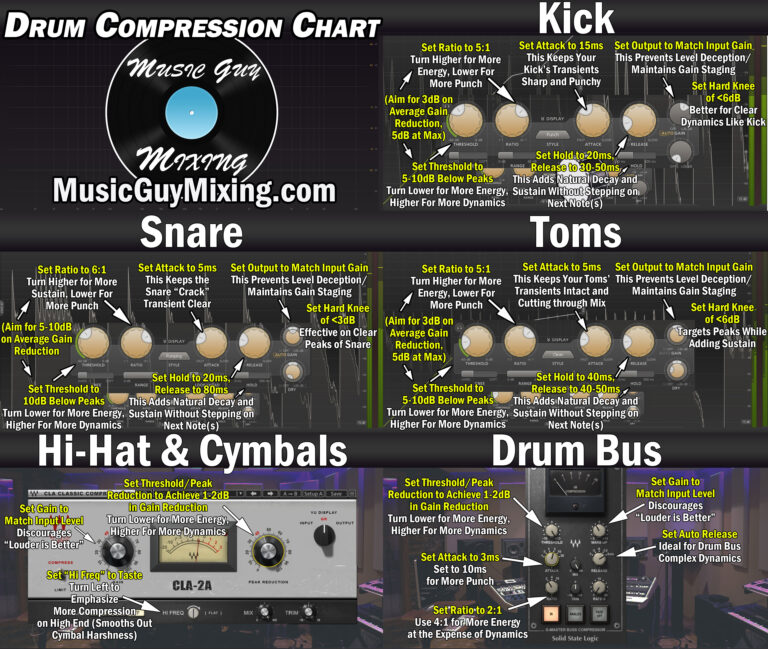
4. A Handy Reference
As you practice, it's useful to have some starting points. This chart provides recommended settings for various drum elements. Use these as a guide, but always let your ears be the final judge.
Conclusion
Today you've made a significant leap from using compression as a corrective tool to using it as a creative one. You've learned how to fundamentally reshape the character of your drums to make them either punchier or fuller.
Key Takeaways:
- Compression can change the balance between a drum's transient (punch) and sustain (body).
- A slow attack lets the transient through, increasing punch.
- A fast attack clamps down on the transient, allowing you to bring up the sustain and add body.
- The release time should be tuned to the tempo of the track to make the drums "breathe" and enhance the groove.
- Always start by exaggerating the settings to hear the effect, then dial them back for a more musical result.
In our next lesson, we'll continue exploring dynamic control by looking at a compressor's counterpart: the noise gate. You'll learn how to use a gate to automatically remove unwanted background noise, a crucial step for cleaning up vocal recordings.