Hello! Welcome to the next lesson in your journey to becoming a backend developer.
In our last lesson, we completed our exploration of data querying techniques by learning how to use native SQL with @Query(nativeQuery = true). You now have a full range of tools, from derived queries to JPQL and native SQL, to retrieve data from your database. All our previous lessons focused on what information to request from the database. Today, we shift our focus to the crucial infrastructure that manages how your application communicates with the database.
This lesson addresses a fundamental concept for building high-performance, scalable applications. Our learning outcome is to describe the role and benefits of database connection pooling, using HikariCP as a primary example. You will learn why creating database connections on the fly is a bad idea and how connection pools solve this problem, making your applications faster and more robust.
1. The Problem: The High Cost of a New Connection
Imagine your web application is handling hundreds of user requests per second. If for every single database query your application had to establish a brand-new connection to the database, the performance would quickly degrade. But why is this the case?
Creating a new database connection is not a trivial operation. It's a resource-intensive process that involves several steps.
Understanding Connection Pooling and How to Implement a Connection Pool in Java
The article "How Connection Pools Work and How to Configure Them" from Talent500 clearly explains why creating new database connections is considered expensive. This will lay the foundation for understanding why pooling is necessary.
Please read the first part of the article, starting from the introduction down to the end of the section "Why is creating a DB connection expensive?". As you read, focus on the list of steps involved in creating a new connection, such as network handshakes and authentication.
As the article highlights, each new connection requires:
- A TCP/IP socket to be opened between the application and the database server.
- The database to perform an authentication handshake to verify the username and password.
- The database server to allocate memory and resources for the new session.
- Various other session-level setups to be performed.
This entire process can introduce significant latency. In a high-traffic application, repeatedly paying this "setup tax" for every query would be disastrous for performance and could easily overwhelm the database server.
2. The Solution: Database Connection Pooling
This is where connection pooling comes in. A connection pool is essentially a cache of pre-established, ready-to-use database connections maintained by your application. Instead of creating a new connection for each query, the application "borrows" a connection from the pool, uses it, and then "returns" it to the pool, making it available for the next request.
This diagram illustrates the concept perfectly. Your application's Data Access Object (DAO) or Repository doesn't connect directly to the database. Instead, it asks the connection pool for a connection.
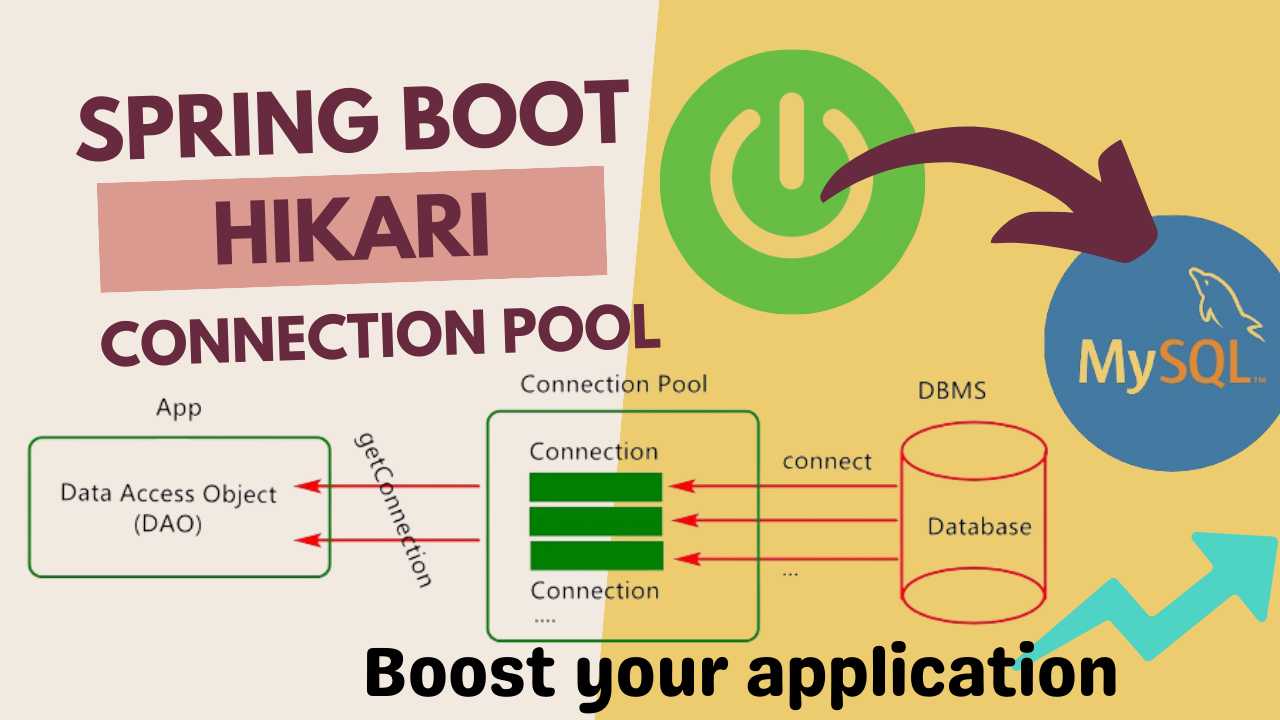
The lifecycle of a connection managed by a pool is simple and efficient:
- Initialization: When the application starts, the pool creates an initial set of physical database connections and keeps them open.
- Borrowing: When your code needs to perform a database operation, it requests a connection from the pool.
- Using: The application uses the borrowed connection to execute one or more queries.
- Returning: Once the work is done (e.g., a transaction is complete), the application closes the logical connection. However, the connection pool intercepts this call. Instead of terminating the physical connection, it simply resets its state and returns it to the pool of available connections.
This "borrow-use-return" pattern completely eliminates the expensive setup and teardown overhead for most requests.
In Java, this is typically managed through a DataSource object, which acts as a factory for database connections. Modern DataSource implementations are backed by a connection pool, whereas the older DriverManager approach you might see in legacy code would create a new connection every time. Spring Boot exclusively uses the DataSource approach.
3. The Benefits of Connection Pooling
By managing connections this way, a connection pool provides several critical benefits that are essential for any production application.
Understanding Connection Pooling and How to Implement a Connection Pool in Java
Let's return to the Talent500 article, which provides a clear list of the major advantages of using a connection pool.
Please read the section titled "Benefits of Using Connection Pooling in Applications". Focus on understanding each of the five benefits listed.
To summarize the key benefits you just read about:
- Reduced Latency: By providing pre-established connections, the pool eliminates the connection setup time, making database operations significantly faster.
- Improved Scalability: The pool can serve a high number of concurrent requests efficiently by recycling connections, preventing the application from overwhelming the database with connection requests.
- Efficient Resource Usage: A connection pool limits the total number of connections that can be opened, which protects your database from being exhausted. It prevents the "connection storm" problem where a sudden spike in traffic leads to a huge number of new connection requests.
- Better Stability and Reliability: A good connection pool can test connections before handing them out to your application, discarding any that have become "stale" or broken (e.g., due to a network glitch or database restart). This prevents your application code from failing due to bad connections.
Test your understanding!
An e-commerce application experiences a major slowdown every year during a Black Friday sale. The server logs show that during the sale, the time taken to execute database queries increases dramatically, and the database CPU usage spikes. Which benefit of connection pooling is most directly related to solving this kind of problem?
Show answer
Efficient Resource Usage and Improved Scalability are the most relevant benefits here.
A connection pool enforces a maximum limit on the number of database connections. This prevents the application from creating an unlimited number of new connections during the traffic spike, which would otherwise overwhelm the database server (causing high CPU usage) and degrade performance for everyone. By efficiently reusing a fixed set of connections, the pool allows the application to scale and handle the load gracefully.
4. HikariCP: Spring Boot's Default Connection Pool
Now that you understand what connection pooling is and why it's important, let's look at a specific implementation. While there are several connection pool libraries available for Java (like Tomcat JDBC Pool and Apache Commons DBCP), HikariCP is the industry standard for performance and reliability.
Because of its excellent performance, Spring Boot uses HikariCP as its default connection pool. As long as you have a JDBC driver and the spring-boot-starter-data-jpa dependency in your project, Spring Boot's auto-configuration will automatically set up and manage a HikariDataSource bean for you.
How Spring Boot Optimizes Database Connections Through HikariCP
The article "How Spring Boot Handles Database Connection Pooling" from Alexander Obregon provides an excellent technical look at how Spring Boot automatically integrates and configures HikariCP.
Please read the sections "Spring Boot’s Default Connection Pooling Mechanism" and "How Spring Boot Configures HikariCP at Startup". Pay attention to the priority order of connection pools and the fact that Spring Boot handles this for you automatically.
This auto-configuration is a perfect example of the power of Spring Boot. You get a production-grade, high-performance connection pool without writing a single line of configuration code. The framework handles the "how" so you can focus on your application's business logic.
You can, of course, tune HikariCP's behavior through your application.properties file. Some of the most common properties you might configure are:
# Sets the maximum number of connections the pool will maintain.
spring.datasource.hikari.maximum-pool-size=10

# Sets the minimum number of idle connections to keep in the pool.
spring.datasource.hikari.minimum-idle=5

# How long a thread will wait for a connection before timing out (in ms).
spring.datasource.hikari.connection-timeout=30000

# How long a connection can be idle in the pool before being retired (in ms).
spring.datasource.hikari.idle-timeout=600000
While the defaults are sensible for many applications, understanding these properties is the first step toward tuning your application's database performance under specific workloads.
Conclusion
In this lesson, we moved from writing queries to understanding the critical infrastructure that delivers them. You've learned about the vital role connection pooling plays in any modern, data-driven application.
Key Takeaways:
- Creating new database connections is an expensive operation that introduces latency and consumes significant resources.
- A database connection pool is a cache of pre-established, reusable connections that an application can borrow from and return to.
- The main benefits of pooling are reduced latency, improved scalability, efficient resource management, and greater application stability.
- HikariCP is a high-performance connection pool that Spring Boot uses by default whenever you use Spring Data JPA.
- Spring Boot's auto-configuration automatically sets up a
HikariDataSourcebean, providing production-grade connection pooling out of the box.
What's Next?
So far, we've always assumed we're connecting to a "real" database like MySQL or PostgreSQL. While this is true for development and production, it can slow down our testing process. In the next lesson, we will learn how to set up and use an in-memory database (like H2) for testing purposes. You'll see that even when connecting to H2, Spring Boot will still be using HikariCP to manage the connection pool, reinforcing the concepts we've learned today.