Hello! Welcome to our next lesson in the "Advanced Database Operations & Transactions" module.
In our previous session, we focused on ensuring data integrity for individual operations using the @Transactional annotation. We saw how it helps maintain an all-or-nothing approach for database writes, which is crucial for reliability.
Today, we're shifting our focus from the integrity of single operations to the efficiency of data retrieval. When your application's database grows, fetching hundreds or thousands of records at once becomes a major performance bottleneck. Our goal for this lesson is to implement pagination and sorting of query results using Pageable and Sort. You will learn how to build APIs that can deliver data in small, manageable chunks, sorted according to the user's preference—a fundamental requirement for any scalable backend application.
1. Why Do We Need Pagination and Sorting?
Imagine your application, perhaps a blog or an e-commerce site, becomes very popular. What happens when a user asks for a list of all blog posts or all products, and there are 100,000 of them?
Without a strategy to manage this, your application would try to:
- Load all 100,000 objects from the database into memory.
- Serialize them into JSON.
- Send a massive JSON payload over the network.
This can lead to serious problems like OutOfMemoryErrors that crash your server, long API response times, and a poor user experience. Pagination is the solution.
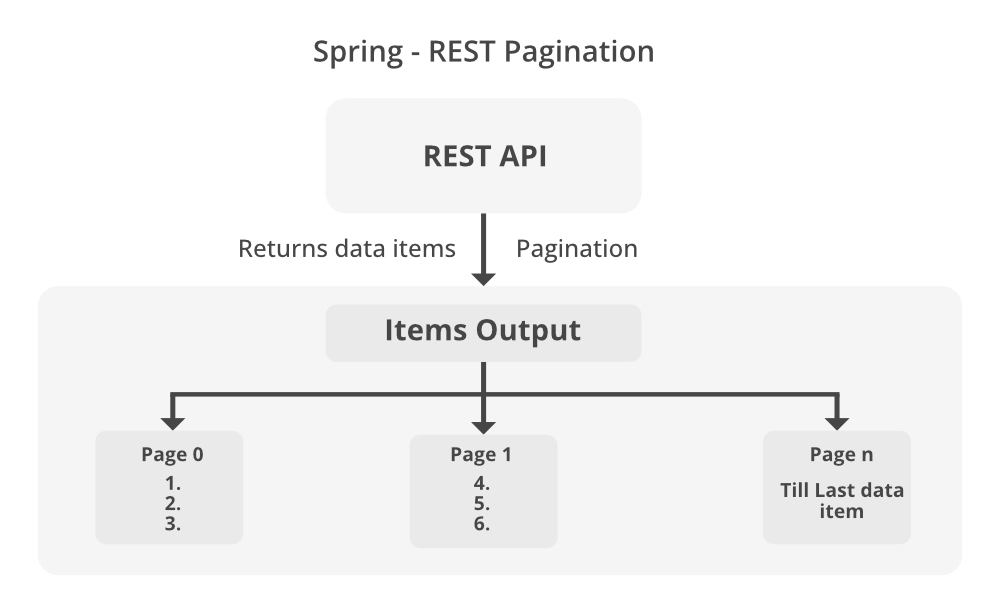
The following reading explains this problem and introduces why pagination and sorting are critical for building robust applications.
Pagination and Sorting with Spring Data JPA
The article "Pagination and Sorting with Spring Data JPA" from CodeSignal provides an excellent overview of the need for these features.
Please read the section titled "Why Pagination and Sorting are needed?". It clearly outlines the performance issues that arise from handling large datasets and introduces pagination and sorting as the solution.
2. Core Concepts in Spring Data JPA
Spring Data JPA provides a simple yet powerful set of tools to handle pagination and sorting, built around three key components:
Sort: An object that represents sorting criteria. You use it to define which properties to sort by and in what direction (ascending or descending).Pageable: An interface that carries pagination information. This includes the page number you want to retrieve, the number of items per page (the "page size"), and optionally, aSortobject for ordering the results.PageRequestis the most common implementation we will use.Page<T>: A special return type for repository methods that perform pagination. It's more than just aList<T>. APageobject contains the list of items for the requested page (getContent()) as well as crucial metadata, such as the total number of items, the total number of pages, and whether it's the first or last page.
The beauty of Spring Data JPA is that if your repository interface extends JpaRepository, it already has methods that accept Sort and Pageable parameters. You don't need to write any implementation.
public interface JpaRepository<T, ID> extends ListCrudRepository<T, ID>, ListPagingAndSortingRepository<T, ID>, ... {
    // ... other methods
}

public interface PagingAndSortingRepository<T, ID> extends Repository<T, ID> {
    Iterable<T> findAll(Sort sort);
    Page<T> findAll(Pageable pageable);
}
As you can see, JpaRepository inherits from PagingAndSortingRepository, giving you the findAll(Sort) and findAll(Pageable) methods out of the box.
3. Implementing Sorting and Pagination
Let's see how to create and use these objects in practice.
Creating a Sort Object
You can easily construct a Sort object using the static factory methods in the Sort class.
// Sort by a single property in ascending order (default)
Sort sortByTitle = Sort.by("title");

// Sort by a single property in descending order
Sort sortByPriceDesc = Sort.by(Sort.Direction.DESC, "price");

// Sort by multiple properties with different directions
Sort sortByPublishDateDescAndTitleAsc = Sort.by(
    Sort.Order.desc("publishDate"),
    Sort.Order.asc("title")
);
You can then pass this object directly to your repository:
List<Book> sortedBooks = bookRepository.findAll(sortByPriceDesc);
Creating a Pageable Object
For pagination, you'll create an instance of Pageable using the PageRequest class. Remember that page numbers are zero-indexed, so the first page is page 0.
// Request the first page (page 0), with 10 items per page
Pageable firstPageWithTenItems = PageRequest.of(0, 10);

// Request the third page (page 2), with 5 items, sorted by title
Pageable thirdPageWithFiveItemsSorted = PageRequest.of(2, 5, Sort.by("title"));
You pass this Pageable object to the repository's findAll method, and the return type will be a Page<T>.
Page<Book> bookPage = bookRepository.findAll(firstPageWithTenItems);

// To get the actual list of books for the current page
List<Book> books = bookPage.getContent();

// To get pagination metadata
int totalPages = bookPage.getTotalPages();       // Total number of pages
long totalElements = bookPage.getTotalElements(); // Total number of books in the DB
int currentPageNumber = bookPage.getNumber();     // The current page number (0-indexed)
The metadata provided by the Page object is essential for building a UI with pagination controls (e.g., "Showing 1-10 of 100 results" and page number links).
Test your understanding!
You need to fetch the fifth page of products (page size of 25), sorted by their creationDate in descending order. Write the Java code to create the appropriate Pageable object.
Show answer
Since pages are zero-indexed, the fifth page is at index 4.
Sort sort = Sort.by(Sort.Direction.DESC, "creationDate");
Pageable pageable = PageRequest.of(4, 25, sort);
Or, more concisely:
Pageable pageable = PageRequest.of(4, 25, Sort.by(Sort.Direction.DESC, "creationDate"));
4. Building a Paginated REST Endpoint
Now, let's tie everything together by creating a REST endpoint that accepts pagination and sorting parameters from the client. The standard way to do this is with URL query parameters.
For example, a request might look like this: GET /api/books?page=0&size=10&sortBy=title&sortDir=ASC
We can implement this using the @RequestParam annotation in our controller. It's also a best practice to provide sensible default values.
The following article from mkyong.com provides a complete, step-by-step tutorial for building an application with a paginated REST endpoint. We will use it as our guide for a practical walkthrough.
Spring Data JPA Paging and Sorting example
The article "Spring Data JPA Paging and Sorting example" provides an excellent, end-to-end implementation. We will walk through the key components of this example.
Please read through the article, focusing on these sections: Sections 1 & 2 (Extends ...Repository): Understand how extending JpaRepository provides the necessary methods. Section 3 (Pageable and Sort examples): Review the concrete examples of creating Pageable objects. Section 4 (Spring Data JPA Paging and Sorting example): This is the core of our lesson. Pay close attention to the code for BookRepository, BookService, and especially BookController to see how the request parameters are captured and used.
Let's break down the key parts of the implementation from the article.
The Project Structure
A typical project for this functionality follows the standard layered architecture.
The Repository
The BookRepository is extremely simple. By extending JpaRepository, it inherits all the necessary functionality.
// From mkyong.com article
public interface BookRepository extends JpaRepository<Book, Long> {
}
The Service Layer
The service layer encapsulates the logic for creating the Pageable object from the controller's parameters.
// From mkyong.com article
@Service
public class BookService {
    @Autowired
    private BookRepository bookRepository;

    public Page<Book> findAll(int pageNo, int pageSize, String sortBy, String sortDirection) {
        // Create a Sort object based on direction and property
        Sort sort = Sort.by(Sort.Direction.fromString(sortDirection), sortBy);
        // Create a Pageable object
        Pageable pageable = PageRequest.of(pageNo, pageSize, sort);
        // Call the repository method
        return bookRepository.findAll(pageable);
    }
}
The Controller
The controller exposes the endpoint and uses @RequestParam to read the query parameters from the URL. Note the use of defaultValue to make the API more user-friendly.
// From mkyong.com article
@RestController
public class BookController {
    @Autowired
    private BookService bookService;

    @GetMapping("/books")
    public List<Book> findAll(
            @RequestParam(defaultValue = "0") int pageNo,
            @RequestParam(defaultValue = "10") int pageSize,
            @RequestParam(defaultValue = "id") String sortBy,
            @RequestParam(defaultValue = "ASC") String sortDirection) {

        Page<Book> resultPage = bookService.findAll(pageNo, pageSize, sortBy, sortDirection);

        // Return only the content for a simple list response
        return resultPage.getContent();
    }
}
In a more advanced API, you might return a custom response object that includes both the content List and the pagination metadata from the Page object.
You can test this endpoint using curl as shown in the mkyong article, or simply by visiting the URL in your browser:http://localhost:8080/books?pageNo=0&pageSize=4&sortBy=title&sortDirection=DESC
5. Using Pagination with Custom Queries
Pagination isn't limited to the findAll method. You can also add a Pageable parameter to your custom-derived query methods in your repository. Spring Data JPA will automatically apply the pagination and sorting rules to your query.
public interface BookRepository extends JpaRepository<Book, Long> {

    // Find books by a specific author, with pagination
    Page<Book> findByAuthor(String author, Pageable pageable);

    // Find books published after a certain date, with pagination
    Page<Book> findByPublishDateAfter(LocalDate date, Pageable pageable);
}
This powerful feature allows you to combine complex filtering logic with efficient data retrieval.
Conclusion
In this lesson, you've learned a critical skill for building scalable and performant backend services. By fetching data in sorted, paginated chunks, you can ensure your application remains fast and responsive, even as your dataset grows.
Key Takeaways:
- Fetching large datasets all at once is inefficient and can cause application failures.
- Spring Data JPA provides the
Sort,Pageable, andPageabstractions to simplify pagination and sorting. - By extending
JpaRepository, your repositories automatically gain methods likefindAll(Pageable pageable). - You can construct
Pageableobjects usingPageRequest.of()andSortobjects usingSort.by(). - The
Page<T>return type contains both the data for the current page and essential metadata (like total pages and elements). - REST endpoints can accept pagination and sorting parameters via
@RequestParam, with default values providing a better user experience. Pageablecan also be used with custom-derived query methods.
What's Next?
We've now covered how to manage transaction integrity and how to retrieve data efficiently. However, as your application evolves, so will its database schema. Manually applying SQL scripts to update tables across different environments (development, testing, production) is error-prone. In our next lesson, we will address this by learning to implement database schema migration and versioning using Flyway. This will give you a robust, automated way to manage and track changes to your database structure.