Hello again! Welcome back to your second lesson.
In our previous session, we mapped out the entire request/response cycle and saw how a Servlet Container acts as the crucial link between a raw HTTP request and your Java code. You requested a strong foundation before diving into frameworks, and that's exactly what we're building.
Today's lesson zooms in on that critical component. We will explore the multiple hats worn by the Servlet Container, moving from simply knowing that it exists to understanding its fundamental roles. By the end of this lesson, you will be able to explain the core responsibilities of a Servlet Container, such as Apache Tomcat, and appreciate why it's the indispensable engine for any Java web application.
What is a Servlet Container?
At a high level, a Servlet Container is a program that provides the runtime environment for Java Servlets.
Think of it this way: the Java Virtual Machine (JVM) provides the runtime environment for any standard Java application. It manages memory, executes bytecode, and handles system-level tasks. A Servlet Container does a similar job, but specifically for web components. It's a specialized JVM extension that knows how to "speak" web protocols (like HTTP) and manage the lifecycle of web-specific Java objects (Servlets).
The most popular example, which we'll refer to often, is Apache Tomcat. While it's often called a "web server," it's more accurately a Servlet Container that also includes basic web server capabilities.
To kick things off, let's watch a short video that introduces Tomcat and its primary function.
What is Tomcat ??? (Java, Spring)
The video 'What is Tomcat ???' by Hamza gives a great, concise overview of what a Servlet Container is and the basic flow of how it handles a request.
Please watch the first minute and eleven seconds (00:00 - 01:11). Focus on the dual role of Tomcat as a web server and a Servlet Container.
As the video highlighted, the container listens for requests and uses servlets to handle them dynamically. But its job is far more comprehensive than that. Let's break down its key responsibilities.
The Core Roles of a Servlet Container
A Servlet Container handles all the low-level, infrastructural "plumbing" of a web application, allowing you, the developer, to focus purely on the business logic inside your servlets.
Here are its four primary roles:
1. Lifecycle Management
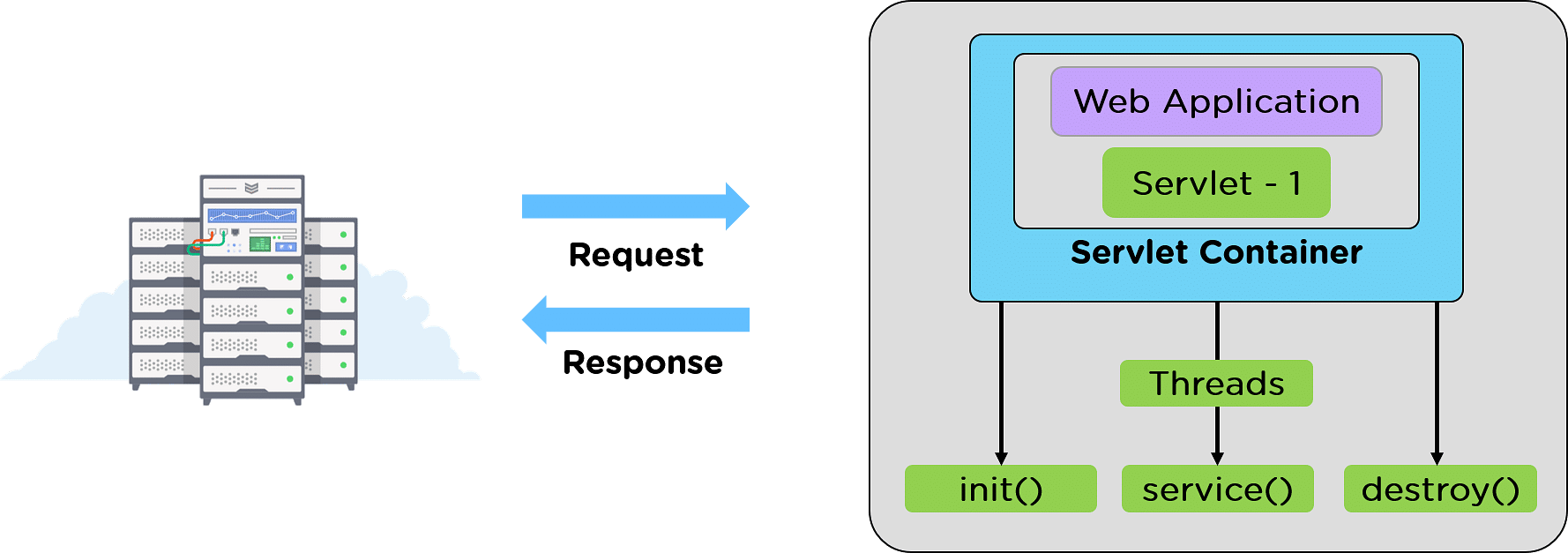
The container is in complete control of a servlet's life from birth to death. It manages three key phases through specific methods that it calls automatically:
init()- Initialization: When a request for a servlet arrives for the first time, the container loads the servlet class, creates an instance of it, and calls theinit()method. This method runs only once in the servlet's lifetime and is used for expensive, one-time setup tasks like establishing a database connection or loading configuration files.service()- Handling Requests: For every single request that comes in for the servlet, the container calls theservice()method. This method examines the HTTP request (e.g., GET, POST) and dispatches it to the appropriatedoGet()ordoPost()method. Your business logic resides in thesedo...()methods.destroy()- End of Life: When the container decides to shut down the servlet (e.g., when the application is stopped or reloaded), it calls thedestroy()method. This method also runs only once and is used for cleanup tasks, like closing database connections or releasing other resources.
The image below shows how the container wraps your web application, managing the servlet's lifecycle and handling incoming requests.
2. Request Dispatching and Communication
As we touched on in the last lesson, the container acts as a translator.
- It receives a raw HTTP request from a client.
- It parses this text-based request and creates two rich Java objects:
HttpServletRequestandHttpServletResponse. - It determines which servlet should handle the request based on the URL pattern. This mapping is configured either in a deployment descriptor file (
web.xml) or, more commonly today, using Java annotations (@WebServlet). - It then calls (dispatches to) the
service()method of the appropriate servlet, passing along the request and response objects it created.
3. Concurrency Management
A real-world web application serves hundreds or thousands of users simultaneously. The container manages this complexity through multithreading, a concept you're already familiar with from your core Java experience.
By default, the container creates a servlet instance only once (the Singleton pattern). When multiple requests for the same servlet arrive at the same time, the container doesn't create new servlet objects. Instead, it uses a thread pool and assigns a different thread to execute the service() method for each request, all on the same servlet instance.
This is a highly efficient model, but it comes with a critical responsibility for the developer: you must ensure your servlets are thread-safe. This means you should avoid using instance variables to store request-specific data, as they would be shared (and likely corrupted) by multiple threads. Always use local variables within your doGet() or doPost() methods for request-specific data.
This next video clip explains this multithreading model very clearly.
Servlets Tutorial 02 - LifeCycle, Request, Response and Webcontainer
The video 'Servlets Tutorial 02' provides a detailed look at how the web container provides multi-threading support.
Please watch the segment from 07:58 to 09:58. Pay close attention to how the container spawns a separate thread for each client but uses the same servlet. Notice that each thread gets its own unique request and response objects.
4. Providing the Infrastructure
Finally, the container provides servlets with access to their environment through standardized objects. The two most important are:
ServletConfig: An object created by the container for each servlet. It holds configuration information specific to that servlet (itsinit-parameters).ServletContext: An object created by the container for the entire web application. It is shared among all servlets in the application and can be used to hold application-wide information (context parameters) and resources.
By providing these objects, the container gives you a standard way to access configuration and share data without resorting to ad-hoc solutions.
To tie all these concepts together, please read the following article. It provides a concise summary of the Servlet Container and its main responsibilities.
The article 'Servlet Container in Java' from GeeksforGeeks offers a clear, structured explanation of the container's role and how it works.
Please read the following sections: 'What is Servlet Container?', 'How Does a Servlet Container Work?', and the bulleted list under the heading 'What are the main responsibilities of a Servlet Container?' at the very end. This will solidify your understanding of the roles we've just discussed.
Test your understanding!
Imagine you are building a web application that needs a connection to a MySQL database. Creating this connection is an expensive operation. Based on the servlet lifecycle, in which method (init(), service(), or destroy()) would you write the code to establish the database connection, and why? Where would you put the code to close it?
Show answer
You would establish the connection in the init() method. Because init() is called by the container only once when the servlet is first loaded, it's the perfect place for one-time, expensive setup tasks. Placing it in service() would mean creating a new database connection for every single request, which is extremely inefficient.
The code to close the connection would go in the destroy() method, which is also called only once when the servlet is being taken out of service. This ensures resources are properly released when the application shuts down.
Key Takeaways
- A Servlet Container (like Tomcat) is the engine that runs Java web applications.
- It manages the complete lifecycle of a servlet (
init(),service(),destroy()). - It handles request dispatching by mapping URLs to specific servlets and translating HTTP into Java objects.
- It manages concurrency by using a thread pool to handle multiple requests on a single servlet instance, which requires developers to write thread-safe code.
- It provides essential infrastructure, giving servlets access to configuration and application-wide context.
What's Next?
We've now thoroughly covered the "what" and "why" of the Servlet Container. You understand the environment your code will live in and the rules it must follow.
In our next lesson, "Implement a basic Java Servlet to handle HTTP GET and POST requests," we will finally put this theory into practice. You'll write your first servlet from scratch, deploy it to a container, and see the request/response cycle and servlet lifecycle in action.