Hello! Let's continue our journey into building robust backend applications.
In our last lesson, we successfully implemented a stateless authentication system using JSON Web Tokens (JWT). We created a JwtUtils class for token management, a custom AuthTokenFilter to validate tokens on incoming requests, and configured Spring Security to be stateless. Our API is now secure.
However, we've created a new, very common problem. Modern applications almost always have a separate frontend (built with a framework like React, Angular, or Vue.js) that runs on a different server or port. By default, web browsers will block this frontend from making API calls to our backend due to a security feature called the Same-Origin Policy.
Today's lesson directly addresses this. Our goal is to configure Cross-Origin Resource Sharing (CORS) policies for our API. This will allow legitimate frontend applications to communicate with our backend, while still being protected by the browser's security model.
1. The "Why": Same-Origin Policy and Cross-Origin Requests
Before we write any code, it's crucial to understand the problem CORS solves. Web browsers enforce a security restriction known as the Same-Origin Policy (SOP). This policy prevents a script loaded from one origin from interacting with resources from a different origin.
An origin is defined by the combination of its protocol (e.g., http), domain (e.g., example.com), and port (e.g., :8080). If any of these three parts differ, the origins are considered different.
For example:
- Frontend running at
http://localhost:3000 - Our Spring Boot API running at
http://localhost:8080
A request from the frontend to the API is a cross-origin request because the ports (3000 vs. 8080) are different. Without a proper CORS policy, the browser will block the frontend from receiving the API's response.
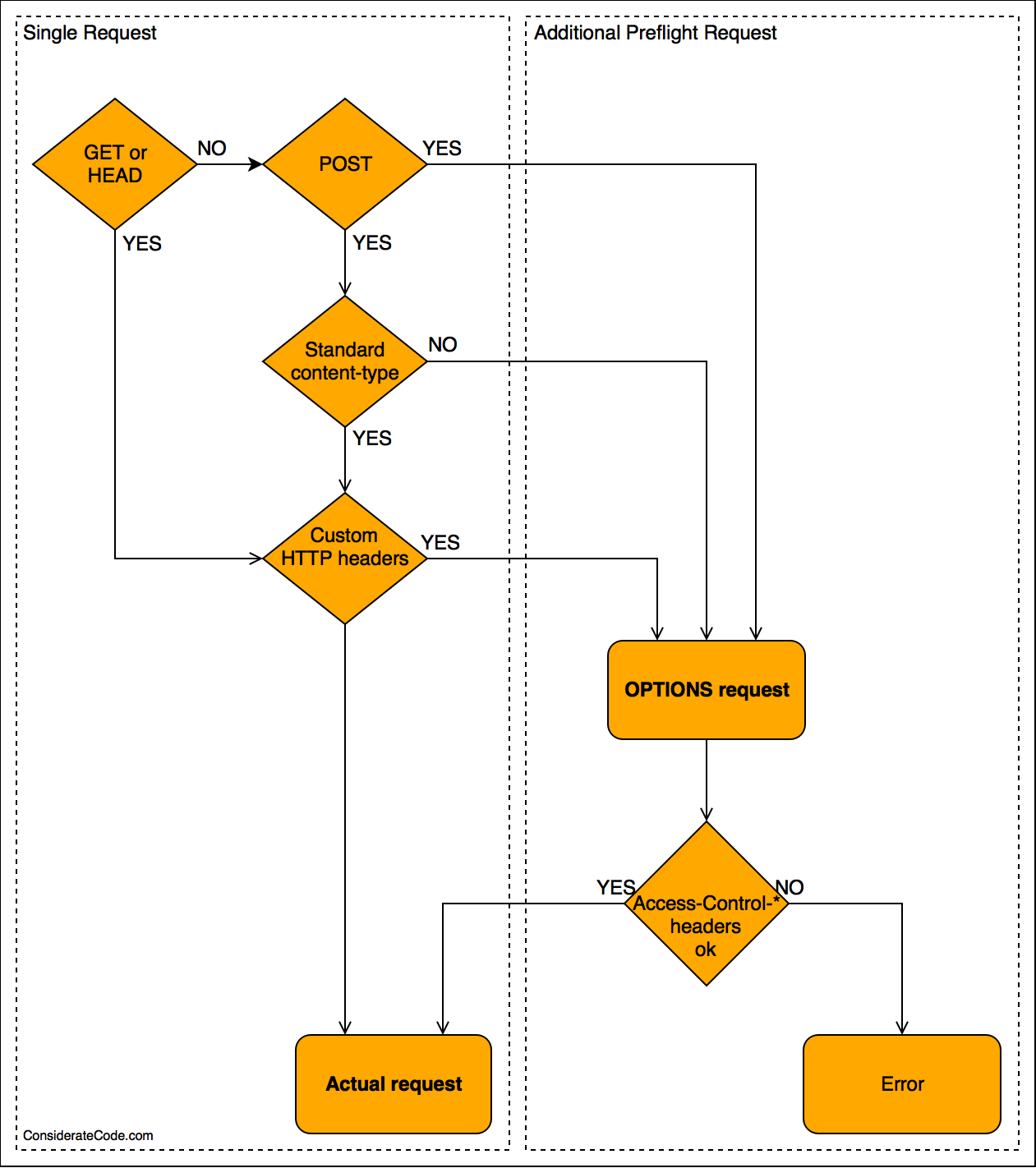
Simple vs. Preflight Requests
Not all cross-origin requests are treated the same.
- Simple Requests: These include basic
GET,HEAD, and somePOSTrequests. They are allowed to be sent, and the server includes CORS headers in the response to tell the browser if the response is accessible. - Preflighted Requests: More complex requests, such as those using methods like
PUTorDELETE, or those that include custom headers likeAuthorization(which our JWT-based API requires!), trigger a preflight request.
The browser first sends an OPTIONS request to the server to "ask for permission." The server then responds with what methods, origins, and headers it allows. If the server's response permits the actual request, the browser then sends it.

2. Configuring CORS in Spring Boot
Spring provides excellent support for CORS. We will focus on the most common and robust method: a global configuration. While you can use the @CrossOrigin annotation on individual controllers or methods for fine-grained control, a global policy ensures consistency across your entire API.
The Baeldung article 'CORS with Spring' provides an excellent overview of the different ways to configure CORS. We will focus on the global configuration approach, which is the most common for setting a single policy for an entire application.
Please read section 3, 'Global CORS Configuration', specifically subsection 3.1, 'JavaConfig'. This section demonstrates how to create a WebMvcConfigurer bean to define a global CORS policy. This is the foundation of the approach we'll be using.
To implement a global CORS configuration, you create a configuration class that implements the WebMvcConfigurer interface and overrides the addCorsMappings method.
Here is an example of what this looks like. You could add this as a new configuration class or add the bean to an existing one (but not your WebSecurityConfig yet).
@Configuration
public class WebConfig implements WebMvcConfigurer {

    @Override
    public void addCorsMappings(CorsRegistry registry) {
        registry.addMapping("/api/**") // Apply to all endpoints under /api
            .allowedOrigins("http://localhost:3000") // The origin of your frontend app
            .allowedMethods("GET", "POST", "PUT", "DELETE", "OPTIONS") // Allowed HTTP methods
            .allowedHeaders("*") // Allowed headers
            .allowCredentials(true) // If you need to include cookies/credentials
            .maxAge(3600); // How long the preflight response can be cached
    }
}
This configuration tells Spring to allow requests from http://localhost:3000 to any endpoint starting with /api/**. This is a clean, centralized way to manage your CORS policy.
However, if you run your application with this configuration and the Spring Security setup from our last lesson, it will fail. Let's see why.
3. The Crucial Integration with Spring Security
This is the most critical part of today's lesson. Spring Security's filter chain runs before the Spring MVC dispatcher that handles CORS.
When a browser sends a preflight OPTIONS request:
- The request has no
Authorizationheader and no cookies. - The
AuthTokenFilterwe built sees no token. - Spring Security rejects the request as "unauthorized" (often with a 401 or 403 status code) before it ever reaches the CORS processing logic.
- The browser sees the rejection and blocks the actual request.
To fix this, we must tell Spring Security to handle CORS processing first.
The Spring Security documentation and the Baeldung article both explain this interaction clearly. They show how to integrate CORS directly into the security filter chain.
Please read section 4, 'CORS With Spring Security'. This section explains why Spring Security must handle CORS first and demonstrates how to do it by adding .cors() to your HttpSecurity configuration and providing a CorsConfigurationSource bean.
The solution is to add CORS configuration directly to your WebSecurityConfig. Spring Security provides a dedicated .cors() method in the HttpSecurity chain. This method will look for a bean of type CorsConfigurationSource to get its configuration.
Let's modify our WebSecurityConfig.java:
- Add
.cors(Customizer.withDefaults())to yourHttpSecuritychain. - Define a
CorsConfigurationSourcebean. This is where you'll put the policy we defined earlier. TheWebMvcConfigurerwe discussed in the previous step is no longer needed, as this bean will be the single source of truth for CORS.
Here's the updated WebSecurityConfig:
@Configuration
@EnableWebSecurity
@EnableMethodSecurity
public class WebSecurityConfig {

    // ... all your existing beans and injections (UserDetailsService, AuthEntryPointJwt, etc.) ...

    @Bean
    public SecurityFilterChain filterChain(HttpSecurity http) throws Exception {
        http.csrf(csrf -> csrf.disable())
            // Tell Spring Security to use the CorsConfigurationSource bean
            .cors(Customizer.withDefaults())
            .exceptionHandling(exception -> exception.authenticationEntryPoint(unauthorizedHandler))
            .sessionManagement(session -> session.sessionCreationPolicy(SessionCreationPolicy.STATELESS))
            .authorizeHttpRequests(auth ->
                auth.requestMatchers("/api/auth/**").permitAll()
                    .anyRequest().authenticated()
            );

        http.authenticationProvider(authenticationProvider());
        http.addFilterBefore(authenticationJwtTokenFilter(), UsernamePasswordAuthenticationFilter.class);

        return http.build();
    }

    // This bean is the source of truth for CORS configuration
    @Bean
    CorsConfigurationSource corsConfigurationSource() {
        CorsConfiguration configuration = new CorsConfiguration();
        // This should be the origin of your frontend application
        configuration.setAllowedOrigins(Arrays.asList("http://localhost:3000"));
        configuration.setAllowedMethods(Arrays.asList("GET", "POST", "PUT", "DELETE", "OPTIONS"));
        configuration.setAllowedHeaders(Arrays.asList("Authorization", "Content-Type"));
        UrlBasedCorsConfigurationSource source = new UrlBasedCorsConfigurationSource();
        source.registerCorsConfiguration("/**", configuration); // Apply this configuration to all paths
        return source;
    }
}
With this setup:
- The
.cors()call ensures Spring Security'sCorsFilteris added to the filter chain early on. - This
CorsFilteruses ourcorsConfigurationSource()bean to get its policy. - It correctly handles preflight
OPTIONSrequests, adding the necessaryAccess-Control-*headers to the response, so the browser allows the subsequent, actual request to proceed.
Test your understanding!
A teammate suggests simplifying the security configuration by using .cors(cors -> cors.disable()). They argue that since the frontend and backend will eventually be deployed under the same domain in production, CORS won't be an issue there, so it's fine to just disable it for local development. What is wrong with this reasoning?
Show answer
The reasoning is flawed because .cors(cors -> cors.disable()) does not disable the browser's Same-Origin Policy. It only disables Spring Security's support for handling CORS. The browser will still send preflight requests, but the server will now fail to respond with the required Access-Control-* headers, leading to the exact same CORS error. To fix CORS issues, you must enable and correctly configure CORS support on the server, not disable it. This is a critical point emphasized in the Spring Security documentation.
Conclusion
Great work! You have now bridged the communication gap between a separate frontend application and your secure backend. This is a fundamental skill for any modern web developer.
Key Takeaways:
- Same-Origin Policy (SOP) is a browser security feature that restricts cross-origin HTTP requests.
- CORS is the standard mechanism that allows servers to specify which origins are permitted to access their resources.
- Requests with custom headers like
Authorizationtrigger a preflightOPTIONSrequest that must be handled correctly. - In a Spring Boot application using Spring Security, CORS must be handled by the security filter chain to process requests before they are rejected for being unauthenticated.
- The standard way to do this is by adding
.cors()to yourHttpSecuritychain and providing aCorsConfigurationSourcebean that defines your policy.
What's Next?
Our API is now functional, secure, and accessible. In the next module, we will shift our focus from infrastructure and security to the art of API Design. A well-designed API is intuitive, predictable, and easy for other developers to use. In our very next lesson, we will start by learning how to apply standard RESTful URI naming conventions to create clean and meaningful endpoint paths.