In our last lesson, we explored the fundamental building blocks of Python: variables and the basic data types used to store single pieces of information like numbers, text, and boolean values. Now, we'll take the next step and learn how to work with collections of data. This is essential for almost any real-world application, especially in web development with FastAPI, where you'll constantly deal with lists of items, user profiles, and other structured data.
This lesson focuses on Python's three primary built-in collection data structures: lists, tuples, and dictionaries. By the end of our session, you'll be able to create these structures, store data within them, and access that data effectively, giving you the tools to manage more complex information in your programs.
An Introduction to Collection Types
While variables holding single values are useful, we often need to group related data together. For example, a list of usernames, a set of geographical coordinates, or the details of a single user's profile. Python provides several powerful data structures for this purpose. A key concept to grasp is the difference between mutable and immutable types.
Python Data Structures: Lists, Dictionaries, Sets, Tuples
This article from Dataquest provides an excellent introduction to data structures.
To start, please read the first two short sections: What Is a Data Structure? Data Structures in Python This will give you a clear definition and introduce the crucial distinction between mutable (changeable) and immutable (unchangeable) data structures, which is central to understanding lists and tuples.
Lists: Ordered and Mutable Collections
A list is the most common and versatile collection type in Python. It's an ordered sequence of items, meaning the items stay in the specific order you put them in. Crucially, lists are mutable, so you can add, remove, or change elements after the list has been created.
To get a practical feel for lists, let's watch a video from Corey Schafer, a well-regarded Python educator. He provides clear, step-by-step examples.
Python Tutorial for Beginners 4: Lists, Tuples, and Sets
This video offers a fantastic introduction to Python lists.
Please watch from the beginning, focusing on these key operations: Creating a list and getting its length. Accessing elements using indexing and slicing. Modifying lists with methods like append(), insert(), extend(), remove(), and pop().
As you saw, lists are incredibly flexible. Here's a quick summary of how to create and access them:
# A list of strings
api_endpoints = ['/users', '/products', '/orders']


# A list with mixed data types
item_details = ['Product A', 14.99, 150, True]


# Accessing elements by index (starts at 0)
first_endpoint = api_endpoints[0]  # '/users'
last_endpoint = api_endpoints[-1] # '/orders'


# Slicing to get a sub-list
user_and_products = api_endpoints[0:2] # ['/users', '/products']


# Modifying the list
api_endpoints.append('/analytics')
print(api_endpoints) # ['/users', '/products', '/orders', '/analytics']
For a more detailed reference, the Dataquest article we looked at earlier has an excellent section on lists.
Python Data Structures: Lists, Dictionaries, Sets, Tuples
This section dives deeper into the properties and methods of lists.
Read the entire section on Lists, from the beginning down to the final code example showing modification. Pay attention to the clear code examples for creating, indexing, slicing, and modifying lists.
Tuples: Ordered and Immutable Collections
A tuple is very similar to a list—it's also an ordered sequence of items. The critical difference is that tuples are immutable. Once you create a tuple, you cannot change it. You can't add, remove, or reassign its elements.
This might seem limiting, but it's a very useful feature for data that you want to protect from accidental modification, like a set of coordinates or configuration settings.
Corey Schafer's video has a great segment explaining this distinction.
Python Tutorial for Beginners 4: Lists, Tuples, and Sets
Now, watch the segment on tuples.
Focus on the part from the beginning of the tuple section where he compares a mutable list to an immutable tuple. The example of trying to change an element and getting a TypeError is the most important concept to grasp.
Tuples are created using parentheses ().
# A tuple for geographical coordinates
location = (40.7128, -74.0060)


# Trying to change a tuple will raise an error
# location[0] = 41.8781  # This would cause a TypeError!


# Accessing elements works just like with lists
latitude = location[0]
One of the most important uses for tuples is as keys in a dictionary, which we'll see next. This is possible precisely because they are immutable.
Python Data Structures: Lists, Dictionaries, Sets, Tuples
This section provides further examples and context for tuples.
Read the full section on Tuples, starting from the beginning to the end. Note the example that shows a tuple being used as a dictionary key.
Dictionaries: Key-Value Pairs
A dictionary is an incredibly powerful and fundamental data structure in Python. Unlike lists and tuples, which are indexed by a range of numbers, dictionaries are indexed by keys. A dictionary stores data in key-value pairs. This is perfect for representing structured data, which is the cornerstone of how information is passed around in APIs.
Think of a user profile: you have labels (keys) like "username", "email", and "is_active", and each has a corresponding value. This maps directly to a Python dictionary.
user_profile = {
    "username": "jane_doe",
    "email": "jane.doe@example.com",
    "is_active": True,
    "login_attempts": 3
}
This structure is conceptually identical to JSON, the standard format for data in modern web APIs. Your journey into FastAPI will be filled with dictionaries!
Let's watch a video that introduces dictionaries and their common methods.
Python Lists, Tuples And Dictionaries - 10 | Python For Beginners | Python Tutorial | Simplilearn
This video from Simplilearn gives a clear overview of dictionaries.
Watch these two sections: The introduction to dictionaries, which explains the key-value concept. The demonstration of methods like accessing values by key, using .get(), .pop(), .keys(), .values(), .update(), and iterating through items.
Key operations for dictionaries include:
- Accessing a value:
user_profile['email'] - Adding or updating a pair:
user_profile['last_login'] = '2023-10-27' - Safely getting a value:
user_profile.get('location', 'N/A')(avoids an error if the key doesn't exist) - Getting all items:
user_profile.items()is very useful for looping.
Now, let's round this out with the detailed reading from Dataquest.
Python Data Structures: Lists, Dictionaries, Sets, Tuples
This section covers dictionaries in depth.
Read the entire section on Dictionaries, from the start to the end of the examples. This will reinforce how to create, access, and modify dictionaries.
The article from GeeksforGeeks also provides an excellent example that directly relates to our goal of learning FastAPI.
Difference between List, Tuple, Set, and Dictionary
This resource has a great example of dictionaries used for API data.
In the Python Dictionary section, find the example for application #4, "Storing and Accessing JSON Data." This shows how a JSON text string is converted directly into a Python dictionary, a process you will use constantly when building APIs.
Summary: Choosing the Right Tool
Knowing when to use each data structure is key to writing effective Python code. This table provides a quick side-by-side comparison.
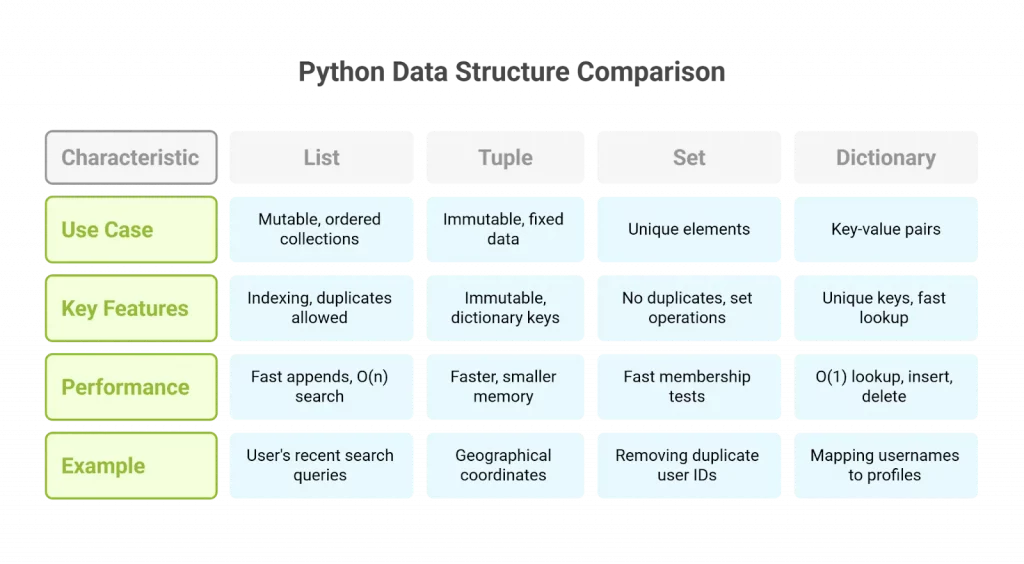
To put it simply:
- Use a List when you need an ordered collection of items that you might need to change, add to, or remove from. Example: A list of tags for a blog post.
- Use a Tuple when you have an ordered collection of items that should not change. Example: A pair of (latitude, longitude) coordinates.
- Use a Dictionary when you need to store structured information and look it up using unique identifiers (keys). Example: A user's profile information.
Conclusion
Today we've moved from single variables to powerful collection types that can store and organize complex data.
Key Takeaways:
- Lists (
[]) are ordered, mutable (changeable) collections. They are your go-to for flexible sequences of items. - Tuples (
()) are ordered, immutable (unchangeable) collections. They are used for data integrity and can serve as dictionary keys. - Dictionaries (
{}) store data as key-value pairs. They are mutable and optimized for fast lookups by key, making them ideal for representing structured data like JSON objects.
These three data structures are fundamental to everything we will do moving forward. In our next lesson, we will learn about conditional statements and loops. This will allow us to iterate through our lists, tuples, and dictionaries, and perform actions based on the data they contain, truly bringing our programs to life.