Welcome to our third lesson in the Python Fundamentals module. In our previous session, we covered how to store collections of data using lists, tuples, and dictionaries. Now that you know how to organize data, it's time to learn how to control the flow of your programs to make decisions and perform repetitive actions based on that data.
This lesson is all about control flow. You will learn to write conditional statements (if, elif, else) to execute different code blocks based on specific conditions, and loops (for, while) to repeat tasks efficiently. Mastering these concepts is fundamental to programming and absolutely essential for building the logic within your future FastAPI applications, where you'll constantly need to check user permissions, validate data, and iterate through database results.
Making Decisions with Conditional Statements
The most basic way to control a program's flow is by making decisions. Python uses if, elif, and else statements to execute code only when certain conditions are met.
A great starting point is this video from Programming with Mosh, which clearly explains the structure of conditional statements in Python.
Control Flow in Python - If Elif Else Statements
This video introduces the core concepts of if, elif, and else.
Please watch the following segments: The first part explains the basic if statement, the role of the condition, and the critical importance of indentation. The next segment demonstrates how to use elif to check for multiple conditions and else to provide a default action.
Let's break down the structure you just saw.
- The
ifstatement: This is the simplest form. The code inside theifblock only runs if the condition evaluates toTrue. - The
if-elsestatement: This provides an alternative path. If the condition isTrue, theifblock runs; otherwise, theelseblock runs. - The
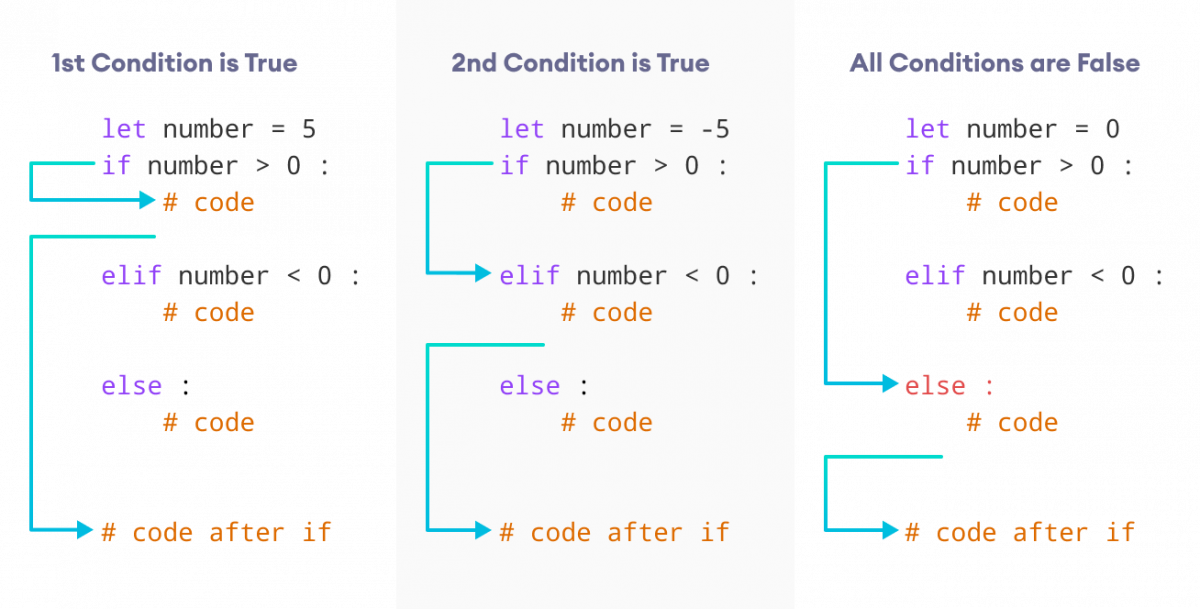
if-elif-elsechain: This allows you to check a series of conditions.elifis short for "else if". Python will check each condition in order, and as soon as it finds one that isTrue, it will execute that block and skip the rest of the chain. The finalelseis optional and runs if none of the preceding conditions were met.
The following image provides a great visual summary of how the if-elif-else structure directs the flow of your program.
For a more detailed textual reference on the syntax, you can read through these sections from the "Open Book Project".
4. Conditionals, loops and exceptions — Beginning Python ...
This resource provides a clear, written explanation of conditional statements.
Please read the following three short sections: The if statement, which covers the basic structure. The if else statement, for handling two possibilities. Chained conditionals, which introduces elif for multiple possibilities.
Combining Conditions with Logical Operators
Often, a decision depends on more than one factor. Python's logical operators—and, or, and not—allow you to create more complex conditions.
and:Trueonly if both conditions are true.or:Trueif at least one condition is true.not: Inverts a boolean value (TruebecomesFalse, andFalsebecomesTrue).
For example, in a web application, you might check if user_is_logged_in and user_is_admin.
The video from Programming with Mosh has an excellent segment on this. Pay close attention to the common mistakes he highlights, like comparing a boolean variable with == True.
Control Flow in Python - If Elif Else Statements
This part of the video explains how to use logical operators to build complex conditions.
Watch the segment from the start of the logical operators section. It covers and, or, and not with practical examples.
Repeating Actions with Loops
Loops are used to execute a block of code multiple times. This is fundamental for working with the data collections we learned about in the last lesson. There are two main types of loops in Python: for loops and while loops.
The key distinction is:
- Use a
forloop when you have a known sequence of items to iterate over (like a list of users or a range of numbers). This is called definite iteration. - Use a
whileloop when you want to repeat an action as long as a condition remains true, but you don't know in advance how many iterations it will take (e.g., waiting for user input). This is called indefinite iteration.
This distinction is explained well in the "Open Book Project" resource.
4. Conditionals, loops and exceptions — Beginning Python ...
This section clearly articulates when to use each type of loop.
Read the section Choosing between for and while.
The for Loop: Iterating Over Sequences
The for loop is Python's workhorse for iteration. It automatically goes through each item in a sequence (like a list, tuple, or string) and assigns it to a temporary variable.
# Iterating over a list
users = ["Alice", "Bob", "Charlie"]
for user in users:
    print(f"Hello, {user}!")


# Iterating over the characters of a string
for char in "FastAPI":
    print(char)
Sometimes you just want to loop a specific number of times. The range() function is perfect for this. range(5) generates numbers from 0 up to (but not including) 5.
# Looping a specific number of times
for i in range(3):
    print(f"This is loop number {i}") # Prints for i=0, i=1, i=2
The following video from Dave Gray demonstrates how to use for loops with lists, strings, and the range() function.
Python While Loops & For Loops | Python tutorial for Beginners
This video provides a practical introduction to for loops.
Watch these two parts: The first part introduces for loops by iterating over a list of names and the characters in a string. The segment on ranges shows how to use the range() function to control the number of iterations, including setting start, stop, and step values.
The while Loop: Looping Based on a Condition
A while loop continues to execute as long as its condition is True. This is useful for scenarios where the end point is not known. A classic example is a game loop that continues until the player decides to quit.
A while loop typically requires three parts:
- An initial setup of a variable that the condition depends on.
- The
whileloop with its condition. - An update to the variable inside the loop, so the condition eventually becomes false and the loop can end. Forgetting this step leads to an infinite loop!
count = 0
while count < 3:
    print(f"Count is {count}")
    count = count + 1 # or count += 1. This prevents an infinite loop.
print("Loop finished.")
Dave Gray's video clearly demonstrates the while loop, including the potential pitfalls.
Python While Loops & For Loops | Python tutorial for Beginners
This segment explains the structure and execution of a while loop.
Watch the introductory part on while loops from the beginning. He explains the basic structure and the importance of incrementing a value to prevent an infinite loop.
Controlling Loops with break and continue
Sometimes you need to alter the flow of a loop from within.
break: Immediately terminates the loop, and the program continues at the statement after the loop.continue: Immediately stops the current iteration and jumps to the beginning of the next one.
These are best understood with an example.
Python While Loops & For Loops | Python tutorial for Beginners
This video shows how break and continue work in both while and for loops.
Watch these four short clips: while loop with break: Break example while loop with continue: Continue example for loop with break: Break example for loop with continue: Continue example
Putting It All Together: A Practical Example
Let's look at a complete piece of code that combines a for loop with an if-elif-else block to create a simple age guessing game. This is a great illustration of how these control flow structures work together to create interactive logic.
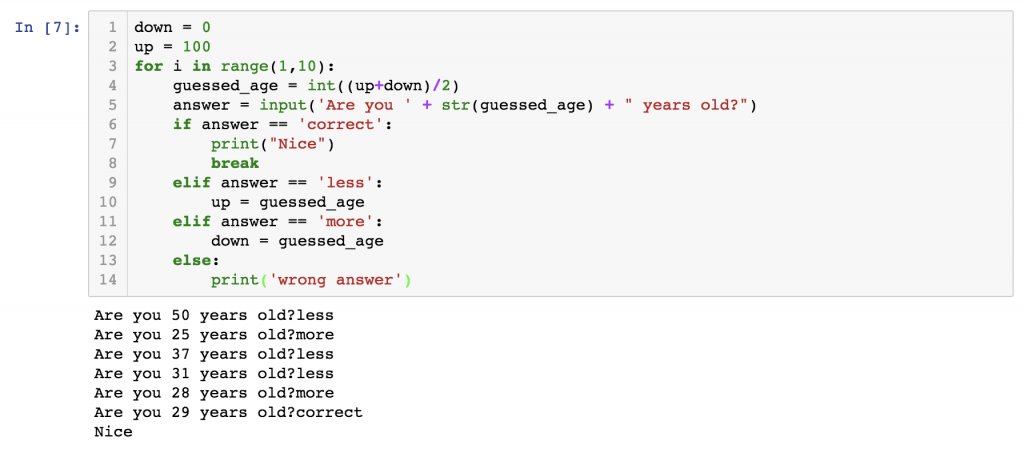
Notice how the for i in range(1, 10): sets up a loop for a maximum of 9 guesses. Inside the loop, the if/elif/else structure checks the user's answer and decides what to do next: narrow the up or down boundaries of the search, or break out of the loop if the answer is 'correct'.
Conclusion
Today, you've learned the essential tools for controlling the logic and flow of your Python programs. These concepts transform your code from a simple, linear script into a dynamic program that can react to data and perform complex, repetitive tasks.
Key Takeaways:
- Conditional Statements (
if/elif/else) allow your program to make decisions and execute different code paths based on whether conditions are true or false. - The
forloop is used for definite iteration over a known sequence, such as the items in a list or a series of numbers fromrange(). - The
whileloop is used for indefinite iteration, repeating a block of code as long as a condition remains true. - Loop Control Statements (
break/continue) give you fine-grained control to exit a loop or skip an iteration.
In our next lesson, we will explore list comprehensions. This is a powerful and "Pythonic" feature that lets you create lists using a compact syntax that builds directly upon the loops and conditionals you learned today. It's a great way to write more concise and readable code.