Hello! In our last lesson, we explored list comprehensions, a concise way to create lists using loops and conditionals. This was our first step towards writing more "Pythonic" code. Today, we'll take a major leap forward in structuring our programs by learning about functions.
This lesson is all about defining and calling your own functions. Functions are the fundamental building blocks of almost any Python program, and they are absolutely central to FastAPI, where every API endpoint you create will be a Python function. We will cover how to define a function to package a piece of logic, how to pass information into it using parameters, and how to get results back using return values.
Why Do We Need Functions?
As programs grow, you often find yourself writing the same or very similar blocks of code over and over again. This repetition makes the code harder to read, harder to change, and more prone to bugs. Functions solve this problem by allowing you to define a block of code once and then reuse it whenever you need it.
Let's look at a clear example of this problem.
24. Functions | Python Tutorial
This article from Python-Course.eu provides a simple, effective example of repetitive code and sets the stage for how functions can solve the issue.
Please read the section titled Motivating Example. Notice how the same three print statements are repeated for each person being greeted.
This kind of redundancy is exactly what functions are designed to eliminate. By packaging that greeting logic into a single, reusable function, you can make your code cleaner, more modular, and much easier to maintain.
Anatomy of a Python Function
A function is a named block of code that you can execute on demand. Defining a function involves a few key components.

Let's break down the syntax for defining and calling a basic function. The "Bro Code" channel has a great, straightforward video that walks through this.
Functions in Python are easy 📞
This video provides a very clear, hands-on introduction to what functions are, why they're useful, and how to define and call them.
Watch the first segment, "What is a function?". Pay attention to the def keyword, the function name, the parentheses (), the colon :, and the indented code block that forms the function's body.
As you saw, the basic structure is:
defkeyword: This signals the start of a function definition.- Function Name: A descriptive name for the function (e.g.,
greet_user). - Parentheses
(): These are required. They will hold the function's parameters, which we'll discuss next. - Colon
:: Marks the end of the function header. - Indented Body: The block of code that runs when the function is called.
Once defined, you call (or invoke) the function by writing its name followed by parentheses: greet_user().
Passing Data with Parameters and Arguments
Simple functions are useful, but their real power comes from the ability to pass data into them, allowing them to produce different results. This is done using parameters and arguments.
- A parameter is the variable listed inside the parentheses in the function definition. It's a placeholder.
- An argument is the actual value that is sent to the function when it is called.
The following video from "Programming with Mosh" explains this crucial distinction very clearly.
Python Functions | Python Tutorial for Absolute Beginners #1
This video demonstrates how to add parameters to a function to make it more dynamic and explains the difference between parameters and arguments.
Please watch the section from "Parameters and Arguments". Notice how the greet function is modified to accept first_name and last_name.
To solidify your understanding of defining and calling functions with parameters, let's turn to a detailed article from Real Python.
Defining Your Own Python Function
This article provides a thorough breakdown of the syntax for defining and calling functions in Python.
First, read the section "Defining Functions" to review the def syntax. Then, carefully read the next section, "Calling Functions", which reinforces the distinction between parameters and arguments and highlights the importance of using parentheses () when making a call.
Getting Results with the return Statement
Functions can do one of two things:
- Perform a task (a "side effect"): Like printing text to the screen. The
greetfunctions we've seen so far do this. - Calculate a value and return it: This allows the calling code to use the result of the function's work.
To send a value back to the caller, we use the return statement. This is incredibly powerful because it allows us to build functions that act like tools, taking input and producing output that can be stored in variables or passed to other functions.
Let's watch another clip from Mosh that explains this concept.
Python Functions | Python Tutorial for Absolute Beginners #1
This clip distinguishes between functions that perform tasks and those that return values. It also explains what happens when you don't explicitly return anything.
Watch these two short segments: Task vs. Return Value: This explains the benefit of returning a value for code reusability. Default Return Value: This explains that if you don't use a return statement, a function returns the special value None by default.
The data flow of a function call—passing arguments to parameters and receiving a return value—can be visualized to make it clearer.
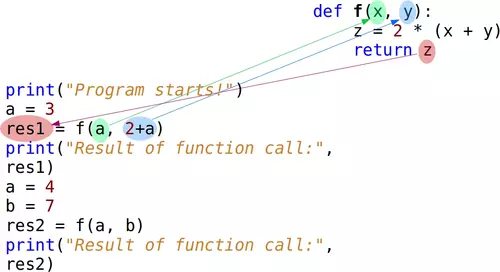
For a more in-depth look at how return works, including returning multiple values (which Python packs into a tuple), let's go back to the Real Python article.
Defining Your Own Python Function
This part of the article discusses the difference between functions that cause "side effects" (like printing) and those that return values.
Please read the sections "Returning From Functions" and "Returning Values". Focus on the syntax of the return statement and the concept that a function without an explicit return will return None.
Ways to Pass Arguments
When you call a function with multiple arguments, Python gives you a couple of ways to pass them.
-
Positional Arguments: This is what we've seen so far. The arguments are matched to parameters based on their order. The first argument goes to the first parameter, the second to the second, and so on.
-
Keyword Arguments: You can explicitly name which parameter each argument is for, using the syntax
parameter_name=value. This makes your code more readable and means the order of arguments no longer matters.
This is a key concept in Python, as many libraries, including FastAPI, use keyword arguments extensively for clarity and flexibility.
Defining Your Own Python Function
This text explains the two main ways to pass arguments to a function.
Read through the sections on Positional Arguments and Keyword Arguments. Pay close attention to the example that shows how keyword arguments can make a function call much more self-explanatory (update_product(...)). Also, note the rule that positional arguments must always come before keyword arguments in a function call.
Essential Function Features
To round out our introduction, let's cover two more features that are vital for writing clean, professional code.
- Default Parameter Values: You can make an argument optional by providing a default value for its parameter in the function definition. If the caller doesn't provide an argument for that parameter, the default value is used.
- Docstrings: A docstring is a string literal placed at the very beginning of a function's body. It's used to document what the function does, what its parameters are, and what it returns. This is crucial for making your code understandable to others and to your future self.
Defining Your Own Python Function
This reading covers two practical and important features for writing robust and maintainable functions.
Please read these two sections: Default Argument Values: This shows you how to make parameters optional. Docstrings: This explains the convention for documenting your functions.
Conclusion
In this lesson, we've covered the essentials of creating and using functions in Python. You now have the tools to package your code into logical, reusable units—a skill that is foundational for any programming task, especially for building web APIs with FastAPI.
Key Takeaways:
- Functions are defined with the
defkeyword and are used to create reusable blocks of code. - Parameters are the placeholders in a function's definition, while arguments are the actual values you pass when you call it.
- The
returnstatement sends a value back from the function to the caller. Functions without an explicitreturnstatement returnNone. - Arguments can be passed by position (order matters) or by keyword (
name=value, order doesn't matter), which improves readability. - You can make parameters optional by providing default values.
- Docstrings are the standard way to document your functions and are a cornerstone of writing maintainable code.
In our next lesson, we'll explore how to import and use modules. Now that you can write your own functions, you'll learn how to leverage the vast collection of functions written by others, which are organized into modules and packages in the Python standard library and the broader ecosystem.