Welcome to the final lesson in our Python Fundamentals module! So far, we've learned to write functions and use modules to build our programs. But what happens when things go wrong? Code doesn't always run perfectly; unexpected situations can arise, like trying to open a file that doesn't exist or dividing a number by zero. If left unhandled, these "errors" will crash your program.
This lesson will teach you how to handle exceptions using try/except blocks. This is a crucial skill for writing robust, reliable software. Instead of letting your program fail, you'll learn to anticipate potential problems and manage them gracefully. This concept is fundamental to your goal of learning FastAPI, as web applications must handle invalid user input and other runtime errors without crashing the server.
Exceptions vs. Syntax Errors
Before we start handling errors, it's important to distinguish between two main kinds of errors in Python.
-
Syntax Errors: These are errors where the code violates the rules of the Python language itself, like a typo, a missing parenthesis, or incorrect indentation. The Python interpreter detects these before the program even starts running. You've likely seen these before, and the only solution is to fix the code's syntax.
-
Exceptions: These occur while the program is running, even if the syntax is perfectly correct. The code is valid, but it encounters a situation it cannot handle. For example, asking for user input and trying to convert the text "hello" into an integer will raise a
ValueError. These are the errors we can manage with exception handling.
The following article from Real Python provides a clear explanation of this distinction.
Python Exceptions: An Introduction
This article introduces the fundamental difference between syntax errors and exceptions, which is key to understanding what we're trying to "handle."
Read the section "Understanding Exceptions and Syntax Errors". Notice the two examples: the first shows a SyntaxError from an unmatched parenthesis, while the second, print(0/0), shows a ZeroDivisionError exception. This second type is our focus today.
The try and except Block: Your Safety Net
When you anticipate that a line of code might cause an exception, you can wrap it in a try...except block. This acts as a safety net.
- The code inside the
tryblock is executed first. - If an exception occurs within the
tryblock, Python immediately stops executing the rest of thetryblock and jumps to theexceptblock. - The code inside the
exceptblock is then executed, allowing you to handle the error gracefully (e.g., by printing a user-friendly message) instead of letting the program crash. - If no exception occurs in the
tryblock, theexceptblock is skipped entirely.
Let's see this in action with a very common scenario: trying to open a file that may not exist.
Python Tutorial: Using Try/Except Blocks for Error Handling
This video from Corey Schafer provides an excellent, practical introduction to try/except using a FileNotFoundError.
Watch the first two minutes, from the beginning to the end. Notice how wrapping the open() function call in a try block and adding an except block prevents the program from crashing and allows you to display a custom message.
Be Specific: Catching the Right Exceptions
The simple except: block you just saw will catch any exception. While this seems safe, it's actually a dangerous practice. It can hide bugs you didn't anticipate, making your code difficult to debug. For instance, it might catch a TypeError from a mistake you made elsewhere in the try block, but you'll get the same "file not found" message, leading to confusion.
A much better practice is to specify the exact exception you expect to handle.
You can have multiple except blocks to handle different types of exceptions, and you can also use except Exception as e to catch any remaining, unexpected exceptions and inspect the error message.
Python Exceptions: An Introduction
This Real Python article goes into detail about why catching specific exceptions is critical and how to handle multiple exception types.
Please read the entire section Handling Exceptions. Pay close attention to these key points: The example of catching FileNotFoundError specifically. The ability to access the exception object using as error (or as e). The structure for handling multiple, different except blocks. The strong warning at the end: "Avoid using bare except clauses." This is one of the most important best practices in Python error handling.
This short video clip also demonstrates this concept very clearly, showing how a general exception can hide an unrelated NameError.
Python Tutorial: Using Try/Except Blocks for Error Handling
Corey Schafer continues his explanation by showing why being specific is so important and how to handle multiple exception types correctly.
Watch the segment from this point. He explains why a general Exception is too broad and demonstrates how to stack specific exceptions before a general one. Note the as e syntax to get the actual error message.
The Full Structure: else and finally
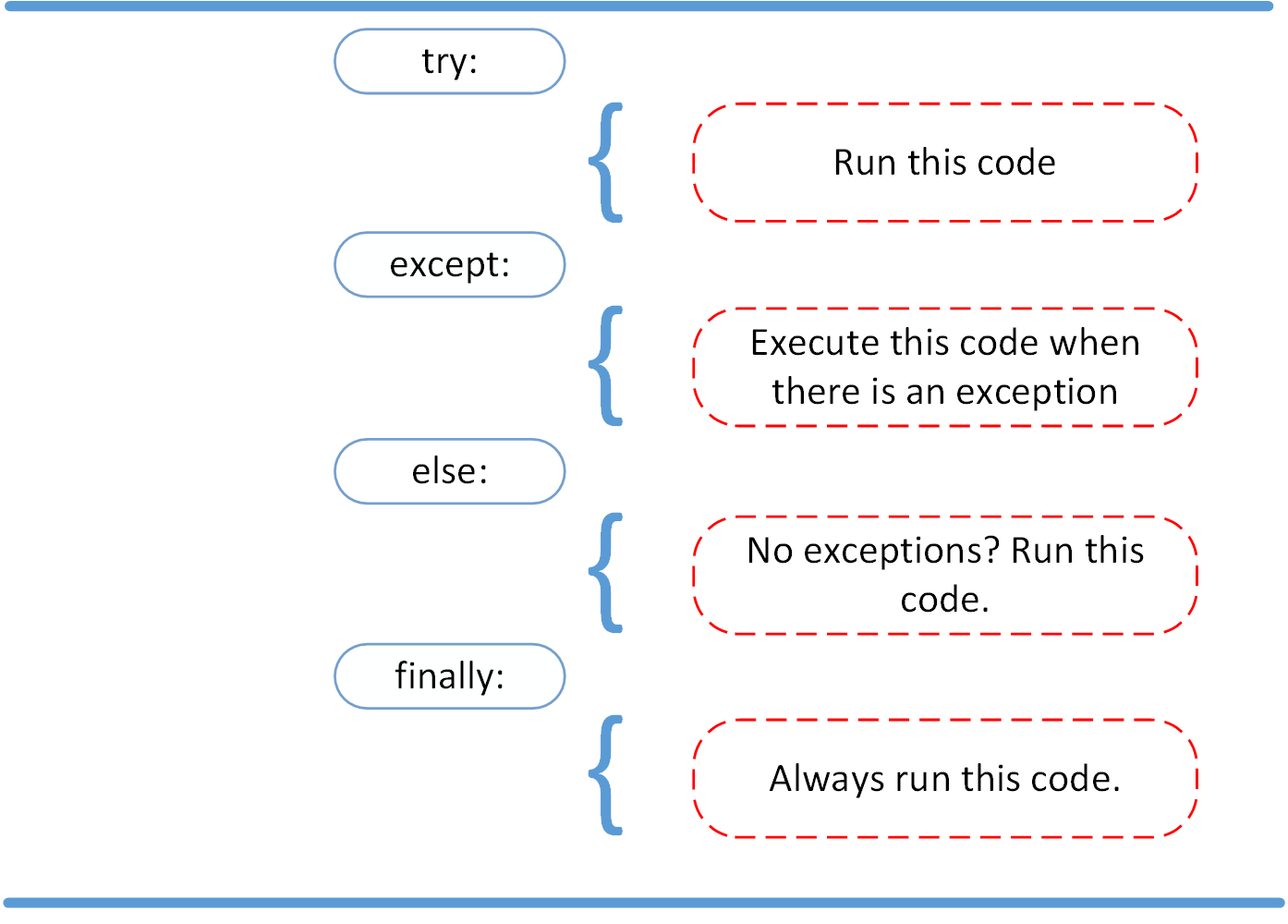
The try...except block can be extended with two more optional clauses: else and finally. They give you even finer control over your program's flow.
-
else: The code in theelseblock runs only if thetryblock completes successfully (i.e., no exceptions were raised). This is useful for code that should only run when the "risky" part succeeds, like processing a file after you've successfully opened it. -
finally: The code in thefinallyblock always runs, regardless of what happened in thetry,except, orelseblocks. It runs if there was an exception, if there wasn't an exception, and even if you exit the block with areturnstatement. This makes it perfect for cleanup actions, like closing a file or releasing a network connection, ensuring these actions happen no matter what.
This diagram provides a great visual summary of how these four blocks work together.
The following video provides a clear walkthrough of both else and finally.
Exception Handling in Python | TRY EXCEPT in Python | Python Tutorial for Beginners #8
This video from techTFQ has distinct sections explaining the else and finally clauses with simple, clear examples.
First, watch the explanation of the else clause from this section. Then, continue with the finally clause from the next part. Notice how finally is executed in both the success and failure scenarios.
Manually Raising Exceptions
Finally, sometimes you need to create an exception yourself. If a function receives invalid input, for example, you can use the raise keyword to signal an error. This allows you to enforce rules in your own functions, which is essential for writing robust and testable code.
def set_age(age):
    if not isinstance(age, int) or age < 0:
        raise ValueError("Age must be a non-negative integer.")
    print(f"Age set to {age}")

try:
    set_age(25)    # This will work
    set_age(-5)    # This will raise a ValueError
except ValueError as e:
    print(f"Error: {e}")
This practice is central to frameworks like FastAPI, which uses raised exceptions to send appropriate HTTP error responses to the client.
Conclusion
You've now reached the end of our Python fundamentals module! In this lesson, we tackled the critical topic of error handling, moving your skills from simply writing code that works to writing code that is resilient and robust.
Key Takeaways:
- Exceptions are errors that occur during program execution.
- The
tryblock contains code that might raise an exception. - The
exceptblock catches and handles specific exceptions, preventing your program from crashing. It's best practice to catch specific exceptions rather than using a bareexcept:. - The
elseblock contains code that runs only if thetryblock completes without any exceptions. - The
finallyblock contains cleanup code that runs no matter what, ensuring that resources are released properly. - You can use the
raisekeyword to trigger exceptions manually when certain conditions are not met.
With this lesson, you've completed the essential Python foundation needed for our journey. You are now prepared to tackle the more advanced concepts that are used directly in FastAPI.
In our next lesson, we will begin a new module, "Advanced Python for FastAPI," starting with a look at type hints. You'll learn how to add type information to your variables and functions, a modern Python feature that FastAPI uses extensively to provide powerful data validation, documentation, and editor support.