Welcome to the start of your journey to mastering professional React development! This first lesson lays the groundwork for everything that follows. We'll demystify the unique syntax you see in React codebases and understand how it actually works under the hood.
Your goal is to build a deep, interview-ready understanding of React, from the fundamentals to advanced architecture. We'll begin with the most basic building block you'll encounter: JSX. By the end of this session, you will be able to explain precisely what JSX is, why it's used, and what it compiles into before it ever reaches a user's browser. This is a foundational concept frequently asked about in technical interviews.
What is JSX and Why Do We Need It?
At its heart, React is a JavaScript library for building user interfaces. You could, in theory, build an entire application using only standard JavaScript functions. However, describing a complex UI—with its nested elements, attributes, and logic—can become incredibly verbose and hard to read using plain function calls.
This is the problem JSX was created to solve.
JSX stands for JavaScript XML. It is a syntax extension for JavaScript that allows you to write HTML-like markup directly inside your JavaScript files.
It's crucial to understand that JSX is not valid JavaScript on its own. A web browser cannot execute it directly. Think of it as "syntactic sugar"—a more convenient and readable way to write code that must be transformed into regular JavaScript before it can be run.
This video from Harry Wolff offers a concise history and explanation for why JSX was introduced, contrasting it with the "repulsive" but now "beloved" reception it initially received.
Watch this short segment for a high-level overview of JSX's purpose.
Pay attention to the core reason for its creation, explained from this point. It's all about making UI development in JavaScript easier.
The Transformation: From JSX to JavaScript
Since browsers don't understand JSX, your code needs to go through a compilation step before it's delivered to users. This process is handled by a tool called a transpiler, with Babel being the most common one in the React ecosystem. Babel reads your JSX and converts it into standard, browser-compatible JavaScript.
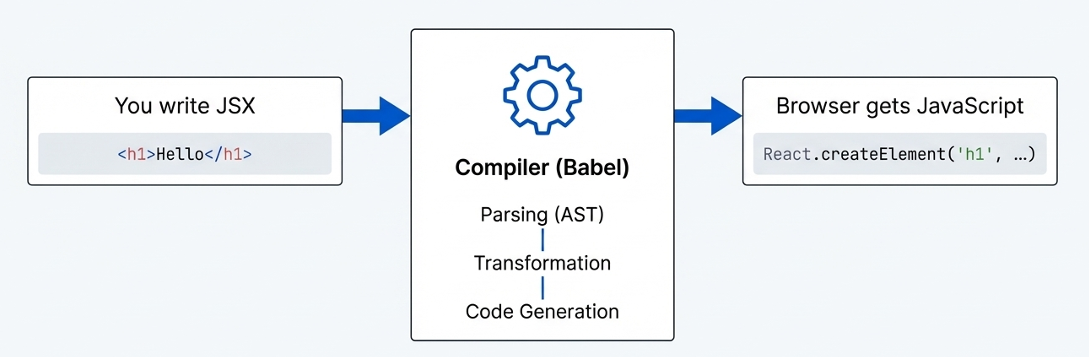
So, what does this "regular JavaScript" look like?
Historically, and as a core conceptual model, every JSX tag is converted into a function call: React.createElement().
This is the central concept you need to grasp. The HTML-like syntax is simply a developer-friendly abstraction over these function calls.
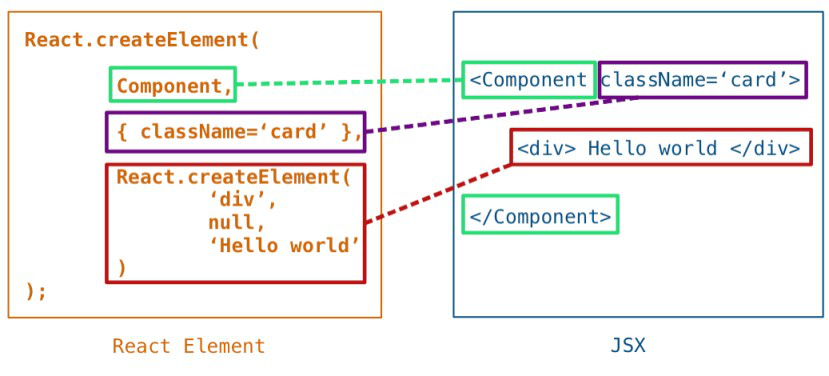
To see this transformation in more detail, let's turn to a comprehensive article from freeCodeCamp. It breaks down the process and the function signature itself.
JSX in React – Explained with Examples
This article provides clear, code-based examples of the JSX-to-JavaScript transformation.
First, read the introduction What is JSX? to solidify the definition. Next, focus on the section "How JSX is transformed to React.createElement". Read the text and compare the JSXDemo component written with JSX to its compiled output. This demonstrates the "syntactic sugar" concept perfectly. Finally, review the section "What is the React.createElement Function?". Pay close attention to the function's signature: React.createElement(type, [props], [...children]). Understanding these three arguments is key.
The React.createElement() function takes three main arguments:
- Type: The element type (e.g.,
'div','h1', or another React component). - Props: An object containing the element's attributes (e.g.,
{ className: 'card' }). - Children: The content inside the element, such as text or other
React.createElementcalls for nested elements.
The result of this function call is a plain JavaScript object known as a React Element, which is a lightweight description of what to render on the screen. We will explore the distinction between elements and components in a later lesson.
To see this transformation happen live, let's watch a demonstration.
In this segment, the instructor uses an online transpiler to show JSX being converted in real-time. This is an excellent way to see the theory in practice.
Watch the demonstration from this section. The instructor starts with a simple <div> and gradually adds complexity, showing how each change in JSX affects the resulting React.createElement() output. Notice how nested JSX tags become nested function calls.
A Modern Update: The New JSX Transform
As a senior developer aiming for mastery of modern practices, you should be aware of a significant evolution. In React 17, a "new JSX transform" was introduced. While the core idea remains the same (JSX becomes function calls), the implementation changed.
- The Old Way: Because JSX compiled to
React.createElement(), you had to explicitly import React (import React from 'react';) in every file that used JSX. If you forgot, you'd get an error becauseReactwould be undefined when the compiled code tried to callReact.createElement. - The New Way: The new transform automatically imports special functions from a
react/jsx-runtimeentry point. This means you no longer need to import React just to use JSX.
This is a common point of confusion and a great topic to be clear on for interviews. The fundamental concept of JSX compiling to function calls is unchanged, but the specific mechanics have been streamlined.
The official React blog post explains this change clearly.
Introducing the New JSX Transform – React Blog
This post from the React team explains the motivation and difference between the old and new transforms.
Read the section What’s Different in the New Transform?. Compare the "old JSX transform" code block with the "new JSX transform" block to see the difference in the compiled output.
Even with this new transform, if you ever need to create an element manually in your code (which is rare), you would still use React.createElement().
Conclusion
In this lesson, we established the absolute foundation of writing React applications. You now have a solid mental model for what happens when you write that familiar HTML-like syntax in your JavaScript files.
Key Takeaways:
- JSX is a syntax extension for JavaScript that allows you to write UI structures in an HTML-like way.
- It is "syntactic sugar" for
React.createElement()function calls (or functions fromreact/jsx-runtimewith the new transform). - Browsers cannot execute JSX directly. It must be transpiled into standard JavaScript by a tool like Babel.
- The output of these function calls are React elements—JavaScript objects that describe the UI.
- Key syntax differences exist between JSX and HTML (e.g.,
classNamevs.class) because JSX is fundamentally JavaScript.
Now that we've defined the syntax we'll be using, our next lesson will focus on putting it to work. We will create our first functional components, learn how to compose them together, and see how they form the reusable, modular building blocks of a React application.