Introduction
In our last lesson, you built a powerful agent using the ReAct framework. This agent can reason about a problem and use tools to find a solution, all within a single, continuous run. However, once that run finishes, the agent forgets everything. If you start a new conversation, it has no memory of your previous interaction. For instance, if you told it about a specific solar project, it wouldn't remember that project's details a minute later in a new query.
This lesson tackles that fundamental limitation. Our goal is to implement short-term memory for an agent to maintain context across multiple interactions. You will learn how to make your agent "stateful," enabling it to remember the flow of a conversation, just like a human analyst would. This is a critical step in building sophisticated agents that can engage in meaningful, multi-turn dialogues for tasks like iterative financial model refinement or progressive due diligence questioning.
We'll explore the core strategies for managing this conversational memory and then implement it using the modern, production-oriented features of LangGraph.
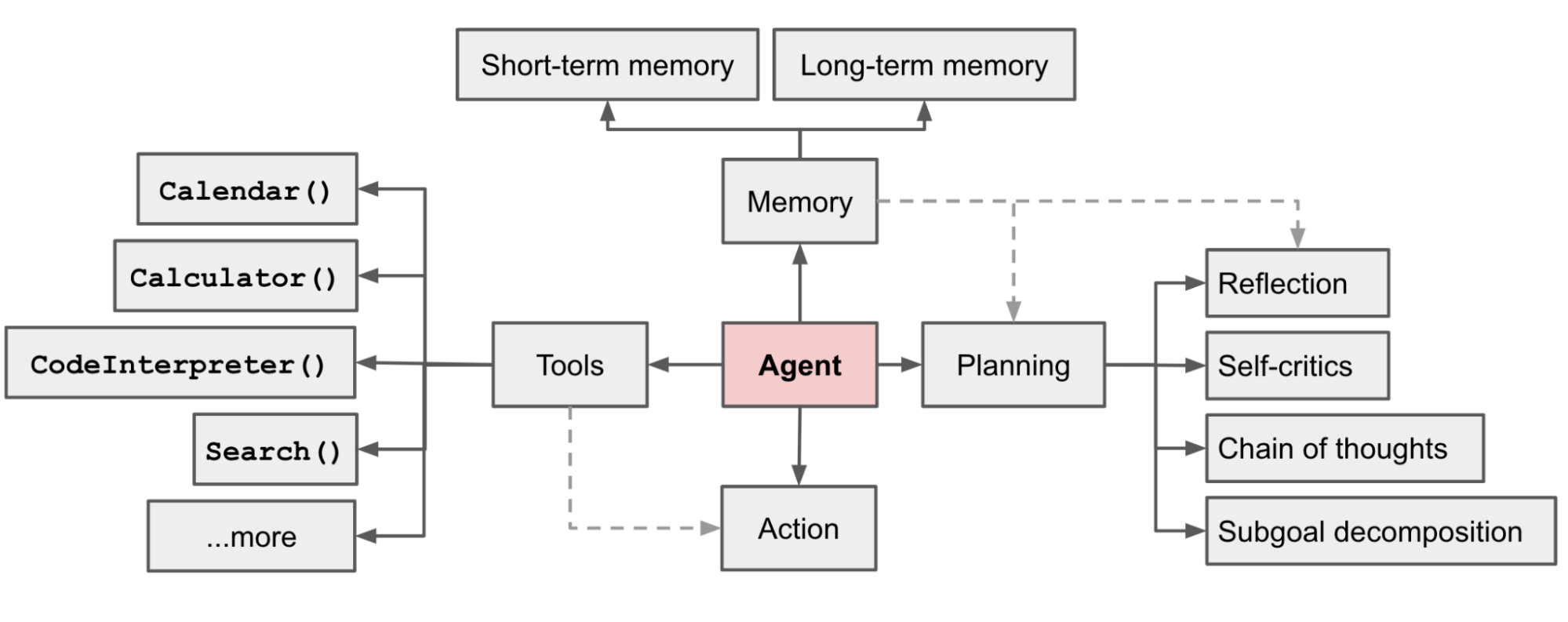
Part 1: Why Conversational Memory is Necessary
At their core, Large Language Models are stateless. Each time you send a request to an LLM's API, it processes that request in isolation, with no inherent knowledge of past requests. To create the illusion of a continuous conversation, we must manually provide the relevant history with each new query.
This "memory" is simply the history of messages (both from the user and the agent) that we include in the prompt we send to the LLM. This allows the model to understand context, resolve references (e.g., knowing what "it" refers to), and build upon previous turns of the conversation.
To start, let's watch a brief, clear explanation of why memory is so crucial for building conversational agents.
LangChain - Conversations with Memory (explanation & code walkthrough)
The video 'LangChain - Conversations with Memory' by Sam Witteveen provides an excellent conceptual overview of why memory is essential and the basic approaches to implementing it.
Watch from the beginning to 02:43. Focus on the key reasons memory is important, like handling abbreviations and co-reference resolution ('he', 'she', 'it').
The fundamental technique, as the video explains, is to put the conversation history back into the prompt. The immediate challenge this creates is managing the LLM's finite context window. A long conversation can easily exceed the token limit, leading to errors or significant costs.
Part 2: Strategies for Managing Short-Term Memory
Since we can't just append messages indefinitely, we need strategies to keep the conversation history a manageable size while retaining the most important context. Your choice of strategy involves trade-offs between context fidelity, token usage (cost), and complexity. Given your background in product management and system design, thinking about these trade-offs is key.
The following video segments provide a practical walkthrough of the most common memory strategies available in LangChain. While the syntax is from an older version of the library, the concepts are universal and provide a clear mental model for each approach.
Strategy 1: The Full History (ConversationBufferMemory)
This is the simplest approach: append every message to the history. It's perfect for short conversations but will quickly fail as the conversation grows.
LangChain - Conversations with Memory (explanation & code walkthrough)
This segment demonstrates the most basic memory type, which keeps the entire conversation history.
Watch from 05:16 to 07:56. Observe how with each new message, the entire previous conversation is included in the new prompt sent to the LLM.
Strategy 2: The Sliding Window (ConversationBufferWindowMemory)
A simple and effective fix for the context limit problem. This strategy only keeps the last k number of conversational turns. It's computationally cheap but risks losing important information from earlier in the conversation.

LangChain - Conversations with Memory (explanation & code walkthrough)
Here, you'll see how to limit the memory to a fixed window of recent interactions.
Watch from 10:53 to 12:43. Notice how the agent loses the memory of the user's name ('Sam') once the conversation window slides past that initial interaction.
Strategy 3: The Summary (ConversationSummaryMemory)
Instead of just dropping old messages, this strategy uses an LLM to progressively summarize the conversation. This can preserve information over a longer dialogue but introduces extra latency and cost due to the summarization calls.
LangChain - Conversations with Memory (explanation & code walkthrough)
This segment explains the more sophisticated summarization approach to memory management.
Watch from 07:56 to 10:53. Pay attention to how the prompt shifts from containing the verbatim history to a running summary, and note the mention of extra LLM calls.
Strategy 4: The Hybrid (ConversationSummaryBufferMemory)
This approach combines the speed of a sliding window with the context preservation of a summary. It keeps recent messages in their raw form while compressing older parts of the conversation into a summary. This often represents the best balance for many applications.
LangChain - Conversations with Memory (explanation & code walkthrough)
Finally, let's look at the hybrid approach that gives you the best of both worlds.
Watch from 12:43 to 15:11. See how the prompt now contains both a summary of the early conversation and the full text of the most recent messages.
Test your understanding!
Imagine you are building an agent to help an investment analyst conduct due diligence on a new C&I solar project. The analyst will have a long, detailed conversation with the agent, asking specific questions about offtaker credit risk, PPA terms, and energy yield reports. They may refer back to a specific detail mentioned 30 minutes earlier.
Which memory strategy would you choose and why? What are its potential downsides?
Show answer
The Hybrid (ConversationSummaryBufferMemory) strategy would be the most suitable choice.
Why:
- It retains the verbatim details of the most recent interactions, which is crucial for answering immediate follow-up questions accurately.
- It summarizes the older parts of the conversation, ensuring that key context (like the project's name, location, or a critical financial metric mentioned earlier) is not lost, even in a very long dialogue. This prevents the agent from losing track of the overall due diligence context.
Potential Downsides:
- Cost & Latency: The periodic summarization requires additional LLM calls, which increases both the cost and the time it takes for the agent to respond, especially as the conversation grows.
- Summarization Fidelity: The summary is only as good as the LLM that creates it. There's a risk that a subtle but important detail from early in the conversation could be lost or misrepresented in the summary.
The simple ConversationBufferWindowMemory would be too risky, as it might drop crucial early context. The full ConversationBufferMemory would likely hit the context limit.
Part 3: Implementing Persistent Memory in LangGraph
Now, let's move from theory to practice. The modern way to handle memory in LangChain is with LangGraph, which treats agent execution as a stateful graph. Memory isn't just an add-on; it's a core part of the agent's state that gets persisted between runs.
The key components are:
- Thread ID: A unique identifier for a single conversation. When you make calls with the same
thread_id, the agent loads the history for that conversation. - Checkpointer: An object responsible for saving and loading the agent's state (which includes the message history) to a backend. This is what makes the memory persistent.
For this lesson, we will use an in-memory checkpointer (InMemorySaver), which is perfect for development. In a production system, you would use a persistent backend like Postgres or Redis.
Let's begin by studying the official LangChain documentation, which is the most up-to-date resource for this implementation.
Short-term memory - Docs by LangChain
The official LangChain documentation on 'Short-term memory' explains the modern approach using checkpointers. It's essential for understanding how to build stateful agents correctly.
Read the sections 'Overview' and 'Usage'. Focus on understanding the role of the checkpointer and the configurable dictionary, which is where you specify the thread_id.
Code Implementation
Now, let's put this into practice. We'll build a simple ReAct agent similar to the one from our last lesson, but this time we'll make it stateful using a checkpointer.
The following code sets up a basic search tool and an agent. The crucial additions are the InMemorySaver and the config dictionary with a thread_id.
import os
from langchain_openai import ChatOpenAI
from langchain.agents import create_tool_calling_agent
from langgraph.checkpoint.memory import InMemorySaver
from langgraph.prebuilt import create_agent_executor
from langchain_core.tools import tool
from langchain_core.runnables import RunnableConfig

# Set your OpenAI API key
# os.environ["OPENAI_API_KEY"] = "your_api_key"

@tool
def search_project_database(query: str) -> str:
    """Searches a dummy project database for information on renewable energy projects."""
    print(f"--- Searching database for: {query} ---")
    if "greenfield solar project in lagos" in query.lower():
        return "Project 'Helios One' is a 50MW C&I solar project in Lagos, Nigeria. Its primary offtaker is a major manufacturing firm. The projected DSCR is 1.4x."
    else:
        return "No specific project found for that query."

# 1. Setup the model and tools
llm = ChatOpenAI(model="gpt-4o")
tools = [search_project_database]
agent_runnable = create_tool_calling_agent(llm, tools)

# 2. Define the checkpointer for memory
# This will store the state of our conversations in memory
memory = InMemorySaver()

# 3. Create the agent executor
# The checkpointer is passed here to make the agent stateful
app = create_agent_executor(agent_runnable, tools, checkpointer=memory)

# 4. Define a unique ID for our conversation thread
config: RunnableConfig = {"configurable": {"thread_id": "project-finance-thread-1"}}

# --- Run 1: Ask an initial question ---
print("--- First Interaction ---")
response1 = app.invoke(
    {"messages": ["Hi, can you find me information on a greenfield solar project in Lagos?"]},
    config=config
)
print(f"Agent Response: {response1['messages'][-1].content}\n")

# --- Run 2: Ask a follow-up question in the same thread ---
print("--- Second Interaction (in the same thread) ---")
response2 = app.invoke(
    {"messages": ["What is the projected DSCR for that project?"]},
    config=config
)
print(f"Agent Response: {response2['messages'][-1].content}\n")

# --- Run 3: Start a new, separate conversation thread ---
print("--- Third Interaction (in a NEW thread) ---")
config_new_thread: RunnableConfig = {"configurable": {"thread_id": "new-unrelated-thread-2"}}
response3 = app.invoke(
    {"messages": ["What was the DSCR we were just talking about?"]},
    config=config_new_thread
)
print(f"Agent Response: {response3['messages'][-1].content}\n")
Run this code. You will observe:
- In the first interaction, the agent uses the
search_project_databasetool to find the 'Helios One' project. - In the second interaction, because we use the same
thread_id, the agent remembers the context of 'Helios One' and correctly answers the question about its DSCR without needing to search again. - In the third interaction, we use a new
thread_id. The agent, now in a separate conversation, has no memory of 'Helios One' and cannot answer the question.
This demonstrates that you have successfully implemented persistent short-term memory, with conversations cleanly separated by thread_id.
Part 4: Production Architecture and Patterns
While InMemorySaver is great for getting started, a production system requires more robust solutions for both persistence and managing long conversations.
How to Architect Short-Term Memory for Agentic AI
The article 'How to Architect Short-Term Memory for Agentic AI' from Jit.io provides a real-world perspective on building production-grade memory systems, reinforcing the concepts we've discussed.
Read the sections 'Why Short-Term Memory Matters...', 'The Architecture...', and 'Managing State...'. This will give you insight into how these concepts are applied at scale, including patterns like dual histories and state hygiene.
For managing long conversations in LangGraph, you don't use the old memory objects directly. Instead, you use middleware that modifies the agent's state before the LLM call.
The LangChain documentation provides code examples for the modern way to implement trimming and summarization.
Short-term memory - Docs by LangChain
Let's revisit the documentation to see the modern, middleware-based approach for managing context length.
Briefly review the code examples in the sections 'Trim messages' and 'Summarize messages'. You don't need to memorize the code, but understand that these strategies are now implemented as middleware (@before_model or SummarizationMiddleware) that you add when creating your agent.
This middleware approach is more modular and aligns better with the graph-based structure of modern agents, allowing you to declaratively add capabilities like summarization to your agent executor.
Conclusion
You have now equipped your agent with one of the most fundamental capabilities: a memory. You've moved from a stateless calculator to a stateful conversational partner.
Key Takeaways:
- Memory is Context: Short-term memory is about providing conversation history to the stateless LLM so it can maintain context.
- Strategies are Trade-offs: You must choose a strategy (full history, windowed, summary, or hybrid) that balances context preservation with token limits and cost for your specific use case.
Checkpointersandthread_idare the Implementation Keys: In modern LangGraph, you make an agent stateful by adding acheckpointerand manage separate conversations using a uniquethread_idin theconfig.- Middleware for Management: Advanced memory management techniques like summarization are now implemented as middleware that plugs into your agent executor.
In this lesson, the agent's memory was limited to the conversation itself. It couldn't draw on external knowledge unless it explicitly used a tool. What if you want your agent to have access to a vast, private knowledge base, such as all your firm's previous investment memos, legal templates, or market research reports?
That requires a different kind of memory. In our next lesson, "Implement a long-term memory system using a vector database for Retrieval-Augmented Generation (RAG)," you will learn how to build this "external brain" for your agent, allowing it to pull in relevant information from a large corpus of documents to answer questions and complete tasks.