Introduction
In our last lesson, we gave your agent short-term memory, allowing it to recall the immediate context of a conversation. While essential, this memory is fleeting and confined. An agent with only short-term memory is like a financial analyst who can't consult their notes, past deal files, or market reports. They can only work with what's said in the current meeting.
This lesson introduces the concept of a permanent, external "brain" for your agent. We will address the learning outcome: Implement a long-term memory system using a vector database for Retrieval-Augmented Generation (RAG).
You will learn how to build a system that allows your agent to ingest a large corpus of documents—such as investment memos, legal agreements, and technical reports—and retrieve relevant information on demand to answer questions. This is a cornerstone of building a truly knowledgeable AI agent for project finance, capable of drawing upon a vast, private knowledge base to inform its analysis and decisions.
Part 1: The "Open-Book Exam" for LLMs - Understanding RAG
At its core, a Large Language Model (LLM) only "knows" what it learned during its training. It has no knowledge of your proprietary project data, recent market events, or specific deal terms. Retrieval-Augmented Generation (RAG) is a powerful technique that solves this problem.
Instead of just asking the LLM a question and hoping it knows the answer, the RAG process first retrieves relevant information from an external knowledge base and then provides this information to the LLM as context to generate a well-founded answer. Think of it as giving the LLM an open-book exam, where your knowledge base is the textbook.
The key components of this process are:
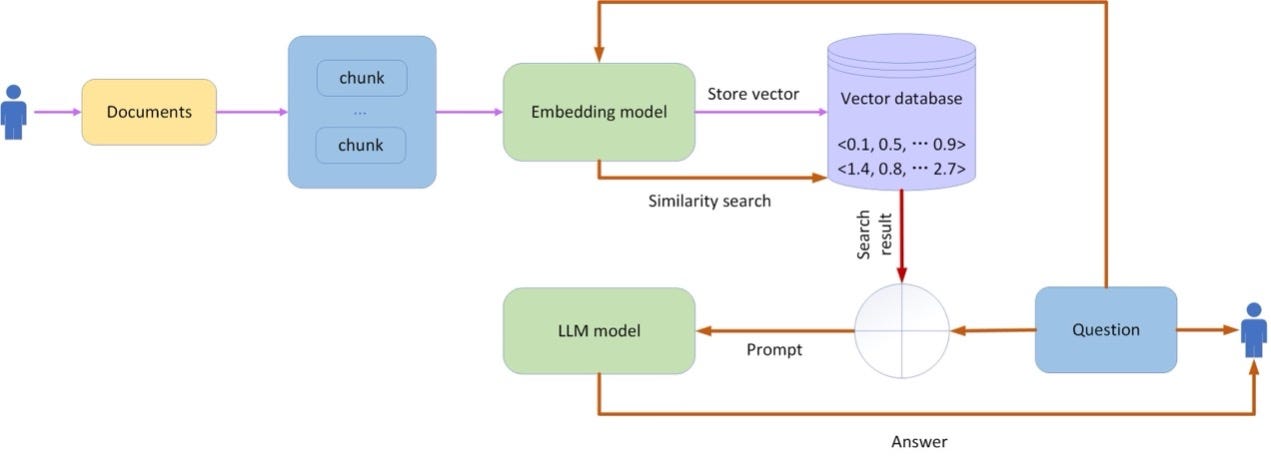
- Indexing: Your documents (e.g., project finance PDFs, Word docs) are broken into smaller chunks. Each chunk is converted into a numerical representation called an embedding using a specialized model. These embeddings, which capture the semantic meaning of the text, are stored in a vector database.
- Retrieval & Generation: When you ask a question, your query is also converted into an embedding. The vector database then performs a similarity search to find the document chunks with embeddings most similar to your query's embedding. These relevant chunks are retrieved and passed to the LLM along with your original question, giving it the specific context it needs to formulate a precise answer.
This workflow is visualized below.
To get a clearer picture of the underlying mechanics, let's turn to a great article from the CFA Institute.
RAG for Finance: Automating Document Analysis with LLMs
The article 'RAG for Finance' provides an excellent, finance-oriented explanation of the RAG workflow, embeddings, and vector databases.
Read the sections 'Under the Surface of RAG Workflows' and the subsequent section that walks through the process with an earnings call transcript example. Focus on understanding the concepts of embeddings, semantic similarity, chunking, and how retrieved context improves the LLM's response.
Part 2: Building the Knowledge Base with a Vector Database
Now let's move to implementation. We will build a simple, local RAG system. The first step is to create the vector database that will serve as our agent's long-term memory. We'll use ChromaDB, a popular open-source vector database that is easy to set up and run locally.
The process involves these key steps:
- Loading Data: Reading your source documents (for this example, a simple CSV).
- Creating
DocumentObjects: Structuring the data into a format LangChain can work with, including the main content and any associated metadata. - Embedding and Storing: Instantiating the vector store, which handles the embedding process and saves the resulting vectors to disk.
The following video provides a clear, step-by-step walkthrough of this entire process.
How to Build a Local AI Agent With Python (Ollama, LangChain & RAG)
The video 'How to Build a Local AI Agent With Python' by Tech With Tim provides a practical guide to setting up a vector store with ChromaDB and LangChain.
Watch from 14:48 to 23:18. Follow along as the video explains how to: Load data using pandas. Instantiate an embedding model. Iterate through the data to create LangChain Document objects with content and metadata. Initialize the Chroma vector store and add the documents to it, creating a persistent local database.
As you saw, the core logic involves preparing your text chunks and then using a command like Chroma.from_documents() to perform the embedding and storage in one go. The CFA Institute article you read earlier reinforces this pattern with a similar code snippet (LINK, Section 3).
Part 3: Retrieving Knowledge from the Vector Database
With our knowledge base created, we now need a way for our agent to query it. In LangChain, this is done using a Retriever. A retriever is an object that takes a query string as input and returns a list of relevant Document objects from the vector store.
Let's continue with the video to see how to create and use a retriever.
How to Build a Local AI Agent With Python (Ollama, LangChain & RAG)
This next segment shows you how to turn your vector store into a functional retriever.
Watch from 23:18 to 24:17. Pay close attention to the vector_store.as_retriever() method and the search_kwargs={'k': 5} parameter, which controls how many documents are retrieved.
The retriever is the bridge between your long-term memory and your agent's reasoning process.
Test your understanding!
Imagine you've loaded 100 project finance deal summaries into your ChromaDB vector store. Each summary is a separate document. You've set up your retriever with k=3.
An analyst asks your agent: "Which projects in our portfolio use a PPA with a government offtaker?"
Describe, step-by-step, what happens when the retriever is invoked with this query.
Show answer
- Query Embedding: The retriever first takes the query string ("Which projects in our portfolio use a PPA with a government offtaker?") and uses the same embedding model that indexed the documents to convert it into a numerical vector.
- Similarity Search: This query vector is sent to the ChromaDB vector store. The database compares the query vector to the 100 stored document vectors using a similarity metric (like cosine similarity or Euclidean distance).
- Ranking and Selection: The database ranks all 100 document vectors based on their similarity to the query vector.
- Retrieval: Because
k=3, the retriever returns the top 3 most semantically similarDocumentobjects. These will likely be the deal summaries that most closely discuss government offtakers and PPAs.
Part 4: Integrating RAG into an Agentic Workflow
Now we'll tie everything together. We will build a complete workflow that:
- Takes a user's question.
- Uses the retriever to find relevant context from our vector database.
- Passes both the question and the context to an LLM to generate an answer.
The final part of the video demonstrates this integration.
How to Build a Local AI Agent With Python (Ollama, LangChain & RAG)
This segment shows how to incorporate the retriever into a LangChain Expression Language (LCEL) chain to complete the RAG process.
Watch from 24:50 to 27:31. Observe how the retriever.invoke(question) call is made first, and the results are then passed as reviews (context) into the main chain that calls the LLM. This clearly separates the 'Retrieve' and 'Generate' steps.
Code Implementation
Here is a complete Python script that builds a RAG system for a simplified project finance use case. It sets up a vector store with information about a few sample renewable energy projects and then uses it to answer questions.
import os
from langchain_openai import ChatOpenAI, OpenAIEmbeddings
from langchain_core.prompts import ChatPromptTemplate
from langchain_core.runnables import RunnablePassthrough
from langchain_core.output_parsers import StrOutputParser
from langchain_community.vectorstores import Chroma
from langchain_core.documents import Document

# Set your OpenAI API key
# os.environ["OPENAI_API_KEY"] = "your_api_key"

# 1. Define Sample Project Data
project_docs = [
    Document(
        page_content="Project 'Helios One' is a 50MW C&I solar project in Lagos, Nigeria. Its primary offtaker is a major manufacturing firm. The projected DSCR is 1.4x. The PPA term is 15 years.",
        metadata={"project_id": "H1", "country": "Nigeria", "technology": "Solar"},
    ),
    Document(
        page_content="Project 'Andes Wind' is a 120MW onshore wind farm in the Atacama region of Chile. It sells power to the spot market. The project relies on merchant pricing and has a high degree of revenue volatility.",
        metadata={"project_id": "AW1", "country": "Chile", "technology": "Wind"},
    ),
    Document(
        page_content="The 'Mekong Delta' project is a 30MW run-of-river hydro project in Vietnam. It has a 20-year PPA with the state-owned utility, EVN. The hydrology risk is considered the primary technical challenge.",
        metadata={"project_id": "MD1", "country": "Vietnam", "technology": "Hydro"},
    ),
]

# 2. Setup the Vector Store (Long-Term Memory)
embedding_model = OpenAIEmbeddings(model="text-embedding-3-small")
vectorstore = Chroma.from_documents(
    documents=project_docs,
    embedding=embedding_model,
    persist_directory="./chroma_db_projects" # Persist the DB to disk
)

# 3. Create the Retriever
retriever = vectorstore.as_retriever(search_kwargs={"k": 2})

# 4. Define the RAG Prompt Template
template = """
You are a project finance analyst assistant. Answer the following question based ONLY on the context provided.
If the context does not contain the answer, state that you don't have enough information.

Context:
{context}

Question:
{question}
"""
prompt = ChatPromptTemplate.from_template(template)

# 5. Build the RAG Chain
llm = ChatOpenAI(model="gpt-4o")

rag_chain = (
    {"context": retriever, "question": RunnablePassthrough()}
    | prompt
    | llm
    | StrOutputParser()
)

# --- Query 1: Ask a question that can be answered by the context ---
print("--- Query 1 ---")
query1 = "What is the PPA term for the Helios One project?"
response1 = rag_chain.invoke(query1)
print(f"Question: {query1}\nAnswer: {response1}\n")

# --- Query 2: Ask about a different project ---
print("--- Query 2 ---")
query2 = "What are the main risks for the Mekong Delta project?"
response2 = rag_chain.invoke(query2)
print(f"Question: {query2}\nAnswer: {response2}\n")

# --- Query 3: Ask a question where context is insufficient ---
print("--- Query 3 ---")
query3 = "What is the construction cost for the Andes Wind project?"
response3 = rag_chain.invoke(query3)
print(f"Question: {query3}\nAnswer: {response3}\n")
Run this code. You'll see how the chain successfully answers questions when the information is in our document set, and correctly states when it doesn't have the information, because we instructed it to rely only on the retrieved context. This prevents the LLM from hallucinating answers.
Part 5: Architecting for Production
While ChromaDB is excellent for local development, building production-grade agentic systems requires more robust and scalable solutions. Your CS background will be valuable in appreciating these architectural considerations. A common challenge is managing multiple types of memory (conversational, factual, procedural) efficiently.
A powerful pattern is to unify these different memory types in a single, scalable database like PostgreSQL, enhanced with extensions like pgvector for vector search.
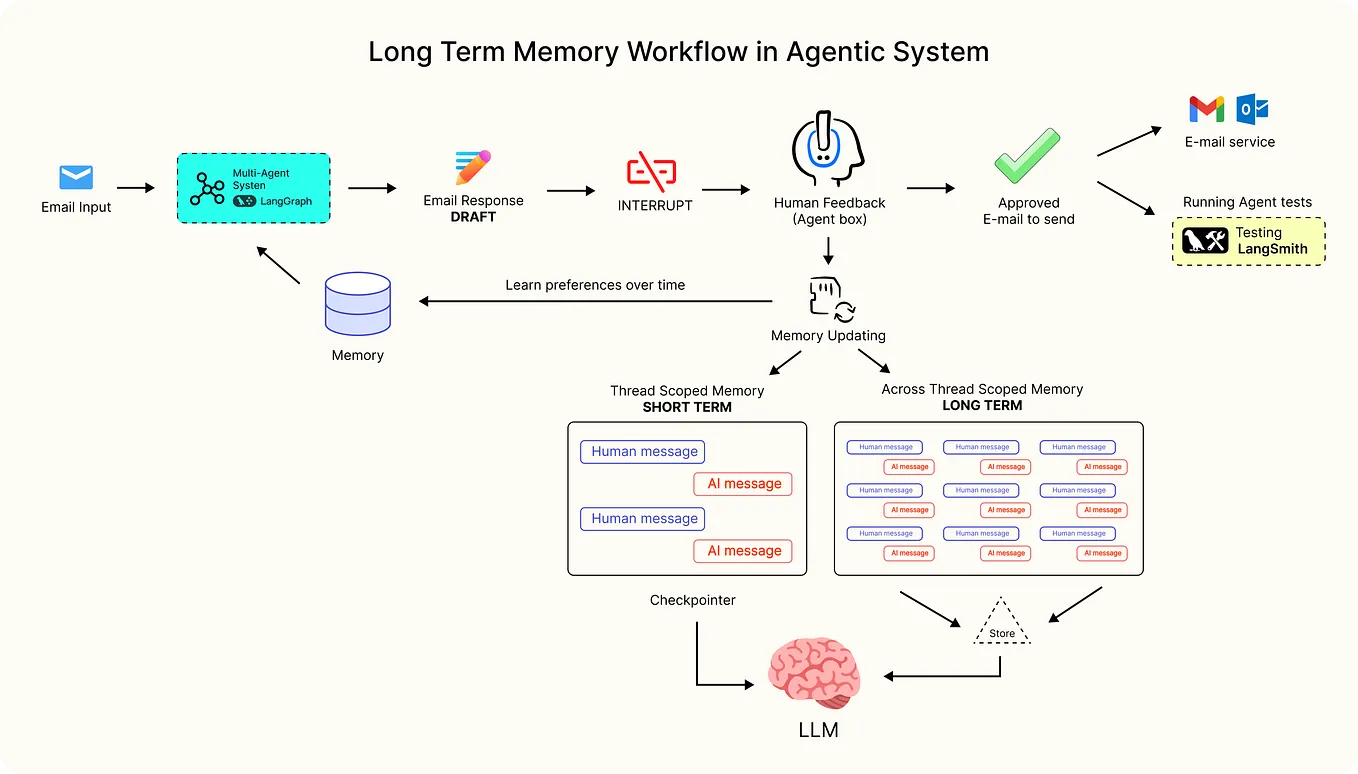
The article "Building AI Agents with Persistent Memory" provides an excellent blueprint for this unified approach. It distinguishes between three memory types:
- Episodic Memory: The conversation history (short-term memory from our last lesson).
- Semantic Memory: The knowledge base of embedded documents (long-term RAG memory).
- Procedural Memory: Stored user preferences or agent configurations.
Building AI Agents with Persistent Memory: A Unified Database Approach
This article details a production-grade architecture for agent memory using a unified PostgreSQL database, a concept highly relevant to your goal of building robust systems.
Read the sections 'The Three Types of Agent Memory' and 'Schema Design: Knowledge Base (Semantic Memory)'. Pay close attention to the SQL schema for the knowledge_items table. Note the use of the vector type and the inclusion of metadata and temporal validity columns (valid_from, valid_until), which are crucial for real-world applications.
Adopting a unified database architecture with PostgreSQL and pgvector allows you to perform powerful queries that join across different memory types in a single transaction, reducing complexity and latency compared to managing separate databases for each memory function. This is a robust pattern for the kind of AI-native systems you aim to build.
Conclusion
In this lesson, you've unlocked a new dimension of agent capability by implementing long-term memory. Your agent can now learn from and leverage a dedicated knowledge base, moving it from a simple conversationalist to a knowledgeable assistant.
Key Takeaways:
- RAG is the Key to Knowledge: Retrieval-Augmented Generation (RAG) is the fundamental process of retrieving relevant information from an external source before generating an LLM response.
- Vector Databases are the "Brain": Vector databases like ChromaDB or PostgreSQL with
pgvectorstore document embeddings and enable the fast semantic search required for RAG. - The RAG Pipeline: The process is to chunk, embed, and store documents (indexing), then use a retriever to find relevant context for a given query to pass to the LLM (retrieval and generation).
- Production Systems Need Robust Architectures: For scalable and maintainable agents, consider unified database architectures that handle episodic, semantic, and procedural memory within a single system.
You now know how to manage both the flow of a conversation (short-term memory) and a vast library of external knowledge (long-term memory). But where does this external knowledge come from in the first place? A project finance professional deals with data from dozens of sources: market data APIs, government filings, news articles, legal documents, and more.
In our next lesson, "Map the diverse data sources for project finance," we will begin exploring the data engineering foundations required to feed your agent's long-term memory, starting by identifying and mapping the critical data sources in the project finance ecosystem.