Hello! Welcome to the final lesson of our first module on Google Ads.
In the past few lessons, we've built a strong foundation. We've explored how the Google Ads auction works, the critical role of conversion tracking, the difference between manual and automated bidding, and finally, we compared the goals and mechanics of the four most common automated strategies: Maximize Clicks, Maximize Conversions, Target CPA, and Target ROAS.
Today, we bring all of that knowledge together. This lesson is all about application and directly addresses our learning outcome: to select an appropriate Google Ads bidding strategy based on a given campaign goal and budget. We'll move from knowing what the strategies are to understanding when and why to use them. By the end of this lesson, you'll be able to analyze a campaign scenario and confidently choose the right bidding strategy to achieve its goals.
A Framework for Choosing Your Bidding Strategy
Selecting a bidding strategy isn't a random choice; it's a logical decision based on three core pillars: your Goal, your available Data, and your Budget.
-
What is my primary GOAL?
- Traffic: Do I just need to get as many people to my site as possible?
- Volume: Do I need to get the maximum number of conversions (leads, sign-ups)?
- Efficiency: Do I need to get conversions at a specific cost (Target CPA)?
- Profitability: Do I need to generate a specific return on my ad spend (Target ROAS)?
-
How much historical DATA do I have?
- Is this a brand new account with zero history?
- Does the campaign have conversion tracking set up?
- How many conversions has the campaign generated in the last 30 days? (This is crucial for smart bidding).
-
What is my BUDGET?
- Is my daily budget large enough to get a meaningful number of clicks, especially in a competitive market with high CPCs? A small budget might not be enough to gather the data needed for smart bidding to learn effectively.
The flowchart below provides a great visual overview of how goals map to strategies.
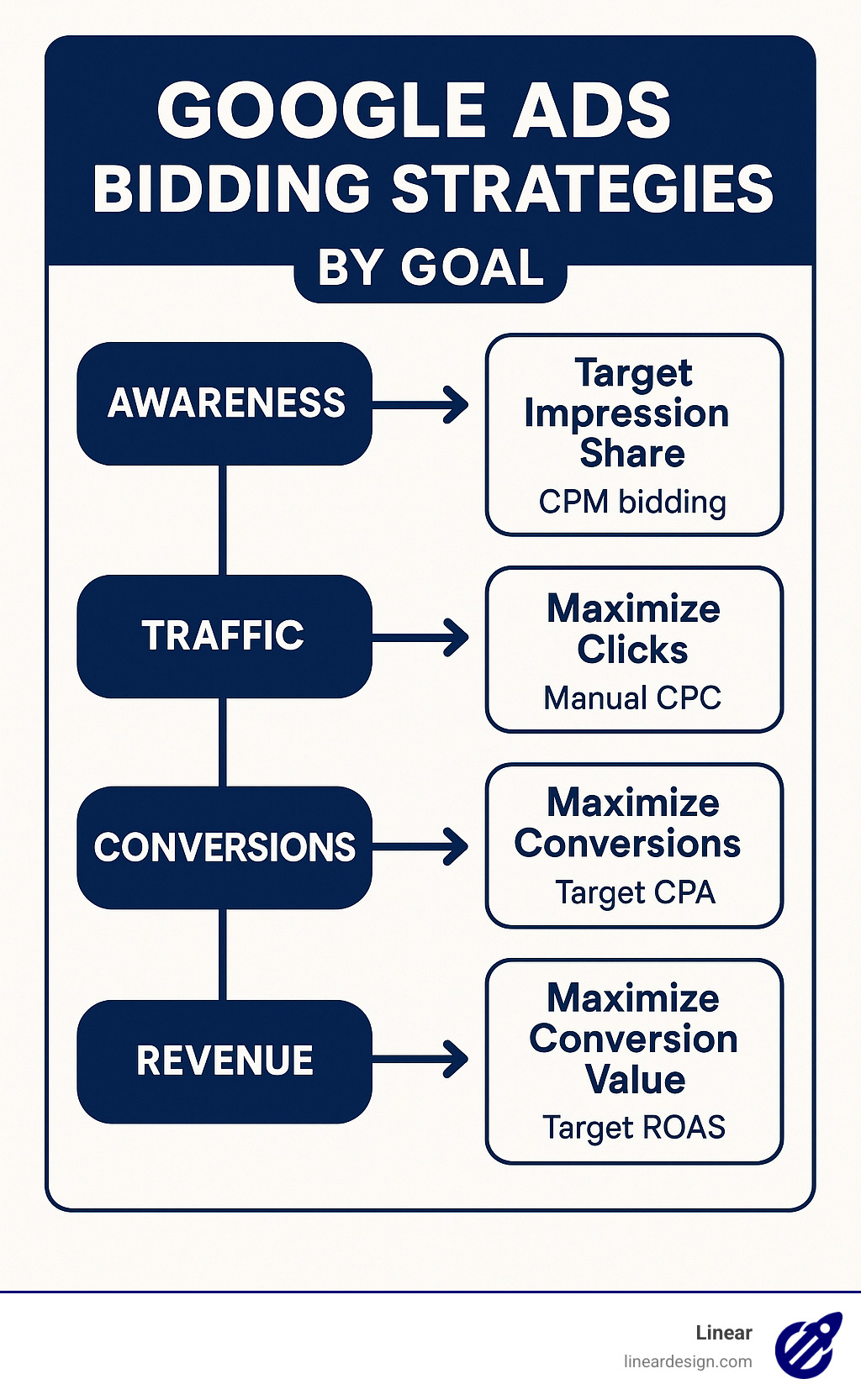
Now, let's apply this framework to some real-world scenarios.
Scenario 1: The Brand New Business
- Business: A local plumbing service in a major city.
- Campaign Goal: Generate new leads (phone calls and contact form submissions).
- Data: None. This is a brand new Google Ads account.
- Budget: $50/day. Keyword research shows that average CPCs are high, around $20-$30.
Analysis:
- Goal: The ultimate goal is conversions (leads), but with no data, we can't use a conversion-focused strategy like Maximize Conversions or Target CPA from the start. Google's algorithm would have no idea what a "good" user looks like.
- Data: Zero. The immediate priority must be data acquisition. We need to spend the budget to get clicks and, hopefully, some initial conversions to "teach" the algorithm.
- Decision: We have two viable starting options:
- Maximize Clicks: This automated strategy will focus on getting as much traffic as possible for the $50/day budget. It's a fast way to gather data on which keywords generate clicks. The risk is that it might attract low-quality traffic that doesn't convert.
- Manual CPC: This gives you maximum control. You can set specific bids for your most important keywords. This is a more conservative approach to control costs while you gather initial data. If you choose this, you would not enable Enhanced CPC (ECPC) at the start, as ECPC is a form of smart bidding that needs data to work.
The following video provides an excellent guide for this exact situation.
Google Ads Bidding Strategies: The Only Guide You'll Ever Need (With Free Cheat Sheet)
The video 'Google Ads Bidding Strategies: The Only Guide You'll Ever Need' from the Grow My Ads channel explains the best approach for a brand new account with no historical data.
Please watch from 07:26 to 11:30. The speaker details why the initial goal is data acquisition, not profit, and recommends starting with either Manual CPC (with ECPC turned off) or Maximize Clicks. Pay attention to how he uses the Keyword Planner to determine a reasonable starting bid.
Verdict for Scenario 1: Start with Maximize Clicks (with a max CPC cap to avoid overpaying) or Manual CPC to gather initial traffic and conversion data. After accumulating 15-30 conversions, you can then switch to a smart bidding strategy like Maximize Conversions.
Scenario 2: The Maturing E-commerce Store
- Business: An online store selling custom-printed t-shirts with varying prices.
- Campaign Goal: Maximize revenue while achieving a profitable return on ad spend (ROAS). The target ROAS is 500% ($5 revenue for every $1 spent).
- Data: The campaign has been running for a few months. It's using Maximize Conversions and generating about 40 conversions in the last 30 days. Conversion value tracking is set up correctly. The current ROAS is hovering around 350%.
- Budget: Healthy at $200/day.
Analysis:
- Goal: Profitability (Target ROAS of 500%).
- Data: The campaign has a decent conversion volume (40/month) and, crucially, conversion value data. This makes it a candidate for a value-based strategy.
- Decision: The temptation is to jump straight to a Target ROAS strategy and set the target to 500%. This would be a mistake.
- The current performance is 350% ROAS. A sudden, aggressive shift to a 500% target would likely "suffocate" the campaign. Google's algorithm would struggle to find users who meet this high-profitability bar, leading to a sharp drop in impressions, clicks, and sales.
- The conversion volume (40) is good, but just on the cusp of the 50+ conversions often recommended for tROAS to work optimally.
The Strategic Path:
- Switch to Maximize Conversion Value: Change the bid strategy from Maximize Conversions to Maximize Conversion Value. This tells the algorithm to stop focusing on just the number of conversions and start prioritizing conversions that bring in more revenue. This aligns better with the e-commerce goal and will help feed the algorithm more value-based data.
- Gather More Data: Run on Maximize Conversion Value until the campaign is consistently getting 50+ conversions per month.
- Transition to Target ROAS: Once you have sufficient data, switch to Target ROAS. But don't set the target to 500% immediately. Set it to a realistic number based on recent history—perhaps 350% or 375%. Let it run for a couple of weeks, and if performance is stable, gradually increase the target by 10-15% increments towards your ultimate 500% goal.
The following article clearly lays out the progression from volume to efficiency.
Determine a bid strategy based on your goals - Google Ads Help
The official Google Ads Help Center guide provides a clear structure for thinking about your goals and choosing the right strategy.
Please read the sections 'Consider your goals' and 'Focus on conversions'. This reinforces the idea of matching your goal (like conversions or conversion value) to the appropriate family of Smart Bidding strategies, such as Maximize Conversion Value and Target ROAS.
Scenario 3: The Stable Lead Generation Campaign
- Business: A B2B software company.
- Campaign Goal: Control the cost per lead (CPA).
- Data: The campaign has been running on Maximize Conversions for six months and is very stable. It generates 80 conversions (demo requests) in the last 30 days. The average CPA over this period is $120. The business has determined that to be profitable, the CPA needs to be at or below $100.
- Budget: Flexible, as long as the CPA target is met.
Analysis:
- Goal: Cost Efficiency (Target CPA of $100).
- Data: Excellent. With 80 conversions/month, the campaign has a wealth of data for the algorithm to work with.
- Decision: This campaign is a perfect candidate for a Target CPA bidding strategy. The data is stable and sufficient.
However, as we learned in the previous scenario, the implementation must be gradual.
Google Ads Bidding Strategies: The Only Guide You'll Ever Need (With Free Cheat Sheet)
Let's return to the Grow My Ads video. The speaker walks through this exact scenario, demonstrating how to transition an existing campaign to Target CPA without killing its performance.
Watch from 14:33 to 20:58. This is a critical section. He uses an electrician example with a goal CPA of $100 and a historical CPA of $120. Notice how he sets the initial target CPA slightly below the historical average (e.g., $110) and then slowly works it down. He then shows a real-world example of what happens when you make a bid change that is too aggressive.
Verdict for Scenario 3: Switch the bidding strategy to Target CPA. Set the initial target to $110 (a ~10% decrease from the historical $120). After 1-2 weeks of stable performance, lower it again to $100 to meet the business goal.
A Powerful Tool: Portfolio Bidding Strategies
What if you have multiple campaigns with the same goal (e.g., a $100 Target CPA), but each campaign individually only gets 10-15 conversions per month? On their own, they don't have enough data for smart bidding to be effective.
This is where Portfolio Bidding Strategies come in. This feature allows you to group multiple campaigns together under a single, shared bidding strategy. The algorithm then pools the data from all campaigns in the portfolio, giving it a much larger dataset to learn from (e.g., 5 campaigns x 10 conversions = 50 conversions for the portfolio). This makes the smart bidding strategy more stable and effective.
Every Google Ads Bid Strategy Explained (2026)
The video 'Every Google Ads Bid Strategy Explained' by Daryl Mander provides a quick and clear explanation of this powerful feature.
Watch from 15:24 to 17:08. The speaker explains what portfolio strategies are and the significant benefit of pooling conversion data across campaigns.
Conclusion
Congratulations on completing the first module! You've gone from the basics of the ad auction to making strategic decisions about bidding.
Here are the key takeaways from today's lesson:
- The Decision Framework: Always start by asking about your Goal, Data, and Budget. This simple framework will guide you to the right choice.
- Start Simple, Then Evolve: For new accounts, the primary goal is data acquisition. Start with broader strategies like Maximize Clicks or Manual CPC.
- Graduate to Smart Bidding: Once you have sufficient conversion data (aim for at least 30 conversions/month), you can graduate to powerful strategies like Maximize Conversions, Target CPA, or Target ROAS.
- Be Realistic and Patient: When setting targets for tCPA or tROAS, base your initial target on recent historical performance, not just your ultimate goal. Make small, gradual adjustments and give the algorithm 1-2 weeks to learn after each change.
You now have the theoretical knowledge and practical framework to manage one of the most crucial aspects of a Google Ads campaign.
Next Up: We will be moving from Google to the world of social media advertising. In our next lesson, we will begin Module 2 by diving into the fundamentals of Meta Ads, starting with its core three-level campaign structure (Campaign, Ad Set, Ad).