Hello! Welcome to the third lesson in our "Python and Data Science Foundations" module.
In our last lesson, you mastered the logical building blocks of Python: functions, control flow statements, loops, and list comprehensions. You now have the tools to write code that performs complex tasks.
Today, we take a pivotal step from general-purpose programming into the world of scientific computing and AI. We will introduce NumPy, which stands for "Numerical Python". It's the absolute cornerstone of the data science and machine learning ecosystem in Python. While Python lists are flexible, they are not efficient for the kind of large-scale numerical operations that AI demands. NumPy provides a new data structure, the array, which is specifically designed for this purpose.
Our goal for this lesson is to create 1D and 2D NumPy arrays and inspect their core attributes: shape, size, and dtype. This is the first step in building the fluency you'll need for nearly every topic we cover from here on out.
Why Do We Need NumPy?
Before we dive into the code, it's important to understand why NumPy is so essential. As a computer science student, you know that the way data is stored in memory has a massive impact on performance.
Python lists are incredibly flexible—they can hold different data types (an integer, a string, another list) all in one place. This flexibility comes at a cost. The elements of a list are stored as separate objects in memory, with the list itself just holding pointers to these objects. This makes iterating over them for numerical calculations relatively slow.
NumPy arrays, on the other hand, are grids of values of the same type. They are stored in a contiguous block of memory. This homogeneity and memory locality allows NumPy to perform operations on the entire array at once (a concept called vectorization), often using highly optimized C or Fortran code under the hood. The result is a dramatic speedup, often by a factor of 10 to 100, and significantly less memory usage.
The NumPy ndarray Object
The fundamental object in NumPy is the N-dimensional array, or ndarray. It's a versatile data structure that can represent vectors (1D arrays), matrices (2D arrays), and higher-dimensional data structures often called tensors.
To get a formal introduction to the ndarray, let's turn to the official NumPy documentation.
NumPy: the absolute basics for beginners
The article 'NumPy: the absolute basics for beginners' provides a clear conceptual overview of the ndarray.
Please read the first section, 'What is an “array”?'. Focus on understanding the three key restrictions mentioned: same data type, fixed size, and rectangular shape. These are the properties that give NumPy its power.
Creating NumPy Arrays
Now, let's get our hands dirty and start creating arrays. First, you'll need to import the NumPy library. The standard convention, which you should always follow, is:
import numpy as np
1. Creating Arrays from Python Lists
The most straightforward way to create an array is by converting a Python list.
- 1D Array (Vector): Pass a simple list to
np.array(). - 2D Array (Matrix): Pass a list of lists, where each inner list represents a row.
# Create a 1D array
list_1d = [1, 2, 3, 4, 5]
arr_1d = np.array(list_1d)
print("1D Array:")
print(arr_1d)

# Create a 2D array
list_2d = [[1, 2, 3], [4, 5, 6]]
arr_2d = np.array(list_2d)
print("\n2D Array:")
print(arr_2d)
The video below provides a great walkthrough of creating arrays from lists and other methods.
Ultimate Guide to NumPy Arrays - VERY DETAILED TUTORIAL for beginners!
The video 'Ultimate Guide to NumPy Arrays' by Python Simplified gives a very clear, step-by-step tutorial on creating arrays.
Please watch the following segments: Arrays from Lists (4:04 - 5:10): This covers exactly what we just discussed, converting a Python list into a NumPy array. Creating 2D Arrays (8:05 - 9:47): This shows two ways to create a 2D array: from a nested list and by combining arange functions.
2. Using NumPy's Array Creation Functions
More often, you will create arrays from scratch using NumPy's built-in functions. These are highly efficient and convenient.
np.arange(start, stop, step): Similar to Python'srange(), but it returns a NumPy array and can use floating-point steps.np.zeros(shape): Creates an array of a given shape filled with zeros.np.ones(shape): Creates an array filled with ones.np.linspace(start, stop, num): Creates an array withnumevenly spaced numbers over a specified interval[start, stop]. Given your calculus background, you can see how useful this is for generating points to evaluate and plot a function.
Let's see them in action.
# Create an array with values from 0 to 9
arr_arange = np.arange(10)
print(f"np.arange(10):\n{arr_arange}\n")

# Create a 3x4 matrix of zeros
# Note that the shape is passed as a tuple: (3, 4)
arr_zeros = np.zeros((3, 4))
print(f"np.zeros((3, 4)):\n{arr_zeros}\n")

# Create a 2x5 matrix of ones
arr_ones = np.ones((2, 5))
print(f"np.ones((2, 5)):\n{arr_ones}\n")

# Create 5 evenly spaced points from 0 to 1 (inclusive)
arr_linspace = np.linspace(0, 1, 5)
print(f"np.linspace(0, 1, 5):\n{arr_linspace}")
For a comprehensive review of these functions, the "Python for Beginners" book by Wes McKinney is an excellent reference.
4 NumPy Basics: Arrays and Vectorized Computation
This chapter from 'Python for Data Analysis' provides concise code examples for the most common array creation functions.
Read the subsection 'Creating ndarrays'. Pay attention to the examples for np.array, np.zeros, np.ones, np.empty, and np.arange. Notice how a tuple like (3, 6) is used to define the shape of a 2D array.
Test your understanding!
Write the code to create the following NumPy arrays:
- A 2D array (matrix) representing the following data:
8 1 6 3 5 7 4 9 2 - A 1D array of 20 zeros.
- A 1D array containing the numbers 10, 12, 14, 16, 18.
Show answer
# 1. The 2D array
matrix = np.array([[8, 1, 6],
                   [3, 5, 7],
                   [4, 9, 2]])
print("1. 2D array:\n", matrix)

# 2. Array of zeros
zeros_arr = np.zeros(20)
print("\n2. Array of zeros:\n", zeros_arr)

# 3. Array of even numbers
evens_arr = np.arange(10, 19, 2)
print("\n3. Array of even numbers:\n", evens_arr)
Inspecting Array Attributes
Once you have an array, you need to be able to inspect its properties. The three most fundamental attributes are shape, size, and dtype.
.ndim: The number of dimensions (or axes) of the array..shape: A tuple of integers indicating the size of the array in each dimension.- For a 1D array of 5 elements, the shape is
(5,). - For a 2D array with 3 rows and 4 columns, the shape is
(3, 4).
- For a 1D array of 5 elements, the shape is
.size: The total number of elements in the array. This is simply the product of the elements in the shape tuple..dtype: An object describing the data type of the array's elements.
The following image provides a fantastic visual summary of these concepts.
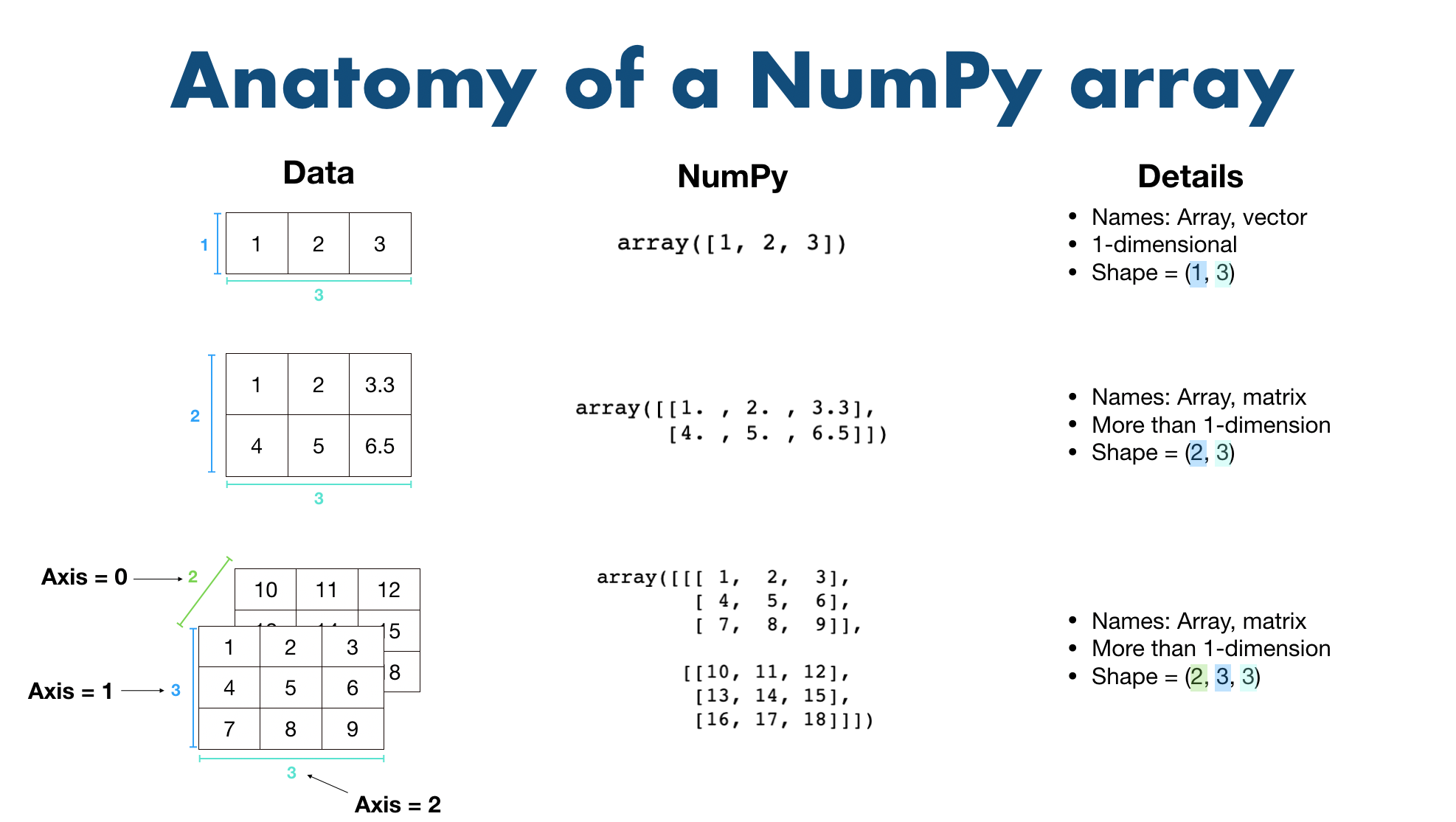
Let's see this in code with the arrays we created earlier.
# Inspecting the 2D array from our previous example
arr_2d = np.array([[1, 2, 3], [4, 5, 6]])

print(f"Array:\n{arr_2d}\n")
print(f"Number of dimensions (ndim): {arr_2d.ndim}")
print(f"Shape of array (shape): {arr_2d.shape}")
print(f"Total elements (size): {arr_2d.size}")
print(f"Data type (dtype): {arr_2d.dtype}")
A Deeper Look at dtype
The dtype is particularly important. Because all elements in a NumPy array must have the same type, NumPy needs to know how much memory to allocate for each element.
- Type Inference: When you create an array from a list, NumPy tries to infer the most appropriate
dtype. If all elements are integers, you'll likely getint64. If even one element is a float, the entire array will be cast tofloat64. - Explicitly Setting
dtype: You can (and often should) specify thedtypefor memory efficiency. If you know your values will not exceed the range of a 32-bit integer, usingnp.int32instead of the defaultnp.int64will cut the memory usage for that array in half.
This video segment explains the importance of dtype and memory efficiency very well.
Ultimate Guide to NumPy Arrays - VERY DETAILED TUTORIAL for beginners!
Let's revisit the 'Ultimate Guide to NumPy Arrays' to focus on dtype.
Watch the segment from 5:10 to 8:05. The speaker does a great job of explaining why dtype matters for memory efficiency, even discussing the number of bits needed to represent values. This should resonate with your CS background.
Here is an example of explicitly setting the data type:
# Default dtype is int64 on most systems
arr_default = np.array([1, 2, 3])
print(f"Default dtype: {arr_default.dtype}")

# Explicitly setting a smaller integer type
arr_smaller = np.array([1, 2, 3], dtype=np.int8)
print(f"Specified dtype: {arr_smaller.dtype}")

# Creating an array of ones with float32 dtype
arr_float = np.ones((2, 2), dtype=np.float32)
print(f"Float dtype: {arr_float.dtype}")
print(arr_float) # Note the decimal points, indicating they are floats
Test your understanding!
Consider the following array:my_array = np.arange(0, 12)
This creates a 1D array [0, 1, 2, 3, 4, 5, 6, 7, 8, 9, 10, 11].
Now, imagine this array is reshaped into a 2D array with 3 rows and 4 columns (we will cover reshaping in the next lesson).
Without running the code, what would you predict for the ndim, shape, size, and dtype of the new 2D array?
Show answer
ndim: 2 (because it's a 2D array or matrix).shape:(3, 4)(3 rows, 4 columns).size: 12 (3 * 4 = 12 total elements).dtype:int64(orint32, depending on your system's default).np.arangecreates integers, so thedtypewill be an integer type. The reshaping operation does not change the data type or the number of elements.
Conclusion
Excellent work! You've just learned the most fundamental operations in NumPy: how to create the ndarray data structure and how to check its basic properties. This knowledge is the bedrock upon which all your future work in data science and AI will be built.
Key Takeaways:
- NumPy Arrays (
ndarray) are efficient, fixed-size, homogeneous data structures that are much faster for numerical computation than Python lists. - You can create 1D arrays from lists (
np.array([1, 2, 3])) and 2D arrays from nested lists (np.array([[1, 2], [3, 4]])). - Functions like
np.arange(),np.linspace(),np.zeros(), andnp.ones()are powerful tools for creating arrays from scratch. - You can inspect an array's properties using its attributes:
.shape: The dimensions of the array (e.g.,(rows, columns))..size: The total number of elements..dtype: The data type of the elements (e.g.,int64,float64), which impacts memory and performance.
In our next lesson, we will build directly on this foundation. You'll learn how to manipulate these arrays by accessing, changing, and selecting data through indexing, slicing, and reshaping.