Introduction
In our last lesson, we established the architectural foundation of a professional financial model: a modular design that separates inputs, calculations, and outputs. This separation is crucial for building models that are transparent, flexible, and auditable. Today, we will bring that structure to life visually.
This lesson is dedicated to the art and science of model formatting. We will move beyond the structural layout and focus on how to apply consistent color-coding, sign conventions, and clear labels to make your model instantly readable. These are not merely aesthetic choices; they are a critical communication tool that reduces errors, simplifies auditing, and signals professionalism to anyone who uses your work. For your goal of achieving the Advanced Financial Modeler (AFM) designation, mastering these conventions is non-negotiable.
Why Formatting is More Than Decoration
A well-formatted model tells a story. Before a user even examines a single formula, they should be able to visually distinguish between an assumption they can change, a calculation that should not be touched, and a final output. Your experience in developing Power BI dashboards has already shown you how critical visual cues are for user comprehension; the same principle applies with even greater rigor in financial modeling.
A model that is difficult to read is assumed to be difficult to trust. Consistent formatting is the first step in building that trust and is a core component of the FMI's principle that a model must work beautifully "on paper" as well as electronically.
Financial Modeling Best Practices: How to Give Your Excel Files a “Makeover”
To start, watch this overview from Mergers & Inquisitions / Breaking Into Wall Street on financial modeling best practices. It provides a great "makeover" context, showing how a poorly formatted model can be transformed.
Pay close attention to the discussions on color coding from this section and on sign conventions from this part. These are the two most fundamental formatting decisions you will make.
The Language of Color: Inputs vs. Calculations
The most fundamental formatting rule is to use color to visually differentiate between hard-coded inputs and calculated formulas. This simple convention prevents users from accidentally overwriting complex formulas and makes scenario analysis far more intuitive.
The industry standard, which you are expected to follow, is:
- Blue Font: Hard-coded numbers (inputs). These are the assumptions of your model—growth rates, inflation, tax rates, and historical data.
- Black Font: Formulas (calculations). These cells should never be manually changed; they are the engine of your model.
To make inputs even more prominent, it's common practice to use a shaded background (often light yellow or grey) in addition to the blue font.
For a clear breakdown of a comprehensive color-coding scheme, let's turn to a guide from Wall Street Prep.
Financial Modeling Guide | Excel Training Tutorial - Wall Street Prep
This guide provides an excellent, concise summary of modeling conventions.
Please read the section titled Guidelines for Color Coding. Focus on the table that outlines the color schemes for different cell types, including links to other worksheets (green) and external files (red).
While the guide mentions add-ins like Capital IQ, you can apply these formats manually. The key is consistency.

Speaking the Same Mathematical Language: Sign Conventions
Inconsistent signs are one of the most common sources of errors in financial models. Imagine an income statement where you have to manually subtract costs and taxes instead of being able to sum the entire section. It's inefficient and prone to mistakes.
The professional standard is to treat all expenses and cash outflows as negative numbers.
- Income Statement: Revenues are positive. Cost of Goods Sold, SG&A, and Taxes are negative.
- Cash Flow Statement: Cash inflows are positive. Capital Expenditures and cash outflows are negative.
Adopting this convention allows you to use the SUM() function for almost all totals, dramatically simplifying your formulas and making the model easier to audit.
Financial Modeling Guide | Excel Training Tutorial - Wall Street Prep
Let's revisit the Wall Street Prep guide.
Read the section on sign conventions, this part here. The guide recommends "Convention 1," which is the standard we will adhere to throughout this course.
Labels, Numbers, and Professional Polish
Beyond colors and signs, readability is enhanced through clear labeling and consistent number formatting.
-
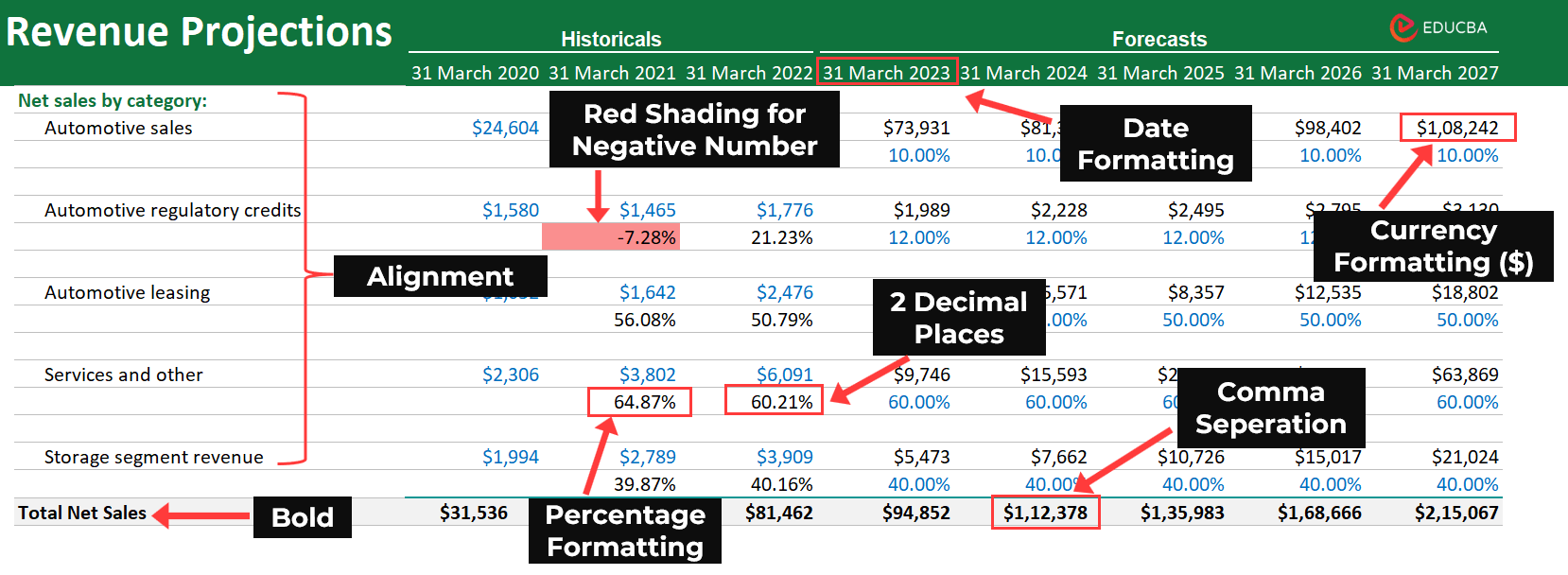
Labeling: Every row and column must be clearly and unambiguously labeled. Always include a "Units" column or specify units in the row header (e.g., "Revenue ($M)" or "Growth Rate (%)"). This avoids confusion about whether a '5' means $5, $5 million, or 5%.
-
Number Formatting: Establish a clear system.
- Currencies should have a dollar sign ($) at the top of a column and use comma separators.
- Use a consistent number of decimal places.
- Represent negative numbers with parentheses, e.g.,
(1,250), which is standard accounting practice. - Use custom number formats to display zero values as a dash (
-). This cleans up the visual presentation and helps the user focus on the non-zero values.
A Practical Demonstration for the AFM Exam
Theory is one thing, but seeing these principles applied in the context of an exam-style problem is invaluable. The following video by Diarmuid Early, an FMI instructor, is a "warm-up" for the AFM exam. It provides a masterclass in applying formatting best practices under pressure.
FMI warm up part 1 - Model setup, revenue, costs, capex and depreciation
As you watch this video, you are seeing the direct application of the principles we've discussed. The modeler is building from scratch, and formatting is integrated into their workflow, not an afterthought.
Focus on these key moments where formatting enhances clarity and control: Setting Up Input Cells: Watch how he "zeroes out" the model and applies a yellow fill to all non-calculation cells from this section. This visually separates the assumptions he needs to build from the existing calculation logic. Formatting for Error-Checking: This is a crucial technique. From this segment, he builds a balance sheet check and uses aggressive conditional formatting to turn the entire sheet red if it goes out of balance. This is a powerful, visual error-checking mechanism. Using Custom Number Formats: In the depreciation schedule, observe how he sets up a custom number format from this part to display zeros as dashes, making the schedule much cleaner and easier to read. Formatting within Schedules: Notice his consistent use of font colors (red for unique formulas), gray fills for reference cells, and italics throughout the video, such as in the revenue and cost schedules from this long section. Each choice communicates something about the nature of the cell.
This workflow—integrating formatting as you build—is what separates a student from a professional. It's a habit that will serve you well in the AFM exam and in your career.
Conclusion
In this lesson, we have detailed the essential formatting conventions that transform a spreadsheet into a professional financial model. You have learned that these are not arbitrary rules but a visual language designed to maximize clarity, minimize errors, and build user trust.
Here are your key takeaways:
- Color-Code Everything: Use blue font for hard-coded inputs and black for formulas. Use background fills (like yellow) to make inputs stand out.
- Use a Consistent Sign Convention: Expenses and cash outflows are negative. This simplifies formulas and makes your model mathematically robust.
- Be Fastidious with Labels and Numbers: Clearly label all rows, columns, and units. Use consistent and clean number formatting (dashes for zeros, parentheses for negatives).
- Formatting is an Active Process: Integrate these practices into your building workflow, as demonstrated in the FMI warm-up video. Don't save it for the end.
In our next lesson, we will formalize and expand upon the concept of error-checking. We've had a preview with the conditional formatting for the balance sheet check, and next, we will dive deep into how to build a comprehensive set of checks and balances to ensure your model's integrity.