Hello! In our last lesson, we took a deep dive into Python lists, which are excellent for storing ordered sequences of items. We learned how to access elements by their numeric index, from my_list[0] to my_list[-1]. But what if you don't want to refer to items by their position, but by a more descriptive label? And what if you need to ensure a collection only contains unique items?
This lesson introduces two more of Python's fundamental data structures: dictionaries and sets. You will learn how to create and use dictionaries to store data as key-value pairs, which is perfect for lookups. We will then explore sets, which are optimized for storing unique elements and performing mathematical set operations. Mastering these structures is essential for efficiently organizing and retrieving data, a skill you will use constantly in your journey toward AI and machine learning.
Dictionaries: The Key-Value Store
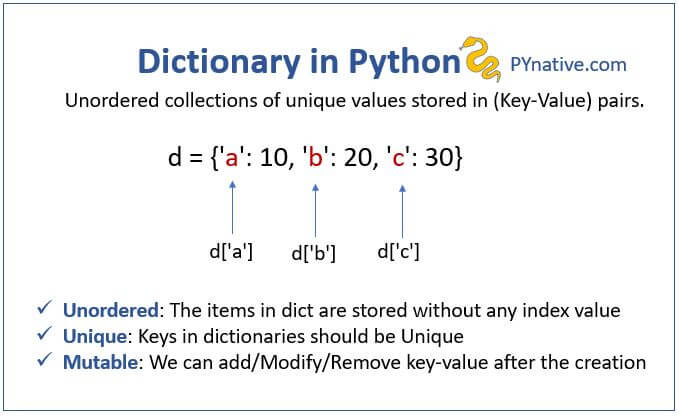
Imagine a real-world dictionary. You don't find a definition by knowing it's the 50,342nd entry; you look up the word (the key) to find its definition (the value). Python dictionaries work exactly the same way. They are collections of key-value pairs.
A dictionary has three main characteristics:
- Key-Value Pairs: Each item in a dictionary is a pair consisting of a unique, unchangeable key (like a string or number) and its corresponding value.
- Mutable: You can add, change, or remove key-value pairs after the dictionary is created.
- Ordered: As of Python 3.7, dictionaries remember the order in which items were inserted. However, you still access elements by their key, not by a numerical position.
Let's watch a short video from Corey Schafer that introduces the concept and shows how to create your first dictionary.
Python Tutorial for Beginners 5: Dictionaries - Working with Key-Value Pairs
This video provides a great introduction to what dictionaries are and how to create them.
Please watch from the beginning until the end of the first example. Pay attention to the {key: value} syntax and how values are retrieved using square brackets [].
Creating, Accessing, and Modifying Dictionaries
As you saw, the most common way to create a dictionary is with curly braces {}.
# A dictionary representing a user profile
user_profile = {
    "username": "alex",
    "email": "alex@example.com",
    "age": 28,
    "is_active": True
}
To access a value, you use its key inside square brackets:
print(user_profile["username"]) # Output: alex
What happens if you try to access a key that doesn't exist? You'll get a KeyError, which will crash your program. To avoid this, you can use the .get() method. It's a safer way to access values because it returns None (or a default value you specify) if the key is not found, instead of raising an error.
To add a new key-value pair or update an existing one, you use a simple assignment:
# Add a new key-value pair
user_profile["location"] = "New York"


# Update an existing value
user_profile["age"] = 29
Let's see these techniques in action.
Python Tutorial for Beginners 5: Dictionaries - Working with Key-Value Pairs
This part of the video demonstrates handling non-existent keys with .get() and how to add or update entries.
Watch the segment from "what happens if we try to access a key that doesn't exist". Note the difference between using square brackets [] and the .get() method, and see how the .update() method can modify multiple key-value pairs at once.
Here is a simple visual summary of a dictionary's structure.
Removing Items and Iterating
To remove an item, you can use the del keyword or the .pop() method. The .pop() method is often useful because it not only removes the item but also returns its value, which you can store in a variable.
The most common task you'll perform with a dictionary is looping over its contents. You can loop through its keys, its values, or its key-value pairs.
my_dict.keys(): Gives you all the keys.my_dict.values(): Gives you all the values.my_dict.items(): Gives you all the key-value pairs as tuples. This is the most common and powerful way to iterate.
Python Tutorial for Beginners 5: Dictionaries - Working with Key-Value Pairs
This final segment covers removing items and looping through a dictionary's contents.
Watch the rest of the video from "let's say that we wanted to delete". The for key, value in student.items(): pattern is extremely common and important to remember.
For a comprehensive written guide on everything we've just covered, from creation to iteration, the following article from Real Python is an excellent resource. You don't need to read it all now, but it's a great reference.
This article covers all the essential dictionary concepts and methods in detail.
Focus your reading on these sections: The introduction to understand the core idea. The section on creating dictionaries, especially using literals ({}). The section on accessing values and the KeyError. The section on adding data to dictionaries. The sections covering methods for retrieving, adding, and removing data. Pay special attention to .get(), .update(), and .pop(). The section on iteration, which reinforces what you saw in the video.
Sets: The Unique Collection
Now, let's switch gears to sets. While dictionaries are for mapping keys to values, sets are simpler. A set is an unordered collection of unique items.
Think of it like this:
- Unique: A set cannot have duplicate elements. If you add an item that's already there, nothing changes.
- Unordered: Items in a set don't have a specific order or index. You can't ask for "the first item" in a set.
- Fast Membership Testing: Their main superpower is being incredibly fast at checking if an item is present in the collection.
The most common use cases for sets are:
- Removing duplicate values from a list.
- Performing mathematical set operations like intersection, union, and difference.
Python Tutorial: Sets - Set Methods and Operations to Solve Common Problems
This video by Corey Schafer provides a clear introduction to sets.
Watch the beginning of the video up to the part about adding and removing values. Pay close attention to how sets automatically handle duplicates and the important difference between creating an empty dictionary ({}) and an empty set (set()).
Set Operations
The real power of sets comes from their methods that perform logical and mathematical operations.
.intersection()(or&): Finds elements that are present in both sets..union()(or|): Combines all elements from both sets into a new one..difference()(or-): Finds elements that are in the first set but not in the second.
Let's see a practical example of how these operations can solve real-world data problems.
Python Tutorial: Sets - Set Methods and Operations to Solve Common Problems
This part of the video demonstrates the core set operations and applies them to a practical scenario.
Please watch from the introduction of intersection, difference, and union. The example using lists of employees, gym members, and developers is a fantastic illustration of how sets simplify complex comparisons.
Dictionaries vs. Lists vs. Sets
You now know three of Python's most important built-in data structures. Choosing the right one is key to writing effective code.
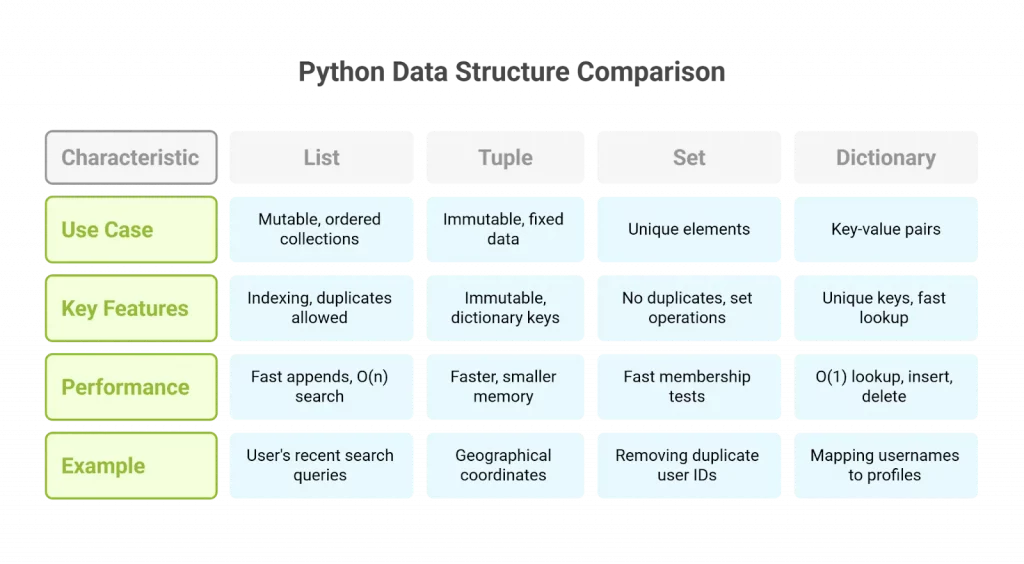
Here's a simple rule of thumb:
- Use a list when you have an ordered collection of items and the order matters (e.g., a sequence of steps, a list of user scores from highest to lowest).
- Use a dictionary when you need to associate unique keys with values for fast lookups (e.g., a user's profile, configuration settings, mapping words to definitions).
- Use a set when you only care about the presence or absence of unique items and need to perform efficient comparisons between collections (e.g., finding common friends, removing duplicates from a list).
Let's Practice
Time to put your new knowledge to the test. Create a new Python file and solve the following problem.
Problem:
You've been given data from a small social media platform. The data is a list of dictionaries, where each dictionary represents a user.
Starting Data:
Copy this list into your script:
users = [
    {"id": 1, "name": "Alice", "interests": ["Python", "Data Science", "Hiking"]},
    {"id": 2, "name": "Bob", "interests": ["Gaming", "Python", "Music"]},
    {"id": 3, "name": "Charlie", "interests": ["Hiking", "Photography", "Travel"]},
]
Instructions:
- Iterate and Print: Loop through the
userslist. For each user (which is a dictionary), print their name and the number of interests they have. (Hint: you can uselen()on a list). - Find All Unique Interests: Create a set that contains every unique interest from all users. Loop through the users, and for each user, add their interests to your set. Finally, print the set of unique interests. (Hint: a set's
.update()method is perfect for adding all items from a list). - Find Users with a Specific Interest: Create a new list called
python_fans. Loop through theuserslist again. If a user has "Python" in their list of interests, add their name to thepython_fanslist. Print thepython_fanslist at the end. (Hint: use theinoperator to check if an item is in a list).
Click to see the solution
users = [
    {"id": 1, "name": "Alice", "interests": ["Python", "Data Science", "Hiking"]},
    {"id": 2, "name": "Bob", "interests": ["Gaming", "Python", "Music"]},
    {"id": 3, "name": "Charlie", "interests": ["Hiking", "Photography", "Travel"]},
]


# 1. Iterate and Print
print("--- User Interest Counts ---")
for user in users:
    name = user["name"]
    num_interests = len(user["interests"])
    print(f"{name} has {num_interests} interests.")


# 2. Find All Unique Interests
print("\n--- All Unique Interests ---")
all_interests = set()
for user in users:
    all_interests.update(user["interests"])
print(all_interests)


# 3. Find Users with a Specific Interest
print("\n--- Python Fans ---")
python_fans = []
for user in users:
    if "Python" in user["interests"]:
        python_fans.append(user["name"])
print(python_fans)
Expected Output:
--- User Interest Counts ---
Alice has 3 interests.
Bob has 3 interests.
Charlie has 3 interests.

--- All Unique Interests ---
{'Travel', 'Music', 'Hiking', 'Gaming', 'Data Science', 'Python', 'Photography'}
(Note: your set's order may be different)

--- Python Fans ---
['Alice', 'Bob']
Conclusion
Great job! You've now added dictionaries and sets to your Python toolkit. These data structures are fundamental to almost any non-trivial program you'll write, especially in data processing and machine learning where you'll constantly be organizing, looking up, and comparing data.
Key Takeaways:
- Dictionaries are your go-to for storing
key: valuepairs, enabling fast data retrieval using descriptive keys. Usemy_dict['key']to access and.get('key')for safe access. - Sets are collections of unique, unordered items. They are perfect for removing duplicates and performing high-speed membership tests and set logic (union, intersection, etc.).
- Remember that
{}creates an empty dictionary, whileset()creates an empty set. - Choosing the correct data structure (list, dictionary, or set) for the task at hand is a crucial programming skill.
In our next lesson, we will move on to another cornerstone of programming: functions. You'll learn how to package your code into reusable blocks that you can call by name, which is essential for writing clean, organized, and scalable programs.