Hello! In our last lesson, we mastered dictionaries and sets, powerful tools for storing and retrieving data using keys and ensuring uniqueness. We now have a solid grasp of Python's core data structures: lists, dictionaries, and sets. However, as our programs grow, simply manipulating data isn't enough. We need a way to organize our logic, avoid repetition, and make our code understandable.
This lesson introduces functions, the most fundamental building block for organizing code in Python and virtually every other programming language. You will learn why we use functions, how to define your own, and how to make them flexible and powerful. By the end of this lesson, you will be able to define and call functions, pass them information using parameters, get results back using return values, and create optional parameters with default arguments. This is a crucial step towards writing clean, efficient, and scalable code.
The "What" and "Why" of Functions
So far, our scripts have been a sequence of commands executed from top to bottom. If we needed to perform the same task multiple times, we had to copy and paste the code. This is not only tedious but also prone to errors. What if you find a mistake in the copied code? You'd have to fix it in every single place you pasted it.
This is where functions come in. A function is a named, reusable block of code that performs a specific task. The core principle behind them is "Don't Repeat Yourself" (DRY). By packaging a set of instructions into a function, you can execute those instructions anytime, anywhere, just by calling the function's name.
This offers several key advantages:
- Reusability: Write the code once, use it many times.
- Modularity: Break down a complex problem into smaller, manageable, and logical pieces.
- Readability: Well-named functions make your code self-documenting. A function called
calculate_interestis much clearer than a block of raw mathematical formulas. - Maintainability: If you need to update the logic, you only need to change it in one place—inside the function definition.
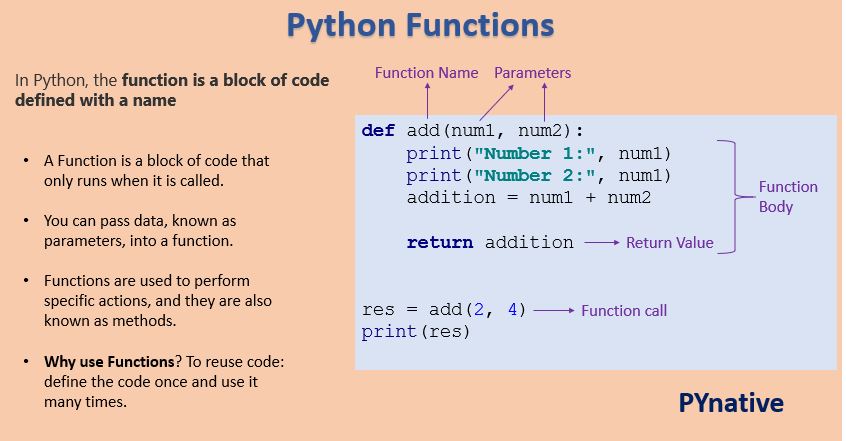
Let's look at the basic structure of a function.
Defining and Calling Your First Function
Defining a function is straightforward. You use the def keyword, followed by the function's name, a pair of parentheses (), and a colon :. The code that belongs to the function is indented on the following lines.
Let's watch a short clip from Programming with Mosh that walks through creating and calling a simple function.
Python Functions | Python Tutorial for Absolute Beginners #1
This video explains the motivation for functions and shows you how to define and call your first one.
Watch the segment from the beginning until the explanation of calling a function. Pay attention to the def keyword, function naming conventions, and the indented code block.
As you saw, creating a function involves two steps:
- Definition: This is where you create the function and define what it does.
def greet(): print("Hello, welcome to the lesson!") print("Let's learn about functions.") - Calling: This is where you execute the function. The code inside the function only runs when you call it.
greet() # This will print the two lines from the function body.
Passing Data to Functions: Parameters and Arguments
Simple functions like greet() are a good start, but their usefulness is limited because they do the exact same thing every time. The real power of functions comes from their ability to accept input data and work with it.
We pass data into functions using parameters. When we call the function, the values we provide for those parameters are called arguments. It's a subtle but important distinction:
- Parameters are the variable names listed inside the parentheses in the function's definition. They are placeholders for the data the function expects.
- Arguments are the actual values or data you pass to the function when you call it.
Let's see how this works.
Python Functions | Python Tutorial for Absolute Beginners #1
This clip clearly explains the difference between parameters and arguments.
Watch from the start of the section where the instructor explains how to pass inputs to a function. Note how the parameters first_name and last_name are used within the function.
Here's an example based on the video:
# 'first' and 'last' are parameters
def greet_person(first, last):
    print(f"Hello, {first} {last}!")


# "Alex" and "Student" are arguments
greet_person("Alex", "Student")


# Output: Hello, Alex Student!

greet_person("Jane", "Doe")


# Output: Hello, Jane Doe!
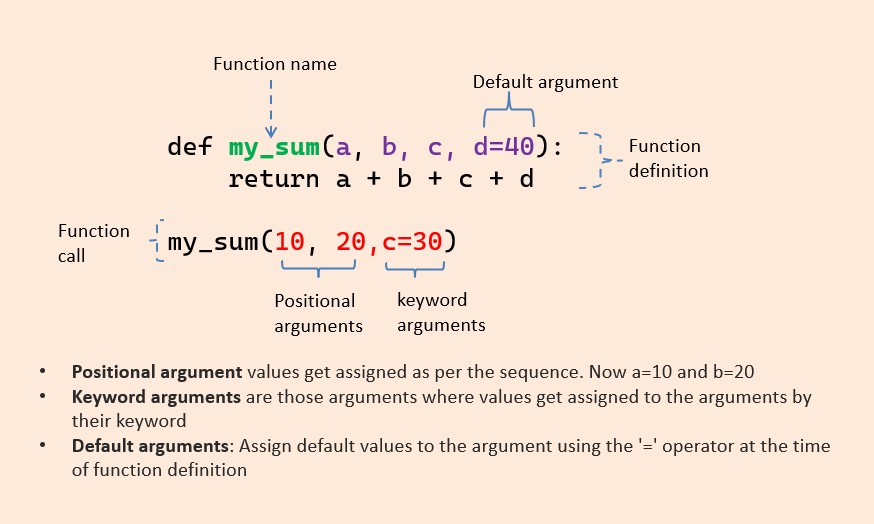
The arguments you pass are matched to the parameters based on their position. "Alex" goes to first, and "Student" goes to last. These are called positional arguments.
Making Calls More Readable: Keyword Arguments
When a function has many parameters, it can be hard to remember the correct order for positional arguments. To make your code clearer and less error-prone, you can use keyword arguments. Here, you explicitly name the parameter you are providing an argument for.
Python Functions | Python Tutorial for Absolute Beginners #1
This clip introduces keyword arguments and highlights how they improve code readability.
Watch this short segment from the explanation of keyword arguments.
With keyword arguments, the order no longer matters, which adds flexibility and clarity.
def calculate_bill(total, tax_rate, tip_percent):
    tax_amount = total * tax_rate
    tip_amount = total * tip_percent
    final_bill = total + tax_amount + tip_amount
    print(f"Final bill: ${final_bill:.2f}")


# Using positional arguments (order matters)
calculate_bill(100, 0.08, 0.20)


# Using keyword arguments (order doesn't matter, more readable)
calculate_bill(tip_percent=0.20, total=100, tax_rate=0.08)
Both calls produce the same result, but the second one is much easier to understand at a glance.
Getting Data Back: The return Statement
So far, our functions have only performed a task (printing to the screen). This is often called a "side effect." But what if we need a function to calculate a value that we can use later in our program?
For this, we use the return statement. When a function returns a value, you can store it in a variable, pass it to another function, or use it in any other expression.
Python Functions | Python Tutorial for Absolute Beginners #1
This video distinguishes between functions that perform a task and those that return a value, and explains what happens if you don't explicitly return anything.
First, watch the section on functions that return a value. Then, continue with the next short clip that explains the default return value, None, from the end of the lecture.
Let's refactor our calculate_bill function to return the final amount instead of printing it.
def calculate_bill(total, tax_rate, tip_percent):
    tax_amount = total * tax_rate
    tip_amount = total * tip_percent
    final_bill = total + tax_amount + tip_amount
    return final_bill # The function's output is this value


# Call the function and store the returned value in a variable
bill_for_table1 = calculate_bill(100, 0.08, 0.20)
bill_for_table2 = calculate_bill(55, 0.08, 0.18)

print(f"Table 1 owes: ${bill_for_table1:.2f}")
print(f"Table 2 owes: ${bill_for_table2:.2f}")


# We can also use the returned value directly
total_collected = bill_for_table1 + bill_for_table2
print(f"Total collected tonight: ${total_collected:.2f}")
This version is much more flexible. The function's single responsibility is to calculate the bill. The calling code can then decide what to do with that result.
As the video mentioned, if a function doesn't have a return statement, it automatically returns a special value called None.
Adding Flexibility with Default Arguments
Sometimes, you want a parameter to have a common or default value, making it optional for the caller to provide. You can achieve this by assigning a default argument in the function definition.
Python Functions | Python Tutorial for Absolute Beginners #1
Here you'll see how to set default values for parameters, making them optional.
Watch this final clip from the beginning of the lecture on optional parameters. Pay close attention to the rule about where optional parameters must be placed.
A key rule to remember is that all required parameters must be placed before any optional (default) parameters in the function definition.
Let's update our greet_person function. Maybe we want a default title.
def greet_person(first, last, title=""):
    if title:


        # If a title was provided, include it
        print(f"Hello, {title} {first} {last}!")
    else:


        # Otherwise, use the simpler greeting
        print(f"Hello, {first} {last}!")

greet_person("Marie", "Curie", title="Dr.") # Uses the provided 'title'
greet_person("Ada", "Lovelace")             # Uses the default empty 'title'
This makes our function more versatile. The caller can choose to provide the optional information or not.
Visual Summary
This image provides a great visual summary, tying together positional, keyword, and default arguments in a single example.
Let's Practice
Now it's time to combine everything you've learned. Create a new Python file and solve the following problem.
Problem:
You're building a simple e-commerce checkout system. You need to write a function that calculates the total cost of an order.
Instructions:
- Define a function named
calculate_order_total. - The function should accept three parameters:
price(the price of a single item)quantity(the number of items)discount_rate(an optional discount percentage, which should have a default value of0.0).
- Inside the function, calculate the initial cost (
price * quantity). - Then, calculate the discount amount (
initial_cost * discount_rate). - Subtract the discount from the initial cost to get the final total.
- The function should
returnthe final total. - After defining the function, call it a few times to test it:
- Call it for an order of 5 items that cost $20 each, with no discount.
- Call it for an order of 2 items that cost $150 each, with a 10% discount (i.e.,
discount_rate=0.1). - Print the results from these function calls to the screen in a formatted way.
Click to see the solution
def calculate_order_total(price, quantity, discount_rate=0.0):
    """Calculates the total cost of an order after an optional discount."""
    initial_cost = price * quantity
    discount_amount = initial_cost * discount_rate
    final_total = initial_cost - discount_amount
    return final_total


# Test case 1: No discount
order1_total = calculate_order_total(20, 5)
print(f"The total for the first order is: ${order1_total:.2f}")


# Test case 2: With a 10% discount, using a keyword argument for clarity
order2_total = calculate_order_total(price=150, quantity=2, discount_rate=0.1)
print(f"The total for the second order is: ${order2_total:.2f}")
Expected Output:
The total for the first order is: $100.00
The total for the second order is: $270.00
Conclusion
Congratulations! You've just learned one of the most important concepts in programming. Functions are essential for writing code that is organized, reusable, and easy to maintain. As you continue your journey, you will be writing and using functions constantly.
Key Takeaways:
- Functions are reusable blocks of code defined with the
defkeyword. - They help you follow the DRY (Don't Repeat Yourself) principle.
- Parameters are placeholders in a function's definition, while arguments are the actual values passed during a function call.
- Arguments can be positional (order matters) or keyword (order doesn't matter, more readable).
- The
returnstatement allows a function to send a value back to the caller. A function withoutreturnimplicitly returnsNone. - Default arguments make parameters optional and your functions more flexible.
In our next lesson, we will explore list comprehensions, a powerful and "Pythonic" way to create lists. This will build on our knowledge of both lists and the idea of transforming data, which you've just practiced with functions.