Hello! Welcome to the first lesson in our module on Data Validation and Serialization with Pydantic.
In the previous module, we built a solid foundation for handling requests by defining routes, organizing them, generating documentation, and configuring CORS. We've defined the entrances to our API; now, it's time to manage the data that flows through them.
This is where Pydantic comes in. It's the library that powers FastAPI's data validation and serialization, and it's one of the main reasons for FastAPI's excellent developer experience.
Learning Outcome: Define Pydantic BaseModel schemas for request validation, comparing them to DRF serializers.
Given your background with Django and the Django Rest Framework (DRF), this lesson will feel very familiar. We'll draw direct parallels between Pydantic's BaseModel and DRF's Serializer, leveraging your existing knowledge to help you master this new tool quickly.
1. Why Pydantic? From Manual Checks to Smart Models
Before we dive into the syntax, let's understand the problem Pydantic solves. In any API, you need to validate incoming data. Is the user ID an integer? Is the email address a valid format? You could write a lot of if/else statements to handle this, but it quickly becomes messy and hard to maintain.
Pydantic offers a declarative, elegant, and powerful solution using Python's own type hints.
Python Pydantic Tutorial: Complete Data Validation Course (Used by FastAPI)
To see the difference, let's watch the first part of a fantastic Pydantic tutorial by Corey Schafer. He starts by showing what manual validation looks like and then introduces a basic Pydantic model to demonstrate its advantages.
Watch from the beginning until 05:36. Pay attention to two key benefits he highlights: 1) The reduction in boilerplate code, and 2) Pydantic's ability to collect all validation errors at once, rather than failing on the first one it finds.
As you saw, Pydantic not only simplifies the code but also provides a much better experience by returning all errors in a single, structured response.
A quick but important note on versions: Pydantic V2 introduced some significant changes. This course uses V2, which is the standard for modern FastAPI development.
Python Pydantic Tutorial: Complete Data Validation Course (Used by FastAPI)
The same video has a brief but important section on the differences between Pydantic V1 and V2. It's good to be aware of this in case you encounter older tutorials or codebases.
Watch from 05:36 to 07:50. The key takeaway is the change in method names, like model_dump() in V2 replacing .dict() in V1.
2. Defining Your First BaseModel
Creating a Pydantic model, or "schema," is straightforward. You create a class that inherits from pydantic.BaseModel and define its attributes using standard Python type hints.
Let's see this in action.
Python Pydantic Tutorial: Complete Data Validation Course (Used by FastAPI)
Let's continue with Corey Schafer's tutorial to learn the fundamentals of defining a model.
Watch from 07:50 to 14:49. This section is packed with core concepts. Focus on how he defines: Required fields (no default value). Optional fields with a default value. Truly optional fields that can be None (using str | None or Optional[str] from the typing module).
Let's summarize what we've learned with a clear example. Imagine we're creating a schema for a new user:
from pydantic import BaseModel
from datetime import datetime
from typing import Optional

class UserCreate(BaseModel):


    # Required fields: No default value
    username: str
    email: str


    # Optional field with a default value
    is_active: bool = True


    # Optional field that can be None
    full_name: Optional[str] = None # Same as `str | None = None` in Python 3.10+
Here, username and email must be provided. If is_active is not provided, it will default to True. If full_name is not provided, it will default to None. Pydantic will enforce that these fields, if provided, match their declared types.
3. The Core Analogy: Pydantic BaseModel vs. DRF Serializer
Now for the main event. How does BaseModel relate to the DRF Serializer you're used to?
They serve the exact same purpose: defining a data structure for validation and serialization/deserialization.
In DRF, data flows from the database through the ORM, gets converted into Python data types by a Serializer, and then rendered as JSON. Pydantic BaseModel does the same job for FastAPI.

The key difference is in the how.
Django vs FastAPI: I Built the Same App Twice
Let's look at a direct code comparison from an article that rebuilt the same app in both frameworks. This will make the differences crystal clear.
Scroll to the section titled 'Validation' and examine the UserSerializer (DRF) and User (Pydantic) code snippets. Note the contrast between DRF's serializers.CharField and Pydantic's simple str type hint.
Let's break down the comparison further.
| Feature | Django Rest Framework (Serializer) |
FastAPI (Pydantic.BaseModel) |
|---|---|---|
| Declaration | class MySerializer(serializers.Serializer): |
class MyModel(BaseModel): |
| Field Types | Uses special field types: serializers.CharField, serializers.EmailField |
Uses standard Python type hints: str, int, bool |
| Validation | Defined via field arguments: max_length=50 |
Often uses type hints + special functions (Field, EmailStr) |
| Verbosity | More verbose, requires explicit field definitions. | More concise, relies on native types. |
| Framework Coupling | Tightly coupled with Django. ModelSerializer links to Django Models. |
Completely framework-agnostic. Can be used in any project. |
This table provides an even more detailed breakdown of the differences in their validation approaches.
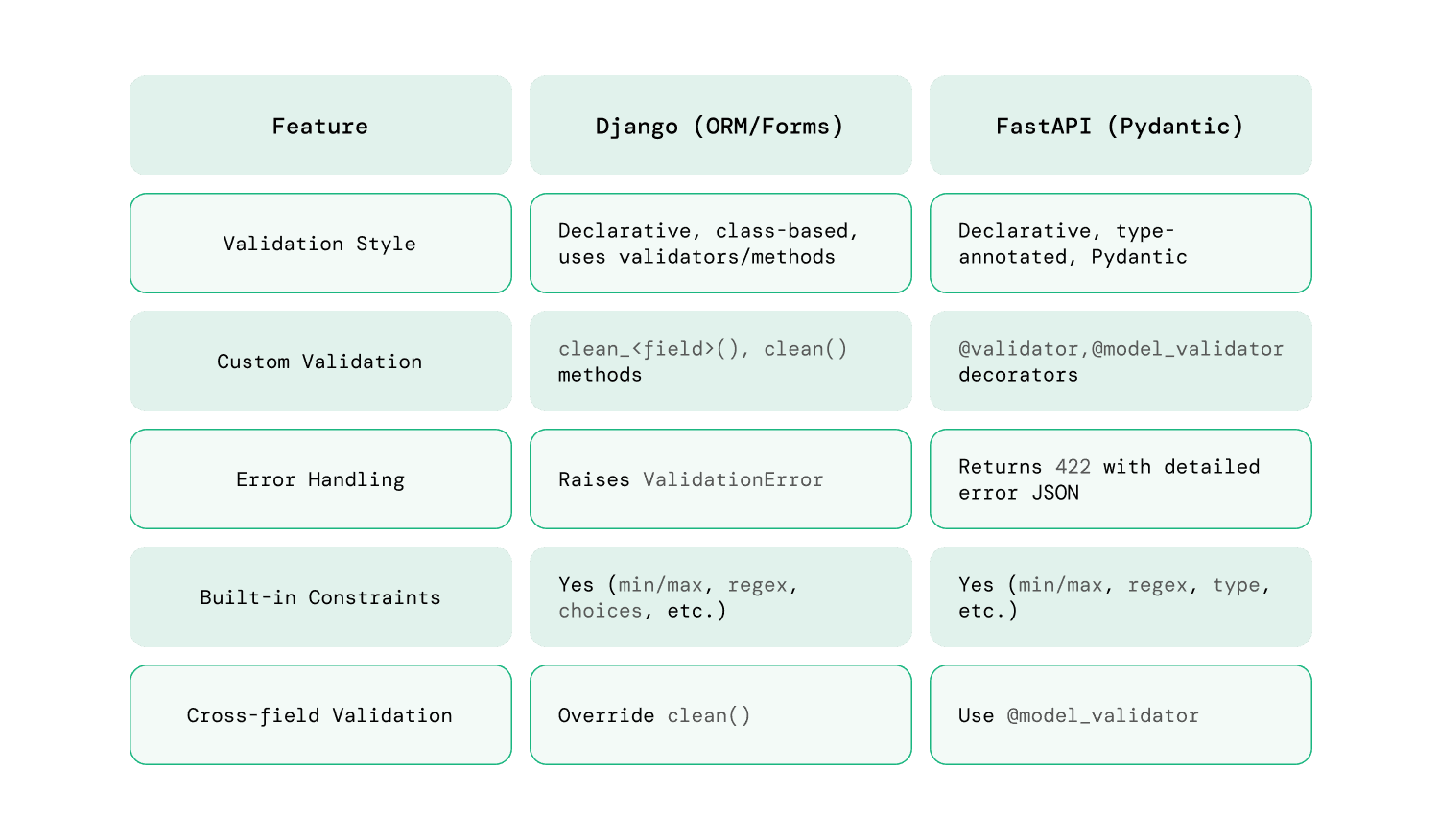
The key takeaway is that Pydantic leverages modern Python features (type hints) to achieve the same result as DRF's custom class-based system, but with significantly less code and greater clarity.
4. BaseModel in Action: Automatic Request Validation
Here is where FastAPI's integration with Pydantic truly shines. When you use a Pydantic model as a type hint in a path operation function, FastAPI handles everything for you.
Consider this DRF view:
# Django Rest Framework
@api_view(['POST'])
def create_widget(request):
    serializer = WidgetSerializer(data=request.data)
    serializer.is_valid(raise_exception=True) # You must call is_valid()


    # ... use serializer.validated_data ...
    return Response({"created": serializer.validated_data})
Now, the FastAPI equivalent:
# FastAPI
from fastapi import FastAPI
from pydantic import BaseModel

app = FastAPI()

class Widget(BaseModel):
    name: str
    stock: int

@app.post("/widgets/")
async def create_widget(widget: Widget): # Type hint does the magic


    # If code reaches here, data is valid.
    # `widget` is a Pydantic object with all the data.
    return {"created": widget}
When a request hits the /widgets/ endpoint, FastAPI automatically:
- Reads the request body as JSON.
- Parses the data into a
Widgetmodel instance. - Validates the data. It checks if
nameis a string andstockis an integer. - Performs type coercion. If you send
{"name": "My Widget", "stock": "100"}, Pydantic is smart enough to convert the string"100"into the integer100. - If validation fails, it immediately stops and returns a
422 Unprocessable Entityerror with a detailed JSON body explaining exactly which fields are wrong and why. - If validation succeeds, it calls your
create_widgetfunction, passing the validatedwidgetobject as an argument.
You never have to manually call is_valid() or handle validation errors. It's all done for you, based on the type hint.
Why Dataclasses Disappear in Real Python Applications
The ArjanCodes channel has a great video that touches on Pydantic's deep integration with FastAPI and this 'type coercion' feature.
First, watch from 03:26 to 04:32 to understand how deeply Pydantic is integrated into FastAPI. Then, skip to 08:50 and watch until 11:29. This part explains why Pydantic's BaseModel is generally preferred over other options (like dataclasses) because it offers powerful features like type coercion, which is demonstrated with an example.
Conclusion
In this lesson, you've taken the first and most crucial step in mastering FastAPI's data layer. By understanding Pydantic BaseModel, you've learned the counterpart to DRF's Serializer.
Key Takeaways:
- Pydantic
BaseModelis for data validation and serialization, just like a DRFSerializer. - It uses Python type hints for validation, making the code more concise and Pythonic than DRF's field-based approach.
- FastAPI automates the entire validation process. By type-hinting a path operation parameter with a Pydantic model, you get parsing, validation, error handling, and type coercion for free.
- This replaces the manual
serializer.is_valid(raise_exception=True)pattern you're used to in DRF.
You now have the foundation for defining the shape of your API's data. However, our simple UserCreate model is just the beginning. What if you need more specific rules, like a minimum username length or a password with certain characters?
In our next lesson, we will build on this foundation and learn how to apply fine-grained validation using Pydantic field types, constraints, and the Field() function. This will give you the power to enforce much more complex business logic directly within your schemas.