Hello! Welcome back to our journey into FastAPI.
In our last lesson, you mastered custom validation with Pydantic's @field_validator and @model_validator, seeing how they mirror the validate_<field> and validate methods from your Django REST Framework experience. We concluded by noting that a single model, or schema, is often not enough to handle all the different ways we need to interact with a resource.
Today, we'll dive into that idea. You will learn how to use separate Pydantic schemas for create, update, and response representations of a single resource. This is a fundamental pattern for building robust, secure, and clear APIs. It's analogous to using different serializers in DRF for read and write operations, but as you'll see, FastAPI's integration makes it even more powerful.
1. The Problem with a "One-Size-Fits-All" Schema
In a typical CRUD (Create, Read, Update, Delete) workflow, the data you expect as input is often different from the data you send back as output.
Consider a User resource:
- Creating a user (input): The client sends a
username,email, andpassword. They should not be able to specify a userid, as this is generated by the database. - Reading a user (output): The API returns the user's
id,username, andemail. It must never send thepasswordback to the client. - Updating a user (input): The client might want to update just the
email. They shouldn't be forced to provide all other fields. This means the fields in an update schema are often optional.
Using a single Pydantic model for all these cases leads to awkward compromises, like making fields optional when they should be required in certain contexts. Let's watch a short video that frames this problem clearly.
Why Dataclasses Disappear in Real Python Applications
The following clip from ArjanCodes explains why using a single Pydantic model for both requests and responses can lead to design issues, especially concerning fields like database IDs.
Watch from 05:26 to 06:40. Pay attention to the dilemma described: a book in the database must have an ID, but a client creating a book must not provide one. This is the core problem we are solving today.
This tension between what the client provides and what the database stores is precisely why we need separate schemas.
2. The Solution: Schemas for Different Contexts
The solution is to define distinct Pydantic models for each context: creation, response, and updates. This allows you to enforce strict, context-specific rules for your data.
A great way to understand this is by reading the SQLModel documentation written by FastAPI's creator, Sebastián Ramírez (Tiangolo). Although it uses SQLModel, the concepts for defining separate Pydantic BaseModel schemas are identical.
Multiple Models with FastAPI - SQLModel
This tutorial, 'Multiple Models with FastAPI', provides a definitive guide on this pattern. It walks through creating HeroCreate and HeroPublic (response) schemas from a base database model.
Please read the following sections. Focus on the reasoning behind each model: 'Review Creation Schema': Understand why accepting an id on creation is undesirable. 'Review Response Schema': Understand why the id should be required in a response, even if it's optional in the database model. 'Multiple Hero Schemas': See the three distinct requirements outlined for the database (Hero), creation (HeroCreate), and response (HeroPublic) models. 'Use Multiple Models to Create a Hero': Pay close attention to how these schemas are used in the path operation: hero: HeroCreate for the request body and response_model=HeroPublic for the response.
As the documentation shows, FastAPI uses these distinct models to automatically:
- Validate incoming data: The
HeroCreatetype hint ensures clients can only sendname,secret_name, andage. - Filter and serialize outgoing data: The
response_model=HeroPublicparameter ensures the response includes theidand matches the response schema. This is a powerful security feature that prevents accidentally leaking sensitive data, like passwords or internal fields.
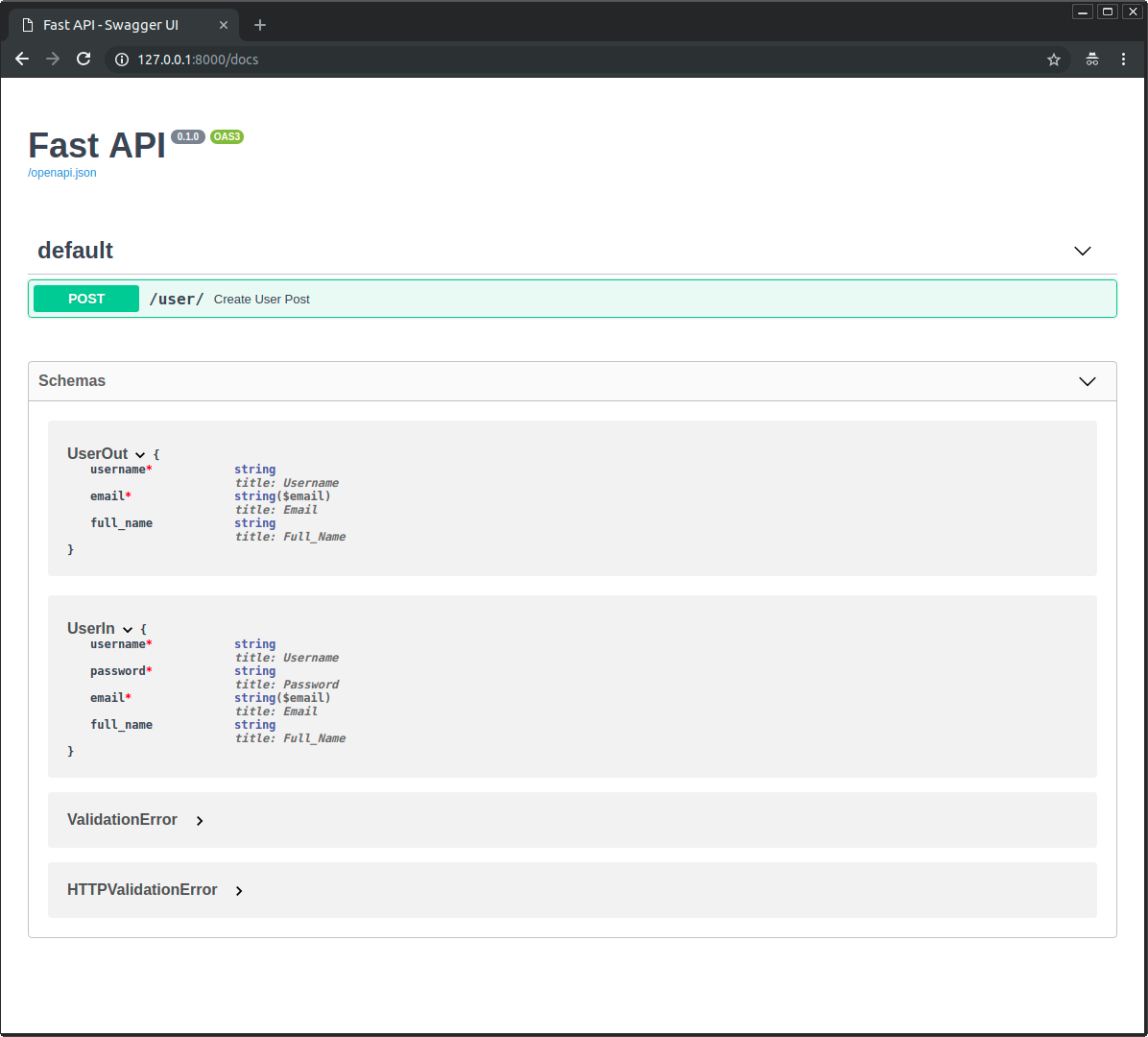
The result is a clear and self-documenting API. The generated OpenAPI documentation (Swagger UI) will show different schemas for input and output, making the API contract unambiguous for frontend developers.
3. Schemas for Updates: PUT vs. PATCH
The pattern of separate schemas becomes even more crucial when handling updates. HTTP has two primary methods for updates: PUT and PATCH.
PUT: Requires the client to send the entire resource representation. If a field is omitted, it should be set to its default value (e.g.,null). This implies a schema where all fields are required, much like aCreateschema.PATCH: Allows the client to send a partial representation, including only the fields they want to change. This requires a schema where all fields are optional.
Your experience with DRF serializers maps here: you might use the same serializer for create and PUT, but a PATCH operation often requires partial=True. In Pydantic, we achieve this by defining an Update schema.
Let's watch how to implement this in practice.
Python FastAPI Tutorial (Part 6): Completing CRUD - Update and Delete (PUT, PATCH, DELETE)
Corey Schafer's tutorial provides an excellent, hands-on demonstration of creating schemas for both full (PUT) and partial (PATCH) updates.
Watch the following segments carefully: Creating a Schema for Partial Updates (PATCH) (02:03 - 03:35): Notice how the PostUpdate schema is defined with all fields as optional (str | None) and given a default value of None. Implementing a Full Update (PUT) (04:32 - 05:36): See how the PostCreate schema is reused for the PUT endpoint, enforcing that all fields must be supplied. Implementing a Partial Update (PATCH) (10:36 - 14:46): This is a key section. Pay close attention to the use of post_data.model_dump(exclude_unset=True). This method is crucial because it creates a dictionary containing only the fields that the client explicitly sent, ignoring the None defaults for the fields that were omitted. This prevents you from accidentally nullifying data.
The model_dump(exclude_unset=True) method is the idiomatic way to handle partial updates in FastAPI and is a vital technique to add to your toolkit.
4. Avoiding Duplication with Inheritance
You've probably noticed that our Create, Update, and Response schemas share many of the same fields. Manually keeping them in sync is tedious and error-prone. This is where a key Object-Oriented principle—inheritance—comes to the rescue, a practice you're interested in for building modern applications.
We can define a Base schema with all the common fields and then have our specific schemas inherit from it.
Let's return to the SQLModel documentation to see this elegant solution.
Multiple Models with FastAPI - SQLModel
This part of the tutorial demonstrates how to refactor the duplicated fields into a HeroBase model, making the code much cleaner and more maintainable (Don't Repeat Yourself - DRY).
Please read these final sections: 'Multiple Models with Inheritance': See how a HeroBase model is created to hold the shared fields. 'The HeroCreate Data Model': Note how HeroCreate simply inherits from HeroBase and uses pass, as it needs no additional fields. This is a common and clean pattern. 'The HeroPublic Data Model': See how HeroPublic inherits from the base and adds the id field specific to responses. 'Rules of Thumb': Read the two rules: 'Only Inherit from Data Models' and 'Avoid Duplication - Keep it Simple'. These are excellent guiding principles for good design.
So, a common structure for a resource might look like this:
from pydantic import BaseModel
from typing import Optional


# 1. Base model with shared fields
class ItemBase(BaseModel):
    name: str
    description: Optional[str] = None
    price: float


# 2. Create model inherits from Base
class ItemCreate(ItemBase):


    # No extra fields needed for creation
    pass


# 3. Update model with all fields optional
class ItemUpdate(BaseModel):
    name: Optional[str] = None
    description: Optional[str] = None
    price: Optional[float] = None


    # Note: It's often simpler to define the Update model separately
    # rather than inheriting, because all fields change their type to Optional.


# 4. Response model inherits from Base and adds fields from the DB
class ItemResponse(ItemBase):
    id: int
    owner_id: int

    class Config:
        orm_mode = True # Now called `from_attributes` in Pydantic v2
This structure is scalable, maintainable, and clearly communicates the intent of your API.
Conclusion
Today you've learned a crucial pattern for professional API development with FastAPI. By using separate Pydantic schemas, you create a more secure, robust, and well-documented API.
Key Takeaways:
- A single data model rarely fits all CRUD operations.
- Create Schema: Defines the data a client sends to create a resource. It should exclude server-generated fields like
id. - Response Schema: Defines the data the server sends back. It should include server-generated fields and exclude sensitive data like passwords. Use it with the
response_modelparameter. - Update Schema: Defines the data for
PATCHrequests. It typically has all fields marked as optional. - Use
model.model_dump(exclude_unset=True)to get a dictionary of only the fields provided by the client in a partial update. - Use inheritance from a
Basemodel to keep your schemas DRY (Don't Repeat Yourself) and easy to maintain.
In our next lesson, we will dive deeper into configuring these models. You will learn how to configure Pydantic model behavior, such as ORM integration, using model_config. This will bridge the gap between our Pydantic data schemas and our database models, a crucial step toward building a complete application.