Hello! Welcome to the next lesson in your journey to master FastAPI.
In our last session, we took a major step toward a cleaner architecture by implementing the repository pattern. This successfully decoupled our data access logic from our API endpoints, centralizing all database interactions into a UserRepository.
However, if you look at our refactored endpoint, it still handles tasks that aren't purely about the HTTP request and response cycle. It checks if a user exists and prepares data (like hashing a password) before calling the repository. This is what we call business logic.
This lesson directly addresses the learning outcome: Implement a service layer to encapsulate business logic, orchestrating calls between route handlers and repositories.
Our goal is to create another layer of abstraction—the service layer—that will sit between our routers and our repositories. This layer will act as the "brain" of our application, containing all the business rules and orchestrating the flow of data. By the end of this lesson, our route handlers will be incredibly thin, with their only job being to manage HTTP concerns.
For you, coming from Django, this is analogous to formalizing the common practice of creating a services.py file within a Django app. While in Django this is a convention adopted for complex projects, in modern FastAPI architecture, the service layer is a foundational pattern that works seamlessly with dependency injection.
The Three-Layer Architecture
In the last lesson, our code had two primary concerns: HTTP handling (in the router) and database access (in the repository). We're now introducing a third layer in the middle to handle business logic.
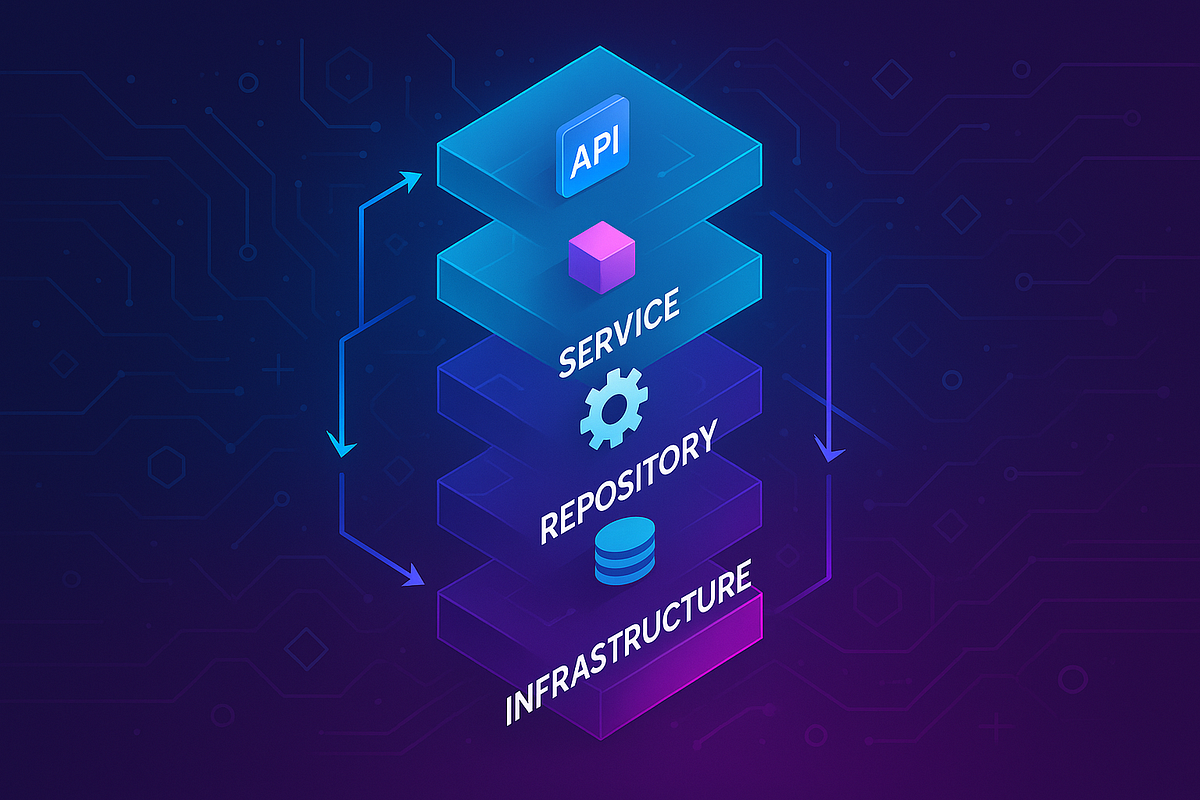
Let's break down the responsibilities:
- Presentation Layer (Router): Responsible for HTTP-related tasks. It parses request bodies, extracts path parameters, handles authentication headers, and formats the final JSON response. It should contain no business logic.
- Service Layer (Business Logic): This is the core of your application. It executes business rules, performs validations, and orchestrates operations. For example, creating a user isn't just an
INSERTstatement; it involves checking for duplicates, hashing a password, and perhaps sending a welcome email. This all belongs in the service layer. - Repository/Data Access Layer: Responsible only for communicating with the database. Its methods should be simple and reflect data storage operations like
create,get_by_id,update, etc.
This separation of concerns is the main motivation for this architecture. It makes the application easier to understand, maintain, and test.
Let's begin by reading a short article that clearly defines these layers and their purpose within a FastAPI context.
Practical FastAPI × Clean Architecture Guide
This article from IT & Life Hacks Blog provides an excellent breakdown of a clean architecture for FastAPI. It will help you form a strong mental model of where the service layer fits and what it does.
Read the sections titled 'The Basic Layer Model: What “Layers” Do We Split Into?' and 'Narrow the Router’s Responsibility: Aim for Thin Endpoints'. Pay close attention to the sample directory structure and the argument for keeping routers thin. This sets the stage for everything we'll build in this lesson.
Implementing the Service Layer
Let's continue with the create_user example. After the last lesson, our route handler might look like this:
# app/routers/users.py - BEFORE the service layer

@router.post("/users", response_model=UserRead)
async def create_user(
    user: UserCreate,
    repo: UserRepository = Depends(get_user_repository)
):


    # This is BUSINESS LOGIC
    db_user = await repo.get_user_by_email(email=user.email)
    if db_user:
        raise HTTPException(status_code=400, detail="Email already registered.")


    # This is also BUSINESS LOGIC
    hashed_password = get_password_hash(user.password)


    # This is a call to the data layer
    return await repo.create_user(user_data=user, hashed_password=hashed_password)
Our goal is to move all the business logic into a new UserService.
Step 1: Create the UserService
First, let's watch a brief video that visualizes where the service layer fits and what it contains.
Anatomy of a Scalable Python Project (FastAPI)
This clip from ArjanCodes' video on scalable project anatomy provides a great, concise look at a services folder and its contents.
Watch the segment from 06:45 to 07:34. The UserService shown here takes a database session and performs the actual work. In our architecture, it will take our UserRepository instead, but the principle of encapsulating business logic is identical.
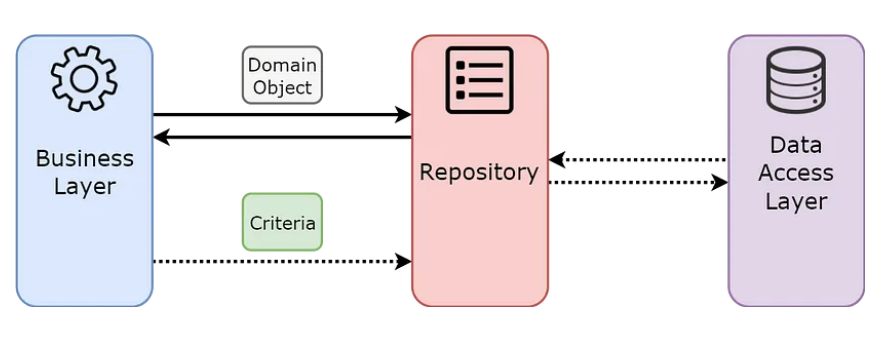
Inspired by that, we'll create app/services/user_service.py. The UserService class will depend on the UserRepository we built previously. This is a key concept: services depend on repositories, not the other way around.
# app/services/user_service.py

from fastapi import HTTPException
from app.repositories.user_repository import UserRepository
from app.schemas.user import UserCreate  # Pydantic schema for request
from app.core.security import get_password_hash  # A helper function for hashing

class UserService:
    def __init__(self, user_repo: UserRepository):


        # The service is initialized with a repository instance
        self.user_repo = user_repo

    async def create_user(self, user_data: UserCreate):
        """
        Orchestrates the user creation process.
        """


        # Business Rule 1: Check if a user with this email already exists
        existing_user = await self.user_repo.get_user_by_email(user_data.email)
        if existing_user:
            raise HTTPException(
                status_code=400,
                detail="An account with this email already exists."
            )


        # Business Rule 2: Hash the incoming password
        hashed_password = get_password_hash(user_data.password)


        # Orchestration: Call the repository to save the new user
        # Note: we pass the hashed password, not the original user_data object
        new_user = await self.user_repo.create_user(
            email=user_data.email,
            hashed_password=hashed_password
        )

        return new_user
Notice how this create_user method clearly outlines the business process, free from any HTTP or direct database code.
Step 2: Wire up the Service with Dependency Injection
Now that we have our UserService, how does our router get access to it? Just as with the repository, we'll use FastAPI's dependency injection system. We'll create a new dependency function that builds and provides a UserService instance.
In app/dependencies.py, add the following:
# app/dependencies.py

from fastapi import Depends
from sqlalchemy.ext.asyncio import AsyncSession

from app.database import get_db
from app.repositories.user_repository import UserRepository
from app.services.user_service import UserService


# Dependency from previous lesson
def get_user_repository(db: AsyncSession = Depends(get_db)) -> UserRepository:
    return UserRepository(db)


# New dependency for the service layer
def get_user_service(
    repo: UserRepository = Depends(get_user_repository)
) -> UserService:
    return UserService(repo)
This new get_user_service function is beautiful in its simplicity. It declares its own dependency on get_user_repository. FastAPI will handle this chain automatically:
- A request comes in for
create_user. - FastAPI sees it
Dependsonget_user_service. - To resolve
get_user_service, FastAPI sees itDependsonget_user_repository. - To resolve
get_user_repository, FastAPI sees itDependsonget_db. get_dbyields a session, which is passed toget_user_repositoryto create aUserRepository.- The
UserRepositoryinstance is passed toget_user_serviceto create aUserService. - The
UserServiceinstance is finally passed to our route handler.
Step 3: Refactor the Route Handler
With the service and dependency in place, our create_user route handler becomes remarkably clean and focused.
# app/routers/users.py - AFTER implementing the service layer

from app.services.user_service import UserService
from app.dependencies import get_user_service

@router.post("/users", response_model=UserRead)
async def create_user(
    user: UserCreate,
    service: UserService = Depends(get_user_service) # Depend on the service now
):


    # The router's only job: delegate to the service and return the result.
    return await service.create_user(user_data=user)
Look at that! The router now has a single responsibility: handling the HTTP request and delegating the real work to the service layer. It has no knowledge of the underlying business rules or data storage mechanisms.
The Payoff: Clarity, Maintainability, and Testability
You've now seen the complete flow from a "fat" endpoint to a clean, three-layer architecture. Let's read one more resource that reinforces why this is so valuable and provides another concrete example.
FastAPI: SOLID Principles and Design Patterns - Medium
The FastAPI: SOLID Principles and Design Patterns article on Medium explicitly defines the Service Layer pattern and its benefits. It provides another full code example that should solidify your understanding.
First, look at the code blocks under 'Refactored Code' to see the final UserRepository, UserService, and UserRouter files. Then, read the sections 'User Service' (under the first code block) and the section titled '2. Service Layer'. This will clearly explain the 'why' behind the pattern we just implemented.
The benefits described in the article are worth restating:
- Separation of Concerns: Business logic is centralized, not scattered across endpoints.
- Decoupling: The presentation layer (routers) is decoupled from the business logic. You could add a CLI or a gRPC interface that reuses the exact same
UserService! - Testability: This is a huge win. Testing the
UserServiceis now trivial. You can pass it a mockInMemoryUserRepository(like we created in the last lesson) and test your business rules in complete isolation from any database or HTTP server.
# tests/test_user_service.py


# A mock repository for testing
class MockUserRepository:
    async def get_user_by_email(self, email: str):
        if email == "exists@example.com":
            return User(id=1, email=email) # Return a dummy user
        return None

    async def create_user(self, email: str, hashed_password: str):
        return User(id=2, email=email) # Return another dummy user

async def test_create_user_fails_if_email_exists():
    mock_repo = MockUserRepository()
    service = UserService(user_repo=mock_repo)
    user_data = UserCreate(email="exists@example.com", password="password")


    # Use pytest.raises to assert that an HTTPException is raised
    with pytest.raises(HTTPException) as excinfo:
        await service.create_user(user_data)

    assert excinfo.value.status_code == 400
    assert "already exists" in excinfo.value.detail
These kinds of unit tests are incredibly fast and precise, allowing you to validate your core business logic with confidence.
Conclusion
In this lesson, you have successfully implemented the service layer, completing the trifecta of a modern, layered API architecture: Router, Service, and Repository. You now have a clear mental model and a practical implementation for separating concerns within your FastAPI applications.
Key Takeaways:
- The Service Layer is responsible for encapsulating all business logic and orchestrating application workflows.
- Services depend on repositories to perform data persistence, but they are not concerned with the details of database interaction.
- Routers depend on services to execute business logic. This makes routers extremely thin, focused only on HTTP-related tasks.
- This layered architecture is wired together elegantly using FastAPI's dependency injection system, with dependencies chaining from the router down to the database session.
- The primary benefit is separation of concerns, which leads to a more maintainable, scalable, and, most importantly, testable codebase.
Preview of the Next Lesson:
We've now successfully refactored a single CRUD endpoint to use this clean architecture. The next logical step is to see how this pattern scales. In our next lesson, we will refactor a simple CRUD endpoint to use the service-repository pattern, solidifying your understanding and demonstrating how this structure applies to all the operations (Create, Read, Update, Delete) for a given resource.