Welcome to Module 9. In our last lesson, we explored how to secure an API using the Microsoft Identity Platform, distinguishing between delegated and application permissions. A key part of that process involved a client application using a client secret to authenticate itself. This raises a critical question for any developer: where do you securely store that secret? Hardcoding it in your application settings or source code is a major security risk.
This lesson introduces the solution: Azure Key Vault. We'll explore how this service acts as a secure digital safe for your application's most sensitive information. By the end of our session, you will be able to create your own Azure Key Vault and use the Azure portal to manage its secrets, a foundational skill for building secure applications in Azure and a key topic for the AZ-204 exam.
1. What is Azure Key Vault?
At its core, Azure Key Vault is a cloud service for securely storing and accessing secrets. A "secret" is anything you want to tightly control access to, such as API keys, passwords, certificates, or cryptographic keys.
Key Vault provides:
- Centralized secret management: Instead of scattering secrets across different applications and configuration files, you have a single, secure place to manage them.
- Secure storage: Secrets are encrypted at rest and can be protected by hardware security modules (HSMs) for the highest level of security.
- Controlled access: You can define granular policies to control which users and applications can access specific secrets.
- Auditing: Key Vault logs all access and activity, giving you a full audit trail.
To get a solid overview of Key Vault's purpose and features, let's watch a short introductory video.
Azure Key Vault Tutorial | Secure secrets, keys and certificates easily
This video from Adam Marczak's "Azure for Everyone" channel provides an excellent introduction to Azure Key Vault and its common use cases.
Please watch the first part of the video, focusing on these points: Core purpose: Understand that Key Vault is for centralizing and protecting secrets, keys, and certificates. Common use cases: Note the examples, such as storing database connection strings for a web app or centralizing secrets for multiple services. Additional features: Pay attention to features like firewalling, auditing, and integration with Azure Active Directory.
As the video highlighted, Key Vault can store three main types of objects: secrets, keys, and certificates. Today, our focus is squarely on secrets.
2. Creating an Azure Key Vault in the Portal
Now, let's get hands-on and create our first Key Vault. The process is straightforward and is done through the Azure portal.
When you create a Key Vault, you'll need to provide some basic information:
- Subscription: The Azure subscription to bill the resource to.
- Resource Group: A logical container for your Azure resources.
- Key vault name: This must be globally unique as it forms part of the service's DNS name.
- Region: The Azure region where the vault will be hosted. You should generally choose the same region as your applications to minimize latency.
- Pricing tier: Standard or Premium. The Premium tier adds support for HSM-protected keys, which is not required for our purposes.

The following video provides a clear, step-by-step walkthrough of this creation process.
Stop Storing Secrets in appsettings.json! Use Azure Key Vault Instead
Milan Jovanović, a well-regarded voice in the .NET community, demonstrates how to create a Key Vault. This video also introduces the modern approach to access control using RBAC, which we will discuss next.
Watch this segment to see the creation process in action: Creation steps: Follow along as he navigates the portal, fills in the required fields, and deploys the Key Vault. Notice the discussion on soft-delete, a safety feature that retains deleted secrets for a configurable period.
3. Configuring Access to Secrets
Creating the vault is the first step. The second, and arguably more important, is configuring who or what can access the secrets inside it. A common point of confusion is that even if you are the owner of the Key Vault resource, you do not automatically have permission to read or write its secrets.
Azure separates management operations (control plane) from data operations (data plane):
- Control Plane: Creating, deleting, or modifying the Key Vault resource itself. This is managed by standard Azure roles like Owner or Contributor.
- Data Plane: Reading, writing, or deleting the secrets, keys, and certificates inside the vault. This is managed by Key Vault-specific permissions.
You can configure data plane permissions using either Vault Access Policies (the older model) or Azure Role-Based Access Control (RBAC) (the recommended model). For the AZ-204 exam, you should be familiar with the RBAC approach.
Let's see how to assign the necessary roles to your user account to allow you to manage secrets.
Stop Storing Secrets in appsettings.json! Use Azure Key Vault Instead
This part of the same video explains how to configure RBAC permissions for Key Vault.
Watch this section carefully: Assigning Roles: Pay close attention to the roles being assigned. To manage secrets, you need the Key Vault Secrets Officer role. To simply read secrets (what an application would typically need), you would use the Key Vault Secrets User role.
Without the Key Vault Secrets Officer role, you would receive a "permission denied" error when trying to create a secret, even as a subscription owner.
4. Managing Secrets in the Portal
With the vault created and permissions assigned, you are ready to manage secrets. This involves adding new secrets, viewing their values, and updating them.
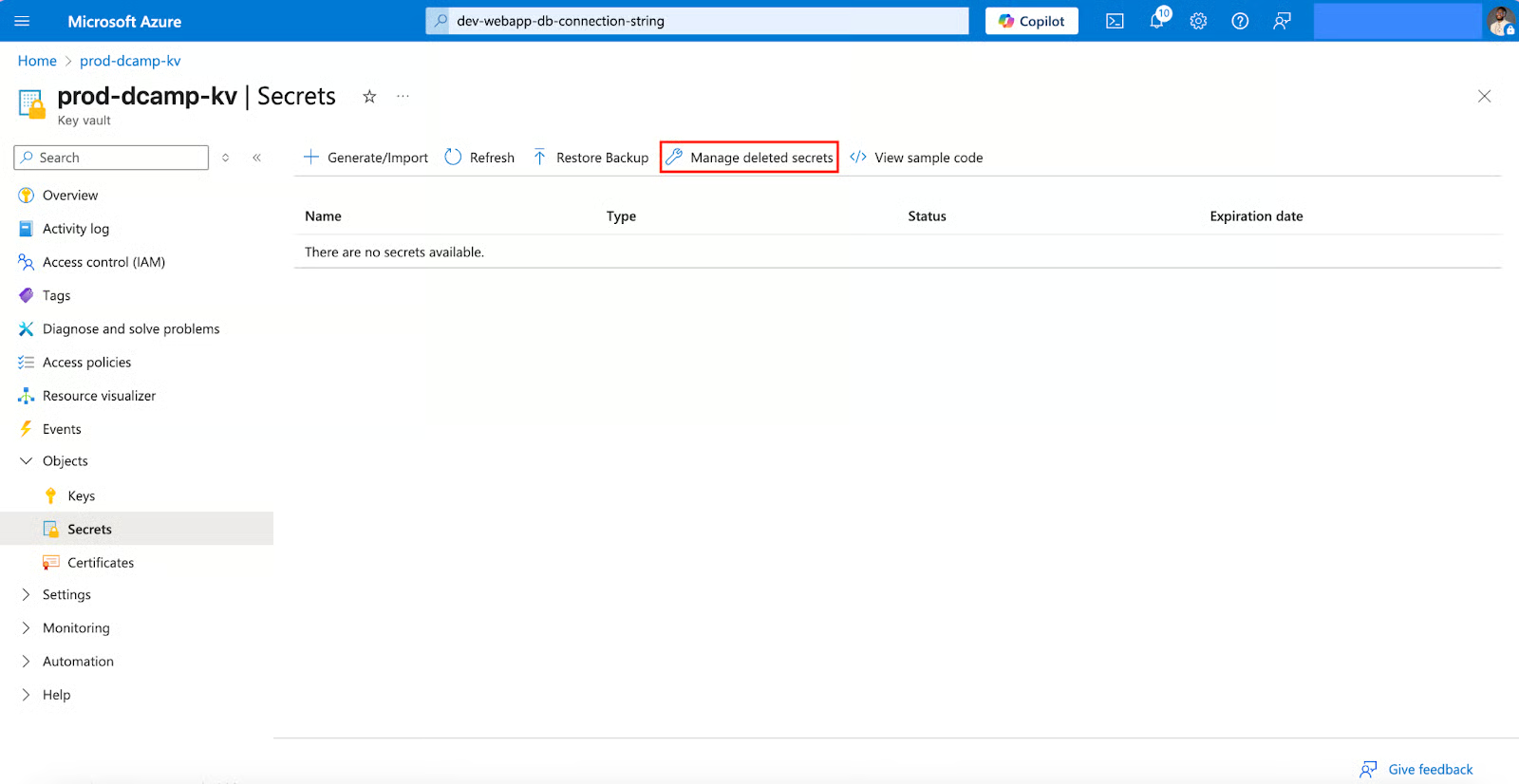
Let's walk through adding your first secret.
Azure Key Vault Tutorial: A Beginner's Guide to Cloud ...
This guide from DataCamp provides clear, step-by-step instructions for managing secrets.
Follow the instructions in the article under the "Storing and retrieving secrets" section. Specifically, perform these actions in your own Azure portal: Read Add Secrets Securely to create your first secret. A good practice is to use a descriptive, dashed-separated name (e.g., my-app-database-connection-string). Follow the steps in Retrieve Secret Values to view the value of the secret you just created. Finally, review Update Existing Secrets. Notice that updating a secret doesn't overwrite the old one; it creates a new version. This is a powerful feature that allows you to roll back to a previous value if needed.
The concept of versioning is crucial. When your application retrieves a secret, it can either request a specific version or always ask for the latest one. This provides flexibility for key rotation and lifecycle management.
Conclusion
In this lesson, you have taken a critical step toward building more secure cloud applications. You've moved beyond storing sensitive data in insecure configuration files and learned how to use Azure's dedicated service for secret management.
Here are the key takeaways:
- Azure Key Vault is a secure, centralized service for storing application secrets, keys, and certificates.
- You can create a Key Vault through the Azure portal by providing a globally unique name, region, and pricing tier.
- Access to the data within a Key Vault (the data plane) is managed separately from the vault resource itself, typically using Azure RBAC roles like
Key Vault Secrets Officer. - You can create, view, and update secrets through the portal. Each update creates a new version of the secret, enabling version history and rollbacks.
We've focused entirely on secrets today. In the next lesson, we'll broaden our understanding of Key Vault by exploring the use cases for the other two object types it manages: cryptographic keys and certificates.