Hello! In our previous lesson, we enhanced our .NET application to manage custom metadata on blobs. This gave you a way to store descriptive information directly with your data.
Today, we shift our focus from describing data to controlling access to it in concurrent environments. Imagine multiple instances of your application trying to write to the same configuration file in Blob Storage simultaneously. This could lead to data corruption. To solve this, Azure provides a locking mechanism called a lease.
This lesson directly addresses the learning outcome: Implement blob lease management programmatically to control concurrency. You will learn how to acquire an exclusive lock on a blob, perform operations, and then release the lock, ensuring data integrity.
1. Understanding Concurrency and Blob Leases
A lease creates and manages an exclusive lock on a blob for write and delete operations. When a blob is leased, any other process that wants to write to or delete it must wait until the lease is released. This is a fundamental pattern for managing concurrency.
Your experience as a software engineer likely includes dealing with thread safety, database locks, or distributed locks. Blob leasing is Azure's native solution for this problem at the storage level. A great real-world example is managing state files for Infrastructure as Code tools like Terraform, where only one user can apply changes at a time.

To manage leases in .NET, you will use the BlobLeaseClient class. Let's start with the official definition of blob leases.
Create and manage blob leases with .NET - Azure Storage
This introductory section from the Microsoft documentation explains what a blob lease is, its purpose, and introduces the BlobLeaseClient class you'll be using.
Please read the sections titled About blob leases and Acquire a lease. Focus on: The purpose of a lease: to lock a blob for write and delete operations. The possible lease durations (15-60 seconds, or infinite). The role of the BlobLeaseClient.
2. The Blob Lease Lifecycle
A lease is not simply "locked" or "unlocked"; it moves through several states. Understanding this lifecycle is crucial for correctly implementing lease management and for the AZ-204 exam. The five states are: Available, Leased, Expired, Breaking, and Broken.
The following diagram provides a clear visual of how a lease transitions between these states based on the operations you perform.
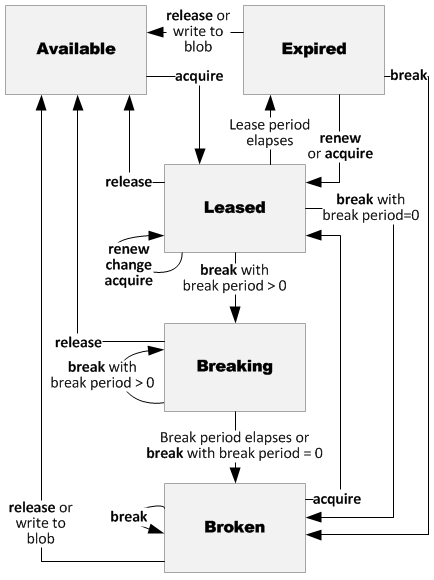
To get a precise definition of each state and the actions that cause a state change, please review the following resource.
Create and manage blob leases with .NET - Azure Storage
This section of the documentation provides a table that complements the diagram, giving a detailed description of each lease state and the allowed actions.
Read the section Lease states and actions. Pay close attention to the table that lists the five lease states. For each state, understand its description and which actions (acquire, renew, release, break) are permitted.
The key operations that drive the lifecycle are:
- Acquire: Obtains a lock on the blob, moving its state from
AvailabletoLeased. - Renew: Resets the lease duration, keeping it in the
Leasedstate. - Release: Immediately unlocks the blob, returning it to the
Availablestate. - Break: Forcibly ends the lease. The blob enters a
Breakingstate and thenBrokenbefore becomingAvailableagain. This prevents another client from acquiring a new lease for a certain period.
3. Implementing Lease Operations in .NET
Now let's see how to perform these operations in your C# code. The BlobLeaseClient provides intuitive async methods for each action. You can get an instance of this client by calling blobClient.GetBlobLeaseClient().
Create and manage blob leases with .NET - Azure Storage
These sections provide the core C# code snippets for acquiring, renewing, releasing, and breaking a lease using the Azure SDK for .NET.
Please review the code examples in the following four sections: Acquire a lease: See how AcquireAsync is used to get a lease for a specific duration. Renew a lease: Note how RenewAsync extends an existing lease. Release a lease: Observe the simple ReleaseAsync call to unlock the blob. Break a lease: Understand how BreakAsync can be used to forcefully terminate a lease.
After reviewing the code, you'll notice a common pattern. You get a BlobLeaseClient from a BlobClient and then call the desired async method (e.g., AcquireAsync, ReleaseAsync).
4. Practical Exercise: Locking a Blob for Upload
It's time to apply this knowledge. We will modify the console application from our last lesson to ensure that our file upload is an atomic operation protected by a lease.
Your Task:
- Before uploading the blob, acquire a 60-second lease on it.
- When uploading the blob, you must prove you own the lease. To do this, you need to pass the acquired lease ID in the
BlobRequestConditionsof yourBlobUploadOptions. This is a critical step that enforces the lock. - After the upload is complete, release the lease so other processes can access the blob.
- Add console messages to track the process: acquiring the lease, uploading with the lease, and releasing the lease.
Use the following starter code (which is the final version from our previous lesson).
using Azure.Storage.Blobs;
using Azure.Storage.Blobs.Models;
using Azure.Storage.Blobs.Specialized; // Add this for the BlobLeaseClient
using System;
using System.Collections.Generic;
using System.IO;
using System.Threading.Tasks;

class Program
{
    static async Task Main()
    {
        Console.WriteLine("Azure Blob Storage - Concurrency with Leases\n");

        string connectionString = "PASTE_YOUR_CONNECTION_STRING_HERE";
        BlobServiceClient blobServiceClient = new BlobServiceClient(connectionString);

        string containerName = "documents";
        BlobContainerClient containerClient = await blobServiceClient.CreateBlobContainerAsync(containerName);

        Console.WriteLine($"Working with container: {containerName}");

        // Create a blob client for a new blob that doesn't exist yet.
        string fileName = "protected-doc-" + Guid.NewGuid().ToString() + ".txt";
        BlobClient blobClient = containerClient.GetBlobClient(fileName);

        // --- TODO: ADD LEASE MANAGEMENT LOGIC HERE ---

        // 1. Get a BlobLeaseClient from the blobClient.
        // 2. Acquire a lease. Store the response to get the lease ID.
        // 3. Create BlobUploadOptions and set the LeaseId in the BlobRequestConditions.
        // 4. Modify the blobClient.UploadAsync call to use these options.
        // 5. Release the lease after the upload. Use a try/finally block to ensure the lease is always released.

        string localPath = "data";
        Directory.CreateDirectory(localPath);
        string localFilePath = Path.Combine(localPath, fileName);
        await File.WriteAllTextAsync(localFilePath, "This content is protected by a lease.");

        Console.WriteLine($"Uploading to Blob storage as blob:\n\t{blobClient.Uri}\n");
        await blobClient.UploadAsync(localFilePath, true); // This line needs to be modified

        // --- End of lease management logic ---

        Console.WriteLine("Upload complete.");

        Console.Write("\nPress any key to begin clean up...");
        Console.ReadLine();

        Console.WriteLine("Deleting blob and container...");
        await containerClient.DeleteAsync();

        Console.WriteLine("Deleting local files...");
        File.Delete(localFilePath);
        Console.WriteLine("Done.");
    }
}
For a detailed example of this pattern, you can refer to the full code sample C# sample code to upload and release a blob with lease (LINK), specifically section 2. Once you have attempted the exercise, compare your implementation with the solution below.
Click to see the complete solution
using Azure.Storage.Blobs;
using Azure.Storage.Blobs.Models;
using Azure.Storage.Blobs.Specialized; // Added this
using System;
using System.Collections.Generic;
using System.IO;
using System.Threading.Tasks;

class Program
{
    static async Task Main()
    {
        Console.WriteLine("Azure Blob Storage - Concurrency with Leases\n");

        string connectionString = "PASTE_YOUR_CONNECTION_STRING_HERE";
        BlobServiceClient blobServiceClient = new BlobServiceClient(connectionString);

        string containerName = "documents-" + Guid.NewGuid().ToString();
        BlobContainerClient containerClient = await blobServiceClient.CreateBlobContainerAsync(containerName);

        Console.WriteLine($"Working with container: {containerName}");

        string fileName = "protected-doc-" + Guid.NewGuid().ToString() + ".txt";
        BlobClient blobClient = containerClient.GetBlobClient(fileName);

        // --- LEASE MANAGEMENT LOGIC ---
        BlobLeaseClient leaseClient = blobClient.GetBlobLeaseClient();

        try
        {
            Console.WriteLine("Acquiring lease...");
            BlobLease lease = await leaseClient.AcquireAsync(TimeSpan.FromSeconds(60));
            Console.WriteLine($"Lease acquired. Lease ID: {lease.LeaseId}");

            // Define upload options with the lease ID condition.
            var uploadOptions = new BlobUploadOptions
            {
                Conditions = new BlobRequestConditions { LeaseId = lease.LeaseId }
            };

            // Prepare local file to upload.
            string localPath = "data";
            Directory.CreateDirectory(localPath);
            string localFilePath = Path.Combine(localPath, fileName);
            await File.WriteAllTextAsync(localFilePath, "This content is protected by a lease.");

            Console.WriteLine($"Uploading to Blob storage as blob:\n\t{blobClient.Uri}\n");
            await blobClient.UploadAsync(localFilePath, uploadOptions);

            Console.WriteLine("Upload complete.");

            // Clean up local file right after upload
            File.Delete(localFilePath);
        }
        catch (Exception ex)
        {
            Console.WriteLine($"An error occurred: {ex.Message}");
        }
        finally
        {
            // Ensure the lease is released.
            Console.WriteLine("Releasing lease...");
            await leaseClient.ReleaseAsync();
            Console.WriteLine("Lease released.");
        }

        // --- End of lease management logic ---

        Console.Write("\nPress any key to begin clean up...");
        Console.ReadLine();

        Console.WriteLine("Deleting container...");
        await containerClient.DeleteAsync();

        Console.WriteLine("Done.");
    }
}
When you run this code, it will successfully upload the file because it provides the correct lease ID. If you were to try uploading to the same blob from another process without the lease ID while the lease is active, the operation would fail with a 412 (Precondition Failed) error.
Conclusion
You have successfully learned how to implement a critical concurrency control mechanism in Azure Storage. By using blob leases, you can protect shared resources from race conditions and ensure data integrity.
Key takeaways from this lesson:
- A blob lease provides an exclusive write and delete lock on a blob.
- The
BlobLeaseClientin the .NET SDK is used to manage the lease lifecycle. - The primary lease operations are
AcquireAsync,RenewAsync,ReleaseAsync, andBreakAsync. - To enforce a lease during an operation, you must provide the
LeaseIdin theBlobRequestConditions. - Using a
try/finallyblock is best practice to guarantee that a lease is released, even if an error occurs.
In our next lesson, we will explore a different aspect of security and access control: implementing Shared Access Signatures (SAS). While leases are about locking for your own application's processes, SAS tokens are about securely delegating limited, temporary access to other users or services.