Welcome to the first lesson in our module on Azure Storage. In the previous module, we explored Azure App Service, focusing on the compute aspect of your applications. Now, we turn our attention to another fundamental pillar of cloud architecture: storage. For the next few lessons, we'll be diving into various storage services, which are critical for virtually any application you'll build or deploy on Azure.
Today, we'll start with the most common and versatile storage service, Azure Blob Storage. This lesson addresses the learning outcome: Describe the types of blob storage accounts, access tiers (Hot, Cool, Archive), and lifecycle policies. Understanding these concepts is essential for designing cost-effective and performant solutions, a key skill tested in the AZ-204 exam.
1. The Building Blocks: Storage Accounts, Containers, and Blobs
Before we discuss costs and performance, let's establish the basic structure of Azure Blob Storage. It follows a simple hierarchy:
- Storage Account: This is the top-level resource that provides a unique namespace in Azure for your data. Every object you store in Azure Storage resides in a storage account.
- Container: A container organizes a set of blobs, similar to a directory or folder in a file system. A storage account can have an unlimited number of containers.
- Blob: The actual file or object (e.g., a document, image, or video) that you store.
The following reading provides a concise overview of this hierarchy and introduces the different types of storage accounts and blobs you'll encounter.
Azure Blob Storage Overview - Cloud Engineer Skills
This article from Cloud Engineer Skills clearly lays out the foundational concepts of Blob Storage.
Focus on the sections "Types of Storage Accounts" and "Blob Storage Resource Hierarchy." As you read, pay attention to the distinction between Standard and Premium accounts, and the three types of blobs: Block, Page, and Append.
As you saw, storage accounts are primarily categorized by performance:
- Standard general-purpose v2 (GPv2): Uses Hard Disk Drives (HDDs). This is the most common account type, offering the lowest cost and supporting all Azure Storage services (Blobs, Files, Queues, Tables).
- Premium: Uses Solid-State Drives (SSDs) for high-performance, low-latency workloads. Premium accounts are specialized for block blobs, page blobs, or file shares.
This video from John Savill offers an excellent breakdown of these performance tiers and account kinds.
Azure Storage Account Types, Performance and Cost
This video by John Savill clarifies the different storage account options you see when creating a new account in the Azure portal.
Watch the segment from the introduction. Notice his recommendation: for most use cases involving standard performance, you'll almost always choose the StorageV2 (general-purpose v2) account type.
For the purpose of the AZ-204 exam and most modern development, you'll primarily work with Block Blobs in a General-purpose v2 account or a Premium Block Blob account.
2. Balancing Cost and Performance: Access Tiers
One of the most powerful features of Azure Blob Storage is the ability to choose an access tier for your data. This allows you to store blobs in the most cost-effective way based on how frequently you expect to access them. The core principle is a trade-off:
- Higher storage costs for data you access frequently (lowest access costs).
- Lower storage costs for data you rarely access (highest access costs).
Azure provides three main online access tiers for GPv2 accounts: Hot, Cool, and Cold, plus an offline Archive tier.
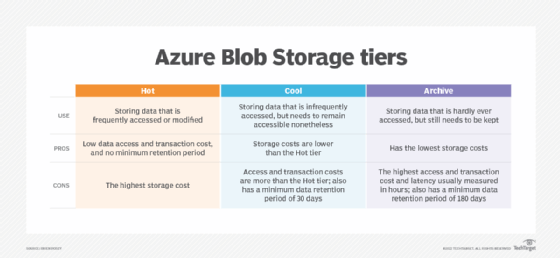
The official Microsoft documentation provides the most detailed explanation of these tiers, their characteristics, and the associated costs.
Access tiers for blob data - Azure Storage | Microsoft Learn
This official Microsoft Learn document is the definitive source on access tiers.
Please read the following sections: The introductory section that lists all the tiers. "Online access tiers": This covers Hot, Cool, and Cold. Pay close attention to the minimum storage durations and the concept of an "early deletion penalty." "Archive access tier": Note that this is an offline tier and what that means for data retrieval (rehydration). "Summary of access tier options": This table is an excellent summary for exam revision.
To reinforce these concepts, especially the relationship between storage cost and transaction cost, the following video provides a clear, practical explanation.
AZ-204 Exam EP 12: Blob Storage Lifecycle
This video from the "A Guide To Cloud" channel is tailored for the AZ-204 exam and effectively explains the tiers and their pricing models.
Watch the sections on the storage tiers and their pricing characteristics. This will help solidify the key trade-off between the cost to store data versus the cost to access it.
Here's a breakdown of the key tiers:
-
Hot Tier:
- Use Case: Data that is actively used and frequently accessed or modified.
- Cost: Highest storage cost, lowest access cost.
- Example: Images and assets for a high-traffic website.
-
Cool Tier:
- Use Case: Data accessed infrequently, but must be immediately available when needed.
- Cost: Lower storage cost, higher access cost than Hot.
- Constraint: Minimum storage duration of 30 days.
- Example: Monthly invoices, recent backups.
-
Cold Tier:
- Use Case: Data accessed very rarely, but still needs to be available online quickly.
- Cost: Lower storage cost, higher access cost than Cool.
- Constraint: Minimum storage duration of 90 days.
- Example: Data for short-term disaster recovery.
-
Archive Tier (Offline):
- Use Case: Long-term archival, compliance data that is rarely, if ever, accessed.
- Cost: Lowest storage cost, highest retrieval cost.
- Constraint: Minimum storage duration of 180 days. Retrieval (rehydration) is not instant and can take several hours.
- Example: Raw telemetry data from a completed project, old legal documents.
A Premium Block Blob storage account is a special case. It's designed for workloads with high transaction rates or that require very low-latency access. It only has one tier, which is comparable to the Hot tier but with even better performance due to the underlying SSD hardware.
3. Automation is Key: Blob Lifecycle Management
Manually moving blobs between tiers would be tedious and error-prone. To solve this, Azure provides Lifecycle Management policies. These are rule-based policies you define at the storage account level to automatically transition blobs to cooler tiers or delete them as they age.
This is a powerful tool for cost optimization. For example, you can create a rule that says:
"For any blob in the
videofilescontainer, move it to the Cool tier after 60 days of inactivity, then move it to the Archive tier after 180 days, and finally delete it after 7 years."
This video introduces the concept well.
AZ-204 Exam EP 12: Blob Storage Lifecycle
Let's return to the "A Guide To Cloud" video to see how lifecycle management ties these concepts together.
Watch from Lifecycle management. Focus on how policies use rules with filters and actions to automate data tiering.
A lifecycle policy is defined in JSON and consists of one or more rules. Each rule has two main parts:
- Filters: Specify which blobs the rule applies to (e.g., blobs in a specific container or with a certain prefix).
- Actions: Define what to do with the filtered blobs (
tierToCool,tierToArchive,delete) based on conditions likedaysAfterModificationGreaterThan.
The following reading provides a concrete example of what a policy looks like and how you would apply it using the Azure CLI, which is highly relevant given your background and the exam's scope.
Azure Blob Storage Overview - Cloud Engineer Skills
This section of the article provides a practical look at lifecycle policies.
Read the section "Create and implement a lifecycle policy." Pay close attention to the example JSON policy and the az storage account management-policy create CLI command. This demonstrates how you can manage storage policies as code.
Conclusion
In this lesson, you've learned the foundational concepts of Azure Blob Storage, focusing on the features that drive cost and performance. This knowledge is crucial for making informed architectural decisions.
Here are the key takeaways:
- Azure Storage is structured with Storage Accounts, which contain Containers that hold Blobs.
- General-purpose v2 is the standard account type, while Premium accounts offer higher performance on SSDs for specific workloads.
- Access tiers—Hot, Cool, Cold, and Archive—allow you to optimize costs by matching your data's storage tier to its access patterns. The main trade-off is between storage cost (at rest) and access cost (transactions).
- Lifecycle Management policies are the key to automating this cost optimization, allowing you to define rules that move data between tiers or delete it over time.
You now have the conceptual framework for Blob Storage. In our next lesson, we will put this knowledge into practice by learning how to create an Azure Storage Account and manage blob containers using the Azure Portal and CLI.