Hello! Welcome to your first lesson in the AZ-204 certification path. We're starting with a foundational service in Azure: the App Service. For someone with your extensive background in building .NET applications, this is the logical first step into the Azure platform. It's the primary service you'll use to take the web apps and APIs you're skilled at creating and run them in the cloud without managing the underlying server infrastructure.
Today, our goal is to explain the features, tiers, and common use cases of Azure App Service. Mastering these concepts is not only crucial for the exam but will also provide the context you need before we start deploying code in the next lesson.
Let's begin by defining what App Service is and how it fits into the Azure ecosystem.
What is Azure App Service?
At its core, Azure App Service is a Platform-as-a-Service (PaaS) offering. This means Azure manages the entire underlying infrastructure for you—the virtual machines, operating system patches, and web server configuration. You simply focus on your application code and its configuration. This is a significant shift from traditional on-premises hosting or even Infrastructure-as-a-Service (IaaS), where you are responsible for managing the virtual machines yourself.
App Service is designed to host:
- Web applications (like ASP.NET Core apps)
- RESTful APIs
- Mobile back-ends
It supports a wide range of programming languages and frameworks, including first-class support for .NET, which we'll be leveraging throughout this course.

To understand how App Service works, it's essential to grasp the relationship between an App Service and an App Service Plan.
- App Service: This is your actual application—the code, the settings, the specific deployment. For example,
my-dotnet-api.azurewebsites.net. - App Service Plan: This is the set of compute resources your app runs on. Think of it as the virtual server farm you're renting. It defines the operating system (Windows/Linux), region, CPU, memory, and storage.
A single App Service Plan can host multiple App Services. This is cost-effective if you have several small applications, as they can share the allocated resources. Conversely, a resource-intensive application might need its own dedicated plan.
To get a clear visual and conceptual introduction, watch the first few minutes of the following video.
Azure App Service (Web Apps) Tutorial
The video "Azure App Service (Web Apps) Tutorial" from Adam Marczak - Azure for Everyone provides a concise introduction to what App Service is and the fundamental concept of an App Service Plan.
Please watch the sections on the introduction to App Service and the explanation of how it works, including the role of the App Service Plan.
Key Features of App Service
App Service is more than just a place to run your code; it's a rich platform with features designed to support enterprise-grade applications. Many of these features will be familiar concepts, now offered as managed services.
Azure App Service (Web Apps) Tutorial
The same video also provides a great summary of the core features.
Watch the segment covering key features. Pay close attention to the concepts of scaling, CI/CD integration, and security.
Let's summarize and expand on the most important features for the AZ-204 exam:
- Scaling: App Service supports two primary scaling methods:
- Scale Up: Increasing the resources of the underlying compute (e.g., more CPU, RAM, disk space). This is like upgrading your server hardware.
- Scale Out: Increasing the number of VM instances that run your app. Azure automatically handles load balancing across these instances.
- Continuous Integration/Continuous Deployment (CI/CD): Given your experience with Azure DevOps, you'll find the integration seamless. App Service can connect directly to repositories in Azure Repos, GitHub, Bitbucket, and others to automate builds and deployments.
- Deployment Slots: This is a powerful feature for minimizing downtime. You can deploy to a non-production "staging" slot, test your application, and then "swap" it with the production slot. The swap is a near-instantaneous operation that warms up the new instance before it takes production traffic. We'll cover this in detail in a future lesson.
- Security: App Service includes built-in authentication and authorization features, allowing you to secure your app with Azure Active Directory, Google, Facebook, etc., with minimal code. It also simplifies managing custom domains and TLS/SSL certificates.
- Container Support: You can deploy custom Docker containers, giving you flexibility if your application has specific dependencies not covered by the built-in runtimes.
App Service Plan Tiers
The App Service Plan tier is one of the most critical concepts to understand. The tier you choose dictates the features available to you, the performance of your application, and how much you pay. The tiers are grouped into three main categories.
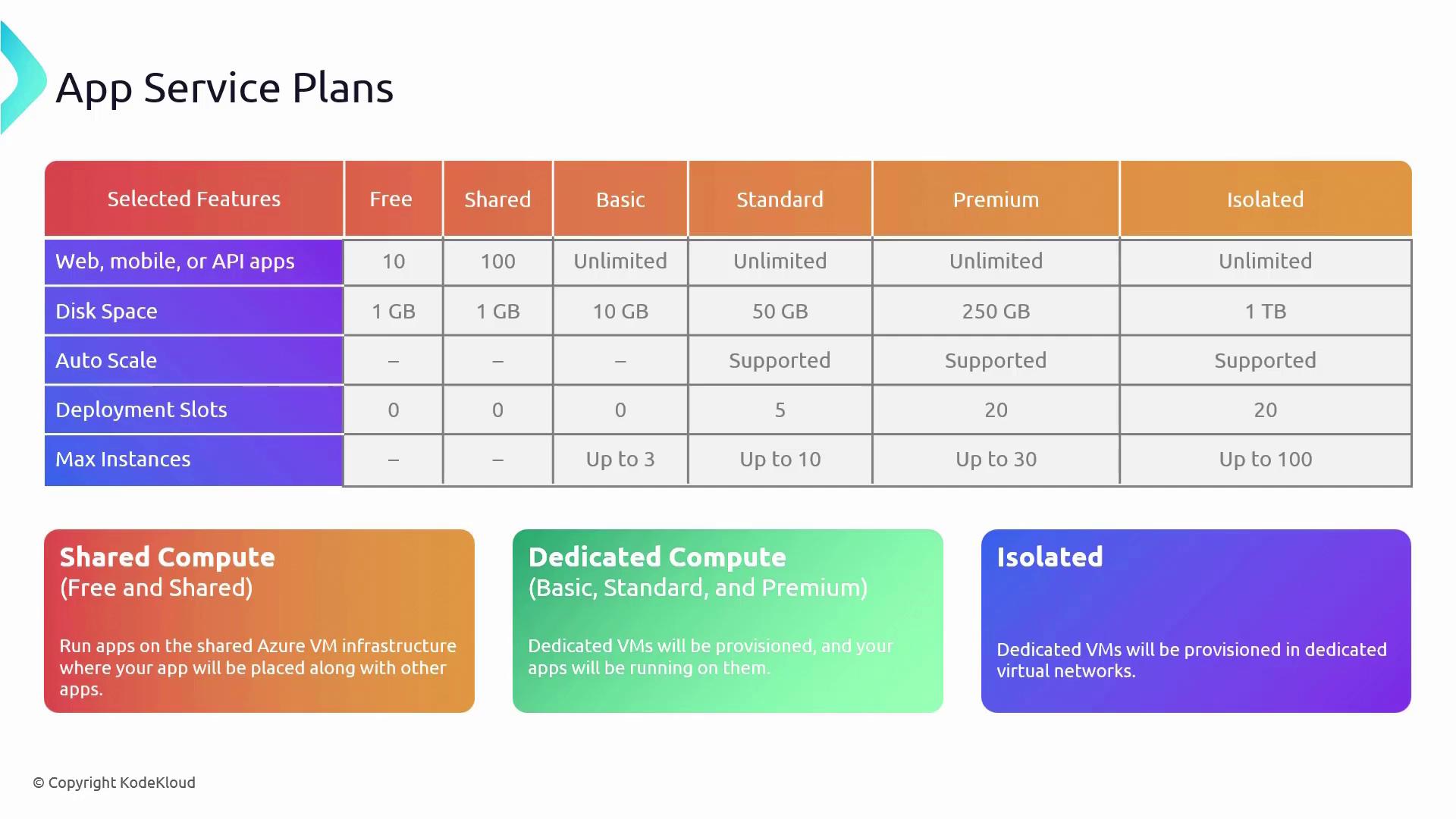
Let's break down these categories.
What are Azure App Service plans?
This official Microsoft Learn documentation provides a clear, textual breakdown of App Service plans and their pricing tiers.
Read the introduction and the "Pricing tiers" section. Focus on the descriptions of the Shared compute, Dedicated compute, and Isolated categories in the table.
As you've just read, the tiers are:
-
Shared Compute (
FreeandShared):- Infrastructure: Your app runs on the same Azure VMs as other customers' apps.
- Use Case: Intended for development and testing only. The
Freetier is great for learning and small experiments, while theSharedtier allows for a custom domain. - Limitations: Cannot scale out. Resources are shared and throttled via CPU quotas.
-
Dedicated Compute (
Basic,Standard,Premium):- Infrastructure: Your app runs on dedicated Azure VMs, which are only shared by other apps in your App Service Plan.
- Use Case: This is the category for most production applications.
- Key Differences:
Basic: Provides dedicated compute but lacks advanced features like deployment slots and auto-scaling.Standard: The typical starting point for production apps. It adds auto-scaling, deployment slots, and daily backups.Premium(P1v2, P2v3, etc.): Offers more powerful VM instances, more deployment slots, and advanced networking features. Ideal for high-traffic, mission-critical applications.
-
Isolated:
- Infrastructure: Your app runs on dedicated VMs inside a dedicated and isolated virtual network, known as an App Service Environment (ASE).
- Use Case: Applications that require a high degree of security, network isolation, and large-scale performance.
- Characteristics: Provides both compute and network isolation, offering the highest level of security and control. It is also the most expensive option.
The following video provides a more detailed walkthrough of these tiers and their cost implications.
AZ-204 Exam EP 03: App Service Plan
This video from "A Guide To Cloud" focuses specifically on App Service Plans and goes into great detail on the different tiers and how they are billed.
Watch the sections that give a breakdown of the pricing tiers and discuss how apps run and scale within them. This will reinforce the differences between Shared, Dedicated, and Isolated environments.
Use Cases: When to Choose App Service
Now that we've covered the what and how, let's focus on the when. For the AZ-204 exam, you'll need to be able to choose the right Azure service for a given scenario.
Azure App Service (Web Apps) Tutorial
The "Azure App Service (Web Apps) Tutorial" video concludes with a helpful decision diagram for choosing App Service.
Watch the final segment on when to choose Azure App Service. This diagram is a great mental model for comparing it against other compute options like VMs or container services.
To summarize, App Service is an excellent choice when:
- You are building new web apps, APIs, or mobile back-ends and want to focus on code rather than infrastructure management.
- You are migrating existing web applications (a "lift and shift") and want to move to a PaaS model to reduce operational overhead.
- Your application can be containerized, and you want a simple platform for hosting a single container (for more complex microservices, Azure Kubernetes Service or Azure Container Apps might be a better fit, which we'll discuss later in the course).
It's generally not the best fit for:
- Applications that need full control over the operating system (use Virtual Machines instead).
- Event-driven, short-lived workloads (use Azure Functions instead).
- Complex, multi-container microservice architectures (use Azure Kubernetes Service or Azure Container Apps instead).
Conclusion
In this lesson, we established a solid foundation for understanding Azure App Service. Here are the key takeaways:
- PaaS Offering: App Service is a fully managed platform that lets you run web applications without managing the underlying servers.
- App Service Plan: This is the compute foundation for your app, defining its OS, region, performance (CPU/memory), and cost. One plan can host multiple apps.
- Tiers Drive Features: The pricing tier (Shared, Dedicated, Isolated) dictates cost, scalability, and available features like deployment slots and network isolation.
- Key Features: App Service provides built-in support for scaling, CI/CD, deployment slots for safe deployments, and robust security options.
You now have the conceptual framework needed to work with this service. In our next lesson, we will transition from theory to practice by creating an App Service and deploying a .NET web app to it using the Azure CLI.