Welcome to the first lesson in our module on asynchronous task processing. In our previous work, we focused on optimizing single-threaded performance by refactoring your data structures to a Struct-of-Arrays (SoA) layout. This improved cache efficiency for tasks like rendering. Now, we shift our focus from optimizing a single stream of execution to managing multiple streams at once.
This lesson introduces you to multithreading in modern C++. You will learn how to spawn and manage background threads using std::thread. This is a foundational skill for your whiteboard project, as it will allow you to offload time-consuming operations—like parsing a PDF document—to a background thread, ensuring your application's user interface remains smooth and responsive at all times.
Concurrency and Parallelism
Before we write any code, it's crucial to understand two related but distinct concepts: concurrency and parallelism.
- Concurrency is about managing multiple tasks over a period of time. The tasks might be interleaved, with the system switching between them, but they aren't necessarily running at the exact same instant. It's a way of structuring your program to handle many things at once.
- Parallelism is about executing multiple tasks at the exact same time. This requires hardware with multiple processing units, such as a multi-core CPU.
The image below provides a great visual distinction. In multitasking (a form of concurrency), a single CPU core switches its attention between Task X and Task Y. In parallelism, two separate cores execute Task X and Task Y simultaneously.

Modern C++ gives us tools to write concurrent code, which the operating system can then execute in parallel on multi-core hardware. This is the key to unlocking the full performance potential of today's processors.
What is a Thread?
A thread is the fundamental unit of execution that the operating system schedules. Every program you've written so far has had at least one thread: the main thread, which starts at your main() function. When you spawn a new thread, you create a new, independent path of execution within your program.
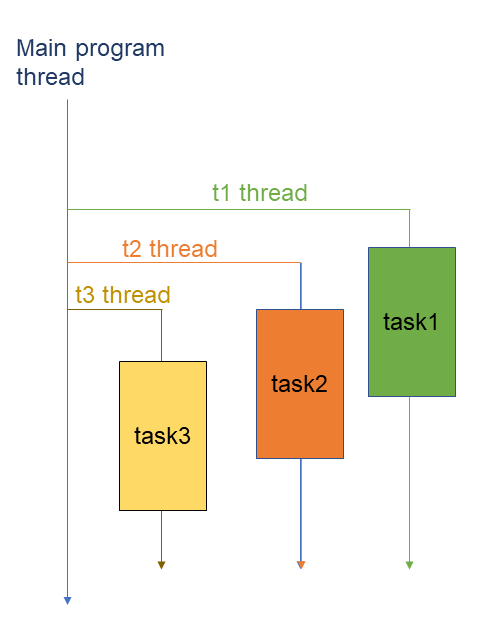
Threads within the same process share the same memory space (code, global data, heap), which makes sharing data between them easy. However, each thread gets its own stack and set of registers, allowing it to have its own local variables and execution state.
For a great overview of what a thread is and why it's useful for performance and simplifying program logic, watch the following short video.
First thread with std::thread | Introduction to Concurrency in C++
This video by Mike Shah provides a clear, conceptual introduction to threads.
Watch the first two segments. The first, "What is a thread?", explains the relationship between threads and processes, highlighting how threads have their own stack but share memory. The second, "When to use threads?", discusses the motivations for multithreading, such as performance and program structure.
Spawning Your First Thread with std::thread
The C++11 standard introduced the <thread> header, which provides the std::thread class. Creating a std::thread object launches a new thread of execution immediately. The constructor takes a callable entity (like a function pointer, lambda, or member function) as its first argument, which becomes the entry point for the new thread.
Let's look at the basic mechanics.
#include <iostream>
#include <thread>
#include <chrono> // For std::this_thread::sleep_for

// This is the function our new thread will execute.
void worker_function() {
    std::cout << "Worker thread started. ID: " << std::this_thread::get_id() << std::endl;
    // Simulate some work
    std::this_thread::sleep_for(std::chrono::seconds(2));
    std::cout << "Worker thread finished." << std::endl;
}

int main() {
    std::cout << "Main thread started. ID: " << std::this_thread::get_id() << std::endl;

    std::thread worker(worker_function);

    std::cout << "Main thread continues execution after starting worker." << std::endl;

    // What happens here is critical! We need to manage the worker thread's lifecycle.

    // We must wait for the worker thread to finish.
    worker.join();

    std::cout << "Main thread finished." << std::endl;
    return 0;
}
In this example, creating worker immediately starts worker_function on a new thread. Notice the use of std::this_thread::get_id() to print the unique identifier for each thread, confirming they are distinct.
Thread Lifecycle: join() and detach()
A std::thread object represents a handle to an operating system thread. Before this handle is destroyed (e.g., when it goes out of scope), you must explicitly decide what to do with the running thread it represents. You have two choices:
-
join(): This is a blocking call. The thread that callsjoin()(in our example, the main thread) will pause its execution and wait until the thread represented by the object (worker) has finished its task. This is the most common way to manage threads, as it ensures synchronization. -
detach(): This severs the connection between thestd::threadobject and the actual thread of execution. The thread becomes a "daemon" process that runs independently in the background. Thestd::threadobject no longer represents it, and you cannot join it later. The operating system becomes responsible for cleaning up its resources when it finishes. This is for "fire-and-forget" tasks where you don't need to know when the task completes.
Crucially, if a std::thread object is destroyed while it is still "joinable" (i.e., you haven't called join() or detach() on it), your program will terminate by calling std::terminate. This is a fundamental rule of std::thread designed to prevent subtle bugs where threads are accidentally abandoned.
The following video from The Cherno provides an excellent, practical demonstration of creating a thread to keep a program responsive. It also introduces join() in a clear context.
This video demonstrates the core motivation for using threads—keeping an application responsive—and shows the basic std::thread syntax.
First, watch the introduction for motivation, where he explains how a blocking operation like waiting for user input can be offloaded. Then, focus on the code demonstration from creating the thread. He shows how to include <thread>, create a std::thread object, and use worker.join() to wait for its completion. The example of a background loop running while the main thread waits for input is highly relevant to your project's needs.
Passing Arguments to Threads
You can pass arguments to your thread's function by providing them as additional arguments to the std::thread constructor.
A critical detail to remember is that arguments are copied into the new thread's internal storage by default, even if the target function expects a reference. If you need to modify an object from the calling thread, you must wrap the argument in std::ref() to pass it by reference.
Let's study the syntax for creating threads and passing arguments.
Multi-Threaded Programming in Modern C++
This article provides clear C++ code examples for creating threads and passing data to them.
First, read the section Creating Your First Thread to see the basic syntax with a function pointer. Then, review the lambda example, as this is a very common and convenient pattern in modern C++. Next, focus on how data is passed. Read the section Passing Arguments to understand the default copy behavior. Finally, carefully study the std::ref section, which explains how to pass arguments by reference. This distinction is a frequent source of bugs for newcomers to C++ threading.
Modern and Safe Thread Management: std::jthread
The manual join()/detach() requirement of std::thread is a classic violation of the RAII (Resource Acquisition Is Initialization) principle. If an exception occurs after a thread is created but before join() is called, the thread's destructor will be invoked, leading to std::terminate.
C++20 introduced std::jthread to solve this problem. std::jthread is a RAII-compliant wrapper around a thread. Its destructor automatically calls join(), ensuring that the thread is always properly waited for, even in the presence of exceptions.
Whenever your compiler supports C++20 or later, you should prefer std::jthread over std::thread for safer and more robust code.
#include <iostream>
#include <thread> // std::jthread is in the <thread> header

void some_work() { /* ... */ }

void process() {
    std::jthread worker(some_work); // Create a jthread

    if (/* some error condition */) {
        throw std::runtime_error("Something went wrong!");
        // an exception is thrown. 'worker' goes out of scope.
        // The destructor of 'worker' is called, which automatically joins the thread.
        // The program exits cleanly after handling the exception, without crashing.
    }

    // No need to manually call join(). 'worker' will be joined
    // when it goes out of scope at the end of the function.
}
This simple change eliminates an entire class of common multithreading bugs.
Top 20 C++ multithreading mistakes and how to avoid them
This article highlights common pitfalls and introduces std::jthread as the modern solution.
Read mistake #1, Not using join(). It clearly explains why forgetting to join a std::thread causes a crash and presents std::jthread as the recommended C++20 solution. Then, skip to the FAQ section and read the answer to the first question for a concise summary.
Conclusion
In this lesson, you've taken your first step into concurrent programming in C++. You now have the tools to move demanding work off your main application thread, which is essential for building the high-performance, responsive whiteboard you envision.
Key Takeaways:
- Concurrency vs. Parallelism: Concurrency is about managing multiple tasks; parallelism is about executing them simultaneously.
std::thread: This class allows you to create new threads of execution. A callable (function, lambda) is passed to its constructor to define the thread's entry point.- Lifecycle Management: Every
std::threadmust be eitherjoin()ed (to wait for it to finish) ordetach()ed (to let it run independently) before its destructor is called. Failure to do so results instd::terminate. - Passing Arguments: Arguments are copied by default. Use
std::refto pass arguments by reference and allow the thread to modify objects owned by the calling thread. std::jthread(C++20): This is the modern, RAII-compliant replacement forstd::thread. It automatically joins upon destruction, making your code safer and more robust. Prefer it whenever possible.
In our next lesson, we will confront a fundamental challenge of multithreading: what happens when multiple threads try to access and modify the same data at the same time? This will lead us to the concept of race conditions and the primary tool for preventing them: the std::mutex.