Welcome to the first lesson of our "High-Throughput Data Structures" module. In the previous module, we successfully designed a robust undo/redo system using the Command pattern. We ended with a HistoryManager that stores commands in a std::vector<std::unique_ptr<Command>>, and an AddStrokeCommand that owns stroke data via a std::unique_ptr<StrokeData>. While this design is clean, safe, and correct from a software architecture perspective, it might hide a significant performance cost.
This lesson delves into the low-level hardware realities that govern application speed. Our goal is to understand why the way we arrange data in memory can have a dramatic impact on performance. By the end of this lesson, you will be able to explain how CPU caches and different memory access patterns are the determining factors in writing truly high-performance code. This knowledge is the foundation for building the "blazingly fast" whiteboard you envision, especially when it needs to render thousands of individual strokes smoothly.
The Great Divide: The Processor-Memory Performance Gap
For decades, CPU processing power has grown at an exponential rate. However, the speed at which we can access main memory (RAM) has not kept pace. This has created a massive performance gap between the processor and memory. A modern CPU can execute hundreds of instructions in the time it takes to fetch a single piece of data from RAM.
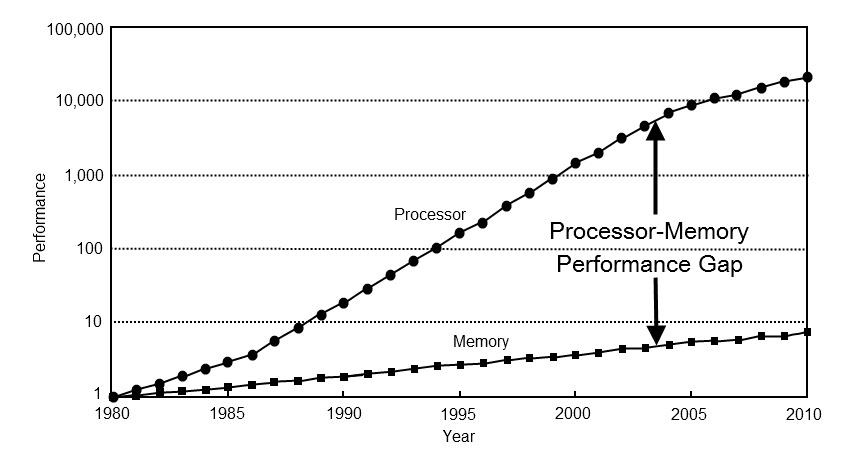
If CPUs had to wait for main memory for every operation, they would spend most of their time idle. To solve this, hardware engineers introduced a small, extremely fast layer of memory right on the CPU chip itself: the CPU cache.
Bridging the Gap: The CPU Cache Hierarchy
Think of the CPU as an accountant who can process paperwork incredibly quickly. Main memory (RAM) is a massive warehouse in a separate building. If the accountant needs a document, they have to send a request, and a slow forklift driver goes to fetch it. The accountant spends most of their day just waiting.
A CPU cache is like having a small shelf right next to the accountant's desk. If a requested document is already on that shelf, it can be retrieved almost instantly. This is a cache hit. If it's not on the shelf and we must go to the warehouse, it's a cache miss, which results in a long, performance-killing stall.
The excellent chapter "Data Locality" from the book Game Programming Patterns provides a wonderful analogy for this.
Data Locality · Optimization Patterns
This chapter provides a great introduction to why data layout matters for performance.
Read the introduction, from the start up to the section titled A data warehouse. This analogy will give you a strong intuition for the problem that CPU caches are designed to solve.
Modern systems complicate this by having multiple levels of caches, forming a hierarchy.

To truly appreciate the speed difference, it's best to hear it from an expert. Scott Meyers' classic talk "CPU Caches and Why You Care" provides a fantastic and memorable demonstration.
code::dive conference 2014 - Scott Meyers: Cpu Caches and Why You Care
In this segment, Scott Meyers explains the typical sizes and latencies of a real-world cache hierarchy. The animated comparison at the end is particularly eye-opening.
Watch the section from the introduction to caches. Pay close attention to the latency numbers for L1, L2, L3, and main memory, and the final animation that visualizes these differences to scale.
As you saw, a cache miss that forces a trip to main memory is devastatingly slow compared to an L1 cache hit. Programming for high performance is, in large part, the art of maximizing cache hits.
The Fundamental Unit: Cache Lines
So, how do we keep the cache full of useful data? The key is understanding that memory is not transferred byte-by-byte. When the CPU requests data from RAM, it fetches a fixed-size block of contiguous memory called a cache line. On most modern x86-64 processors, a cache line is 64 bytes.
This means if your program asks for a single 4-byte integer, the hardware doesn't just fetch those 4 bytes. It fetches the entire 64-byte block that contains that integer and places it into the cache. This has a profound implication: if your code then immediately needs the next integer in memory, it will already be in the cache—a guaranteed cache hit!
This principle is the foundation of spatial locality: the idea that if you access a piece of data, you are likely to access data located near it in memory very soon.
Beating the Cache: How to Make Your C++ Code Orders ...
This article provides a C++-centric view on cache performance. This first section clearly explains the concept of a cache line.
Read the section titled 1. Cache Lines Explained. It reinforces the idea that memory is always moved in blocks, which is the central mechanism we need to exploit.
Access Patterns: The Good, the Bad, and the Ugly
The way your code accesses memory—its access pattern—determines how effectively it uses the cache.
The Good: Linear Scan
The best-case scenario is a linear, or sequential, scan through a contiguous block of memory. This is what happens when you iterate through a std::vector<int> or a C-style array.
std::vector<int> data = { /* ... millions of integers ... */ };
for (int i = 0; i < data.size(); ++i) {
    // Process data[i]
}
This pattern is extremely cache-friendly:
- The first access
data[0]causes a cache miss. An entire cache line (containingdata[0]throughdata[15]) is loaded. - The subsequent 15 accesses are all cache hits.
- Modern CPUs have a hardware prefetcher that detects this linear access pattern. It will start automatically fetching the next cache lines into the cache before your code even asks for them, leading to even more cache hits.
A classic example of access patterns mattering is traversing a 2D matrix. Let's return to Scott Meyers' talk.
code::dive conference 2014 - Scott Meyers: Cpu Caches and Why You Care
This segment demonstrates the performance difference between row-major and column-major matrix traversal and explains exactly why it happens.
First, watch the demonstration from the matrix traversal example. Then, after explaining cache lines, he revisits this example from this timestamp to connect the behavior directly to cache lines and the prefetcher.
Row-major traversal is a linear scan, while column-major traversal jumps through memory, trashing the cache and defeating the prefetcher.
The Bad: Pointer Chasing
The worst-case scenario is an unpredictable, random access pattern. This is often called pointer chasing and occurs when you iterate through data structures where each element is stored in a separate, arbitrary memory location. A classic example is a linked list (std::list).
A more relevant example for us is the structure we designed for our HistoryManager: a std::vector<std::unique_ptr<StrokeData>>.
// From our previous design
std::vector<std::unique_ptr<StrokeData>> strokes_;

// In the render loop...
for (const auto& stroke_ptr : strokes_) {
    // This access requires a pointer dereference.
    render_stroke(*stroke_ptr);
}
Each std::unique_ptr points to a StrokeData object that was allocated individually on the heap. These objects could be scattered all over memory. When you iterate through the vector, each access *stroke_ptr jumps to a potentially random memory address, causing a near-certain cache miss. The hardware prefetcher is completely helpless here.
Vittorio Romeo's talk on data-oriented design powerfully illustrates this exact problem.
More Speed & Simplicity: Practical Data-Oriented Design in C++ - Vittorio Romeo - CppCon 2025
This talk demonstrates how a standard object-oriented design using a vector of unique pointers becomes a performance bottleneck due to cache misses.
First, watch the segment from this timestamp for another excellent visualization of cache versus RAM speed and an explanation of cache misses. Then, see how he diagnoses the problem in his OOP design from this section. The issue he describes is identical to the one in our stroke storage design.
The performance difference between linear access and pointer chasing is not subtle. The following article provides a benchmark that measures it directly.
Beating the Cache: How to Make Your C++ Code Orders ...
This section benchmarks linear, strided, and pointer-chasing access patterns, providing concrete numbers for the performance impact.
Read through the section Comparing Linear vs Non-Linear Memory Access. Pay close attention to the benchmark results table. The pointer-chasing example is orders of magnitude slower than the linear access, even though they do the same amount of "work."
The Ugly: Conflict Misses
As you saw in the last reading, even a regular strided access (jumping through memory by a fixed amount) can sometimes be problematic. This introduces a more advanced topic: conflict misses. A cache is divided into a smaller number of "sets," and each memory address can only be stored in one specific set. If your strided access pattern causes all your data to map to the same set, you will constantly be evicting data you still need, even if the rest of the cache is empty.
This is a deeper topic, but it highlights that achieving optimal cache performance requires a nuanced understanding of the hardware. For your interests in low-level engineering, it's a valuable concept to be aware of.
Conclusion
In this lesson, we've journeyed from high-level C++ code down to the metal of the CPU. We've seen that the enormous speed gap between the CPU and RAM makes cache performance a primary driver of application speed.
Key Takeaways:
- CPUs are much faster than RAM: This gap is bridged by CPU caches.
- Cache misses are expensive: Our goal is to write code that maximizes cache hits.
- Memory is moved in cache lines: Accessing one byte brings its contiguous neighbors (e.g., 63 other bytes) into the cache for free. This enables spatial locality.
- Linear access is king: Iterating over contiguous data (like in
std::vector<MyObject>) is extremely fast because it fully utilizes cache lines and the hardware prefetcher. - Pointer chasing is a performance killer: Data structures that scatter objects across the heap (like
std::listorstd::vector<std::unique_ptr<MyObject>>) lead to frequent cache misses and should be avoided in performance-critical loops.
The std::vector<std::unique_ptr<StrokeData>> in our design, while architecturally clean, falls squarely into the "pointer chasing" category. For a whiteboard with thousands of strokes, a render loop iterating over this structure would be bottlenecked by memory latency, not CPU computation.
Now that we understand why this is a problem, our next lesson will focus on the solution. We will contrast the "Array-of-Structs" (AoS) layout we have now with a much more cache-friendly "Struct-of-Arrays" (SoA) layout, and begin refactoring our stroke storage to be truly high-performance.