Hello! In our previous lesson, we designed the abstract architecture for a robust undo/redo system using the Command design pattern and a HistoryManager. We now have the blueprints for a Command interface and the mechanism to track command history. It's time to pour the concrete and build our first functional, undoable action.
This lesson focuses on implementing a concrete AddStrokeCommand. You will learn how to encapsulate the data and logic required to add a new user-drawn stroke to your whiteboard canvas. This moves us from pure architectural design to practical implementation, creating the first reversible action in your high-performance whiteboard application. By the end, you'll have a command that seamlessly integrates with the HistoryManager to make your drawing actions fully undoable and redoable.
From Abstract to Concrete
Let's quickly recall the abstract Command interface we defined:
class Command {
public:
    virtual ~Command() = default;
    virtual void execute() = 0;
    virtual void undo() = 0;
};
And our HistoryManager, which uses undo_stack_ and redo_stack_ vectors of std::unique_ptr<Command> to manage the command lifecycle.
Our task now is to create a class that inherits from Command and implements these execute and undo methods for the specific action of adding a stroke.
The Receiver: A Model for Our Whiteboard
Before a command can act on something, the "something" needs to exist. In the Command pattern, this is called the Receiver. For our application, the receiver is the central data model that represents the state of the whiteboard—primarily, the collection of all strokes that should be drawn on the canvas.
Let's define a simple model. This class won't own the stroke data itself; ownership will lie with the commands in the HistoryManager. Instead, it will maintain a list of non-owning pointers to the strokes that are currently active and visible. This is a clean, data-oriented design that separates data ownership from its presentation.
#include <vector>
#include <algorithm> // For std::remove

// Assume StrokeData is a class/struct holding your SkVertices or other stroke info.
// struct StrokeData { ... };

class WhiteboardModel {
public:
    // A list of non-owning pointers to strokes that should be rendered.
    const std::vector<const StrokeData*>& getRenderableStrokes() const {
        return renderable_strokes_;
    }

    void addStroke(const StrokeData* stroke) {
        renderable_strokes_.push_back(stroke);
        // In a real application, you would flag this area as "dirty" to trigger a redraw.
    }

    void removeStroke(const StrokeData* stroke) {
        // Use the erase-remove idiom to efficiently remove the pointer from the vector.
        renderable_strokes_.erase(
            std::remove(renderable_strokes_.begin(), renderable_strokes_.end(), stroke),
            renderable_strokes_.end()
        );
        // Again, trigger a redraw here.
    }

private:
    std::vector<const StrokeData*> renderable_strokes_;
};
This WhiteboardModel acts as the receiver of our commands. It's simple, efficient, and clearly separates concerns. The render loop will query getRenderableStrokes() each frame to know what to draw.
Implementing AddStrokeCommand
Now we can design AddStrokeCommand. This class needs to hold two key pieces of information:
- A reference to the
WhiteboardModelit will act upon. - The
StrokeDatafor the new stroke. The command will take full ownership of this data using astd::unique_ptr.
Here is the complete implementation:
#include <memory> // For std::unique_ptr

class AddStrokeCommand : public Command {
public:
    // The constructor takes the receiver and moves ownership of the stroke data into the command.
    AddStrokeCommand(WhiteboardModel& model, std::unique_ptr<StrokeData> stroke)
        : model_(model),
          stroke_data_(std::move(stroke)) {}

    // Execute adds the stroke to the model, making it visible.
    void execute() override {
        model_.addStroke(stroke_data_.get());
    }

    // Undo removes the stroke from the model, making it disappear.
    void undo() override {
        model_.removeStroke(stroke_data_.get());
    }

private:
    WhiteboardModel& model_; // A reference to the receiver.
    std::unique_ptr<StrokeData> stroke_data_; // Owns the stroke data.
};
This implementation is robust and efficient.
- Encapsulation: The command packages everything needed to perform and reverse the action.
- State Restoration: The
undomethod doesn't try to reverse the logic of "drawing." It simply restores the state to what it was before the stroke was added by removing it. This is a much more reliable approach. - Memory Management:
std::unique_ptrensures that theStrokeDatais automatically deallocated when the command is eventually destroyed by theHistoryManager(e.g., when clearing the undo stack). This prevents memory leaks, a critical concern in high-performance C++ applications.
The article "Command" from Game Programming Patterns provides an excellent example of a similar concrete command. It's worth reviewing how it implements a MoveUnitCommand.
Command · Design Patterns Revisited
This chapter provides a fantastic guide to the Command pattern. We'll focus on the section about implementing undo functionality.
Read the section titled Undo and Redo. Pay close attention to the MoveUnitCommand implementation. Notice how it stores the previous state (xBefore_, yBefore_) within the command object itself to enable the undo operation. Our AddStrokeCommand works on a similar principle: it stores the stroke_data_ object, which is all the information needed to either add or remove it from the model.
The approach of creating a specific, custom command for a particular action is a powerful and flexible pattern, especially when dealing with complex or non-standard data modifications. The article "Undo, the art of" calls this creating "Custom entries".
Undo, the art of – Part 1 - Max Liani - WordPress.com
This article explores various advanced patterns for undo systems. We'll look at the section on creating bespoke undo objects for specific tasks.
Read the section 3.5 Custom entries. The example defines a local UndoObjectVisibility struct to handle a specific API call. This mirrors what we've done with AddStrokeCommand: we've created a specialized class to handle a single, well-defined action—adding a stroke to our WhiteboardModel.
The Full Workflow
Let's visualize how all the pieces fit together when a user finishes drawing a line.
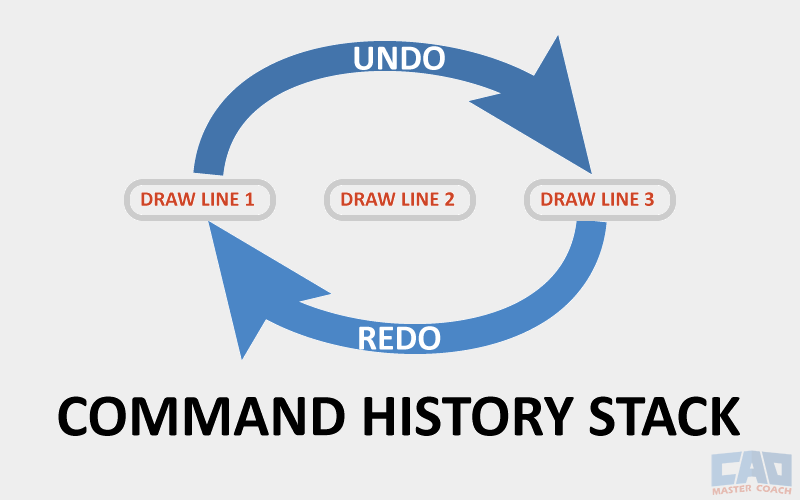
- Input Handling: Your SDL2 event loop detects that the user has lifted the stylus, completing a stroke.
- Stroke Creation: Your drawing logic finalizes the raw input points into a
StrokeDataobject (containing theSkVerticesmesh, color, etc.). This object is managed by astd::unique_ptr. - Command Instantiation: The application creates a new
AddStrokeCommand, passing a reference to yourWhiteboardModeland moving ownership of theStrokeDatainto the command.// whiteboard_model is your instance of WhiteboardModel // final_stroke is a std::unique_ptr<StrokeData> auto command = std::make_unique<AddStrokeCommand>(whiteboard_model, std::move(final_stroke)); - Execution: This new command is passed to your
HistoryManager.// history_manager is your instance of HistoryManager history_manager.doCommand(std::move(command)); - State Change: The
HistoryManager::doCommandmethod immediately callsexecute()on theAddStrokeCommand. This adds the stroke's pointer to theWhiteboardModel::renderable_strokes_vector. The new stroke now appears on the screen in the next render frame. The command itself is pushed onto theHistoryManager's undo stack.
When the user hits Ctrl+Z, the HistoryManager pops the AddStrokeCommand, calls undo() (removing the stroke from the model), and pushes the command to the redo stack. When they hit Ctrl+Y, the reverse happens. The beauty of the system is that the execute() method naturally serves as the "redo" action.
Conclusion
In this lesson, you have successfully bridged the gap between the abstract Command pattern and a concrete, practical implementation. By creating the AddStrokeCommand, you've made the core feature of your whiteboard—drawing—fully reversible.
Key Takeaways:
- A concrete command class like
AddStrokeCommandinherits from aCommandinterface and implements theexecute()andundo()methods. - The command encapsulates both the logic for an action and the data required to perform and reverse it.
- In our design, the
AddStrokeCommandtakes ownership of theStrokeDataviastd::unique_ptr, ensuring proper memory management. - The "Receiver" (
WhiteboardModel) is the object that commands act upon. It maintains the current visible state but does not own the underlying data, which is held by the command history. - This separation of concerns—
HistoryManagerfor ownership,Commandfor logic/data, andWhiteboardModelfor current state—creates a robust and maintainable system.
In our next module, "High-Throughput Data Structures," we will scrutinize the std::vector<const StrokeData*> we created in our WhiteboardModel. While this is a perfectly valid approach, for an application with potentially thousands or millions of strokes, the memory layout of our data can have a profound impact on rendering performance. We will explore how CPU caches work and analyze the trade-offs between different data layouts, like Array-of-Structs (AoS) and Struct-of-Arrays (SoA), to ensure your application remains "blazingly fast" as complexity grows.