Introduction
In the last lesson, you correctly set up the dotenv package to manage your server's port, moving it from hardcoded text into a .env file. We ended on a critical rule: the .env file, which will soon hold sensitive database credentials, must never be committed to version control. Accidentally pushing this file to a public GitHub repository is a major security failure.
This lesson addresses that problem directly. You will learn how to create and use a .gitignore file. This is a simple text file that acts as a bouncer for your Git repository, telling it which files and folders to ignore completely. By the end of this lesson, you will have a professional .gitignore file in your project that automatically prevents node_modules/ and .env from ever being tracked or committed, securing your project and keeping it clean.
What to Ignore and Why
A .gitignore file is a plain text file where each line lists a file or folder that Git should ignore. For our Node.js project, two entries are non-negotiable:
node_modules/: This directory contains all the third-party code your project depends on (like Express and dotenv). It can be massive. There is no need to store it in your repository because anyone can perfectly recreate it by runningnpm installusing yourpackage.jsonfile..env: This file contains your environment-specific configuration and secrets. It's unique to your machine (or your production server) and must be kept private.
The following short video provides a great visual overview of creating the file and adding these two critical entries.
3.4 Hiding API Keys with Environment Variables (dotenv) and Pushing Code to GitHub
Watch this quick segment from The Coding Train to see exactly why we need a .gitignore file and how to add node_modules and .env to it.
Watch from 06:03 to 06:52. The presenter quickly creates the .gitignore file and explains the purpose of ignoring node_modules and the .env file.
The Fast, Professional Method: Generating a .gitignore
While you can create the file manually, the fastest and most robust method for the exam and professional work is to generate a standard template. This ensures you also ignore common system files (like .DS_Store on macOS), log files, and other temporary files.
The npx command, which you already have as part of Node.js, provides a tool for this.
This short article from DEV Community introduces a powerful command you can use to instantly generate a complete .gitignore file for any language.
Read the main body of the article. It's very short and focuses on one command: npx gitignore node. This is the exact pattern you'll use.
This command pulls a standard template, like the official one maintained on GitHub, and creates the file for you.
Your Turn: Create and Verify Your .gitignore
Let's implement this now. It's a single command.
Step 1: Navigate to Your Project Root
Make sure your terminal is open at the root of your backend-api directory.
Step 2: Run the gitignore Generator
Execute the following command:
npx gitignore node
This will create a new file named .gitignore in your project's root directory.
Step 3: Inspect the File
Open the newly created .gitignore file. You will see a comprehensive list of patterns. This is far more robust than just adding two lines manually.
Scroll through the file and find these specific lines to confirm it's correct. The generator includes them by default.
# Dependency directories
node_modules/


# dotenv environment variable files
.env.*
Note: The generator might use .env or .env.*. Both are correct for our purposes. The * is a wildcard that would also ignore files like .env.local or .env.production.
Your project structure should now look like this:
backend-api/
├── node_modules/
├── src/
│   ├── ...
│   └── server.js
├── .env
├── .gitignore   <-- Your new file
├── package.json
└── package-lock.json
Verification: Is Git Actually Ignoring the Files?
Now for the most important part: confirming it works. If you haven't already, initialize a Git repository in your project folder so we can check the status.
Step 1: Initialize Git (if you haven't already)
If this is the first time you are using Git in this project, run:
git init
Step 2: Check the Git Status
Now, run the standard git status command:
git status
You will see a list of "Untracked files". Notice that node_modules/ and .env are not on this list. Git is already ignoring them! The .gitignore file itself, however, will be listed, as it's a new file that we do want to commit to our repository.
Step 3: Explicitly List Ignored Files
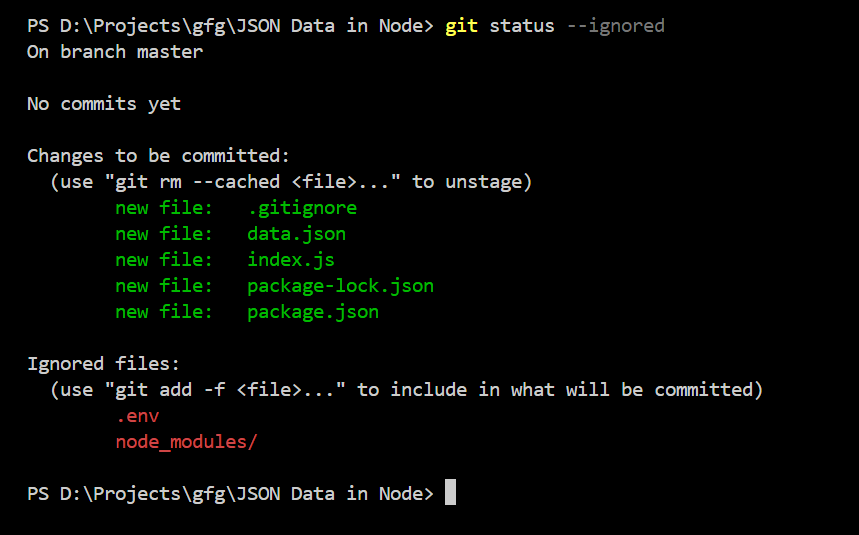
To be absolutely certain, you can use a special Git command to see exactly what is being ignored.
git status --ignored
The output will clearly show you the files and directories that are being ignored, confirming your setup is correct.
Conclusion
Excellent work. You've just implemented a crucial security and project hygiene practice. By creating a .gitignore file, you ensure that sensitive information and unnecessary dependency folders are never checked into your source control. Using the npx gitignore node command is a fast, repeatable pattern perfect for exam conditions.
Key Takeaways:
- A
.gitignorefile tells Git which files and folders to ignore. - It must be placed in the project's root directory.
- You must always ignore
node_modules/to keep your repository small and.envto protect your secrets. - The command
npx gitignore nodeis the fastest way to generate a comprehensive, professional.gitignorefile for a Node.js project. - You can confirm your setup is working with
git statusandgit status --ignored.
In the next lesson, we'll complete the initial server setup. You will configure the Express app instance, add the essential express.json() middleware to parse incoming API requests, and officially start the server using the PORT from your now-protected .env file.