Introduction
Welcome to the second lesson in our Network Security module. In the previous lesson, we explored the stealthy world of Man-in-the-Middle attacks, where an attacker's goal is to intercept and potentially modify data without being detected. We saw how ARP spoofing exploits the trust within a local network to achieve this.
Now, we shift our focus from stealth to brute force. This lesson covers Denial-of-Service (DoS) and Distributed Denial-of-Service (DDoS) attacks. Instead of listening in, the goal of these attacks is to make a service—like a website, an application, or an entire network—unavailable to its legitimate users. You will learn the core principles behind these attacks, understand the crucial difference between DoS and DDoS, and see how they exploit different layers of the network to achieve their disruptive goal.
What are DoS and DDoS Attacks?
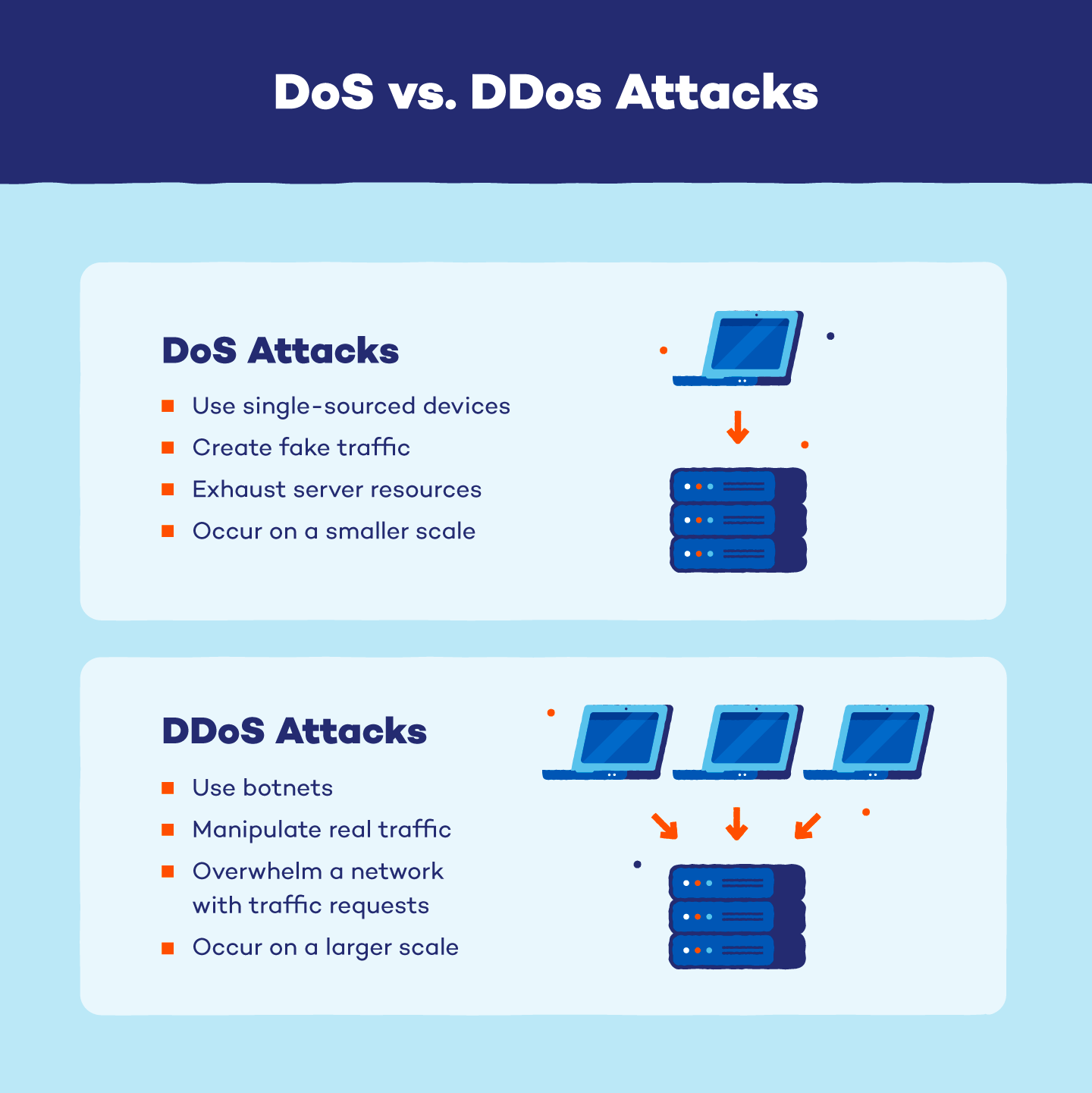
At its core, a Denial-of-Service attack is an attempt to exhaust the resources of a target system so that it can no longer serve legitimate requests. Imagine a single person calling a popular restaurant's phone line and refusing to hang up. They are denying service to other potential customers.
A Distributed Denial-of-Service (DDoS) attack scales this up dramatically. Instead of one person, thousands of people (or, more accurately, compromised computers) call the restaurant at the same time, completely overwhelming its phone system.
To get a clear visual and conceptual understanding of these attacks, please watch the beginning of this video.
DoS and DDoS Attacks Explained: Types and Countermeasures| Denial of Service Attack| DoS DDoS Attack
The video 'DoS and DDoS Attacks Explained' by CyberPlatter provides excellent analogies to introduce the core concepts of DoS and DDoS attacks and the idea of a botnet.
Watch from the beginning until 02:30. Focus on the distinction between a single attacker (DoS) and a network of 'zombie' computers or 'bots' (DDoS).
As the video explained, DDoS attacks rely on a botnet—a network of compromised devices (computers, IoT devices, etc.) that an attacker controls remotely. Because the attack traffic comes from many different, legitimate-seeming sources, it is much more powerful and harder to defend against than a single-source DoS attack.
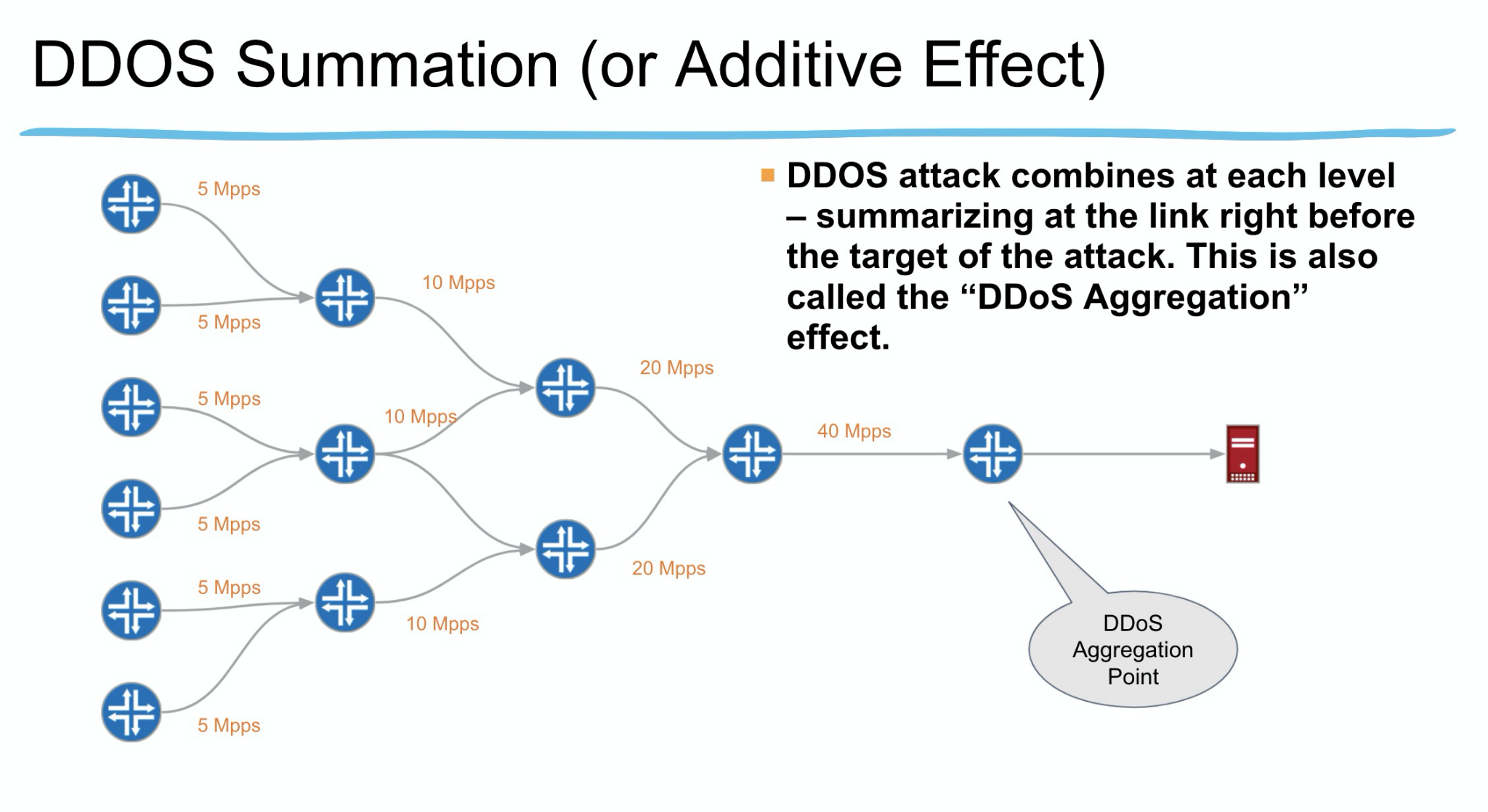
The "distributed" nature of a DDoS attack allows for a massive aggregation of traffic that can easily overwhelm even the most robust servers.
Categories of DDoS Attacks
To bring some structure to the different ways attackers can overwhelm a target, it's helpful to categorize attacks based on which part of the network connection they target. We can group them into three main types, which correspond roughly to different layers of the TCP/IP model we've discussed.
What is a distributed denial-of-service (DDoS) attack?
This article from Cloudflare, a company that specializes in DDoS mitigation, provides a great framework for classifying attacks. It will help organize the examples that follow.
Read the section titled 'What are some common types of DDoS attacks?'. Focus on understanding the three main categories: Application layer attacks, Protocol attacks, and Volumetric attacks. Don't worry about the OSI model references; we'll map these to the TCP/IP layers you know.
Let's explore a concrete example from each of these categories.
1. Volumetric Attacks (Target: Network Bandwidth)
These are the most straightforward type of DDoS attack. The goal is simply to use up all the available bandwidth of the target's internet connection with a massive flood of traffic.
A common example is a UDP Flood. As you'll recall from our Transport Layer lesson, UDP is a connectionless protocol. An attacker can send a huge volume of UDP packets to random ports on a target server. The server tries to process each packet, checking to see which application is listening on that port. When it finds no application, it must reply with an ICMP "Destination Unreachable" packet. The process of receiving the flood of UDP packets and generating these replies can exhaust the server's network resources and bandwidth.
DoS and DDoS Attacks Explained: Types and Countermeasures| Denial of Service Attack| DoS DDoS Attack
Let's return to the CyberPlatter video for a concise explanation of a UDP flood attack.
Watch from 05:55 to 07:00. Notice how the attack leverages the connectionless and stateless nature of UDP.
2. Protocol Attacks (Target: Server State Tables)
These attacks are more sophisticated. Instead of just flooding bandwidth, they aim to consume the resources of servers, firewalls, or load balancers by exploiting how certain protocols work. They focus on exhausting the state tables these devices maintain to keep track of network connections.
The classic example is a TCP SYN Flood. This attack exploits the TCP three-way handshake (SYN, SYN-ACK, ACK).
DoS and DDoS Attacks Explained: Types and Countermeasures| Denial of Service Attack| DoS DDoS Attack
The CyberPlatter video provides one of the clearest explanations of a SYN flood, complete with a review of the TCP handshake.
Watch from 02:30 to 05:55. Pay close attention to how the attacker leaves connections in a 'half-open' state, consuming the server's resources until it can no longer accept new, legitimate connections.
Since you have an interest in command-line tools, it's interesting to see how these attacks can be generated. A tool called hping3 can craft custom packets for network testing and attacks. A SYN flood could be initiated with a command like this (for educational purposes only):sudo hping3 -S -p 80 --flood --rand-source <target_ip>
-Ssets the SYN flag.-p 80targets port 80 (HTTP).--floodsends packets as fast as possible.--rand-sourcespoofs the source IP address, making it harder to block.
3. Application Layer Attacks (Target: Application Resources)
These are often the most difficult attacks to detect and mitigate because they can look like legitimate user traffic. They target the Application Layer, aiming to exhaust the resources of the application itself (e.g., CPU, memory, or web server processes).
A common example is an HTTP Flood. In this attack, bots from a botnet repeatedly send valid-seeming HTTP GET or POST requests to a web server. Each request forces the server to do work—load files, query a database, and render a page. When thousands of these requests arrive per second, the server's resources are quickly consumed, and it becomes unavailable to real users.
DoS and DDoS Attacks Explained: Types and Countermeasures| Denial of Service Attack| DoS DDoS Attack
Finally, watch this segment on HTTP floods to understand how an attack can target the application itself.
Watch from 07:00 to 08:35. Note how this attack is different from the previous two, as it uses seemingly legitimate application-level requests.
Detecting DDoS Attacks with Wireshark
Connecting this theory to practice, how would you actually see a DDoS attack on the network? Using Wireshark, you can identify the tell-tale signatures of these floods. Let's focus on detecting a SYN flood. The key indicator is a massive number of TCP SYN packets from many different source IPs directed at a single target, with very few or no corresponding SYN-ACK or ACK packets.
The following video provides a practical demonstration of how to identify this pattern in a packet capture.
How to Detect and Analyse DOS and DDOS attacks with Wireshark | CEH practical
In 'How to Detect and Analyse DOS and DDOS attacks with Wireshark', the presenter walks through a captured pcap file of a SYN flood, showing you exactly what to look for.
Watch from 01:28 to 05:28. This is a full demonstration. Focus on the three methods used to identify the attack: Display Filters: See how they filter for SYN packets (tcp.flags.syn == 1) and compare the count to SYN-ACK packets. Conversation Statistics: Observe how the Statistics > Conversations window shows thousands of connections being initiated to the victim, but not from the victim. I/O Graph: Note the dramatic spike in the traffic graph (Statistics > I/O Graph), a clear visual indicator of a flood attack.
Conclusion
In this lesson, we explored the principles of Denial-of-Service attacks, whose objective is to disrupt and disable services rather than steal information. We contrasted the single-source nature of DoS with the distributed, botnet-powered scale of DDoS.
Key Takeaways:
- DoS and DDoS attacks aim to make a service unavailable by overwhelming it with traffic or requests, exhausting its resources (bandwidth, CPU, connection state tables).
- DDoS attacks are far more potent because they use a botnet of compromised devices to generate traffic from many sources, making them difficult to block.
- Attacks can be categorized by the layer they target:
- Volumetric (e.g., UDP Flood): Saturate network bandwidth.
- Protocol (e.g., TCP SYN Flood): Exhaust connection state tables on servers and firewalls.
- Application (e.g., HTTP Flood): Overwhelm application resources with requests that appear legitimate.
- Practical tools like Wireshark are essential for identifying the traffic patterns characteristic of a DDoS attack, such as a massive spike in SYN packets without completed handshakes.
Preview of the Next Lesson:
We've now seen attacks that intercept traffic (MitM) and attacks that deny service (DDoS). But how does an attacker find a target in the first place? In our next lesson, we will investigate how attackers perform reconnaissance. You will learn to use the powerful nmap tool to scan for open ports on a host, discovering which services are running and potentially vulnerable. We will also introduce the role of firewalls in blocking this kind of scanning.